Minecraft version
Back to mods 
CurseForge · Minecraft mod
Identity Alias
Lets each player pick an alias that replaces their username in chat, head name, books and more!
Choose a version Pick your version below, then grab the matching file.
Quick answer
Which Identity Alias release should I use?
Latest stable file identity-alias-1.0.0-1.20.1.jar
Game version 1.20.1
Loader Fabric
Identity Alias identity-alias-1.0.0-1.20.1.jar targets 1.20.1 with Fabric. The project page does not say whether this file belongs on the client, dedicated server, or both. No extra mods listed for this file.
Where it goes
Is Identity Alias required on the client, server, or both?
The project page does not say whether this file belongs on the client, dedicated server, or both.
Client Source doesn’t say
Dedicated server Source doesn’t say
Loader for this release Fabric
Required install it here Optional supported, not mandatory Not supported do not install here Source doesn’t say do not assume
The source does not explicitly classify this release as client-only or server-only.
What else does Identity Alias identity-alias-1.0.0-1.20.1.jar need?
identity-alias-1.0.0-1.20.1.jar. Change the file and its required mods may change too.
This file does not list any required mods. Do not add a library just because a different file uses it.
This file does not list any required or optional mods.
Before you install it
Add Identity Alias without breaking your instance.
Built for Identity Alias identity-alias-1.0.0-1.20.1.jar. Pick another file and the loader, install side or required mods may change.
- 01
Stick to this file
Use identity-alias-1.0.0-1.20.1.jar. It targets 1.20.1 with Fabric; another release may have different loader, side or dependency requirements.
- 02
Bring the mods it needs
This file does not list any required mods. Do not add a library just because a different file uses it.
- 03
Put it on the correct side
The project page does not say whether this file belongs on the client, dedicated server, or both.
- 04
Pick the file you checked
Use the “Get this file” button beside identity-alias-1.0.0-1.20.1.jar. It opens that exact file at the source.
About this project
What does Identity Alias add?
Identity Alias
Side note: I made this mod for my friends' server and maintain it mainly for this purpose. Feel free to try it anyway! The mod works standalone and includes optional integrations with other mods. Useful where player identity is part of the experience (roleplay, communities, themed servers, etc.).
Identity Alias lets every player choose an alias that replaces their Minecraft username across the UI without touching the account's real identity. All gameplay logic, permissions, item ownership, etc. keep working on the real username. Only what players see changes.
Join Us on Discord
How it works
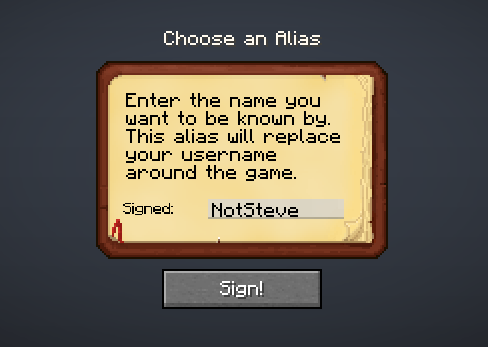
- The server owns the alias registry. On first join, a player is greeted with an alias-selection screen (customizable via config); once set, the alias is broadcast to all clients.
- The client receives a synced alias list and swaps real names for aliases at render time (chat, above head names, books, tooltips, and supported mod screens).
Features
- Overhead names: show the alias above players' heads. Server admins can hide name tags entirely by config (
show_overhead_names), and operators can toggle their own view with a command. - Chat messages: player names in chat are replaced, including death messages.
- Player list (Tab): regular players see aliases; server operators see both alias and real nickname so administration stays easy.
- Death screen: in the "You died!" screen and the death message in chat are shown with the alias.
- Written & writable books: author names on the signing screen and item tooltip.
- Actionbar messages: names inside actionbar/overlay text (e.g. claim boundary announcements and other mods that might use this).
- Configurable selection screen: First login, players see a themed alias-selection screen. The title, body text, and input prefix right before the signature field are all server-configurable.
Optional mod compatibility
All can be toggled independently in the config.
| Mod | What gets aliased |
|---|---|
| XercaPaint | Canvas author tooltips, signing screen, viewing screen, easel floating name |
| Furnish | Letter author tooltips, mailbox owner name tags |
| Extradeinary | Order owner names in the market screen |
| Four Sides | Player names in the playmat lobby |
| Claimorous | Player names in the claim permission screen |
Server administration
All commands live under /id-alias and require operator permissions (level 2):
| Command | Description |
|---|---|
/id-alias reload |
Reloads the config file without restarting the server |
/id-alias create <nickname> <alias> |
Assign an alias to a player |
/id-alias edit <current_alias> <new_alias> |
Change an existing alias |
/id-alias remove <alias> |
Delete an alias entry |
/id-alias get_alias <nickname> |
Returns a player's alias |
/id-alias get_nickname <alias> |
Returns the original nickname from an alias |
/id-alias show_all [page] |
Paginated list of all alias mappings |
/id-alias toggleOverheadNames |
Toggle the display of overhead names for yourself only |
Configuration
The server configuration file is located at config/identity-alias.toml.
It is generated on first start and synced to clients automatically: clients cannot override it. The command /id-alias reload applies config changes live.
Every feature surface has its own toggle (the master switch enabled, followed by enable_chat_aliases, enable_overhead_names, show_overhead_names, enable_book_tooltip, enable_actionbar_names, plus one per mod integration), and GUI text customization (gui_title, gui_text, sign_prefix).
Check config file for detailed descriptions of each option.
Project description from CurseForge.
Pick your setup
Identity Alias by Minecraft version and loader
Choose the version and loader you play, then open the matching release.
Check the dependencies, then try the file in a copied instance before changing a world you care about.
Recent files
Identity Alias versions and loaders
identity-alias-1.0.0-1.20.1.jar
3 Oct 2026
Client Source doesn’t say Server Source doesn’t say Dependencies No extras listed Listed on Release listing
Check the 1.20.1 · Fabric setup Fabric1.20.1 release
Looking for an older file? The official CurseForge project page is in Resources.
 mod
mod CurseForge · Minecraft
LC Money
A small currency mod with a lottery
 mod
mod CurseForge · Minecraft
Omni Wheel
Client-side radial quick-action menu with configurable wheels, profiles, shortcuts, and multiplayer-safe command and keybind access.
 mod
mod CurseForge · Minecraft
Petrichor: Rain & Storms
Realistic rain and storms: rain types, puddles, runoff and drips, branching lightning with delayed thunder.