Minecraft version
Back to mods 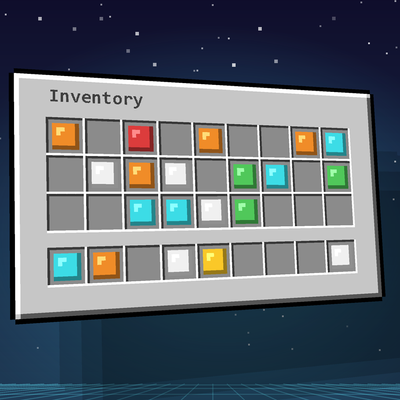
CurseForge · Minecraft mod
Spatial GUI (Forge)
Unofficial Forge port of Spatial GUI by tastytrash. Your inventory, chests and crafting screens float as a 3D plane in front of you, with your character beside it. Client-side only, fully configurable. Minecraft 1.20.1 and 1.20.2.
Choose a version Pick your version below, then grab the matching file.
Quick answer
Which Spatial GUI (Forge) release should I use?
Latest stable file spatialgui-forge-1.20.2-1.0.0.jar
Game version 1.20.2
Loader Forge
Spatial GUI (Forge) spatialgui-forge-1.20.2-1.0.0.jar targets 1.20.2 with Forge. The project page does not say whether this file belongs on the client, dedicated server, or both. No extra mods listed for this file.
Where it goes
Is Spatial GUI (Forge) required on the client, server, or both?
The project page does not say whether this file belongs on the client, dedicated server, or both.
Client Source doesn’t say
Dedicated server Source doesn’t say
Loader for this release Forge
Required install it here Optional supported, not mandatory Not supported do not install here Source doesn’t say do not assume
The source does not explicitly classify this release as client-only or server-only.
What else does Spatial GUI (Forge) spatialgui-forge-1.20.2-1.0.0.jar need?
spatialgui-forge-1.20.2-1.0.0.jar. Change the file and its required mods may change too.
This file does not list any required mods. Do not add a library just because a different file uses it.
This file does not list any required or optional mods.
Before you install it
Add Spatial GUI (Forge) without breaking your instance.
Built for Spatial GUI (Forge) spatialgui-forge-1.20.2-1.0.0.jar. Pick another file and the loader, install side or required mods may change.
- 01
Stick to this file
Use spatialgui-forge-1.20.2-1.0.0.jar. It targets 1.20.2 with Forge; another release may have different loader, side or dependency requirements.
- 02
Bring the mods it needs
This file does not list any required mods. Do not add a library just because a different file uses it.
- 03
Put it on the correct side
The project page does not say whether this file belongs on the client, dedicated server, or both.
- 04
Pick the file you checked
Use the “Get this file” button beside spatialgui-forge-1.20.2-1.0.0.jar. It opens that exact file at the source.
About this project
What does Spatial GUI (Forge) add?
Spatial GUI (Forge)
Your inventory doesn't have to be flat.
Open your inventory and watch it float into the world. Spatial GUI renders inventories and containers as a 3D plane in front of you, while the camera swings around to show your character standing right next to it. Chests, crafting tables, furnaces, villager trades: everything feels like it lives inside the game instead of sitting on top of it.
It is purely visual. It changes how screens are drawn, not how the game works, so it gives you no gameplay advantage.
Credits: This is an unofficial Forge port of Spatial GUI by tastytrash, who created the original for Fabric and NeoForge. All credit for the idea and design goes to them. Source: https://github.com/tastytrash/Spatial-GUI
What you get
- A floating 3D screen that tilts gently toward your cursor
- Character view: a third-person camera with your character beside the panel
- Smooth open/close animations: fade, scale and a choice of easing curves
- Shadow and glow: soft drop shadow, optional glowing rim in several colours
- Make it yours: hold ALT to drag the panel around or scroll to resize it (right or middle click resets)
- Works with almost every screen: inventory, creative, crafting, furnaces, anvil, enchanting, brewing, beacon, smithing, chests, barrels, shulker boxes, hoppers, dispensers, villager trading, grindstone, loom, cartography, stonecutter, books, lecterns and more. Each one can be switched on or off.
- First-person options: move and rotate the plane, hide hotbar, hands or shield
- Everything is configurable in an in-game settings screen with live preview
Quick start
- Install the mod and start the game.
- Open your inventory.
- Press F8 for the settings, F9 to turn the effect on or off. Both keys can be rebound.
Compatibility
- Minecraft 1.20.2, Forge 48+ (a separate file for 1.20.1 is available on this project)
- Client-side only. Not needed on the server, works on any server (check your server's rules on client-side mods).
- Other mods that heavily change GUIs may behave oddly. You can turn Spatial GUI off per screen type in the settings.
- Modpack use is welcome. The original author explicitly allows it.
License
Released under the MIT License. The original license text is included in the mod file (LICENSE-SpatialGUI.txt).
Not an official Minecraft product. Not approved by or associated with Mojang or Microsoft.
Project description from CurseForge.
Pick your setup
Spatial GUI (Forge) by Minecraft version and loader
Choose the version and loader you play, then open the matching release.
Minecraft version
1.20.1
1 loader buildCheck the dependencies, then try the file in a copied instance before changing a world you care about.
Recent files
Spatial GUI (Forge) versions and loaders
spatialgui-forge-1.20.2-1.0.0.jar
5 Oct 2026
Client Source doesn’t say Server Source doesn’t say Dependencies No extras listed Listed on Release listing
Check the 1.20.2 · Forge setup 1.20.2Forge release
spatialgui-forge-1.20.1-1.0.0.jar
spatialgui-1.0.0.jar
3 Oct 2026
Client Source doesn’t say Server Source doesn’t say Dependencies No extras listed Listed on Release listing
Check the 1.20.1 · Forge setup 1.20.1Forge release
Looking for an older file? The official CurseForge project page is in Resources.
 mod
mod CurseForge · Minecraft
UpscaleCraft (Forge)
More FPS: renders the world at lower resolution and upscales it with FSR 1.0 or temporal upscaling.
 mod
mod CurseForge + Modrinth · Minecraft
The Deep Void
Deep under the bedrock, a world locked in the abyss. Lurking, stalking, creatures wait patiently for prey.
 mod
mod CurseForge · Minecraft
Spawn N' Warps
Spawn N' Warps adds configurable delayed teleportation to spawn and warp locations, automatically canceling the teleport if the player moves or takes damage.