Minecraft version
Back to mods 
CurseForge · Minecraft mod
LootLens
Find items instantly. LootLens adds a fast chest search bar, smart item filtering, and a clean Chest
Choose a version Pick your version below, then grab the matching file.
Quick answer
Which LootLens release should I use?
Latest stable file LootLens-Fabric_v1.0.5-26.3.jar
Game version 26.3
Loader Fabric
LootLens-Fabric_v1.0.5-26.3.jar targets 26.3 with Fabric. The project page does not say whether this file belongs on the client, dedicated server, or both. No extra mods listed for this file.
Where it goes
Is LootLens required on the client, server, or both?
The project page does not say whether this file belongs on the client, dedicated server, or both.
Client Source doesn’t say
Dedicated server Source doesn’t say
Loader for this release Fabric
Required install it here Optional supported, not mandatory Not supported do not install here Source doesn’t say do not assume
The source does not explicitly classify this release as client-only or server-only.
What else does LootLens-Fabric_v1.0.5-26.3.jar need?
LootLens-Fabric_v1.0.5-26.3.jar. Change the file and its required mods may change too.
This file does not list any required mods. Do not add a library just because a different file uses it.
This file does not list any required or optional mods.
Before you install it
Add LootLens without breaking your instance.
Built for LootLens-Fabric_v1.0.5-26.3.jar. Pick another file and the loader, install side or required mods may change.
- 01
Stick to this file
Use LootLens-Fabric_v1.0.5-26.3.jar. It targets 26.3 with Fabric; another release may have different loader, side or dependency requirements.
- 02
Bring the mods it needs
This file does not list any required mods. Do not add a library just because a different file uses it.
- 03
Put it on the correct side
The project page does not say whether this file belongs on the client, dedicated server, or both.
- 04
Pick the file you checked
Use the “Get this file” button beside LootLens-Fabric_v1.0.5-26.3.jar. It opens that exact file at the source.
About this project
What does LootLens add?


 # 🔍 LootLens
Find your loot faster. Keep your inventory clean. Spend less time searching.
**LootLens** is a lightweight Minecraft mod designed to make searching through chests faster, cleaner, and much more convenient.
Large storage rooms can quickly become a mess. You open chest after chest trying to remember where you placed one specific item. LootLens improves that experience by adding a clean **live search bar directly to supported chest interfaces**, allowing you to instantly focus on the items you are looking for.
No complicated menus. No unnecessary systems. Just a simple quality-of-life feature that feels like it belongs in Minecraft.
> Search less. Loot faster.

✨ What LootLens Does
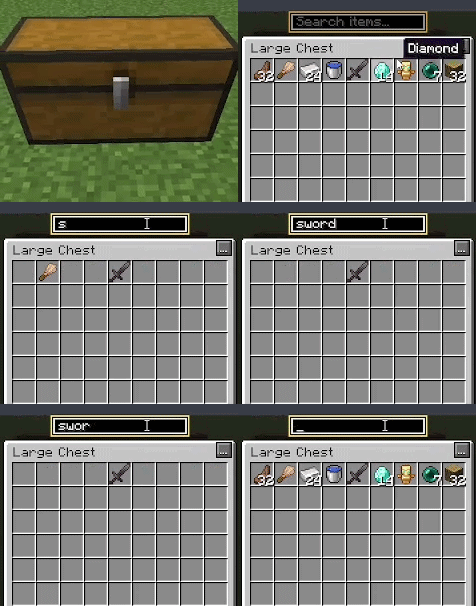
Start typing the name of an item into the search bar and LootLens immediately filters the chest display.
Instead of scanning every slot manually, matching items remain easy to identify while unrelated chest items are filtered from view.
Your **player inventory remains untouched**, so the search only focuses on the storage container you are currently viewing.
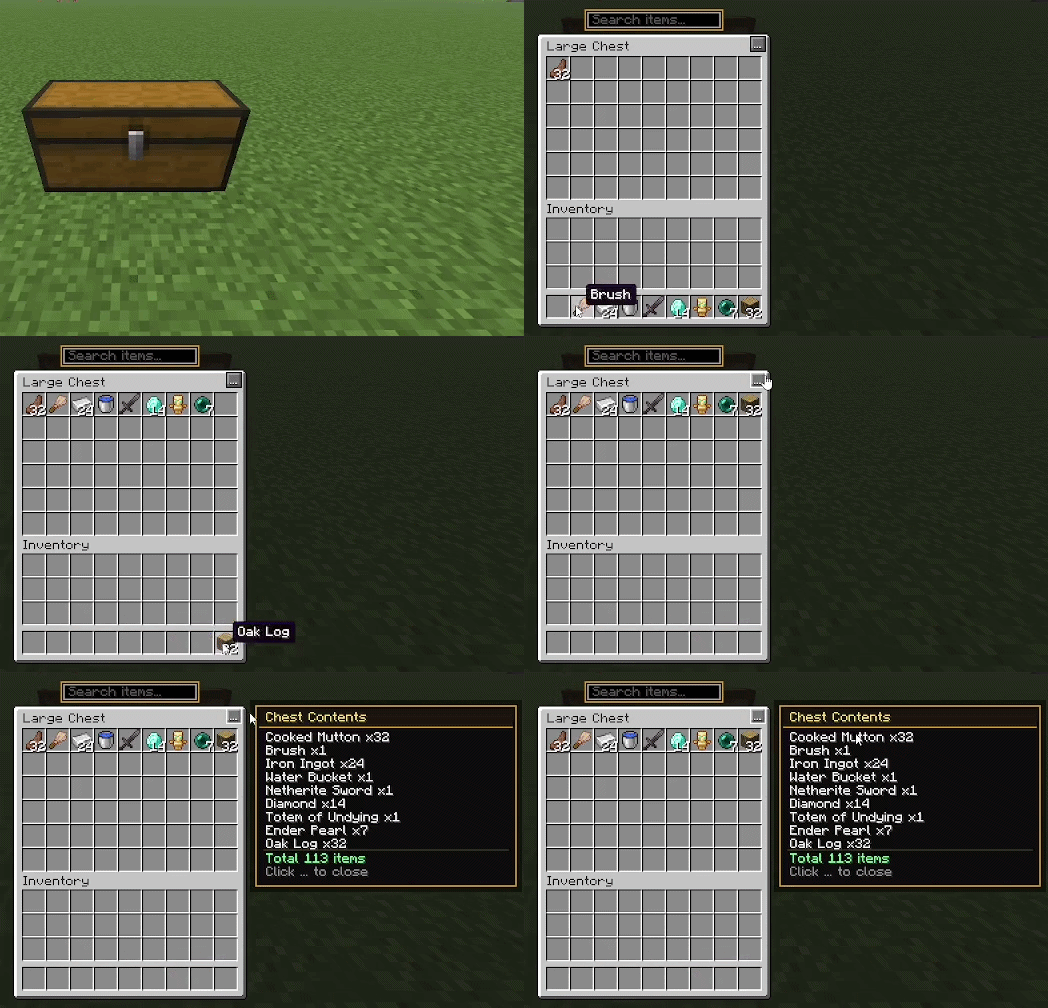
LootLens also includes a compact **three-dot menu** that opens a useful **Chest Contents** panel, giving you a quick overview of the items stored inside the chest.
The result is a faster and cleaner storage experience without changing how Minecraft inventories actually work.

⭐ Features
- 🔎 **Live Chest Search** — Find items instantly by typing their name.
- 📦 **Chest-Only Filtering** — Search affects chest contents without hiding items in your player inventory.
- 👁️ **Smart Item Visibility** — Non-matching chest slots are filtered so matching loot is easier to spot.
- 📋 **Chest Contents Summary** — Quickly view stored item names and quantities.
- 🔢 **Item Count Overview** — See how much of each item is stored in the container.
- ⋯ **Clean Three-Dot Menu** — Access the contents summary without cluttering the vanilla interface.
- 🟨 **Gold Search Outline** — A subtle visual highlight that keeps the interface recognizable while giving LootLens its own identity.
- ⚡ **Lightweight Design** — Focused on useful features without unnecessary systems.
- 🎨 **Vanilla-Friendly UI** — Keeps Minecraft's familiar inventory style instead of completely replacing it.

🔎 Live Search
LootLens adds a search field directly above the chest interface.
Simply type something like:
diamond
iron
book
apple
and matching chest items become much easier to locate.
The search updates as you type, making it useful even when you only remember part of an item's name.
This is especially helpful for large storage rooms, survival bases, technical worlds, long-running multiplayer worlds, and players who keep many different resources in the same area.

📋 Chest Contents Panel
Need a quick overview instead of searching manually?
Press the **three-dot button** in the chest interface to open the Chest Contents panel.
It provides a simple summary of what is currently stored inside the chest, including item names and quantities.
The panel is positioned beside the chest interface so it does not unnecessarily cover the inventory you are trying to inspect.

🎨 Designed to Feel Like Minecraft
LootLens is intentionally simple.
It does not try to turn Minecraft's inventory into a completely different interface.
The familiar chest layout stays intact, while LootLens adds only the tools needed to improve item searching.
The search box uses a subtle **gold outline**, while the rest of the interface stays close to Minecraft's original style.
That makes LootLens easy to understand immediately, even the first time you install it.

🧠 Why LootLens?
Minecraft storage systems can become huge.
After enough mining trips, farms, exploration, building projects, and adventures, even an organized storage room can contain thousands of items.
Vanilla Minecraft gives you storage, but finding one particular item can still take time.
LootLens is built around one simple idea:
**You should spend more time playing Minecraft and less time searching through chests.**
Whether you are looking for a rare enchanted book, building materials, ores, food, redstone components, or something you stored days ago, LootLens helps you locate it faster.

⚙️ Installation
- Install the correct **Fabric Loader** version for your Minecraft version.
- Install **Fabric API** if required by the release.
- Download the correct LootLens
.jarfor your Minecraft version. - Place the LootLens
.jarinside your Minecraftmodsfolder. - Launch Minecraft.
Always use the LootLens version made specifically for your Minecraft version.

🛡️ Safe Storage Philosophy
LootLens is designed as an interface enhancement.
It does **not** need to increase vanilla chest capacity or modify the number of storage slots in vanilla containers simply to provide its searching features.
Your Minecraft storage remains familiar while LootLens improves how you interact with it.

🌐 Multiplayer
LootLens focuses on improving the client interface without changing the fundamental storage mechanics of the world.
Server rules can vary, so always follow the rules of the multiplayer server you are playing on.

📦 Modpacks
Modpack usage is subject to the **LootLens Custom License**.
Please read the license included with the project before redistributing LootLens as part of a public modpack.
Do not re-upload LootLens as a standalone download or redistribute modified copies under another name unless permission is explicitly granted by the project owner.

📜 License
**LootLens is distributed under the LootLens Custom License.**
Copyright remains with the project owner.
Unauthorized standalone redistribution, re-uploading, selling, or publishing modified versions of LootLens as your own project is not permitted unless specifically allowed by the license or written permission.
Please read the complete license before redistributing the mod.

🚀 Built for Players Who Love Organized Loot
Whether you have ten chests or an entire warehouse, LootLens makes finding items feel faster and more natural.
**Open a chest.**
**Type what you need.**
**Find it.**
**Continue playing.**
🔍 LootLens — Search less. Loot faster.
Project description from CurseForge.
Pick your setup
LootLens by Minecraft version and loader
Choose the version and loader you play, then open the matching release.
Minecraft version
26.2
1 loader buildMinecraft version
26.1.2
1 loader buildMinecraft version
26.1.1
1 loader buildMinecraft version
26.1
1 loader buildMinecraft version
1.21.11
1 loader buildMinecraft version
1.21.10
1 loader buildMinecraft version
1.21.9
1 loader buildMinecraft version
1.21.8
1 loader buildMinecraft version
1.21.7
1 loader buildMinecraft version
1.21.6
1 loader buildMinecraft version
1.21.5
1 loader buildShowing the newest 12 of 22 game versions. Older files are in the list below.
Check the dependencies, then try the file in a copied instance before changing a world you care about.
Recent files
LootLens versions and loaders
LootLens-Fabric_v1.0.5-26.3.jar
4 Oct 2026
Client Source doesn’t say Server Source doesn’t say Dependencies No extras listed Listed on Release listing
Check the 26.3 · Fabric setup Fabric26.3 release
LootLens-Fabric_v1.0.4-26.2.jar
4 Oct 2026
Client Source doesn’t say Server Source doesn’t say Dependencies No extras listed Listed on Release listing
Check the 26.2 · Fabric setup Fabric26.2 release
LootLens-Fabric_v1.0.3-26.1.2.jar
4 Oct 2026
Client Source doesn’t say Server Source doesn’t say Dependencies No extras listed Listed on Release listing
Check the 26.1.2 · Fabric setup Fabric26.1.2 release
LootLens-Fabric_v1.0.2-26.1.1.jar
4 Oct 2026
Client Source doesn’t say Server Source doesn’t say Dependencies No extras listed Listed on Release listing
Check the 26.1.1 · Fabric setup Fabric26.1.1 release
LootLens-Fabric_v1.0.1-26.1.jar
4 Oct 2026
Client Source doesn’t say Server Source doesn’t say Dependencies No extras listed Listed on Release listing
Check the 26.1 · Fabric setup Fabric26.1 release
LootLens-Fabric_v1.1.2-1.21.11.jar
4 Oct 2026
Client Source doesn’t say Server Source doesn’t say Dependencies No extras listed Listed on Release listing
Check the 1.21.11 · Fabric setup Fabric1.21.11 release
LootLens-Fabric_v1.1.1-1.21.10.jar
4 Oct 2026
Client Source doesn’t say Server Source doesn’t say Dependencies No extras listed Listed on Release listing
Check the 1.21.10 · Fabric setup Fabric1.21.10 release
LootLens-Fabric_v1.1.0-1.21.9.jar
4 Oct 2026
Client Source doesn’t say Server Source doesn’t say Dependencies No extras listed Listed on Release listing
Check the 1.21.9 · Fabric setup Fabric1.21.9 release
LootLens-Fabric_v1.0.9-1.21.8.jar
4 Oct 2026
Client Source doesn’t say Server Source doesn’t say Dependencies No extras listed Listed on Release listing
Check the 1.21.8 · Fabric setup Fabric1.21.8 release
LootLens-Fabric_v1.0.8-1.21.7.jar
4 Oct 2026
Client Source doesn’t say Server Source doesn’t say Dependencies No extras listed Listed on Release listing
Check the 1.21.7 · Fabric setup Fabric1.21.7 release
LootLens-Fabric_v1.0.7-1.21.6.jar
4 Oct 2026
Client Source doesn’t say Server Source doesn’t say Dependencies No extras listed Listed on Release listing
Check the 1.21.6 · Fabric setup Fabric1.21.6 release
LootLens-Fabric_v1.0.6-1.21.5.jar
4 Oct 2026
Client Source doesn’t say Server Source doesn’t say Dependencies No extras listed Listed on Release listing
Check the 1.21.5 · Fabric setup Fabric1.21.5 release
Looking for an older file? The official CurseForge project page is in Resources.
 mod
CurseForge + Modrinth · Minecraft
VanillaHUD
A mod that modifies various vanilla HUD elements, such as the bossbar, action bar, sidebar / scoreboard, hotbar, title / subtitle, and more. By Polyfrost, best with OneClient.
 mod
CurseForge · Minecraft
Visual Villager Trade Edit
Add custom villager trades with a GUI
 mod
CurseForge · Minecraft
SkyblockRPGRU
Russian translation for Hypixel SkyBlock: items, menus, quests, NPCs, HUD and more