Xaero's Minimap Needed by Xaero Iconize v1.0.0
requiredMatching file found Matched file: xaerominimap-neoforge-1.21.1-26.6.0.jar

CurseForge · Minecraft mod
Adds custom icons to Xaero maps and HUD elements
Quick answer
Xaero Iconize v1.0.0 targets 1.21.1 with NeoForge. The project page does not say whether this file belongs on the client, dedicated server, or both. 1 required mod needs a matching file.
Where it goes
The project page does not say whether this file belongs on the client, dedicated server, or both.
The source does not explicitly classify this release as client-only or server-only.
Xaero Iconize v1.0.0. Change the file and its required mods may change too.
Install Xaero's Minimap, XaeroLib first, but 1 required mod has no matching file for this setup. Do not mix loader builds to force a match. 1 comes through another mod in the chain.
1 extra mod was pulled in by another dependency. Indented rows show who needs each one. We only count dependency files that match this setup. A file for another loader does not fill the gap.
Before you install it
Built for Xaero Iconize v1.0.0. Pick another file and the loader, install side or required mods may change.
Use Xaero Iconize v1.0.0. It targets 1.21.1 with NeoForge; another release may have different loader, side or dependency requirements.
Install Xaero's Minimap, XaeroLib first, but 1 required mod has no matching file for this setup. Do not mix loader builds to force a match. 1 comes through another mod in the chain.
The project page does not say whether this file belongs on the client, dedicated server, or both.
Use the “Get this file” button beside Xaero Iconize v1.0.0. It opens that exact file at the source.
About this project
Xaero Iconize is a client-side addon for Xaero's Minimap and Xaero's World Map that allows you to use Minecraft items as waypoint icons.
Instead of being limited to waypoint initials, you can choose any registered item from Minecraft or your installed mods and use it as a custom waypoint icon.
When creating or editing a waypoint, Xaero Iconize adds an icon button next to the waypoint name field.
Click the button to open the item picker and select the item you want to use as the waypoint icon.
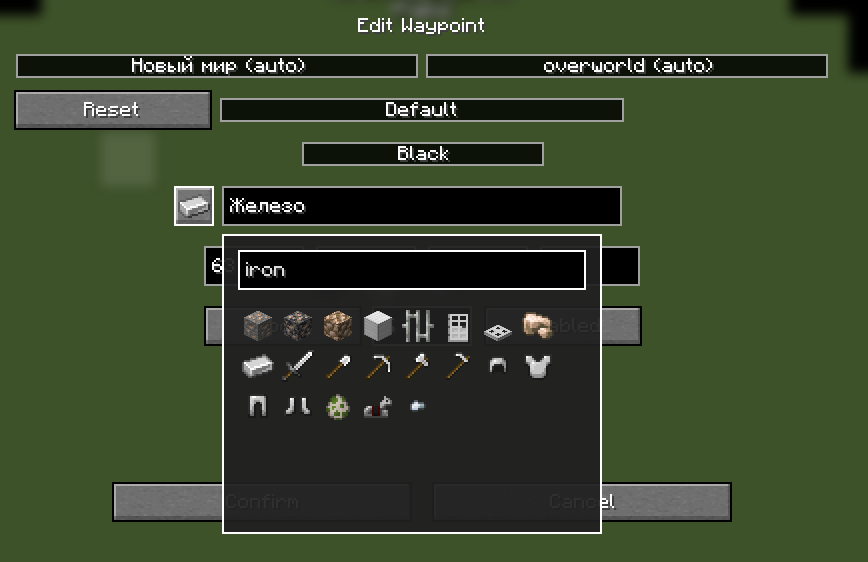
The picker includes a search field, so you don't have to scroll through every item installed in the game.
Right-click the icon button to remove the currently assigned custom icon.
Custom waypoint icons are also displayed directly on Xaero's World Map.

The original Xaero waypoint background, colors and labels are preserved.
Xaero Iconize uses Minecraft's item registry, which means items added by other mods can also be used as waypoint icons.
No additional compatibility layer is required for individual item mods.
mods folder.The selected item will now be used as the waypoint icon.
To restore the default Xaero waypoint symbol, right-click the icon button and confirm the waypoint changes.
Project description from CurseForge.
Pick your setup
Choose the version and loader you play, then open the matching release.
Check the dependencies, then try the file in a copied instance before changing a world you care about.
Recent files
xaero_iconize-1.0.0.jar
4 Oct 2026
Looking for an older file? The official CurseForge project page is in Resources.
 mod
modTweaks for the Cobblemon Origins modpack and server.
 mod
modAdds elden ring movesets and weapons to epic fight mod
 mod
modHigh School DxD comes to Tensura: Reincarnated, starting with the Red Dragon Emperor’s Boosted Gear.