Minecraft version
Back to mods 
CurseForge · Minecraft mod
Minimap Shapes Core
Shared minimap shapes, selection screens, and separate saved preferences for map add-ons.
Choose a version Pick your version below, then grab the matching file.
Quick answer
Which Minimap Shapes Core release should I use?
Latest stable file minimapshapes_core-0.1.0+forge-1.20.1
Game version 1.20.1
Loader Forge
Minimap Shapes Core minimapshapes_core-0.1.0+forge-1.20.1 targets 1.20.1 with Forge. The project page does not say whether this file belongs on the client, dedicated server, or both. No extra mods listed for this file.
Where it goes
Is Minimap Shapes Core required on the client, server, or both?
The project page does not say whether this file belongs on the client, dedicated server, or both.
Client Source doesn’t say
Dedicated server Source doesn’t say
Loader for this release Forge
Required install it here Optional supported, not mandatory Not supported do not install here Source doesn’t say do not assume
The source does not explicitly classify this release as client-only or server-only.
What else does Minimap Shapes Core minimapshapes_core-0.1.0+forge-1.20.1 need?
minimapshapes_core-0.1.0+forge-1.20.1. Change the file and its required mods may change too.
This file does not list any required mods. Do not add a library just because a different file uses it.
This file does not list any required or optional mods.
Before you install it
Add Minimap Shapes Core without breaking your instance.
Built for Minimap Shapes Core minimapshapes_core-0.1.0+forge-1.20.1. Pick another file and the loader, install side or required mods may change.
- 01
Stick to this file
Use minimapshapes_core-0.1.0+forge-1.20.1. It targets 1.20.1 with Forge; another release may have different loader, side or dependency requirements.
- 02
Bring the mods it needs
This file does not list any required mods. Do not add a library just because a different file uses it.
- 03
Put it on the correct side
The project page does not say whether this file belongs on the client, dedicated server, or both.
- 04
Pick the file you checked
Use the “Get this file” button beside minimapshapes_core-0.1.0+forge-1.20.1. It opens that exact file at the source.
About this project
What does Minimap Shapes Core add?
Build minimap shape add-ons with shared contour geometry, a selection screen, and a separate saved preference for each map.
Minimap Shapes Core is the library used by the JourneyMap and Xaero shape add-ons. Install it when an add-on requires it. Each add-on connects Core to its map's renderer and registers the shapes that renderer supports.
Core alone does not change a minimap. With the JourneyMap add-on installed, the minimap can use these outlines:
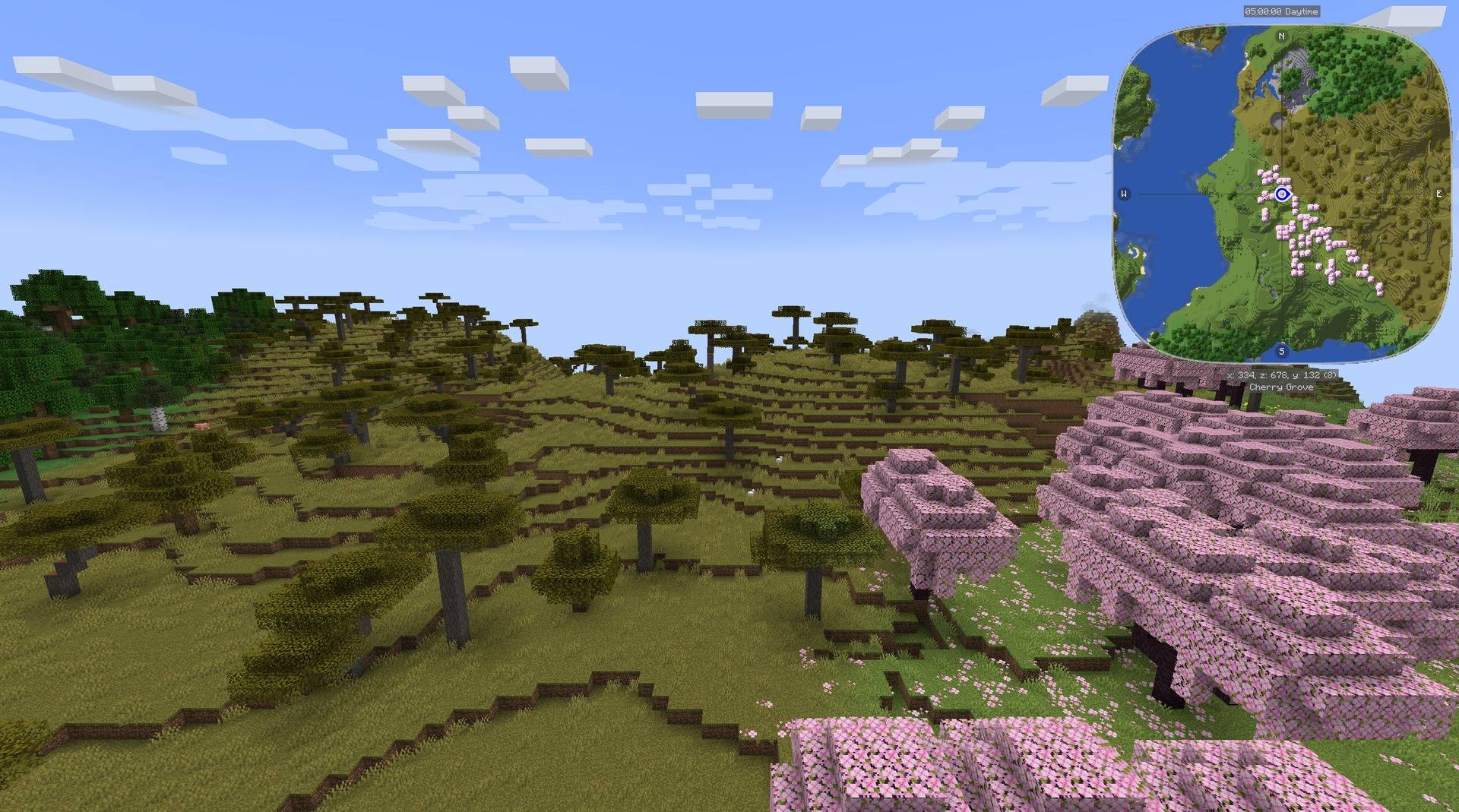
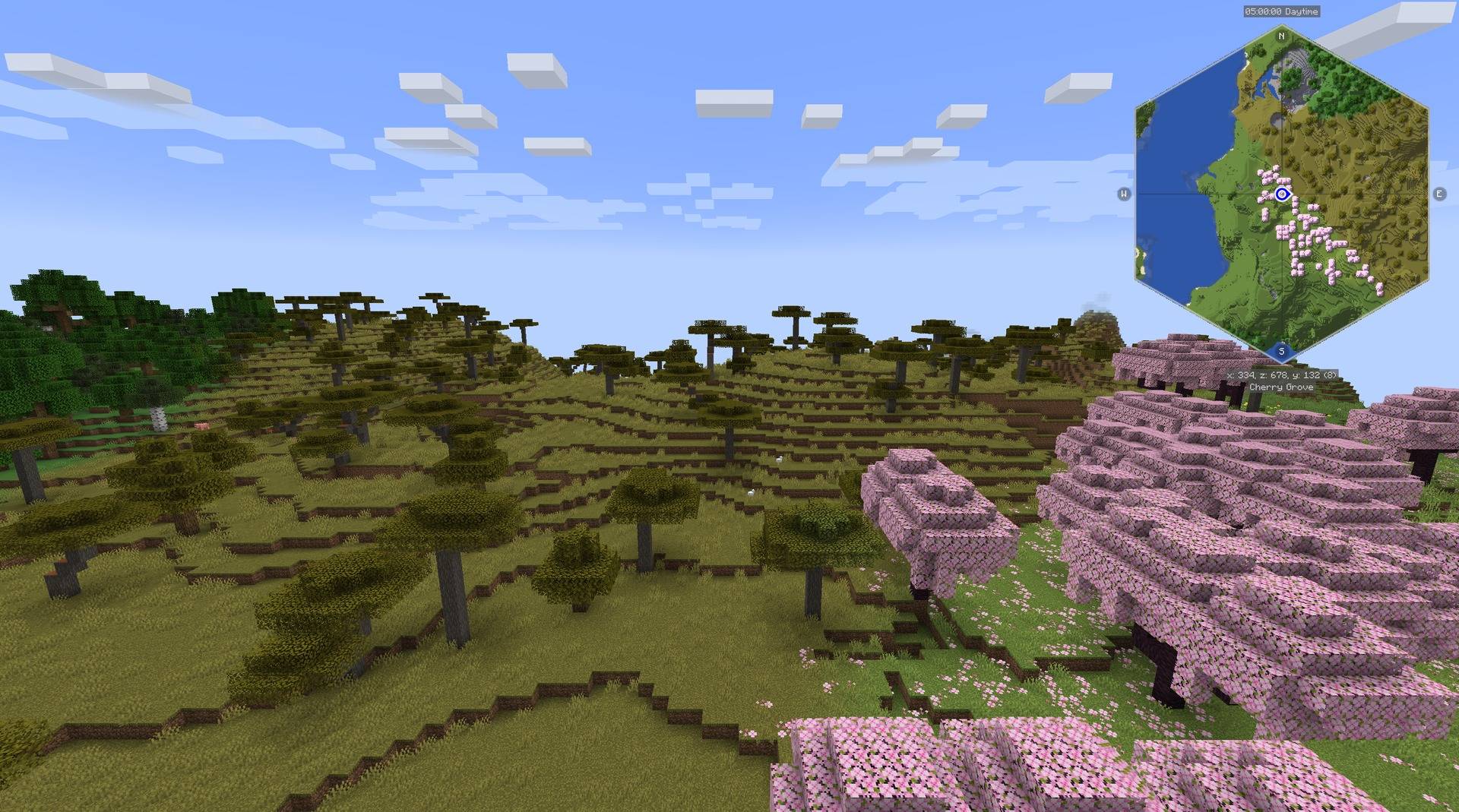
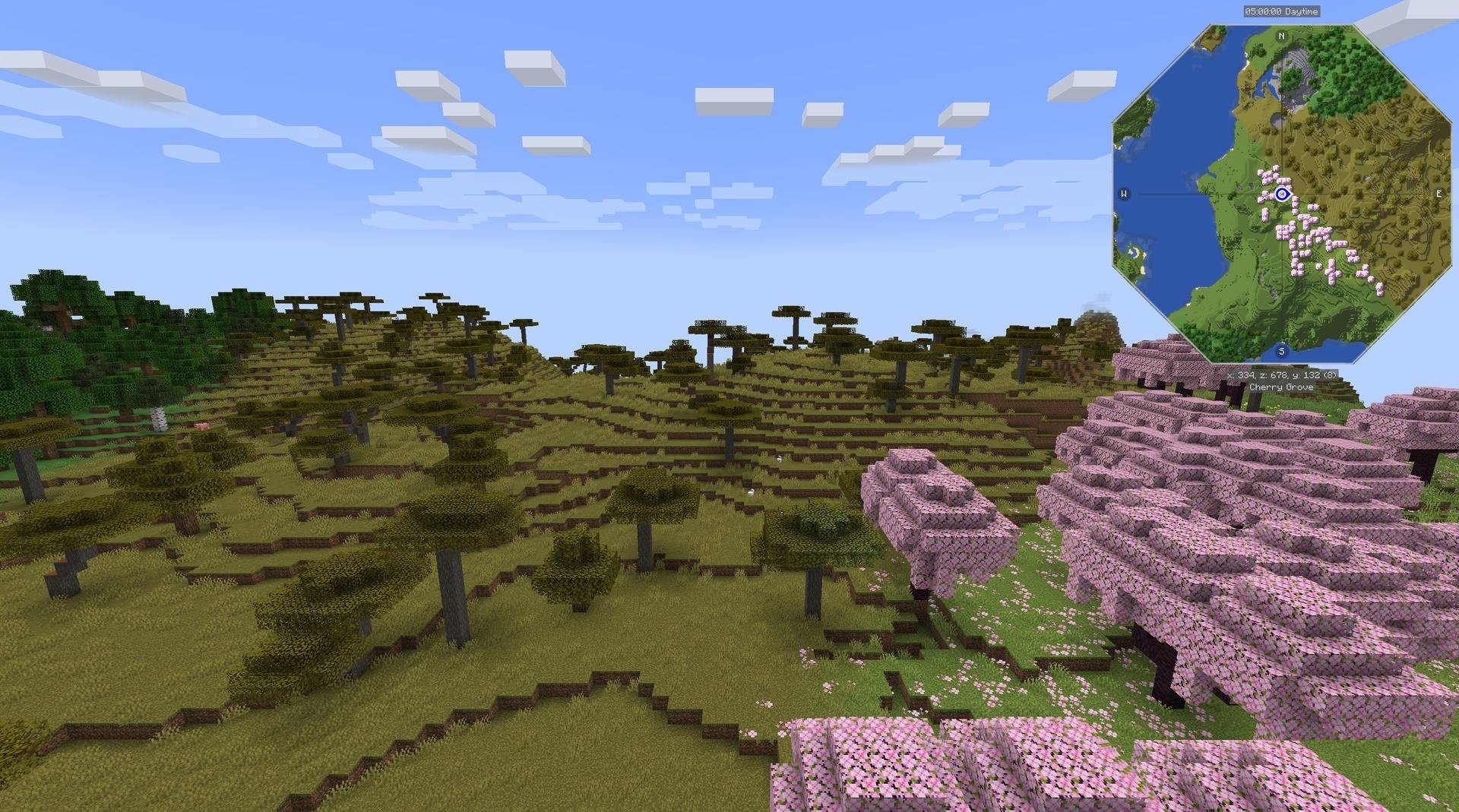
Geometry
The shared shapes are a rounded square, hexagon, octagon, horizontal rectangle, and vertical rectangle. A Default selection delegates rendering to the map's native shape. Geometry is expressed in a centered unit square, so an integration can apply the same contour to a terrain mask, frame, and marker boundary.
A minimal radius query uses the public Java API:
import com.kuronami.minimapshapes.Shape;
import com.kuronami.minimapshapes.ShapeGeometry;

double angle = Math.PI / 4;
double radius = ShapeGeometry.radius(Shape.HEXAGON, angle);
The rectangle overload accepts an aspect ratio and crops the short axis while keeping the map texture's scale. Integrations provide their own coordinate transformations and offscreen projection.
Selection and saved preferences
Register a stable map ID, a list of supported shapes, and an apply callback through ClientShapes.register. The add-on registers its key binding and calls ClientShapes.tick from its client tick handler. Core opens the selector, saves the chosen enum value, and requests application when it changes.
Preferences are separate for each registered map. The JourneyMap and Xaero integrations can therefore share one Core installation while retaining independent selections. A new integration supplies its screen-title translation and connects the contour to its host's rendering, rotation, and marker rules.
API scope
Core provides these shared building blocks. Map-specific rendering hooks, host dependencies, texture ownership, and version compatibility remain the integration's responsibility. The source includes API documentation and a small geometry consumer example.




Paid commissions for videos, streams and servers. Send me your idea: kuronami.mods@gmail.com

MIT licensed. Free to use, modify, and distribute under the terms of the MIT license.
Bugs and questions: comment on the CurseForge page, or DM @kuronami333 on X.
Source: Minimap Shapes.
Project description from CurseForge.
Pick your setup
Minimap Shapes Core by Minecraft version and loader
Choose the version and loader you play, then open the matching release.
Minecraft version
1.20.1
1 loader buildCheck the dependencies, then try the file in a copied instance before changing a world you care about.
Recent files
Minimap Shapes Core versions and loaders
minimapshapes_core-0.1.0+forge-1.20.1
minimapshapes_core-0.1.0+forge-1.20.1.jar
4 Oct 2026
Client Source doesn’t say Server Source doesn’t say Dependencies No extras listed Listed on Release listing
Check the 1.20.1 · Forge setup 1.20.1Forge release
minimapshapes_core-0.1.0+neoforge-1.21.1
minimapshapes_core-0.1.0+neoforge-1.21.1.jar
4 Oct 2026
Client Source doesn’t say Server Source doesn’t say Dependencies No extras listed Listed on Release listing
Check the 1.21.1 · NeoForge setup 1.21.1NeoForge release
minimapshapes_core-0.1.0+fabric-1.21.1
minimapshapes_core-0.1.0+fabric-1.21.1.jar
4 Oct 2026
Client Source doesn’t say Server Source doesn’t say Dependencies No extras listed Listed on Release listing
Check the 1.21.1 · Fabric setup Fabric1.21.1 release
Looking for an older file? The official CurseForge project page is in Resources.
 mod
CurseForge + Modrinth · Minecraft
Adventure Item Names
Unique names for weapons, tools, armour and items found throughout your world.
 mod
CurseForge + Modrinth · Minecraft
AnvilCraft: PigsPlus
This mod is an addon for AnvilCraft, with main content including production-friendly machines
 mod
CurseForge + Modrinth · Minecraft
PolyHitbox
Improves performance of hitbox rendering and adds per-hover and per-damaged (i-frame) colors. By Polyfrost, best with OneClient.