
Minecraft version
Back to mods 
CurseForge · Minecraft mod
OLeaf
Client-side graphics mod with presets, FSR upscaling, frame generation, FPS overlay, and easy video settings for Minecraft.
Choose a version Pick your version below, then grab the matching file.
Quick answer
Which OLeaf release matches 26.1?
Best match for your filters oleaf-26.1-fabric.jar
Game version 26.1
Loader Fabric
oleaf-26.1-fabric.jar targets 26.1 with Fabric. The project page does not say whether this file belongs on the client, dedicated server, or both. No extra mods listed for this file.
Where it goes
Is OLeaf required on the client, server, or both?
The project page does not say whether this file belongs on the client, dedicated server, or both.
Client Source doesn’t say
Dedicated server Source doesn’t say
Loader for this release Fabric
Required install it here Optional supported, not mandatory Not supported do not install here Source doesn’t say do not assume
The source does not explicitly classify this release as client-only or server-only.
What else does oleaf-26.1-fabric.jar need?
oleaf-26.1-fabric.jar on 26.1. Every mod below is checked against that same setup.
This file does not list any required mods. Do not add a library just because a different file uses it.
This file does not list any required or optional mods.
Before you install it
Add OLeaf without breaking your instance.
Built for oleaf-26.1-fabric.jar on 26.1. Pick another file and the loader, install side or required mods may change.
- 01
Stick to this file
Use oleaf-26.1-fabric.jar. It targets 26.1 with Fabric; another release may have different loader, side or dependency requirements.
- 02
Bring the mods it needs
This file does not list any required mods. Do not add a library just because a different file uses it.
- 03
Put it on the correct side
The project page does not say whether this file belongs on the client, dedicated server, or both.
- 04
Pick the file you checked
Use the “Get this file” button beside oleaf-26.1-fabric.jar. It opens that exact file at the source.
About this project
What does OLeaf add?
Oleaf
Oleaf is now open source!
The complete source code is available on GitHub. If you encounter a bug, have a feature request, or want to contribute, please open an issue on the GitHub repository.

Oleaf is a client-side Fabric graphics mod for Minecraft designed to make video settings easier to manage while providing modern upscaling, frame generation, performance controls, and a customizable FPS overlay.
✨ Features
🎨 Graphics
- Graphics presets
- Graphics quality controls
- Render, simulation, and entity distance
- Maximum FPS
- VSync
- Brightness
- FOV
- GUI scale
- Fullscreen
- Particles
- Clouds
- Entity shadows
- View bobbing
- Performance and stability options
- Advanced Minecraft, Sodium, and Iris settings
- Automatically applies compatible Minecraft and Sodium options
🔍 Upscaling
Oleaf supports multiple upscaling methods:
- AMD FidelityFX FSR 1
- Qualcomm SGSR 1
- Bicubic
- Bilinear
- Nearest Neighbor
- Ultra Quality
- Quality
- Balanced
- Performance
- Ultra Performance
- Custom render scale
- Adjustable sharpening
⚡ Frame Generation
- 2×–6× Frame Generation
- Pace Frames
- Adaptive Frame Generation
- Recommended settings
- Designed to work alongside supported rendering configurations
📊 FPS Overlay
The built-in performance overlay can display:
- FPS
- Frame time
- Memory usage
- Ping
- Entity count
- FSR status
- Frame Generation status
- Adjustable position
- Adjustable scale
- Adjustable opacity
- Custom keybinds
💡 Why Not DLSS?
DLSS is NVIDIA's proprietary technology and cannot be directly integrated into an open-source Fabric mod in the same way as an openly licensed solution.
Oleaf instead uses AMD FidelityFX FSR 1, which is open source and MIT licensed. FSR 1 is a spatial upscaling technique that can be used across different GPU vendors, including:
- AMD
- NVIDIA
- Intel Arc
- Intel integrated graphics
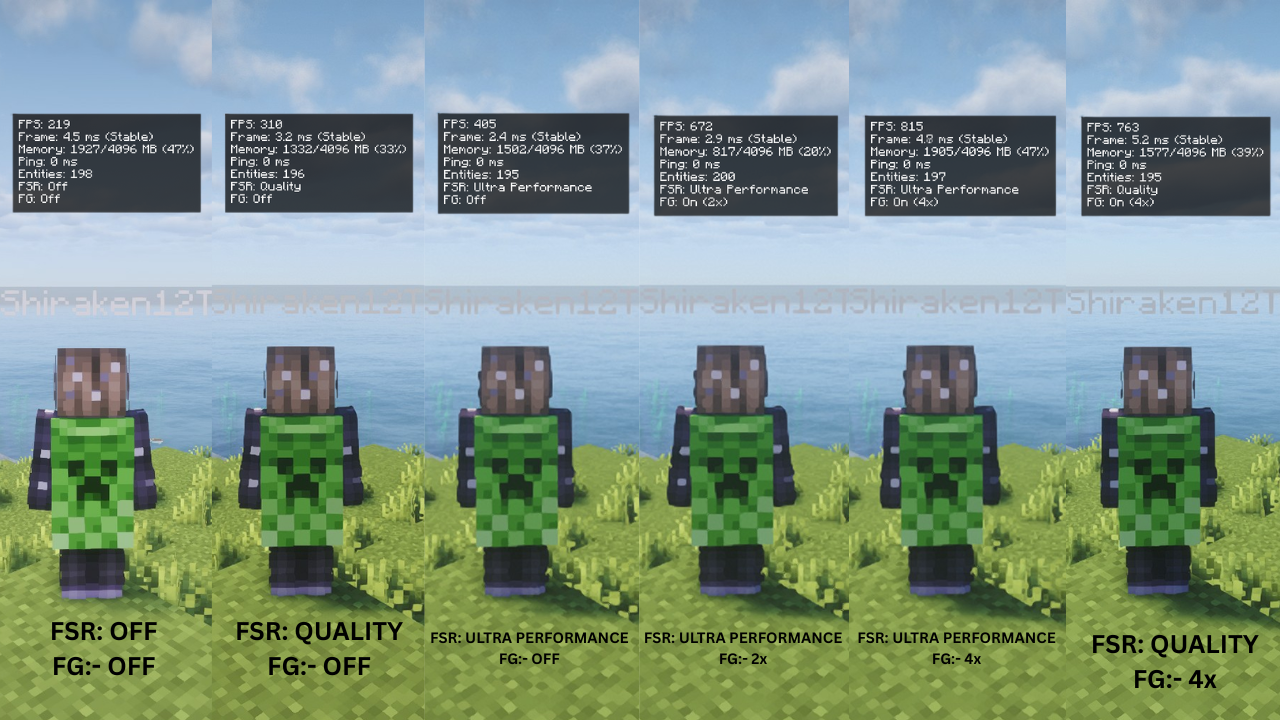
📈 Performance Comparison
FPS Comparison
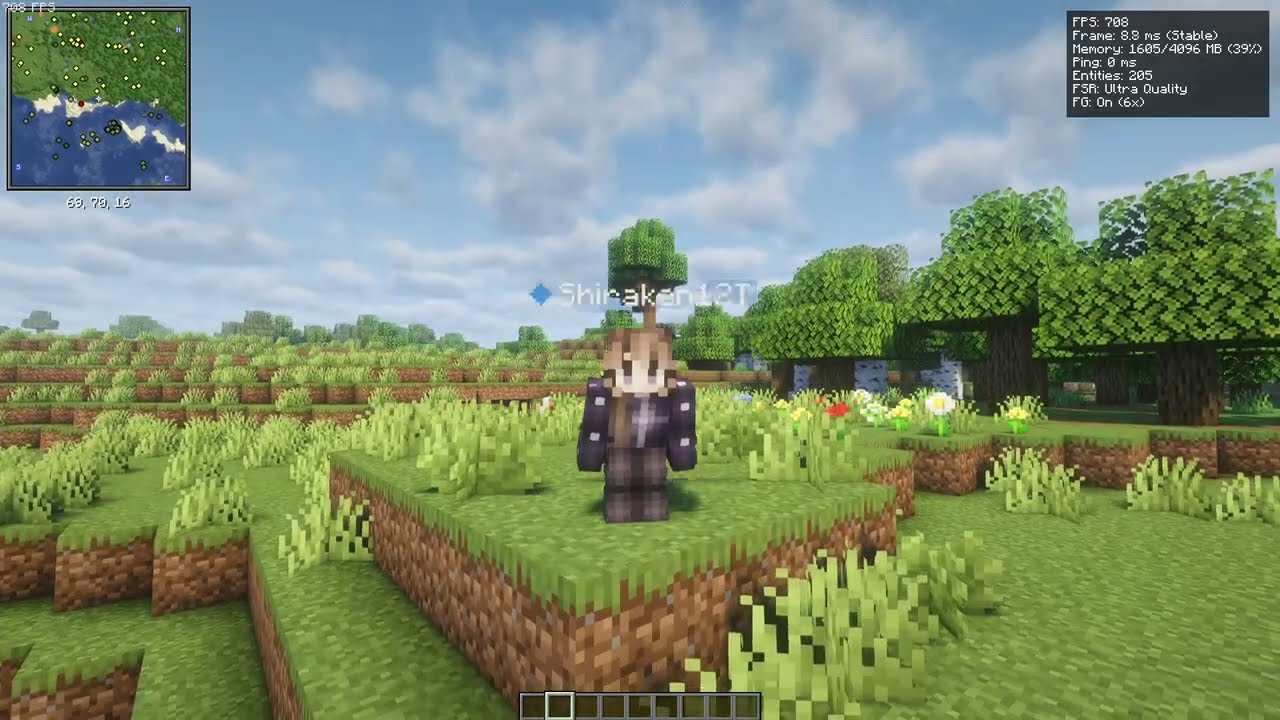
🎥 Video Comparison
See Oleaf in action:
📦 Dependencies
Required
- Minecraft 1.21.x or 26.x
- Fabric Loader 0.19.3+
- Fabric API
- Mod Menu
- Cloth Config
- Java 21+
Optional
- Sodium
- Iris Shaders
🧩 Compatibility
- Client-side only
- Minecraft 1.21.11
- Compatible with Sodium
- Compatible with Iris
Oleaf is designed to work alongside Sodium rather than being a replacement for it.
Configuration
The configuration file is located at:
Project description from CurseForge.
Pick your setup
OLeaf by Minecraft version and loader
Choose the version and loader you play, then open the matching release.
Minecraft version
26.2
1 loader buildMinecraft version
26.1.1
1 loader buildMinecraft version
26.1
1 loader buildMinecraft version
1.21.11
1 loader buildMinecraft version
1.21.10
1 loader buildMinecraft version
1.21.9
1 loader buildMinecraft version
1.21.8
1 loader buildMinecraft version
1.21.7
1 loader buildMinecraft version
1.21.6
1 loader buildMinecraft version
1.21.5
1 loader buildMinecraft version
1.21.4
1 loader buildShowing the newest 12 of 23 game versions. Older files are in the list below.
Check the dependencies, then try the file in a copied instance before changing a world you care about.
Recent files
OLeaf versions and loaders
oleaf-26.1-fabric.jar
6 Oct 2026
Client Source doesn’t say Server Source doesn’t say Dependencies No extras listed Listed on Release listing
Check the 26.1 · Fabric setup Fabric26.1 release
Looking for an older file? The official CurseForge project page is in Resources.
 mod
CurseForge + Modrinth · Minecraft
quick pack
Optimize datapack / resourcepack zip file loading times
 mod
CurseForge · Minecraft
Euphoria Pacing
A FPS Booster Mod that is really helpful. This is not a Fork i repeat this is not a Fork.
 mod
CurseForge + Modrinth · Minecraft
Eymistaken's HUD
A highly customizable PvP HUD featuring a Drag & Drop Layout Designer, CPS, Keystrokes, Reach, Armor HUD and Combo display.