Quick answer
Which Velox release should I use?
Latest stable file 0.1.1 26.1–26.3
Game version 26.1, 26.1.1, 26.1.2
Loader NeoForge
Velox 0.1.1 26.1–26.3 targets 26.1, 26.1.1, 26.1.2 with NeoForge. The project page does not say whether this file belongs on the client, dedicated server, or both. All 1 required mods have matching files.
Where it goes
Is Velox required on the client, server, or both?
The project page does not say whether this file belongs on the client, dedicated server, or both.
Client Source doesn’t say
Dedicated server Source doesn’t say
Loader for this release NeoForge
Required install it here Optional supported, not mandatory Not supported do not install here Source doesn’t say do not assume
The source does not explicitly classify this release as client-only or server-only.
What else does Velox 0.1.1 26.1–26.3 need?
0.1.1 26.1–26.3. Change the file and its required mods may change too.
Install Celeris first. We found matching files for this game-version and loader setup.
Celeris Needed by Velox 0.1.1 26.1–26.3 requiredMatching file found Matched file: 0.2.2 26.1–26.3
We only count dependency files that match this setup. A file for another loader does not fill the gap.
Before you install it
Add Velox without breaking your instance.
Built for Velox 0.1.1 26.1–26.3. Pick another file and the loader, install side or required mods may change.
- 01
Stick to this file
Use 0.1.1 26.1–26.3. It targets 26.1, 26.1.1, 26.1.2 with NeoForge; another release may have different loader, side or dependency requirements.
- 02
Bring the mods it needs
Install Celeris first. We found matching files for this game-version and loader setup.
- 03
Put it on the correct side
The project page does not say whether this file belongs on the client, dedicated server, or both.
- 04
Pick the file you checked
Use the “Get this file” button beside 0.1.1 26.1–26.3. It opens that exact file at the source.
About this project
What does Velox add?







Velox is built to take work off your server when lots of dropped items are lying around. Big explosions, mob drops piling up, a storage room emptied onto the floor: instead of working out where each item goes one by one, Velox does them all in one go.
⚡ What it does
- 🧺 Dropped items in one batch. Items are worked out together instead of one by one, so a crowded floor costs the server far less time per tick.
- 👀 Looks the same to players. Items on the ground stay where they are and move the way they always did.
- 🌊 Vanilla where it matters. Items in water, lava, on hoppers or on slabs keep the normal game's behaviour.
- 🖥️ Server only. Players do not need to install anything.
Velox runs its physics on Celeris, which must be installed on the server too.
🏁 How fast
Milliseconds per server tick. The budget for 20 ticks per second is 50 ms.
- 🖥️ 20,000 falling items (Minecraft 1.21.1, dedicated NeoForge server, CI runner, median of 3 runs on 30 Oct 2026): 28.0 ms instead of 493.0 ms, 18× faster. Resting on the ground: 21.3 ms instead of 260.4 ms, 12× faster. (The normal game moves a lot between runs, so read the factor as good to about 20 %.)
- 🧹 8,000 resting items: 8.7 ms instead of 54.9 ms, 6× faster. 2,000 resting items: 1.3 ms instead of 8.5 ms, 7× faster.
- ⚙️ Java, JNI and FFM kernels tie. Velox runs on any of Celeris's three physics engines and they give the same tick to within noise (20,000 falling items: 28.5 ms Java, 28.0 ms JNI, 31.2 ms FFM; the whole physics step is 1–2 % of the server thread with a native kernel and about 7 % with the Java one). The gain over the normal game comes from Velox skipping Minecraft's per-item work, not from native code.
- 🧱 Crowded piles gain most. In the local tests, 100,000 items packed on 224 × 224 blocks: 171 ms instead of 3,315 ms, 19× faster.
- 🏗️ A million items: 2.8 s per tick instead of 25.5 s. Velox does not make a million items playable, but it makes a big drop survivable.
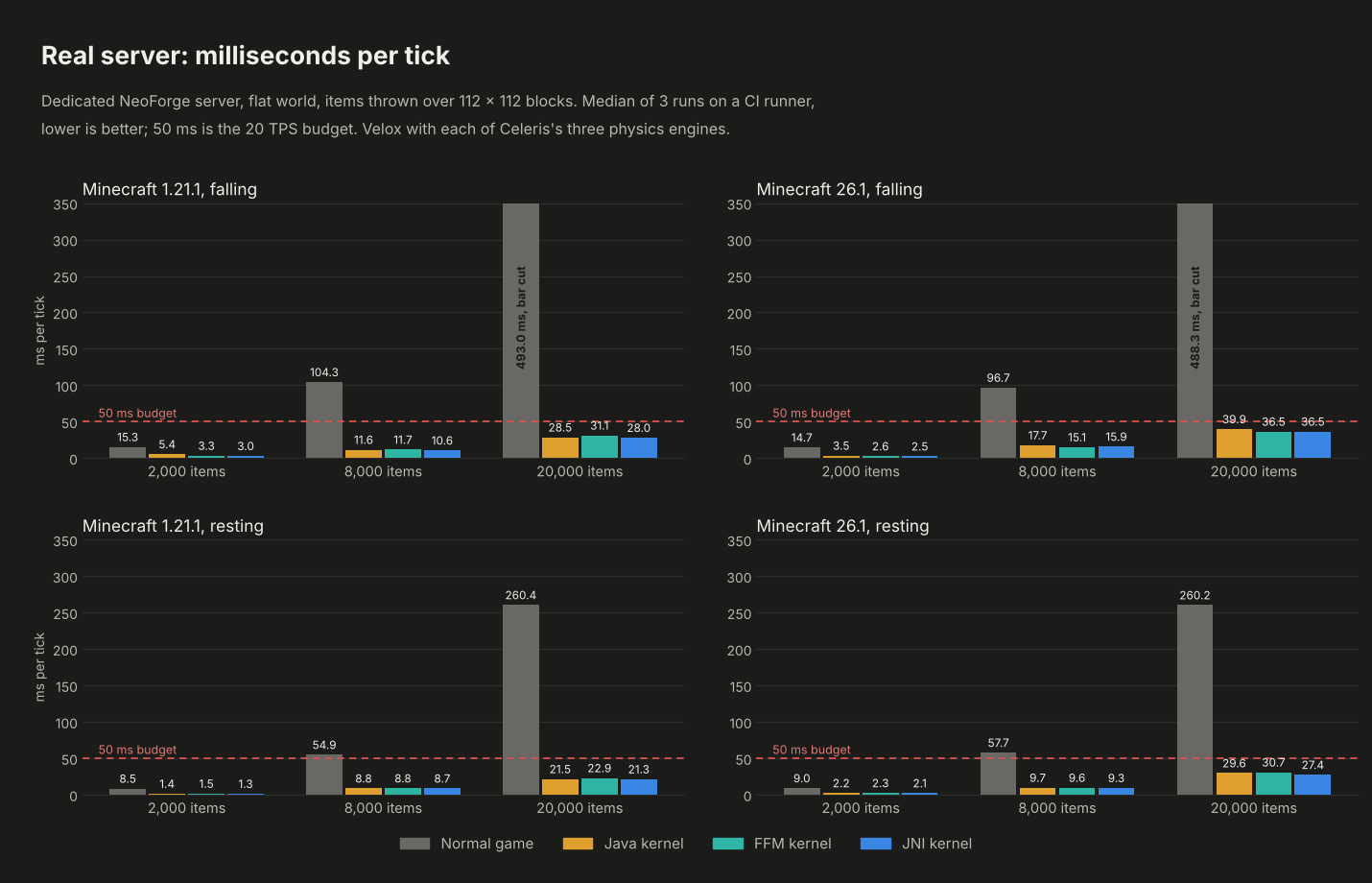
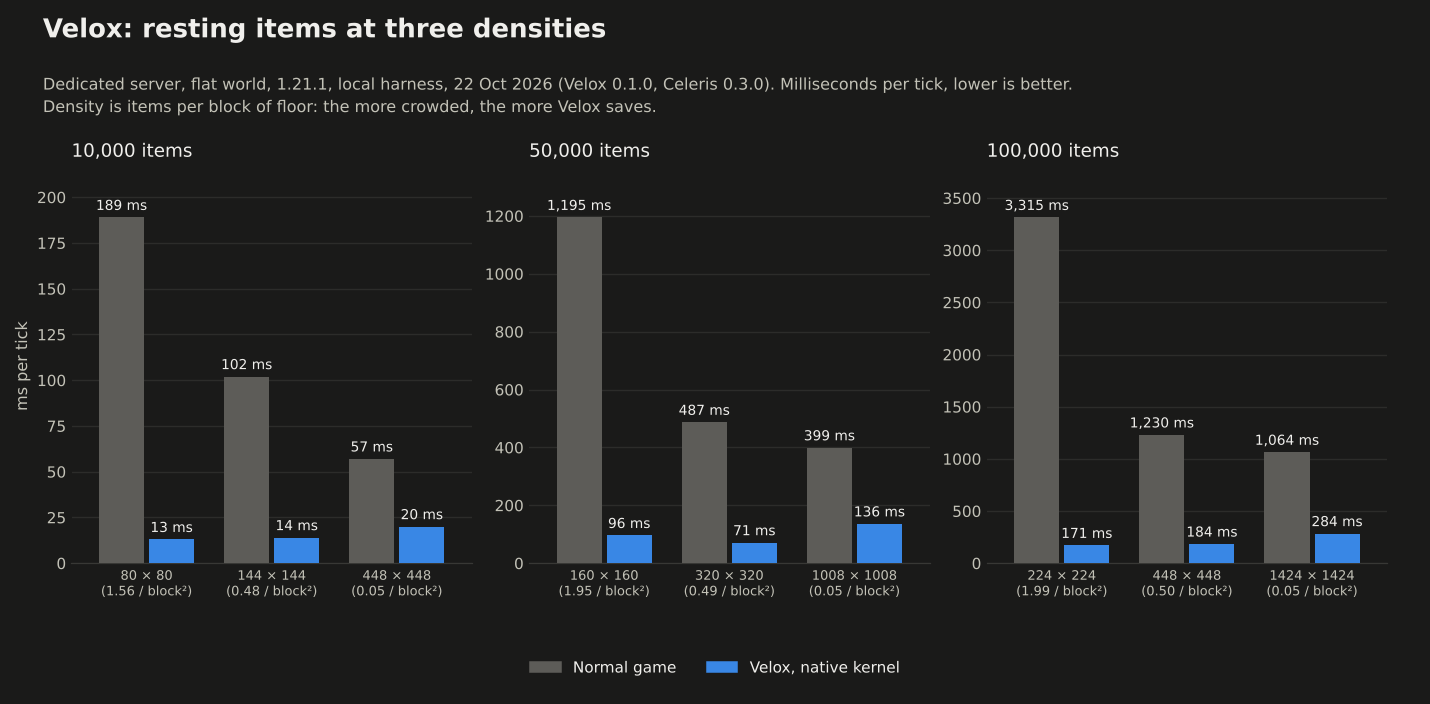
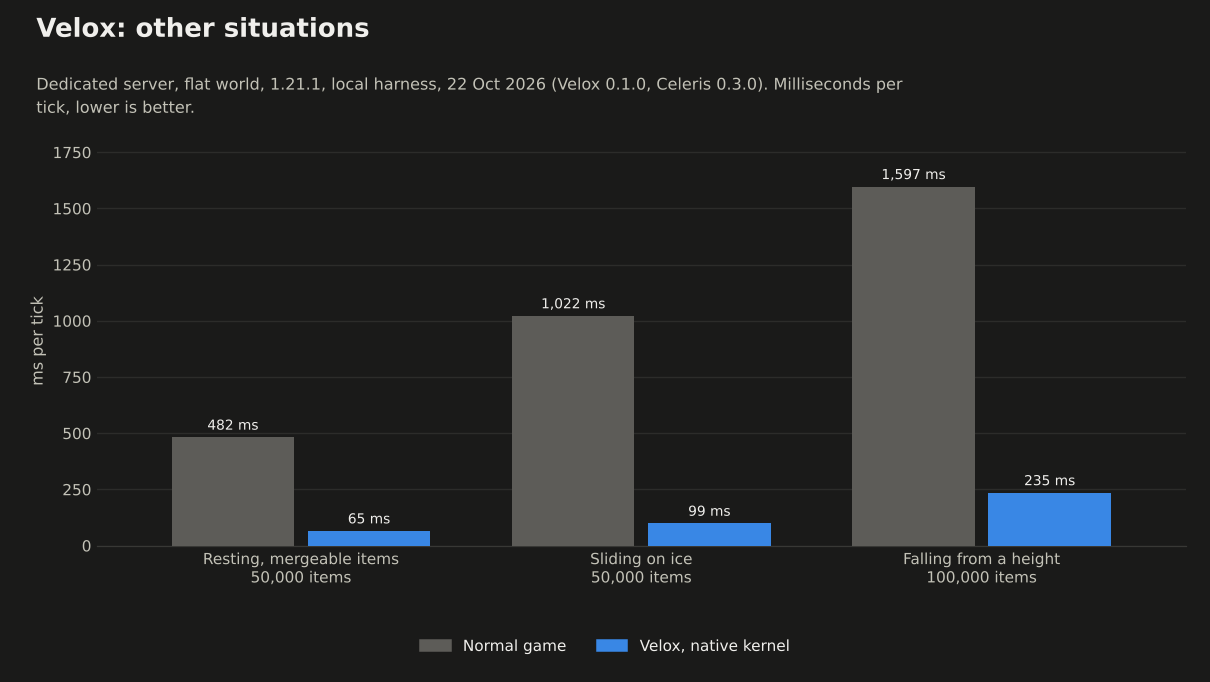
The benchmarks page has every number, the test machine and how each run was made. Results vary by about 20 % between runs on a shared machine.
📦 Requirements
- 🟩 Minecraft: 1.21 to 1.21.11 and 26.1 to 26.3.
- 🔶 Loader: NeoForge, on the server.
- 🧩 Mod: Celeris 0.3.1.1 or newer, on the server.
- ☕ Java: 21 for 1.21.x, 25 for 26.x.
📚 Learn more
The Velox wiki has the settings, how it works, the benchmarks and the build notes.


License
Source code: you may study, modify and redistribute it under the AGPL; if you run a modified version as a network service, its source must be available to that service's users.
Artwork: credit Bichal, no commercial use without permission, and share derivatives under the same license.
See LICENSE for the full summary.
Code: AGPL-3.0 · Art: CC BY-NC-SA 4.0 · Made by Bichal
Project description from CurseForge.
Pick your setup
Velox by Minecraft version and loader
Choose the version and loader you play, then open the matching release.
Minecraft version
26.3
1
loader build Minecraft version
26.2
1
loader build Minecraft version
26.1.2
1
loader build Minecraft version
26.1.1
1
loader build Minecraft version
26.1
1
loader build Minecraft version
1.21.11
1
loader build Minecraft version
1.21.10
1
loader build Minecraft version
1.21.9
1
loader build Minecraft version
1.21.8
1
loader build Minecraft version
1.21.7
1
loader build Minecraft version
1.21.6
1
loader build Minecraft version
1.21.5
1
loader build Showing the newest 12 of 17 game versions.
Older files are in the list below.
Check the dependencies, then try the file in a copied instance before changing a world you care about.
Recent files
Velox versions and loaders
velox-0.1.1-26.1.jar
3 Nov 2026
Client Source doesn’t say Server Source doesn’t say Dependencies 1 required · matched Listed on Release listing
Check the 26.3 · NeoForge setup → NeoForge26.126.1.126.1.2 release
velox-0.1.1-1.21.11.jar
3 Nov 2026
Client Source doesn’t say Server Source doesn’t say Dependencies 1 required · 1 unchecked Listed on Release listing
Check the 1.21.11 · NeoForge setup → velox-0.1.1-1.21.10.jar
3 Nov 2026
Client Source doesn’t say Server Source doesn’t say Dependencies 1 required · 1 unchecked Listed on Release listing
Check the 1.21.10 · NeoForge setup → 1.21.81.21.7NeoForge1.21.9 release
velox-0.1.1-1.21.1.jar
3 Nov 2026
Client Source doesn’t say Server Source doesn’t say Dependencies 1 required · 1 unchecked Listed on Release listing
Check the 1.21.6 · NeoForge setup → 1.211.21.51.21.41.21.1 release
velox-0.1.0-26.1.jar
28 Oct 2026
Client Source doesn’t say Server Source doesn’t say Dependencies 1 required · 1 unchecked Listed on Release listing
Check the 26.3 · NeoForge setup → NeoForge26.126.1.126.1.2 beta
velox-0.1.0-1.21.11.jar
28 Oct 2026
Client Source doesn’t say Server Source doesn’t say Dependencies 1 required · 1 unchecked Listed on Release listing
Check the 1.21.11 · NeoForge setup → velox-0.1.0-1.21.10.jar
28 Oct 2026
Client Source doesn’t say Server Source doesn’t say Dependencies 1 required · 1 unchecked Listed on Release listing
Check the 1.21.10 · NeoForge setup → 1.21.81.21.7NeoForge1.21.9 beta
velox-0.1.0-1.21.1.jar
28 Oct 2026
Client Source doesn’t say Server Source doesn’t say Dependencies 1 required · 1 unchecked Listed on Release listing
Check the 1.21.6 · NeoForge setup → 1.211.21.51.21.41.21.1 beta

 mod
 mod
 mod