Minecraft version
Back to mods 
CurseForge · Minecraft mod
Chaos Ranks
Custom pixel-art rank badges for chat, tab list and nametags, with an in-game editor and live preview.
Choose a version Pick your version below, then grab the matching file.
Quick answer
Which Chaos Ranks release should I use?
Latest stable file Chaos Ranks 1.0.2 - NeoForge 26.3
Game version 26.3
Loader NeoForge
Chaos Ranks 1.0.2 - NeoForge 26.3 targets 26.3 with NeoForge. The project page does not say whether this file belongs on the client, dedicated server, or both. No extra mods listed for this file.
Where it goes
Is Chaos Ranks required on the client, server, or both?
The project page does not say whether this file belongs on the client, dedicated server, or both.
Client Source doesn’t say
Dedicated server Source doesn’t say
Loader for this release NeoForge
Required install it here Optional supported, not mandatory Not supported do not install here Source doesn’t say do not assume
The source does not explicitly classify this release as client-only or server-only.
What else does Chaos Ranks 1.0.2 - NeoForge 26.3 need?
Chaos Ranks 1.0.2 - NeoForge 26.3. Change the file and its required mods may change too.
This file does not list any required mods. Do not add a library just because a different file uses it.
This file does not list any required or optional mods.
Before you install it
Add Chaos Ranks without breaking your instance.
Built for Chaos Ranks 1.0.2 - NeoForge 26.3. Pick another file and the loader, install side or required mods may change.
- 01
Stick to this file
Use Chaos Ranks 1.0.2 - NeoForge 26.3. It targets 26.3 with NeoForge; another release may have different loader, side or dependency requirements.
- 02
Bring the mods it needs
This file does not list any required mods. Do not add a library just because a different file uses it.
- 03
Put it on the correct side
The project page does not say whether this file belongs on the client, dedicated server, or both.
- 04
Pick the file you checked
Use the “Get this file” button beside Chaos Ranks 1.0.2 - NeoForge 26.3. It opens that exact file at the source.
About this project
What does Chaos Ranks add?

Show who's who, in pixel-art style.
Chaos Ranks adds custom pixel-art rank badges next to player names: in chat, in the tab list and above their heads. Design every badge in-game from a custom menu with a live preview: no config files, no resource packs to send around, no restarts.
OWNER, ADMIN, VIP+, YOUTUBE, BUILDER… whatever ranks your server needs, with your own colors, frames and icons. Built for Fabric 1.21.1.
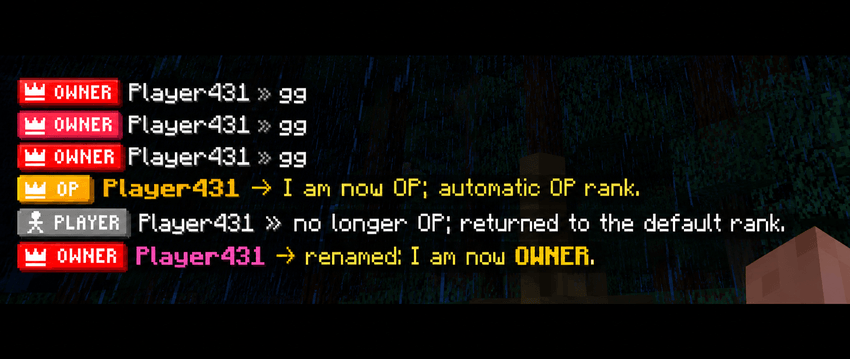
✨ Features
🏷️ Badges everywhere a name shows up
- Chat:
\[BADGE\] Name » message. The vanilla<>brackets are gone. - Tab list: a compact version of the badge that fits the row perfectly, sorted by rank priority.
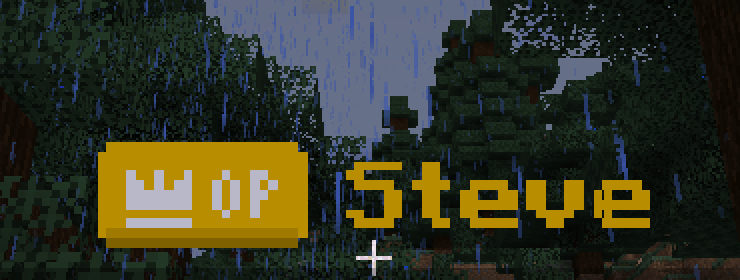
- Nametags: the same badge floats above the player's head.
- Badges are crisp pixel art at any GUI scale, with a subtle 3D shading and drop shadow.

🎨 A real in-game editor
Type
/rankand a custom menu opens (not a chest!). On the left is the list of ranks, at the top a big live preview of the badge and how it looks in chat, and below it four tabs:
Badge: text, bold, priority, and whether it's the default rank or the OP rank.
Icon: pick from 144 hand-made pixel icons.
Colors: background, text, icon and frame (or no frame). Pick from the palette or type any hex color.
Chat: the player's name color (any RGB color, not just the 16 vanilla ones), bold name, message color, and a custom separator (
»,->,|…) with its own color.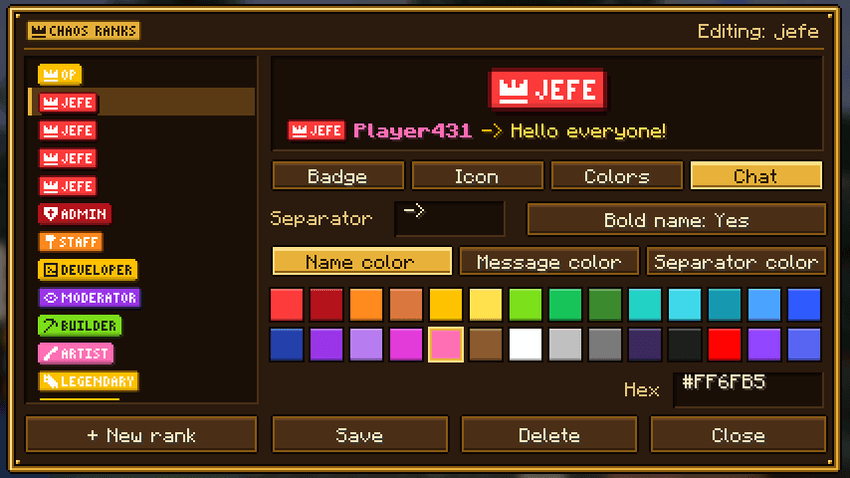
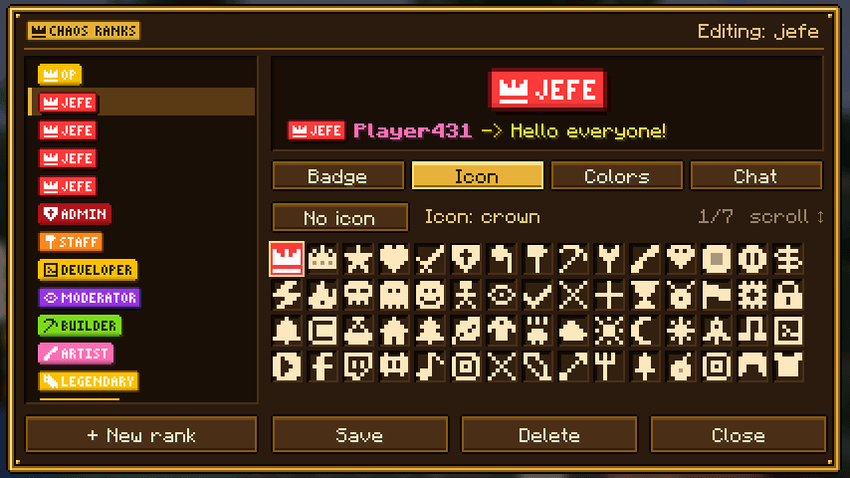
🖼️ 144 pixel icons
Crowns, swords, shields, hammers, gems, diamonds, emeralds, creepers, TNT, dragons, hearts, stars, skulls, wizards, ninjas, robots… plus social icons for YouTube, Twitch, Discord, TikTok, Instagram, Twitter/X, Kick, Spotify, GitHub and Reddit. They're all drawn for the badge size, so they stay sharp.
💬 Chat format per rank
Every rank has its own chat style. Make your owners shine with a bold gold name and yellow text, and keep regular players clean and simple. Colors you choose for the name also apply to the tab list and the nametag.
⚙️ Works out of the box
- Comes with two ranks ready to go: PLAYER, the default for everyone (including new players on their first join), and OP.
- Automatic OP rank:
/op playergives them the OP badge instantly, and/deopputs them back to their previous rank. - Any rank can be marked as default or for OPs from the editor.
- Rename a rank and everybody who had it follows the change automatically.
- Ranks are saved per world in simple JSON files (
<world>/chaosranks/). - English and Spanish translations.
📜 Commands
All commands require operator permissions (level 2).
| Command | What it does |
|---|---|
/rank |
Opens the rank editor |
/rank give <players> <rank> |
Gives a rank (overrides the default and OP rank) |
/rank remove <players> |
Removes the manual rank, so the player falls back to the OP or default rank |
/rank delete <rank> |
Deletes a rank |
Which rank a player shows: rank given with /rank give → OP rank (if they're an operator) → default rank.
Project description from CurseForge.
Pick your setup
Chaos Ranks by Minecraft version and loader
Choose the version and loader you play, then open the matching release.
Minecraft version
26.2
3 loader buildsMinecraft version
26.1
3 loader buildsMinecraft version
1.21.4
3 loader buildsMinecraft version
1.21.1
3 loader buildsMinecraft version
1.20.1
3 loader buildsCheck the dependencies, then try the file in a copied instance before changing a world you care about.
Recent files
Chaos Ranks versions and loaders
Chaos Ranks 1.0.2 - NeoForge 26.3
chaosranks-neoforge-26.3-1.0.2.jar
15 Oct 2026
Client Source doesn’t say Server Source doesn’t say Dependencies No extras listed Listed on Release listing
Check the 26.3 · NeoForge setup NeoForge26.3 release
Chaos Ranks 1.0.2 - Forge 26.3
chaosranks-forge-26.3-1.0.2.jar
15 Oct 2026
Client Source doesn’t say Server Source doesn’t say Dependencies No extras listed Listed on Release listing
Check the 26.3 · Forge setup Forge26.3 release
Chaos Ranks 1.0.2 - Fabric 26.3
chaosranks-fabric-26.3-1.0.2.jar
15 Oct 2026
Client Source doesn’t say Server Source doesn’t say Dependencies 1 required · 1 unchecked Listed on Release listing
Check the 26.3 · Fabric setup Fabric26.3 release
Chaos Ranks 1.0.2 - NeoForge 26.2
chaosranks-neoforge-26.2-1.0.2.jar
13 Oct 2026
Client Source doesn’t say Server Source doesn’t say Dependencies No extras listed Listed on Release listing
Check the 26.2 · NeoForge setup NeoForge26.2 release
Chaos Ranks 1.0.2 - Forge 26.2
chaosranks-forge-26.2-1.0.2.jar
13 Oct 2026
Client Source doesn’t say Server Source doesn’t say Dependencies No extras listed Listed on Release listing
Check the 26.2 · Forge setup Forge26.2 release
Chaos Ranks 1.0.2 - Fabric 26.2
chaosranks-fabric-26.2-1.0.2.jar
13 Oct 2026
Client Source doesn’t say Server Source doesn’t say Dependencies 1 required · 1 unchecked Listed on Release listing
Check the 26.2 · Fabric setup Fabric26.2 release
Chaos Ranks 1.0.2 - NeoForge 26.1
chaosranks-neoforge-26.1-1.0.2.jar
13 Oct 2026
Client Source doesn’t say Server Source doesn’t say Dependencies No extras listed Listed on Release listing
Check the 26.1 · NeoForge setup NeoForge26.1 release
Chaos Ranks 1.0.2 - Forge 26.1
chaosranks-forge-26.1-1.0.2.jar
13 Oct 2026
Client Source doesn’t say Server Source doesn’t say Dependencies No extras listed Listed on Release listing
Check the 26.1 · Forge setup Forge26.1 release
Chaos Ranks 1.0.2 - Fabric 26.1
chaosranks-fabric-26.1-1.0.2.jar
13 Oct 2026
Client Source doesn’t say Server Source doesn’t say Dependencies 1 required · 1 unchecked Listed on Release listing
Check the 26.1 · Fabric setup Fabric26.1 release
Chaos Ranks 1.0.1 - NeoForge 1.21.4
chaosranks-neoforge-1.21.4-1.0.1.jar
13 Oct 2026
Client Source doesn’t say Server Source doesn’t say Dependencies No extras listed Listed on Release listing
Check the 1.21.4 · NeoForge setup 1.21.4NeoForge release
Chaos Ranks 1.0.1 - Forge 1.21.4
chaosranks-forge-1.21.4-1.0.1.jar
13 Oct 2026
Client Source doesn’t say Server Source doesn’t say Dependencies No extras listed Listed on Release listing
Check the 1.21.4 · Forge setup 1.21.4Forge release
Chaos Ranks 1.0.1 - Fabric 1.21.4
chaosranks-fabric-1.21.4-1.0.1.jar
13 Oct 2026
Client Source doesn’t say Server Source doesn’t say Dependencies 1 required · 1 unchecked Listed on Release listing
Check the 1.21.4 · Fabric setup Fabric1.21.4 release
Looking for an older file? The official CurseForge project page is in Resources.