Minecraft version
Back to mods 
CurseForge · Minecraft mod
Chaos Tablist
Fully customize your tab list with animated headers, gradients, pixel-art icons, Chaos Ranks badges, and live server stats, all edited in-game with a live preview.
Choose a version Pick your version below, then grab the matching file.
Quick answer
Which Chaos Tablist release should I use?
Latest stable file Chaos Tablist 1.2.0 - 26.1 (NeoForge)
Game version 26.1
Loader NeoForge
Chaos Tablist 1.2.0 - 26.1 (NeoForge) targets 26.1 with NeoForge. The project page does not say whether this file belongs on the client, dedicated server, or both. No extra mods listed for this file.
Where it goes
Is Chaos Tablist required on the client, server, or both?
The project page does not say whether this file belongs on the client, dedicated server, or both.
Client Source doesn’t say
Dedicated server Source doesn’t say
Loader for this release NeoForge
Required install it here Optional supported, not mandatory Not supported do not install here Source doesn’t say do not assume
The source does not explicitly classify this release as client-only or server-only.
What else does Chaos Tablist 1.2.0 - 26.1 (NeoForge) need?
Chaos Tablist 1.2.0 - 26.1 (NeoForge). Change the file and its required mods may change too.
This file does not list any required mods. Do not add a library just because a different file uses it.
This file does not list any required or optional mods.
Before you install it
Add Chaos Tablist without breaking your instance.
Built for Chaos Tablist 1.2.0 - 26.1 (NeoForge). Pick another file and the loader, install side or required mods may change.
- 01
Stick to this file
Use Chaos Tablist 1.2.0 - 26.1 (NeoForge). It targets 26.1 with NeoForge; another release may have different loader, side or dependency requirements.
- 02
Bring the mods it needs
This file does not list any required mods. Do not add a library just because a different file uses it.
- 03
Put it on the correct side
The project page does not say whether this file belongs on the client, dedicated server, or both.
- 04
Pick the file you checked
Use the “Get this file” button beside Chaos Tablist 1.2.0 - 26.1 (NeoForge). It opens that exact file at the source.
About this project
What does Chaos Tablist add?
✦ Chaos Tablist ✦
Customize your tab list with animations, gradients, pixel-art icons and live stats, all edited in-game with a live preview.
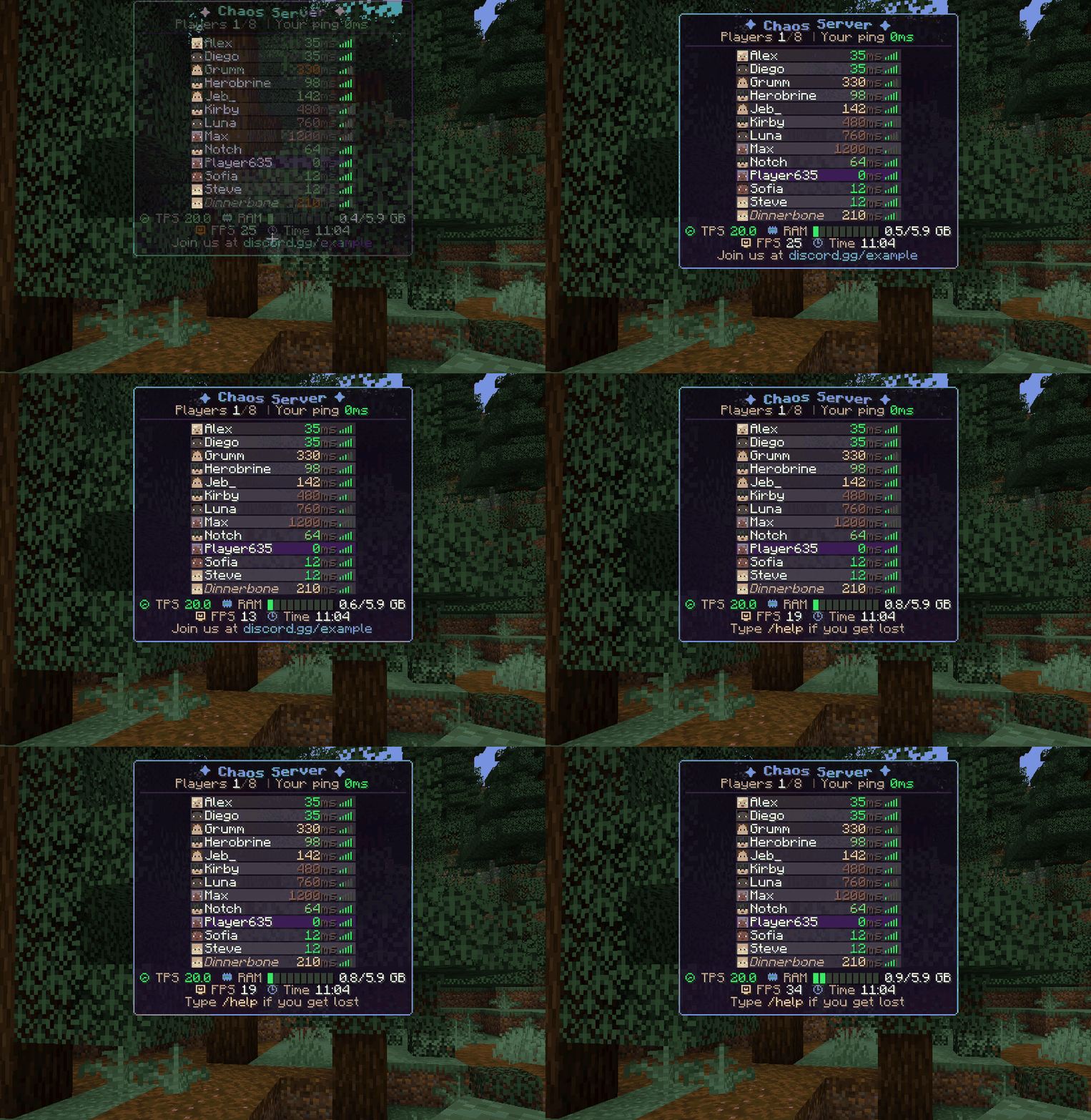
✨ Features
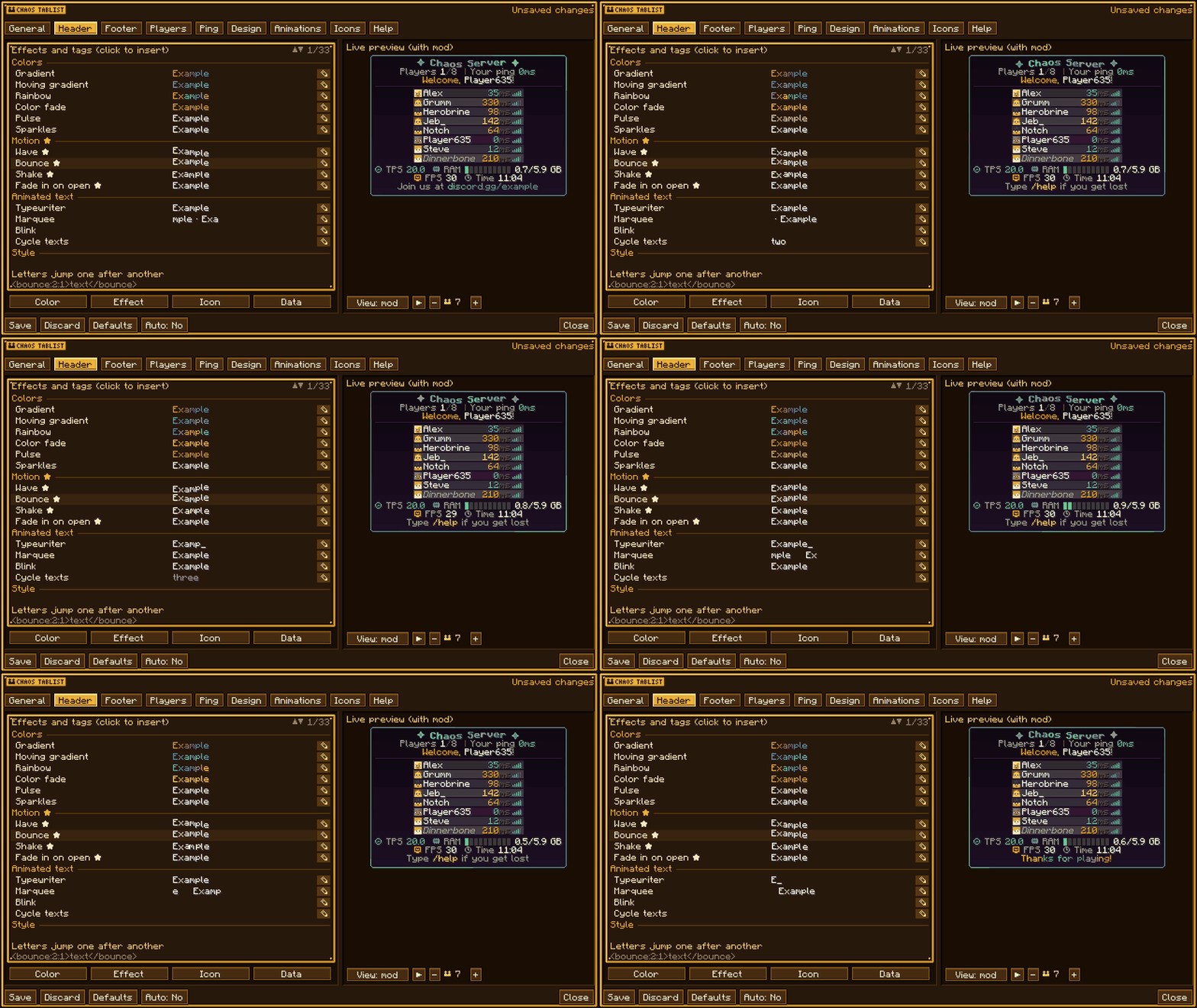
- Animated header and footer with several lines: gradients, rainbow, fade, wave, typewriter, marquee and more.
- 162 pixel-art icons and badges, plus your own PNG images.
- Live data: TPS, RAM, CPU, ping, players online, world, coordinates, FPS, local time and 80+ placeholders.
- Chaos Ranks support: each player shows their rank badge next to their name.
- Works with vanilla clients. Players who also have the mod get smooth 60 FPS animations, text backgrounds, glow, player heads and a styled panel.
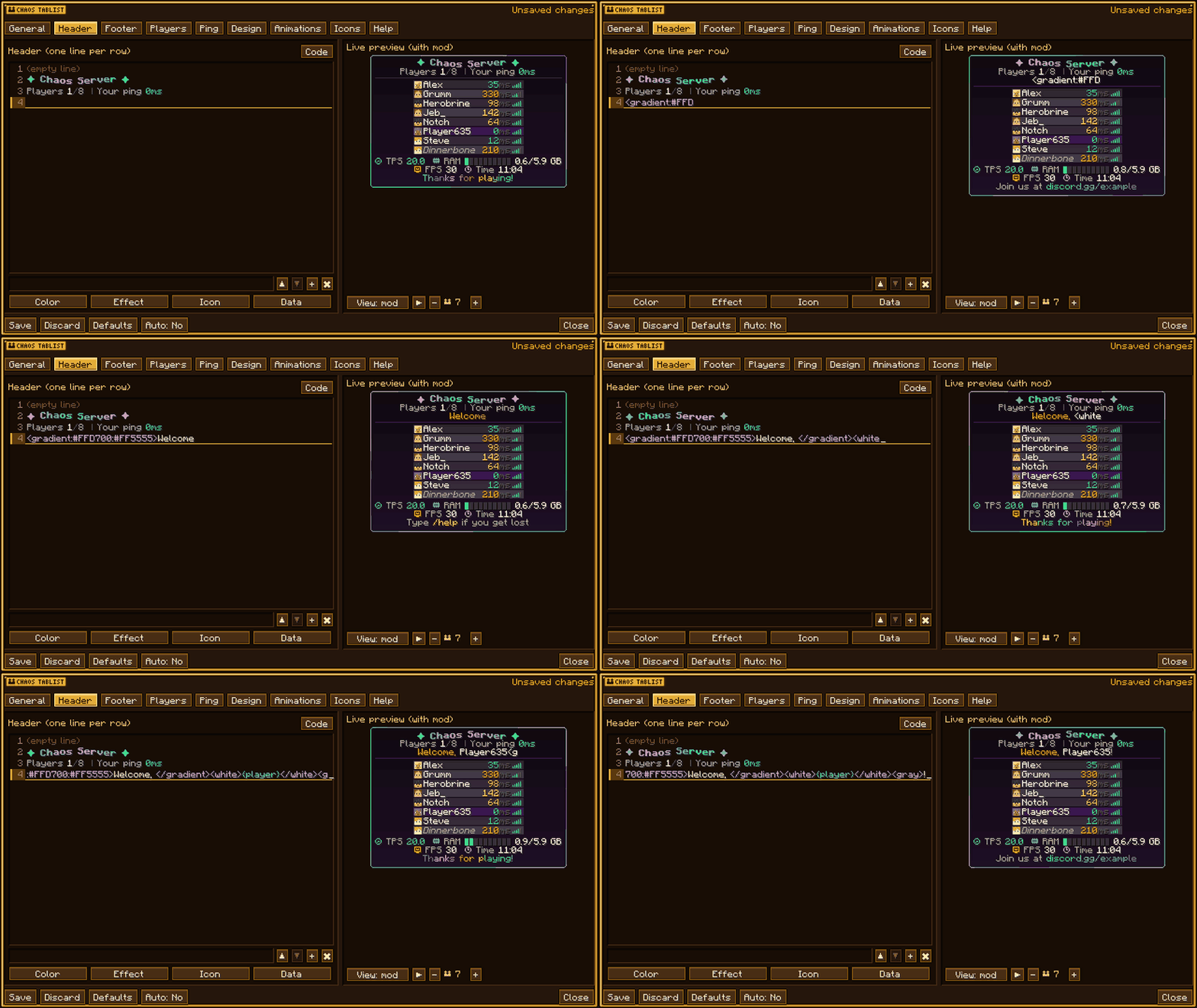
🎨 In-game editor
Type /tablist to open the editor with a live preview. Changes apply to the whole server as soon as you save.
- Click ✎ on any effect to set its colors, speed, and text or icon.
- Try a color in the preview before you accept it.
- Double-click a line to edit it in place. Ctrl+Z undoes and Ctrl+Y redoes.
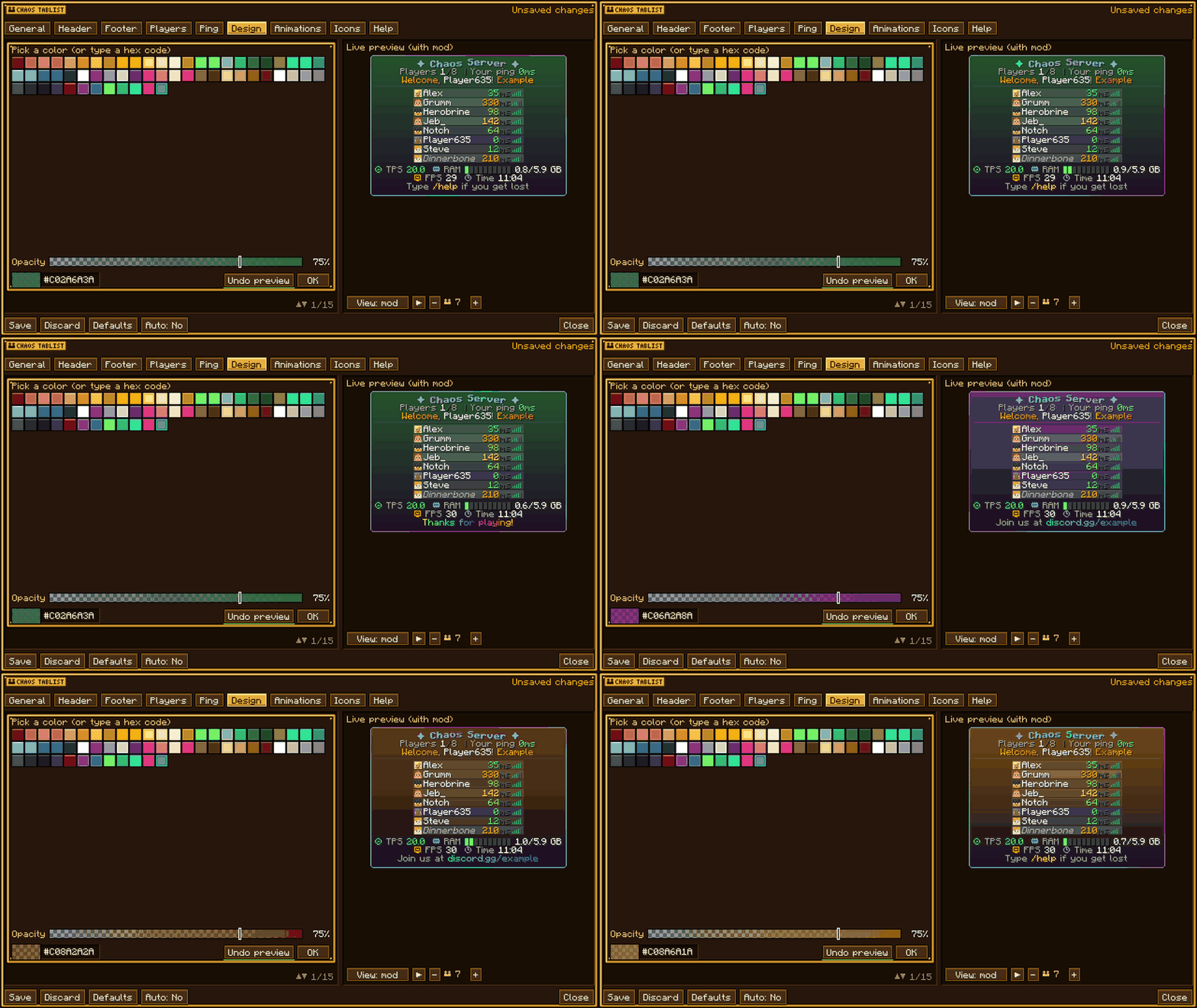
📋 Commands (OP)
/tablist: open the editor/tablist reload: reload the config/tablist toggle: turn the custom tab on or off/tablist player <players> ...: give a player their own format, or hide them
Requires: Fabric API · Minecraft 1.21.1 · Languages: English and Spanish
Project description from CurseForge.
Pick your setup
Chaos Tablist by Minecraft version and loader
Choose the version and loader you play, then open the matching release.
Minecraft version
1.21.4
3 loader buildsMinecraft version
1.21.1
3 loader buildsMinecraft version
1.20.1
3 loader buildsCheck the dependencies, then try the file in a copied instance before changing a world you care about.
Recent files
Chaos Tablist versions and loaders
Chaos Tablist 1.2.0 - 26.1 (NeoForge)
chaostablist-neoforge-26.1-1.2.0.jar
17 Oct 2026
Client Source doesn’t say Server Source doesn’t say Dependencies No extras listed Listed on Release listing
Check the 26.1 · NeoForge setup NeoForge26.1 release
Chaos Tablist 1.2.0 - 26.1 (Forge)
chaostablist-forge-26.1-1.2.0.jar
17 Oct 2026
Client Source doesn’t say Server Source doesn’t say Dependencies No extras listed Listed on Release listing
Check the 26.1 · Forge setup Forge26.1 release
Chaos Tablist 1.2.0 - 26.1 (Fabric)
chaostablist-fabric-26.1-1.2.0.jar
17 Oct 2026
Client Source doesn’t say Server Source doesn’t say Dependencies 1 required · 1 unchecked Listed on Release listing
Check the 26.1 · Fabric setup Fabric26.1 release
Chaos Tablist 1.2.0 (NeoForge)
chaostablist-neoforge-1.21.4-1.2.0.jar
16 Oct 2026
Client Source doesn’t say Server Source doesn’t say Dependencies No extras listed Listed on Release listing
Check the 1.21.4 · NeoForge setup 1.21.4NeoForge release
Chaos Tablist 1.2.0 (Forge)
chaostablist-forge-1.21.4-1.2.0.jar
16 Oct 2026
Client Source doesn’t say Server Source doesn’t say Dependencies No extras listed Listed on Release listing
Check the 1.21.4 · Forge setup 1.21.4Forge release
Chaos Tablist 1.2.0 (Fabric)
chaostablist-fabric-1.21.4-1.2.0.jar
16 Oct 2026
Client Source doesn’t say Server Source doesn’t say Dependencies 1 required · 1 unchecked Listed on Release listing
Check the 1.21.4 · Fabric setup Fabric1.21.4 release
Chaos Tablist 1.2.0 (NeoForge)
chaostablist-neoforge-1.20.1-1.2.0.jar
16 Oct 2026
Client Source doesn’t say Server Source doesn’t say Dependencies No extras listed Listed on Release listing
Check the 1.20.1 · NeoForge setup 1.20.1NeoForge release
Chaos Tablist 1.2.0 (Forge)
chaostablist-forge-1.20.1-1.2.0.jar
16 Oct 2026
Client Source doesn’t say Server Source doesn’t say Dependencies No extras listed Listed on Release listing
Check the 1.20.1 · Forge setup 1.20.1Forge release
Chaos Tablist 1.2.0 (Fabric)
chaostablist-fabric-1.20.1-1.2.0.jar
16 Oct 2026
Client Source doesn’t say Server Source doesn’t say Dependencies 1 required · 1 unchecked Listed on Release listing
Check the 1.20.1 · Fabric setup Fabric1.20.1 release
Chaos Tablist 1.2.0 (NeoForge)
chaostablist-neoforge-1.21.1-1.2.0.jar
16 Oct 2026
Client Source doesn’t say Server Source doesn’t say Dependencies No extras listed Listed on Release listing
Check the 1.21.1 · NeoForge setup 1.21.1NeoForge release
Chaos Tablist 1.2.0 (Forge)
chaostablist-forge-1.21.1-1.2.0.jar
16 Oct 2026
Client Source doesn’t say Server Source doesn’t say Dependencies No extras listed Listed on Release listing
Check the 1.21.1 · Forge setup Forge1.21.1 release
Chaos Tablist 1.2.0 (Fabric)
chaostablist-fabric-1.21.1-1.2.0.jar
16 Oct 2026
Client Source doesn’t say Server Source doesn’t say Dependencies 1 required · 1 unchecked Listed on Release listing
Check the 1.21.1 · Fabric setup Fabric1.21.1 release
Looking for an older file? The official CurseForge project page is in Resources.