Minecraft version
Back to mods 
CurseForge · Minecraft mod
Headquarters (HQ)
HQ works with catastrophic_impact's mods to bring together an optional GUI settings.
Choose a version Pick your version below, then grab the matching file.
Quick answer
Which Headquarters (HQ) release should I use?
Latest stable file hq-1.0.1.jar
Game version 26.3
Loader Fabric
Headquarters (HQ) hq-1.0.1.jar targets 26.3 with Fabric. The project page does not say whether this file belongs on the client, dedicated server, or both. No extra mods listed for this file.
Where it goes
Is Headquarters (HQ) required on the client, server, or both?
The project page does not say whether this file belongs on the client, dedicated server, or both.
Client Source doesn’t say
Dedicated server Source doesn’t say
Loader for this release Fabric
Required install it here Optional supported, not mandatory Not supported do not install here Source doesn’t say do not assume
The source does not explicitly classify this release as client-only or server-only.
What else does Headquarters (HQ) hq-1.0.1.jar need?
hq-1.0.1.jar. Change the file and its required mods may change too.
This file does not list any required mods. Do not add a library just because a different file uses it.
This file does not list any required or optional mods.
Before you install it
Add Headquarters (HQ) without breaking your instance.
Built for Headquarters (HQ) hq-1.0.1.jar. Pick another file and the loader, install side or required mods may change.
- 01
Stick to this file
Use hq-1.0.1.jar. It targets 26.3 with Fabric; another release may have different loader, side or dependency requirements.
- 02
Bring the mods it needs
This file does not list any required mods. Do not add a library just because a different file uses it.
- 03
Put it on the correct side
The project page does not say whether this file belongs on the client, dedicated server, or both.
- 04
Pick the file you checked
Use the “Get this file” button beside hq-1.0.1.jar. It opens that exact file at the source.
About this project
What does Headquarters (HQ) add?
HQ
(Fabric)
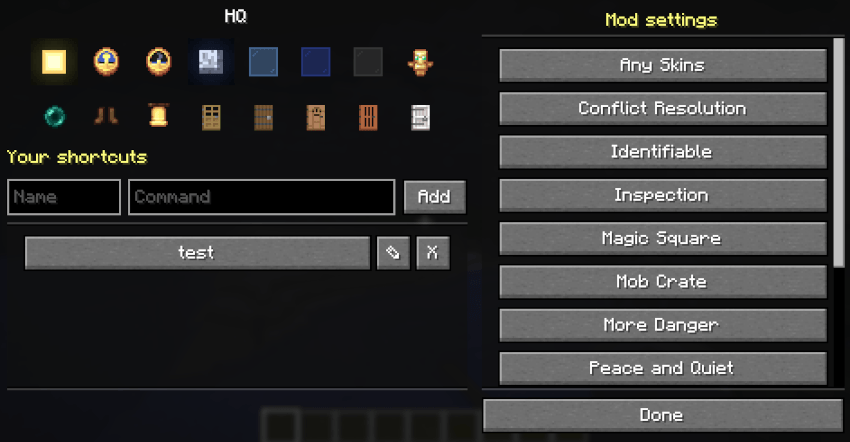
One button for everything: HQ adds an "HQ" button to your inventory that opens a list of shortcuts to your mods' settings screens and to any command you save.
FEATURES
The HQ button
- Centered above the inventory panel, in survival and creative (above the creative tabs). It moves with the inventory when the recipe book opens. With Wave Matrix installed, its ♪ button sits to the right and the pair is centered.
- Kept away from the sides, where item-list mods like JEI, REI and EMI, inventory sort buttons and tabs usually go. Only on a very small screen, with no room above, does it move to the left of the panel.
The HQ screen
- Right side: a scrolling list of the shortcuts mods offer, one button per mod. Hover over a button to see its command and who added it.
- Left side, top: two rows of eight picture buttons. Hover over one for what it does.
- Row 1: Sun = time to day, Clock (noon) = time to noon, Clock (midnight) = time to midnight, Moon = time to night, Light blue glass = clear weather, Blue glass = rain, Gray glass = thunder (it flashes white twice, quickly, every 5 seconds, like lightning), and the game mode toggle: a Diamond Sword when you are in survival, a Totem of Undying in creative. Press it to switch.
- Row 2: Night vision toggle (Eye of Ender = on, Ender Pearl = off), Speed toggle (Diamond Boots = on, Leather Boots = off; Speed II), then find the nearest village and go there: any village (Bell), or a plains (Oak Door), taiga (Spruce Door), desert (Jungle Door), savanna (Acacia Door) or snowy (Pale Oak Door) village.
- Everything keeps HQ open except the village buttons, which close it (you are teleported). The game mode, night vision and speed pictures change to show the new state.
- The picture buttons run
/time,/weather,/gamemode,/effectand/locate+/tp, so they need operator permission (cheats on in singleplayer). Without it the picture buttons are hidden altogether (and appear as soon as you get permission). - The pictures are always Minecraft's own, read from the game itself, so resource packs and texture packs don't change them.
- Left side, below: type a name and a command, then Add, to save your own shortcut. Yours are in a scrolling list under it. Each has a pencil to edit it (its name and command load into the boxes, the Add button becomes Save, and Cancel backs out; a rename keeps its place) and an X to delete it.
- Pressing a shortcut runs its command as if you typed it.
Villages
- The village buttons ask the game where the nearest village is, wait for the place to load, then put you on the ground there. If none is found nearby, HQ says so and you stay put. (Villages don't exist in the Nether or End, and there are no jungle villages in Minecraft.)
Shortcuts from mods
- Mods that support HQ add their own shortcut automatically. Nothing to set up.
- If you remove a mod, its shortcut is gone the next time you start the game. Nothing is left behind in your config.
- Mod shortcuts can't be deleted (they belong to the mod).
Your own shortcuts
- Save any command, for example:
/hq add findvillage /locate structure minecraft:village_plains - Then run it with
/hq findvillageor from the HQ screen. - Commands run with your own permissions: HQ never lets you use a command you couldn't type yourself.
COMMANDS
| Command | Description |
|---|---|
/hq |
Open the HQ list. |
/hq add <name> <command> |
Save a command as a shortcut. The leading / is optional. |
/hq <name> |
Run a shortcut. |
/hq remove <name> |
Delete one of your shortcuts. |
/hq list |
List every shortcut in chat. |
Names can use letters, numbers, _ and - (up to 32). "add", "remove" and "list" are reserved.
SETTINGS
Your shortcuts are saved in config/hq.json. Everything is managed from the HQ list or the /hq commands.
HQ COMPATIBILITY (for mod authors)
Add your mod's shortcut with no code and no dependency on HQ. Put this in your mod's fabric.mod.json:
  "custom": {
    "hq": { "name": "My Mod", "command": "mymod" }
  }
"command": what to run, without the slash."name": the button label (default: your mod's name)."id": optional, the name for/hq <id>(default: your mod id).- For several shortcuts, use a list of these objects.
HQ reads these from the installed mods every time the game starts.
Mods with HQ shortcuts: More Danger, Populations, Tameful, Conflict Resolution, Any Skins, Identifiable, Peace and Quiet, Mob Crate, Magic Square, Wave Matrix, Wide Awake.
COMPATIBILITY & NOTES
- Client only: it doesn't need to be on the server.
- Works with mods that open their screens through a client command (like
/md) as well as with server commands.
Project description from CurseForge.
Pick your setup
Headquarters (HQ) by Minecraft version and loader
Choose the version and loader you play, then open the matching release.
Check the dependencies, then try the file in a copied instance before changing a world you care about.
Recent files
Headquarters (HQ) versions and loaders
hq-1.0.1.jar
11 Oct 2026
Client Source doesn’t say Server Source doesn’t say Dependencies No extras listed Listed on Release listing
Check the 26.3 · Fabric setup Fabric26.3 release
hq-1.0.0.jar
6 Oct 2026
Client Source doesn’t say Server Source doesn’t say Dependencies No extras listed Listed on Release listing
Check the 26.3 · Fabric setup Fabric26.3 release
Looking for an older file? The official CurseForge project page is in Resources.
 mod
mod CurseForge · Minecraft
PianoLib
Add 88 PianoNotes For Disc Jockey Plus. 为 Disc Jockey Plus 添加了 88 个钢琴音符。
 mod
mod CurseForge · Minecraft
Auto Sprint X
AutoSprintX is a lightweight and customizable Fabric mod that automatically makes your player sprint.
 mod
mod CurseForge · Minecraft
Camera Monitoring: CCTV System Fully Customizable + Screens
Professional CCTV for Minecraft: PTZ security cameras, live monitor screens that auto-switch to whoever is on camera, patrol and motion tracking modules, alarms and permissions. Fabric, NeoForge and Forge, 1.20.1 to 26.3.