Minecraft version
Back to mods 
CurseForge · Minecraft mod
Check Engine
Tells you what's wrong with your modpack in plain English: broken, missing and duplicate mods, plus recipes, loot and quests from mods you don't have.
Choose a version Pick your version below, then grab the matching file.
Quick answer
Which Check Engine release should I use?
Latest stable file Check Engine 0.4.0 (Forge 1.20.1)
Game version 1.20.1
Loader Forge
Check Engine 0.4.0 (Forge 1.20.1) targets 1.20.1 with Forge. The project page does not say whether this file belongs on the client, dedicated server, or both. No extra mods listed for this file.
Where it goes
Is Check Engine required on the client, server, or both?
The project page does not say whether this file belongs on the client, dedicated server, or both.
Client Source doesn’t say
Dedicated server Source doesn’t say
Loader for this release Forge
Required install it here Optional supported, not mandatory Not supported do not install here Source doesn’t say do not assume
The source does not explicitly classify this release as client-only or server-only.
What else does Check Engine 0.4.0 (Forge 1.20.1) need?
Check Engine 0.4.0 (Forge 1.20.1). Change the file and its required mods may change too.
This file does not list any required mods. Do not add a library just because a different file uses it.
This file does not list any required or optional mods.
Before you install it
Add Check Engine without breaking your instance.
Built for Check Engine 0.4.0 (Forge 1.20.1). Pick another file and the loader, install side or required mods may change.
- 01
Stick to this file
Use Check Engine 0.4.0 (Forge 1.20.1). It targets 1.20.1 with Forge; another release may have different loader, side or dependency requirements.
- 02
Bring the mods it needs
This file does not list any required mods. Do not add a library just because a different file uses it.
- 03
Put it on the correct side
The project page does not say whether this file belongs on the client, dedicated server, or both.
- 04
Pick the file you checked
Use the “Get this file” button beside Check Engine 0.4.0 (Forge 1.20.1). It opens that exact file at the source.
About this project
What does Check Engine add?
Check Engine
Know what's wrong with your modpack, in plain English. Check Engine checks your pack every time the game starts and tells you about broken, missing and duplicate mods. In a world, one command checks every recipe, loot table and quest for items from mods you don't have.
Made for pack makers, server owners and anyone who's ever stared at "Mod loading has failed" wondering which of 400 mods is the problem.
How to use it
Put the Check Engine jar in your mods folder and launch. That's it. No config, no gameplay changes.
Startup popup
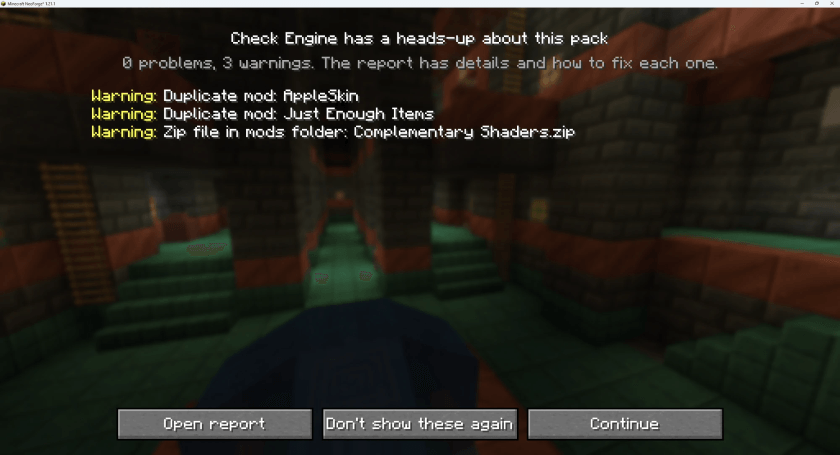
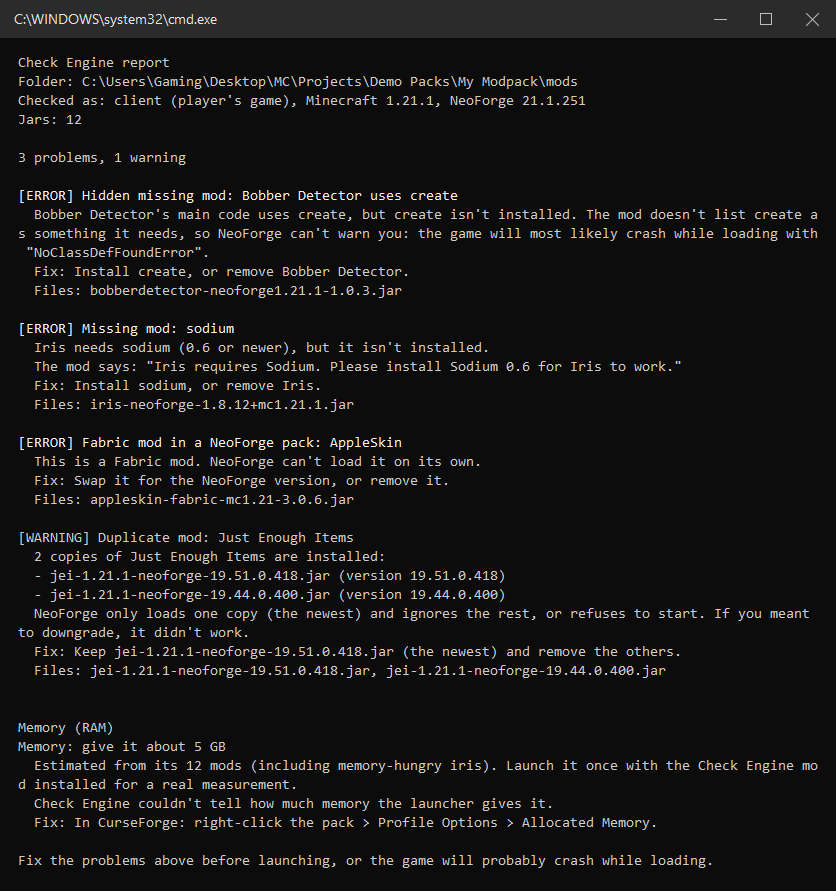
Every time the game starts, Check Engine checks the whole pack. If something's wrong, you get a clear screen before the title screen (saved to checkengine/boot-report.txt). If everything's fine, you'll never see it.
It finds:
- Duplicate mods: two versions of the same mod, and which one actually loads
- Missing dependencies: a mod needs another mod you don't have
- Hidden missing mods: a mod uses another mod's code without listing it, so the loader can't warn you
- Wrong versions: a mod needs a different Minecraft, NeoForge, Forge or library version
- Incompatible mods: mods that say they don't work together
- Wrong loader: Fabric or Forge mods dropped into a NeoForge pack, and the other way round
- Broken downloads: half-finished jars and .zip files in the wrong folder
- Client-only mods on a server
- Memory: how much RAM the pack needs, and whether it's getting enough
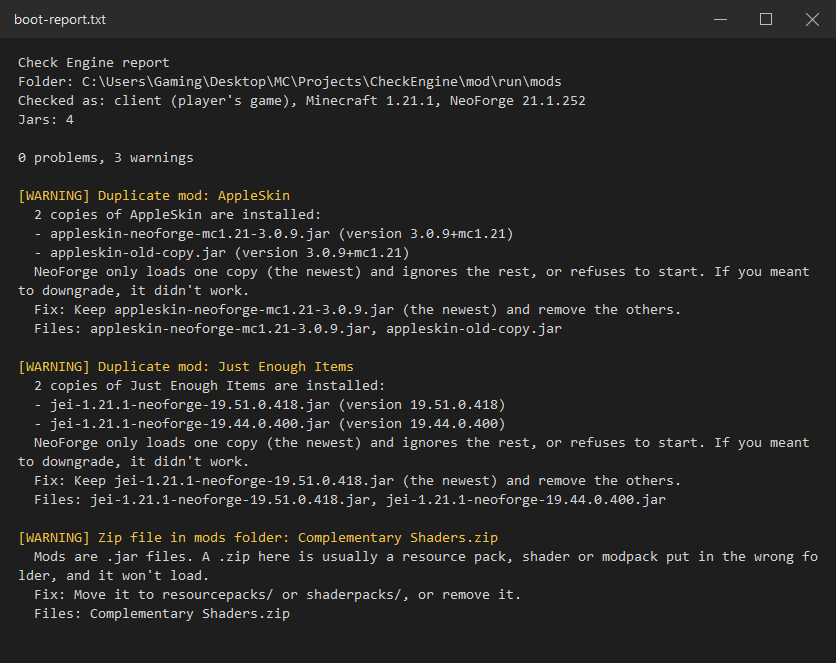
Every finding says what's wrong, which file it is, and how to fix it.
/checkengine scan
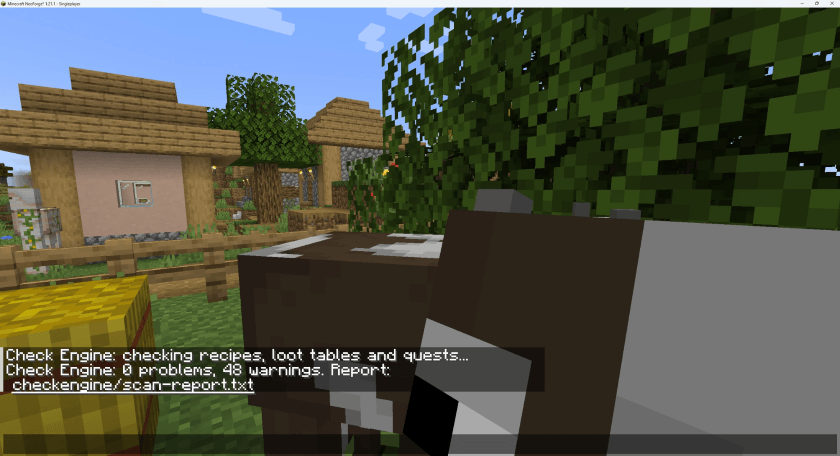
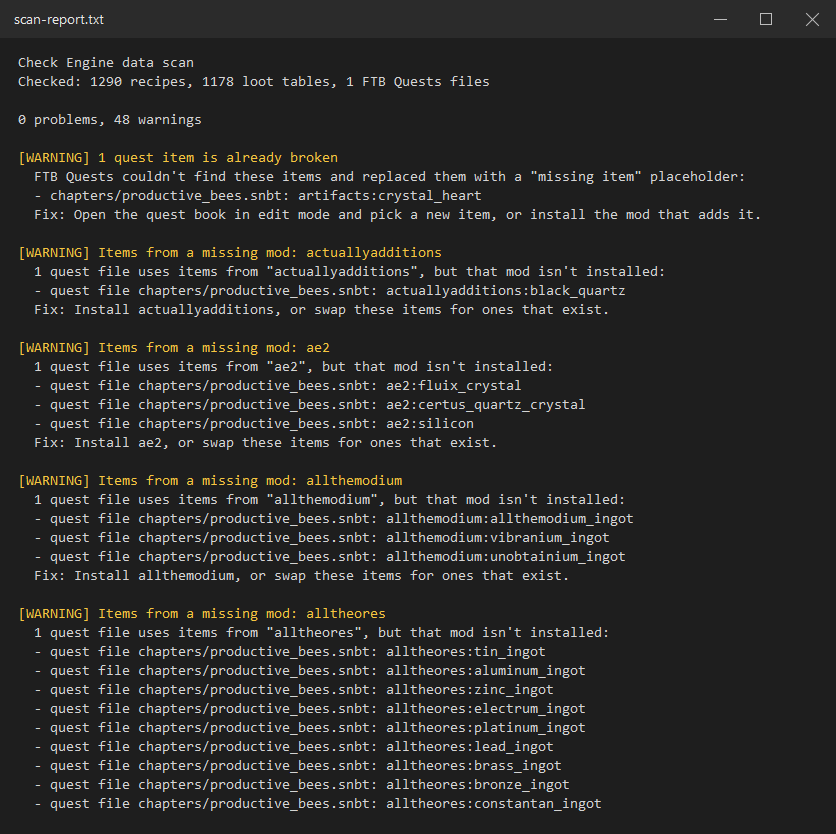
Run it in a world (needs op/cheats) to check every recipe, loot table and FTB Quests file for items from mods that aren't installed: the stuff that silently breaks after you remove a mod. The report goes to checkengine/scan-report.txt.
/checkengine startup
Shows how long the last startup took and which mods were slowest. The full report goes to checkengine/startup-report.txt.
"Why can't I join?"
When a server kicks you for mismatched mods, you get a clear list of what's missing and which versions don't match, instead of a wall of text.
Want to check a pack before launching?
There's also a free standalone checker, Check Pack.bat, on GitHub. Drag a modpack folder onto it and it runs the same check without starting the game, so it even works on packs that won't start at all. It can also explain your last crash report, build a server pack and compare your pack with a server.
Versions
| Minecraft | Loader |
|---|---|
| 26.1.2 | NeoForge |
| 1.21.1 | NeoForge |
| 1.20.1 | Forge |
FAQ
Does it change anything in my pack?
No. It only reads files and writes its reports to a checkengine folder.
Does it need to be on the server too?
No, it works on client, server or both. On a server it checks the pack at startup and adds the scan command.
Can I put it in my modpack?
Yes, please do. It's MIT licensed. Your players get a clear message instead of a confusing crash.
It flagged something that works fine.
Please tell us (see Feedback below). We test against real packs (ATM10, FTB Skies 2, Techopolis 3, Better MC and more), and every false alarm gets fixed.
Feedback welcome!
Check Engine is brand new, and the best way to make it better is real packs. Please tell us:
- It flagged something that works fine (a false alarm)
- It missed a problem that crashed your game
- Ideas for things it should check
Leave a comment below, or open an issue on GitHub, with your report from the checkengine folder (boot-report.txt or scan-report.txt). Long reports: upload them to mclo.gs and paste the link. Every report helps, and false alarms get fixed first.
Check Engine is open source: github.com/Uanme37/CheckEngine
Project description from CurseForge.
Pick your setup
Check Engine by Minecraft version and loader
Choose the version and loader you play, then open the matching release.
Minecraft version
1.21.1
1 loader buildMinecraft version
1.20.1
1 loader buildCheck the dependencies, then try the file in a copied instance before changing a world you care about.
Recent files
Check Engine versions and loaders
Check Engine 0.4.0 (Forge 1.20.1)
checkengine-forge-1.20.1-0.4.0.jar
8 Oct 2026
Client Source doesn’t say Server Source doesn’t say Dependencies No extras listed Listed on Release listing
Check the 1.20.1 · Forge setup 1.20.1Forge release
Check Engine 0.4.0 (NeoForge 1.21.1)
checkengine-neoforge-1.21.1-0.4.0.jar
8 Oct 2026
Client Source doesn’t say Server Source doesn’t say Dependencies No extras listed Listed on Release listing
Check the 1.21.1 · NeoForge setup 1.21.1NeoForge release
Check Engine 0.4.0 (NeoForge 26.1)
checkengine-neoforge-26.1-0.4.0.jar
8 Oct 2026
Client Source doesn’t say Server Source doesn’t say Dependencies No extras listed Listed on Release listing
Check the 26.1.2 · NeoForge setup NeoForge26.1.2 release
Check Engine 0.3.0 (NeoForge 1.21.1)
checkengine-neoforge-1.21.1-0.3.0.jar
8 Oct 2026
Client Source doesn’t say Server Source doesn’t say Dependencies No extras listed Listed on Release listing
Check the 1.21.1 · NeoForge setup 1.21.1NeoForge release
Check Engine 0.2.0 (NeoForge 26.1)
checkengine-neoforge-26.1-0.2.0.jar
8 Oct 2026
Client Source doesn’t say Server Source doesn’t say Dependencies No extras listed Listed on Release listing
Check the 26.1.2 · NeoForge setup NeoForge26.1.2 release
Check Engine 0.2.0 (NeoForge 1.21.1)
checkengine-neoforge-1.21.1-0.2.0.jar
8 Oct 2026
Client Source doesn’t say Server Source doesn’t say Dependencies No extras listed Listed on Release listing
Check the 1.21.1 · NeoForge setup 1.21.1NeoForge release
Check Engine 0.2.0 (Forge 1.20.1)
checkengine-forge-1.20.1-0.2.0.jar
8 Oct 2026
Client Source doesn’t say Server Source doesn’t say Dependencies No extras listed Listed on Release listing
Check the 1.20.1 · Forge setup 1.20.1Forge release
Check Engine 0.1.4 (Forge 1.20.1)
checkengine-forge-1.20.1-0.1.4.jar
6 Oct 2026
Client Source doesn’t say Server Source doesn’t say Dependencies No extras listed Listed on Release listing
Check the 1.20.1 · Forge setup 1.20.1Forge release
Check Engine 0.1.4 (NeoForge 1.21.1)
checkengine-neoforge-1.21.1-0.1.4.jar
6 Oct 2026
Client Source doesn’t say Server Source doesn’t say Dependencies No extras listed Listed on Release listing
Check the 1.21.1 · NeoForge setup 1.21.1NeoForge release
Looking for an older file? The official CurseForge project page is in Resources.
 mod
mod CurseForge · Minecraft
SwordRealm
A xianxia-themed sword-riding flight mod. Slay monsters to open the Sword Realm, attune your sword with a Sword Heart, ride your blade through the sky, and summon an orbiting blade to guard you.
 mod
mod CurseForge · Minecraft
FoodHealing Overhaul
When you eat food, you restore an amount of health based on your fullness level.
 mod
mod CurseForge · Minecraft
NEST Core
Pack-specific resource integration, targeted compatibility fixes, and tutorial operation tracking for NEST.