Minecraft version
Back to mods 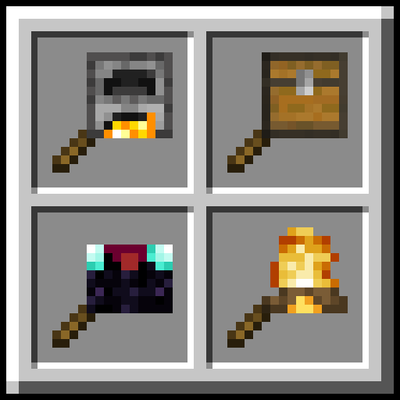
CurseForge · Minecraft mod
Pocket Workshop
Portable versions of the vanilla utility blocks on a stick: crafting table, furnaces, chests, anvil, enchanting table, jukebox and more. Open them anywhere, no placing needed.
Choose a version Pick your version below, then grab the matching file.
Quick answer
Which Pocket Workshop release should I use?
Latest stable file PocketWorkshop-forge-1.20.1-1.0.3.jar
Game version 1.20.1
Loader Forge, NeoForge
Pocket Workshop PocketWorkshop-forge-1.20.1-1.0.3.jar targets 1.20.1 with Forge, NeoForge. The project page does not say whether this file belongs on the client, dedicated server, or both. No extra mods listed for this file.
Where it goes
Is Pocket Workshop required on the client, server, or both?
The project page does not say whether this file belongs on the client, dedicated server, or both.
Client Source doesn’t say
Dedicated server Source doesn’t say
Loader for this release Forge, NeoForge
Required install it here Optional supported, not mandatory Not supported do not install here Source doesn’t say do not assume
The source does not explicitly classify this release as client-only or server-only.
What else does Pocket Workshop PocketWorkshop-forge-1.20.1-1.0.3.jar need?
PocketWorkshop-forge-1.20.1-1.0.3.jar. Change the file and its required mods may change too.
This file does not list any required mods. Do not add a library just because a different file uses it.
This file does not list any required or optional mods.
Before you install it
Add Pocket Workshop without breaking your instance.
Built for Pocket Workshop PocketWorkshop-forge-1.20.1-1.0.3.jar. Pick another file and the loader, install side or required mods may change.
- 01
Stick to this file
Use PocketWorkshop-forge-1.20.1-1.0.3.jar. It targets 1.20.1 with Forge, NeoForge; another release may have different loader, side or dependency requirements.
- 02
Bring the mods it needs
This file does not list any required mods. Do not add a library just because a different file uses it.
- 03
Put it on the correct side
The project page does not say whether this file belongs on the client, dedicated server, or both.
- 04
Pick the file you checked
Use the “Get this file” button beside PocketWorkshop-forge-1.20.1-1.0.3.jar. It opens that exact file at the source.
About this project
What does Pocket Workshop add?
This mod adds portable versions of the vanilla utility blocks, each one on a stick: Crafting Table, Furnace, Chest, Anvil, Enchanting Table, Jukebox and many more. Keep them in your inventory and open them anywhere, without placing anything in the world.
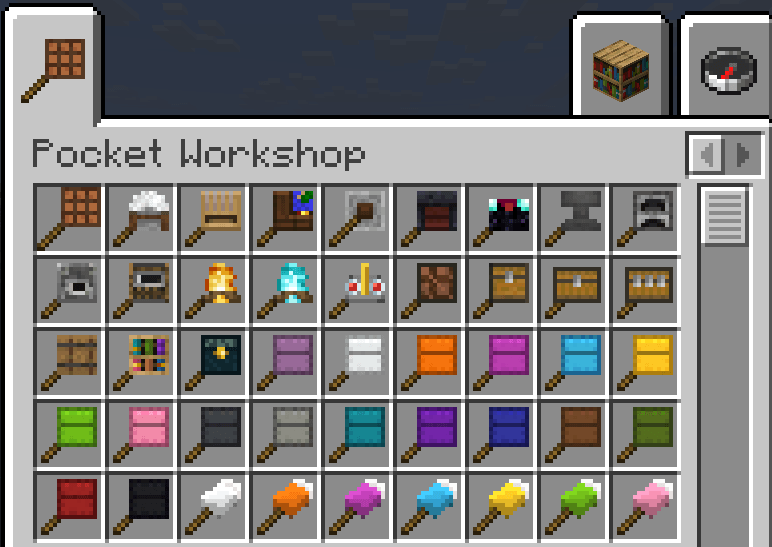
22 different portable tools, plus all the colored versions of shulker boxes and beds (54 items in total). No dependencies. Available for Forge, NeoForge and Fabric.
How it works
- Right click with a tool in your hand to open it.
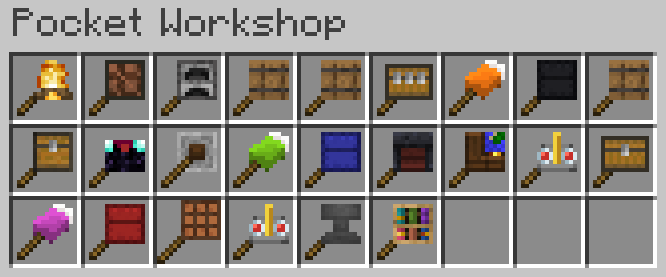
- Press V to open a selector with every portable tool in your inventory, so you don't need them in the hotbar. Click an icon to open that tool. The key can be changed in the controls menu.
- Hold Shift over a tool to see what it does.
- Tools that hold items (chests, furnaces, jukebox…) save their content inside the item: nothing is lost if you die, drop the tool or put it away.
- Furnaces, campfires and the brewing stand keep working while they are in your inventory, even with their screen closed.
Crafting
Every tool is crafted like this: the block in the top right corner and two sticks in a diagonal.
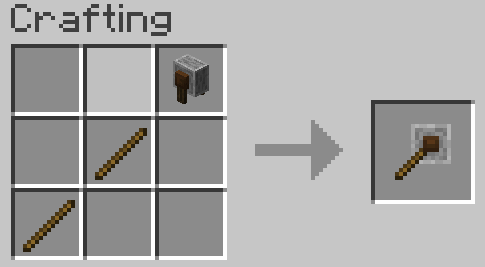
- Double Chest: two chests side by side on the top row.
- Triple Chest: three chests on the top row.
- Recipes unlock in the recipe book as soon as you pick up the block.
The tools
WORKSTATIONS — They open the normal screen of the block, with the same recipes and rules.
- Crafting Table, Stonecutter, Loom, Cartography Table, Grindstone, Smithing Table
- Enchanting Table: counts the bookshelves around you, exactly like the block. Stand next to your bookshelves for level 30 enchantments.
- Anvil: the only tool that wears out. It has 25 uses and its icon becomes chipped and then damaged, like the real anvil.
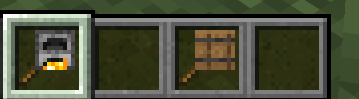
FURNACE, BLAST FURNACE, SMOKER — Same recipes, fuel and speed as the blocks. They keep smelting in your inventory and the icon lights up while they burn. Experience is given to you as the items are smelted.
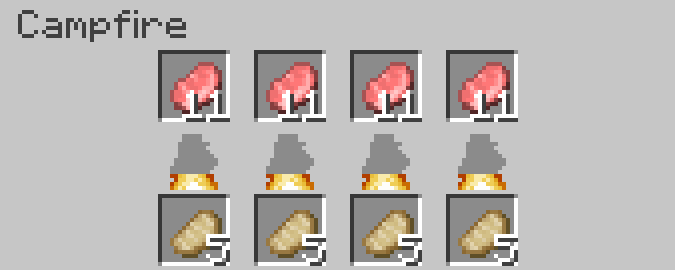
CAMPFIRE, SOUL CAMPFIRE — Custom screen with 4 cooking slots on top and 4 output slots below. No fuel needed, same recipes and cooking time as the block (30 seconds per item). Unlike the block, every slot accepts a full stack and cooks it one item at a time. The flame between the slots fills up as the food cooks. The two versions work the same way, only the look changes.
BREWING STAND — Same screen and recipes as the block. Keeps brewing in your inventory.
CHEST, BARREL — 27 slots.
DOUBLE CHEST — 54 slots.
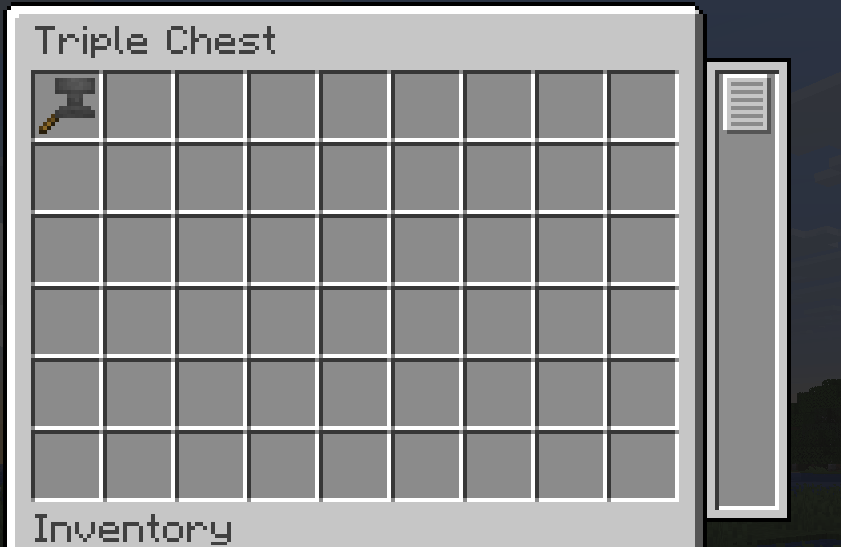
TRIPLE CHEST — 81 slots in a custom screen: 6 rows are visible, scroll with the mouse wheel or drag the scrollbar on the right to see the other 3. Shift-click fills the hidden rows too when the visible ones are full.
SHULKER BOX — 27 slots. Available plain and in all 16 colors.
CHISELED BOOKSHELF — 9 slots, books only.
ENDER CHEST — Opens your normal ender chest, the same one you see from the block.
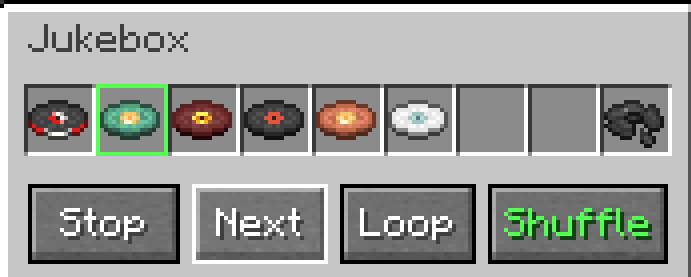
JUKEBOX — Custom screen with 9 disc slots and 4 buttons. The music is bound to you and follows you while you walk; players nearby can hear it too.
- Play / Stop: starts from the first disc. The first disc you insert starts on its own.
- Next: skips to the next disc.
- Loop: when the last disc ends, starts again from the first. With a single disc, it repeats that one.
- Shuffle: picks the next disc at random, never the same twice in a row.
- The disc that is playing has a green frame. Loop and Shuffle turn green when active.
- The playlist keeps going with the screen closed.
BED — Available in all 16 colors. Right click at night or during a thunderstorm to sleep, with the vanilla rules (no monsters nearby, all players sleeping in multiplayer).
Good to know
- The bed does not set your spawn point. It only skips the night.
- Portable containers cannot be put inside each other, or inside shulker boxes and bundles. This is intended, to avoid infinite storage.
- A tool cannot be moved while its own screen is open.
- If the jukebox leaves your inventory while it is playing, the current song plays until it ends.
- In multiplayer the mod must be installed on both the server and the client.
BisectHosting offers quick, simple and high quality server hosting with over a dozen locations available across the world, ensuring low latency. After your purchase, the server is already configured and ready to use. With their 24/7 support and fast-response time, no issues shall stand in your way! Use the promo code BLACKWOLF to get a 25% discount off your first month when buying any of their gaming servers.
Feel free to use this mod in your modpack
Project description from CurseForge.
Pick your setup
Pocket Workshop by Minecraft version and loader
Choose the version and loader you play, then open the matching release.
Minecraft version
26.1.2
3 loader buildsMinecraft version
1.21.1
3 loader buildsMinecraft version
1.20.1
3 loader buildsCheck the dependencies, then try the file in a copied instance before changing a world you care about.
Recent files
Pocket Workshop versions and loaders
PocketWorkshop-forge-1.20.1-1.0.3.jar
19 Oct 2026
Client Source doesn’t say Server Source doesn’t say Dependencies No extras listed Listed on Release listing
Check the 1.20.1 · Forge setup 1.20.1ForgeNeoForge release
PocketWorkshop-fabric-1.20.1-1.0.3.jar
19 Oct 2026
Client Source doesn’t say Server Source doesn’t say Dependencies No extras listed Listed on Release listing
Check the 1.20.1 · Fabric setup Fabric1.20.1 release
PocketWorkshop-forge-1.21.1-1.0.3.jar
19 Oct 2026
Client Source doesn’t say Server Source doesn’t say Dependencies No extras listed Listed on Release listing
Check the 1.21.1 · Forge setup Forge1.21.1 release
PocketWorkshop-neoforge-1.21.1-1.0.3.jar
19 Oct 2026
Client Source doesn’t say Server Source doesn’t say Dependencies No extras listed Listed on Release listing
Check the 1.21.1 · NeoForge setup 1.21.1NeoForge release
PocketWorkshop-fabric-1.21.1-1.0.3.jar
19 Oct 2026
Client Source doesn’t say Server Source doesn’t say Dependencies No extras listed Listed on Release listing
Check the 1.21.1 · Fabric setup Fabric1.21.1 release
PocketWorkshop-neoforge-26.3-1.0.3.jar
15 Oct 2026
Client Source doesn’t say Server Source doesn’t say Dependencies No extras listed Listed on Release listing
Check the 26.3 · NeoForge setup NeoForge26.3 release
PocketWorkshop-fabric-26.3-1.0.3.jar
15 Oct 2026
Client Source doesn’t say Server Source doesn’t say Dependencies No extras listed Listed on Release listing
Check the 26.3 · Fabric setup Fabric26.3 release
PocketWorkshop-forge-26.3-1.0.3.jar
15 Oct 2026
Client Source doesn’t say Server Source doesn’t say Dependencies No extras listed Listed on Release listing
Check the 26.3 · Forge setup Forge26.3 release
PocketWorkshop-neoforge-26.1.2-1.0.3.jar
15 Oct 2026
Client Source doesn’t say Server Source doesn’t say Dependencies No extras listed Listed on Release listing
Check the 26.1.2 · NeoForge setup NeoForge26.1.2 release
PocketWorkshop-fabric-26.1.2-1.0.3.jar
15 Oct 2026
Client Source doesn’t say Server Source doesn’t say Dependencies No extras listed Listed on Release listing
Check the 26.1.2 · Fabric setup Fabric26.1.2 release
PocketWorkshop-forge-26.1.2-1.0.3.jar
15 Oct 2026
Client Source doesn’t say Server Source doesn’t say Dependencies No extras listed Listed on Release listing
Check the 26.1.2 · Forge setup Forge26.1.2 release
PocketWorkshop-neoforge-26.3-1.0.2.jar
14 Oct 2026
Client Source doesn’t say Server Source doesn’t say Dependencies No extras listed Listed on Release listing
Check the 26.3 · NeoForge setup NeoForge26.3 release
Looking for an older file? The official CurseForge project page is in Resources.