Minecraft version
Back to mods 
CurseForge · Minecraft mod
Storage Scanner
Scan nearby chests and barrels and view their contents in screen
Choose a version Pick your version below, then grab the matching file.
Quick answer
Which Storage Scanner release should I use?
Latest stable file storagescanner-1.0.0-mc26.2-fabric.jar
Game version 26.2
Loader Fabric
Storage Scanner storagescanner-1.0.0-mc26.2-fabric.jar targets 26.2 with Fabric. The project page does not say whether this file belongs on the client, dedicated server, or both. No extra mods listed for this file.
Where it goes
Is Storage Scanner required on the client, server, or both?
The project page does not say whether this file belongs on the client, dedicated server, or both.
Client Source doesn’t say
Dedicated server Source doesn’t say
Loader for this release Fabric
Required install it here Optional supported, not mandatory Not supported do not install here Source doesn’t say do not assume
The source does not explicitly classify this release as client-only or server-only.
What else does Storage Scanner storagescanner-1.0.0-mc26.2-fabric.jar need?
storagescanner-1.0.0-mc26.2-fabric.jar. Change the file and its required mods may change too.
This file does not list any required mods. Do not add a library just because a different file uses it.
This file does not list any required or optional mods.
Before you install it
Add Storage Scanner without breaking your instance.
Built for Storage Scanner storagescanner-1.0.0-mc26.2-fabric.jar. Pick another file and the loader, install side or required mods may change.
- 01
Stick to this file
Use storagescanner-1.0.0-mc26.2-fabric.jar. It targets 26.2 with Fabric; another release may have different loader, side or dependency requirements.
- 02
Bring the mods it needs
This file does not list any required mods. Do not add a library just because a different file uses it.
- 03
Put it on the correct side
The project page does not say whether this file belongs on the client, dedicated server, or both.
- 04
Pick the file you checked
Use the “Get this file” button beside storagescanner-1.0.0-mc26.2-fabric.jar. It opens that exact file at the source.
About this project
What does Storage Scanner add?
Storage Scanner
Storage Scanner lets you locate and inspect nearby storage without opening containers one by one. Use the Storage Scanner item to search for chests and barrels in your current dimension and view their locations and contents in a single screen.
WIP: Many features and improvements will be added to this mod soon.
Features
- Searches for chests and barrels within a configurable spherical radius.
- The default radius is 10 blocks and can be configured from 1 to 32.
- Displays each double chest as a single entry.
- Shows each container's type, coordinates, item icons, and quantities.
- Supports scrolling and displays loading, empty, result-limit, and error states.
- Only checks loaded chunks and containers in the current dimension.
- Limits each scan to 64 containers and applies a short cooldown between uses.
- Includes English and Spanish translations.
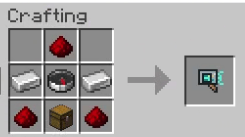
Configuration
The server creates config/storagescanner.properties on startup. Edit the file and restart the server to apply changes:
radius=10
containerTypes=chest,barrel
radius accepts values from 1 to 32. containerTypes accepts chest and barrel; leaving the list empty disables scanning.
Limitations
The mod does not integrate with claims, password systems, or third-party protection mods (For the moment).
Project description from CurseForge.
Pick your setup
Storage Scanner by Minecraft version and loader
Choose the version and loader you play, then open the matching release.
Minecraft version
26.2
1 loader buildCheck the dependencies, then try the file in a copied instance before changing a world you care about.
Recent files
Storage Scanner versions and loaders
storagescanner-1.0.0-mc26.2-fabric.jar
11 Oct 2026
Client Source doesn’t say Server Source doesn’t say Dependencies No extras listed Listed on Release listing
Check the 26.2 · Fabric setup Fabric26.2 release
storagescanner-1.0.0-mc26.3-neoforge.jar
9 Oct 2026
Client Source doesn’t say Server Source doesn’t say Dependencies No extras listed Listed on Release listing
Check the 26.3 · NeoForge setup NeoForge26.3 release
storagescanner-1.0.0-mc26.3-fabric.jar
8 Oct 2026
Client Source doesn’t say Server Source doesn’t say Dependencies 1 required · 1 unchecked Listed on Release listing
Check the 26.3 · Fabric setup Fabric26.3 release
storagescanner-0.1.0-mc26.3-fabric.jar
6 Oct 2026
Client Source doesn’t say Server Source doesn’t say Dependencies 1 required · 1 unchecked Listed on Release listing
Check the 26.3 · Fabric setup Fabric26.3 release
Looking for an older file? The official CurseForge project page is in Resources.
 mod
mod CurseForge + Modrinth · Minecraft
HUD Manager
Manages HUD elements gracefully.
 mod
mod CurseForge + Modrinth · Minecraft
AntOS Computer | Quests + Guidebook
An immersive and fully functioning computer that provides an anternative to the stale and overused quest book and guide book
 mod
mod CurseForge + Modrinth · Minecraft
BandwidthOptimizer
Save your MC bandwidth with big quantities.