Minecraft version
Back to mods 
CurseForge · Minecraft mod
CircleKeep
I just want a few villagers… Build protected spaces with villagers using simple commands!
Choose a version Pick your version below, then grab the matching file.
Quick answer
Which CircleKeep release should I use?
Latest stable file CircleKeep-NeoForge-2.0.20+26.3
Game version 26.3
Loader NeoForge
CircleKeep-NeoForge-2.0.20+26.3 targets 26.3 with NeoForge. The project page does not say whether this file belongs on the client, dedicated server, or both. No extra mods listed for this file.
Where it goes
Is CircleKeep required on the client, server, or both?
The project page does not say whether this file belongs on the client, dedicated server, or both.
Client Source doesn’t say
Dedicated server Source doesn’t say
Loader for this release NeoForge
Required install it here Optional supported, not mandatory Not supported do not install here Source doesn’t say do not assume
The source does not explicitly classify this release as client-only or server-only.
What else does CircleKeep-NeoForge-2.0.20+26.3 need?
CircleKeep-NeoForge-2.0.20+26.3. Change the file and its required mods may change too.
This file does not list any required mods. Do not add a library just because a different file uses it.
This file does not list any required or optional mods.
Before you install it
Add CircleKeep without breaking your instance.
Built for CircleKeep-NeoForge-2.0.20+26.3. Pick another file and the loader, install side or required mods may change.
- 01
Stick to this file
Use CircleKeep-NeoForge-2.0.20+26.3. It targets 26.3 with NeoForge; another release may have different loader, side or dependency requirements.
- 02
Bring the mods it needs
This file does not list any required mods. Do not add a library just because a different file uses it.
- 03
Put it on the correct side
The project page does not say whether this file belongs on the client, dedicated server, or both.
- 04
Pick the file you checked
Use the “Get this file” button beside CircleKeep-NeoForge-2.0.20+26.3. It opens that exact file at the source.
About this project
What does CircleKeep add?
CircleKeep – build, populate, decorate
Get started
Stand where you want the center of your build and open chat (cheats enabled).
/add all
Creates a circular area with walls and a moat, then adds 18 villagers, 36 beds, and torches. The radius is chosen automatically.

Essential commands
Build a complete keep: /add all 20 40 - Adds an area, 20 villagers, 40 beds, and torches; radius 40
Build an empty area: /add area 40 - Creates the floor, walls, and moat; radius 40
Add villagers: /add villager 10 - Spawns 10 more villagers
Place beds: /add bed 20 40 blue - Places up to 20 blue beds within radius 40
Place torches: /add torch 40 - Distributes torches within radius 40
Lay carpet: /add carpet blue - Covers available matching floor with blue carpet
Clear overhead: /add sky 40 - Clears upward within radius 40, leaving four blocks of headroom untouched
Clear overhead and next to you: /add sky 0 30 - Clears upward within radius 30
Clear overhead and dig a hole: /add sky -100 50 - Clears upward and -100 blocks downwars within radius 50 (even makes persistent holes into the ocean)
Check your surroundings: /show count 40 - Reports nearby villagers, beds, torches, and other statistics
Reading the numbers: For all, villager, and bed, the count comes first, followed by the radius. Radius is measured in blocks from your position.
**
Choose your walls and floor**
Examples: /add area stonewall woodfloor 40

/add all glasswall stonefloor 20 40

Materials: stone, brick, cobble, deepslate, sandstone, redsandstone, quartz, wood, glass, obsidian.
Nearby compatible areas (areas with the same wall) can merge. To keep a new area separate, place "closed" as you see below:
/add area closed stonewall 40/add all closed stonewall 20 40
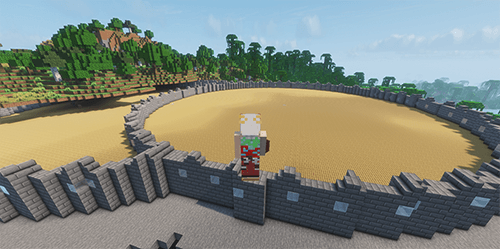 (closed)
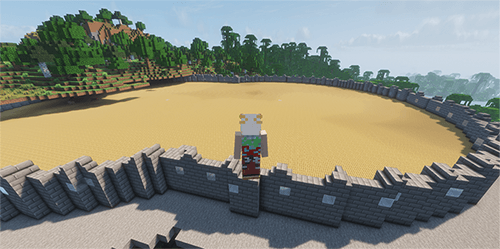 (merged)
Beds: colors and spacing
/add bed 20 – 20 white beds, radius 32./add bed 20 40 blue – 20 blue beds spread across a larger area./add bed 20 15 mix – 20 colorful beds in a smaller area.
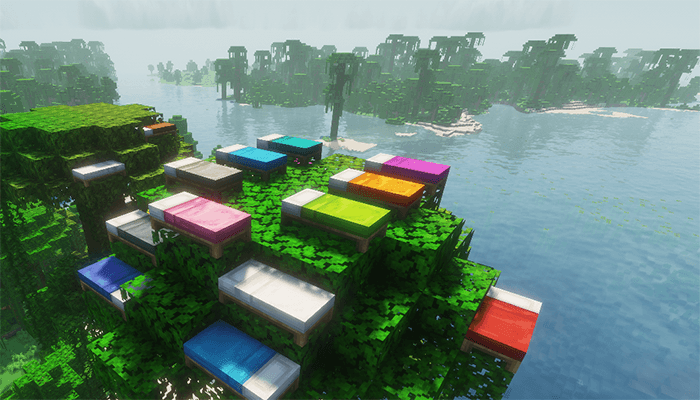
Beds use spaced positions first and pack together only when space runs short. Placement starts within five blocks vertically, then searches farther above and below if needed.
Carpets: solid, mixed, or checkered
/add carpet – white carpet./add carpet blue – blue carpet./add carpet mix – random colors./add carpet 40 blue – blue carpet within radius 40./add carpet checker green lime 40 – a green-and-lime checkerboard within radius 40.
Carpet covers its available matching floor of the same height. An explicit radius limits that coverage further.
A new carpet command replaces existing carpet.
Commands for beds and torches take priority and can replace carpet. The lodestone in the centre of your area stays uncovered.

Beds and carpets support all 16 Minecraft colors:
white, orange, magenta, light_blue, yellow, lime, pink, gray, light_gray, cyan, purple, blue, brown, green, red, black.
In-game help: /ck help. If another mod uses /add, use /ck add … instead.
Project description from CurseForge.
Pick your setup
CircleKeep by Minecraft version and loader
Choose the version and loader you play, then open the matching release.
Minecraft version
26.2
2 loader buildsCheck the dependencies, then try the file in a copied instance before changing a world you care about.
Recent files
CircleKeep versions and loaders
CircleKeep-NeoForge-2.0.20+26.3
CircleKeep-NeoForge-2.0.20+26.3.jar
17 Oct 2026
Client Source doesn’t say Server Source doesn’t say Dependencies No extras listed Listed on Release listing
Check the 26.3 · NeoForge setup NeoForge26.3 release
CircleKeep-NeoForge-2.0.20+26.2
CircleKeep-NeoForge-2.0.20+26.2.jar
17 Oct 2026
Client Source doesn’t say Server Source doesn’t say Dependencies No extras listed Listed on Release listing
Check the 26.2 · NeoForge setup NeoForge26.2 release
CircleKeep-Fabric-2.0.20+26.3
CircleKeep-2.0.20+26.3.jar
10 Oct 2026
Client Source doesn’t say Server Source doesn’t say Dependencies No extras listed Listed on Release listing
Check the 26.3 · Fabric setup Fabric26.3 release
CircleKeep-Fabric-2.0.20+26.2
CircleKeep-2.0.20+26.2.jar
10 Oct 2026
Client Source doesn’t say Server Source doesn’t say Dependencies No extras listed Listed on Release listing
Check the 26.2 · Fabric setup Fabric26.2 release
Looking for an older file? The official CurseForge project page is in Resources.