Minecraft version
Back to mods 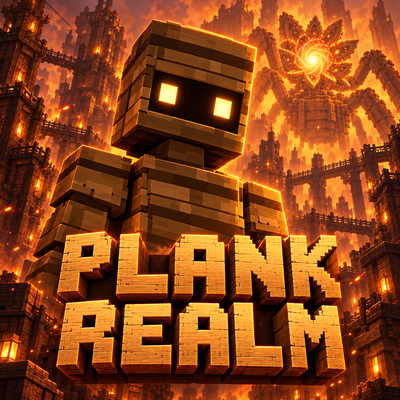
CurseForge · Minecraft mod
Plank Realm
Explore a haunted wooden dimension with vanishing doors, living plank creatures, noise-based survival and a colossal guardian.
Choose a version Pick your version below, then grab the matching file.
Quick answer
Which Plank Realm release should I use?
Latest stable file plankrealm-1.20.1-1.0.0.jar
Game version 1.20.1
Loader Forge
Plank Realm plankrealm-1.20.1-1.0.0.jar targets 1.20.1 with Forge. The project page does not say whether this file belongs on the client, dedicated server, or both. No extra mods listed for this file.
Where it goes
Is Plank Realm required on the client, server, or both?
The project page does not say whether this file belongs on the client, dedicated server, or both.
Client Source doesn’t say
Dedicated server Source doesn’t say
Loader for this release Forge
Required install it here Optional supported, not mandatory Not supported do not install here Source doesn’t say do not assume
The source does not explicitly classify this release as client-only or server-only.
What else does Plank Realm plankrealm-1.20.1-1.0.0.jar need?
plankrealm-1.20.1-1.0.0.jar. Change the file and its required mods may change too.
This file does not list any required mods. Do not add a library just because a different file uses it.
This file does not list any required or optional mods.
Before you install it
Add Plank Realm without breaking your instance.
Built for Plank Realm plankrealm-1.20.1-1.0.0.jar. Pick another file and the loader, install side or required mods may change.
- 01
Stick to this file
Use plankrealm-1.20.1-1.0.0.jar. It targets 1.20.1 with Forge; another release may have different loader, side or dependency requirements.
- 02
Bring the mods it needs
This file does not list any required mods. Do not add a library just because a different file uses it.
- 03
Put it on the correct side
The project page does not say whether this file belongs on the client, dedicated server, or both.
- 04
Pick the file you checked
Use the “Get this file” button beside plankrealm-1.20.1-1.0.0.jar. It opens that exact file at the source.
About this project
What does Plank Realm add?
Plank Realm
Beyond the door, everything is made of wood. And something is listening.
Plank Realm introduces a mysterious wooden dimension: the Ashen City. Explore towering timber buildings, bridges, abandoned rooms and forgotten passages while learning how to survive among its inhabitants.
Your entrance is temporary. Once crossed, the Threshold Door closes and disappears. Finding your way home becomes part of the journey.
Features
- A dedicated dimension with wooden streets, towers, interiors, bridges and ruins.
- Threshold Doors that disappear after use, with a short window for companions to follow.
- Boardlings: articulated wooden inhabitants with glowing eyes that react to noise and aggression.
- Noise-based survival: move carefully, avoid unnecessary disturbances and use equipment to stay quiet.
- The Blossom Colossus: an enormous wooden guardian with six supporting legs, two mantis-like claws and a folding flower head.
- A ceiling-dwelling guardian that awakens, crawls down the walls and hunts intruders.
- An unkillable threat that must be avoided or soothed rather than defeated with ordinary weapons.
- Amber Resin, Echo Shards, return anchors and craftable exploration tools.
- A journal that reveals information and recipes as you make discoveries.
- Custom animations, atmospheric music, sounds, particles and advancements.
- English and Russian translations.
Getting Started
Break logs in the Overworld to discover an Unsettling Splinter and receive your journal.
Read the journal, then craft a Threshold Door using six oak planks, two iron ingots and one Unsettling Splinter. Bring food, an axe and supplies before entering.
Inside the realm, collect Amber Resin, follow the journal's clues and locate a return anchor. Quiet movement helps you avoid unwanted attention. Resin and Whispering Lanterns can calm Boardlings.
Be careful beneath the ceiling. The Blossom Colossus listens to nearby activity, and a noisy group can awaken it quickly. Discover Lullaby Petals to soothe the guardian.
Requirements
- Minecraft Java Edition 1.20.1
- Forge 47.2.0 or later in the 47.x series
- Java 17
- Install on both the client and server for multiplayer.
GeckoLib and additional animation libraries are not required.
Installation
Install Forge for Minecraft 1.20.1, place the Plank Realm .jar file in your mods folder and launch your Forge profile.
Project description from CurseForge.
Pick your setup
Plank Realm by Minecraft version and loader
Choose the version and loader you play, then open the matching release.
Check the dependencies, then try the file in a copied instance before changing a world you care about.
Recent files
Plank Realm versions and loaders
plankrealm-1.20.1-1.0.0.jar
7 Oct 2026
Client Source doesn’t say Server Source doesn’t say Dependencies No extras listed Listed on Release listing
Check the 1.20.1 · Forge setup 1.20.1Forge release
Looking for an older file? The official CurseForge project page is in Resources.
 mod
mod CurseForge · Minecraft
Naruto Striker
This is a naruto inspired mod, bringing the ninja world to minecraft!
 mod
mod CurseForge · Minecraft
Relicera - accessories and relics
A mod focus on useful accessories and relics.
 mod
mod CurseForge · Minecraft
Caerula Arbor: Seaborn Adaptive Evolution
An add-on mod for Deep Blue Tree, designed to recreate the original's adaptation mechanics,made by AI.