Minecraft version
Back to mods 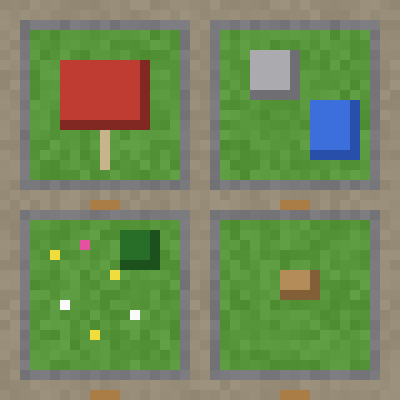
CurseForge · Minecraft mod
PCA Plots
Pixel Creators Academy Plots Mod
Choose a version Pick your version below, then grab the matching file.
Quick answer
Which PCA Plots release should I use?
Latest stable file pca plots 0.1.2
Game version 1.20.1
Loader Forge
pca plots 0.1.2 targets 1.20.1 with Forge. The project page does not say whether this file belongs on the client, dedicated server, or both. No extra mods listed for this file.
Where it goes
Is PCA Plots required on the client, server, or both?
The project page does not say whether this file belongs on the client, dedicated server, or both.
Client Source doesn’t say
Dedicated server Source doesn’t say
Loader for this release Forge
Required install it here Optional supported, not mandatory Not supported do not install here Source doesn’t say do not assume
The source does not explicitly classify this release as client-only or server-only.
What else does pca plots 0.1.2 need?
pca plots 0.1.2. Change the file and its required mods may change too.
This file does not list any required mods. Do not add a library just because a different file uses it.
This file does not list any required or optional mods.
Before you install it
Add PCA Plots without breaking your instance.
Built for pca plots 0.1.2. Pick another file and the loader, install side or required mods may change.
- 01
Stick to this file
Use pca plots 0.1.2. It targets 1.20.1 with Forge; another release may have different loader, side or dependency requirements.
- 02
Bring the mods it needs
This file does not list any required mods. Do not add a library just because a different file uses it.
- 03
Put it on the correct side
The project page does not say whether this file belongs on the client, dedicated server, or both.
- 04
Pick the file you checked
Use the “Get this file” button beside pca plots 0.1.2. It opens that exact file at the source.
About this project
What does PCA Plots add?
PCA Plots
Give every student their own protected building plot in a flat, always-sunny world, with teacher tools to reset, copy, save, lock and tour the plots.
PCA Plots adds a separate building world to your server. Each student gets a plot with their name on it, where they can build freely and nobody else can wreck it. Teachers can copy an example build to the whole class, lock building while they talk, reset plots between lessons and take the class on a tour of everyone's work.
It was made by Pixel Creators Academy for teaching servers, and works on any Forge 1.20.1 server. It's server side only: students don't need to install anything.
What it's like to use
- A student types
/plot homeand lands on the road in front of their own 30×30 grass plot, edged in stone brick, with a sign saying "Plot 12 – Amy". They're in creative mode with an empty plot-world inventory, ready to build. - Amy wants to build with her friend, so she types
/plot add Ben. Ben can now build in Amy's plot too. Anyone else who walks over can look but can't break a thing. - The teacher wants everyone to start from the same base, so they build an example on their own plot and run
/plot admin copy MrSmith all. Every student's plot fills with a copy, one plot at a time so the server doesn't stall. - Time to stop and listen:
/plot admin lock all. Nobody can build until/plot admin unlock all. - At the end,
/plot admin tour starttakes everyone in the plot world to each plot in turn, with "Amy's plot – stop 3 of 24" on screen, and/plot admin tour nextmoves on. /plot leavetakes students back to where they were in the main world, with their normal inventory and game mode back. Creative items stay in the plot world.
The best build can be kept forever with /plot admin save Amy amys_castle. It can be loaded with a structure block, or even used as a room in PCA Puzzle.
Features
The plot world
- A separate flat grass world: always midday, no monsters, no animals, nothing to spoil a build.
- Plots in neat rows with roads between, a stone brick edge round each, and a name sign.
- Teacher-chosen size (default 32×32, anything from 8 to 256). Changing it only affects new plots, so nobody's build moves.
Plots for students
- Automatic: a student gets their plot the first time they type
/plot home(can be turned off). - Teacher-assigned:
/plot admin give @amakes plots for the whole class at once. - Shared plots: any number of helpers per plot, added by the owner or a teacher.
/plot visit <name>to look at a friend's work,/plot infoand/plot list.
Protection
- Students can only build in plots they own or help on.
- No PvP, no taking things from other people's chests or item frames.
- Explosions don't break anything. Water and lava can't flow from one plot into another, and pistons can't push across plot edges.
- Separate inventory and game mode in the plot world, so creative items can never be carried back to the survival or adventure world. Ender chests are blocked there for the same reason.
Teacher tools
| Command | What it does |
|---|---|
/plot admin give <players> |
Make plots for students |
/plot admin bring <players> |
Send students to their plots |
/plot admin size <n> |
Size of new plots |
/plot admin resize <owner> <n> |
Make one plot bigger or smaller (it moves to a new spot) |
/plot admin mode <owner|all> <mode> |
A game mode for students inside a plot, e.g. adventure for a puzzle |
/plot admin lock all / unlock all |
Stop or allow building everywhere (or one plot by owner name) |
/plot admin reset <owner|all> |
Back to flat grass |
/plot admin copy <from> <owner|all> |
Copy one plot onto others |
/plot admin save <owner> <name> |
Save a plot as a structure file |
/plot admin addmember / removemember |
Change helpers on any plot |
/plot admin delete <owner> |
Remove a plot |
/plot admin tour start / next / back / stop |
Guided tour of every plot |
Teachers can build anywhere in the plot world. Teachers are ops, plus anyone on the PCA Classroom teacher list if you use that mod.
Requirements and dependencies
No other mods are required.
| Mod | ||
|---|---|---|
| PCA Classroom | Optional | Its teacher list also counts as teachers in PCA Plots |
| PCA Perms | Optional | Its teacher group are plot teachers (pcaplots.teacher), without needing op |
| PCA Puzzle | Optional | Saved plots can be used as puzzle rooms ("file": "pcaplots:<name>", with a plot size that's a multiple of 5) |
| PCA Puzzle Plots | Optional | Builds a PCA Puzzle escape room in every student's plot, growing plots to fit |
- Minecraft 1.20.1, Forge 47 or newer
- Install on the server only. Students can join without it. It also works in single player and on LAN.
Standalone
PCA Plots doesn't need the Pixel Creators Academy server or any PCA service. It works on any Forge 1.20.1 server.
Getting started
- Put the jar in your server's
modsfolder and start it. The plot world is created automatically, in new and existing worlds. - Choose a plot size if you like:
/plot admin size 30. - Ask the class to type
/plot home, or send everyone at once with/plot admin bring @a. - Settings (automatic plots, game mode in the plot world, separate inventory) are in
config/pcaplots-common.toml.
Version: 0.1.2 · Licence: All Rights Reserved · Made by Pixel Creators Academy
Project description from CurseForge.
Pick your setup
PCA Plots by Minecraft version and loader
Choose the version and loader you play, then open the matching release.
Check the dependencies, then try the file in a copied instance before changing a world you care about.
Recent files
PCA Plots versions and loaders
pca plots 0.1.2
pcaplots-0.1.2.jar
7 Oct 2026
Client Source doesn’t say Server Source doesn’t say Dependencies No extras listed Listed on Release listing
Check the 1.20.1 · Forge setup 1.20.1Forge release
pca plots 0.1.1
pcaplots-0.1.1.jar
7 Oct 2026
Client Source doesn’t say Server Source doesn’t say Dependencies No extras listed Listed on Release listing
Check the 1.20.1 · Forge setup 1.20.1Forge release
pca plots 0.1.0
pcaplots-0.1.0.jar
7 Oct 2026
Client Source doesn’t say Server Source doesn’t say Dependencies No extras listed Listed on Release listing
Check the 1.20.1 · Forge setup 1.20.1Forge release
Looking for an older file? The official CurseForge project page is in Resources.
 mod
CurseForge · Minecraft
Multiverse Heroes: Rise of Doom
Play as 70+ superheroes, villains, anime and movie characters with ability wheels, cinematic ultimates, planets and boss lairs.
 mod
CurseForge · Minecraft
GoblinCraft Distant Lands
An endgame dimension of floating islands with nine domains, ruled by nine ancient serpent dragons.
 mod
CurseForge · Minecraft
Epic Dungeons Nicktale
Explore 59 dungeons filled with epic bosses, dangerous enemies, mimics, and treasure with individual player rewards.