Minecraft version
Back to mods 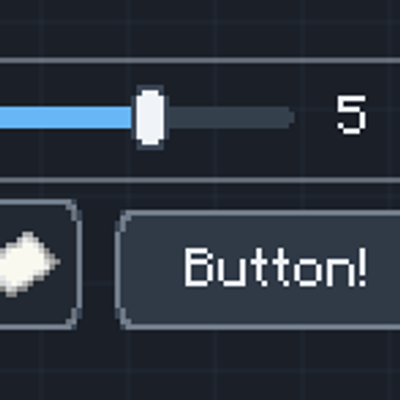
CurseForge · Minecraft mod
R-UI Lib
Build Minecraft mod interfaces from reusable, themed components
Choose a version Pick your version below, then grab the matching file.
Quick answer
Which R-UI Lib release should I use?
beta file r-ui-lib-forge-0.5.0.jar
Game version 1.20.1
Loader Forge
R-UI Lib r-ui-lib-forge-0.5.0.jar targets 1.20.1 with Forge. The project page does not say whether this file belongs on the client, dedicated server, or both. No extra mods listed for this file.
Where it goes
Is R-UI Lib required on the client, server, or both?
The project page does not say whether this file belongs on the client, dedicated server, or both.
Client Source doesn’t say
Dedicated server Source doesn’t say
Loader for this release Forge
Required install it here Optional supported, not mandatory Not supported do not install here Source doesn’t say do not assume
The source does not explicitly classify this release as client-only or server-only.
What else does R-UI Lib r-ui-lib-forge-0.5.0.jar need?
r-ui-lib-forge-0.5.0.jar. Change the file and its required mods may change too.
This file does not list any required mods. Do not add a library just because a different file uses it.
This file does not list any required or optional mods.
Before you install it
Add R-UI Lib without breaking your instance.
Built for R-UI Lib r-ui-lib-forge-0.5.0.jar. Pick another file and the loader, install side or required mods may change.
- 01
Stick to this file
Use r-ui-lib-forge-0.5.0.jar. It targets 1.20.1 with Forge; another release may have different loader, side or dependency requirements.
- 02
Bring the mods it needs
This file does not list any required mods. Do not add a library just because a different file uses it.
- 03
Put it on the correct side
The project page does not say whether this file belongs on the client, dedicated server, or both.
- 04
Pick the file you checked
Use the “Get this file” button beside r-ui-lib-forge-0.5.0.jar. It opens that exact file at the source.
About this project
What does R-UI Lib add?
R-Ui Lib
ALPHA — Under construction.
R-Ui Lib is in active development. Expect unfinished features and API changes between releases.
Build Minecraft mod interfaces from reusable, themed components.
R-Ui Lib is a UI toolkit for Minecraft mod developers. Compose settings screens, inventory filters, dashboards, and notifications with shared layouts, controls, and themes. Players interact with these interfaces through the mods that use the library.
What you can build
- Interactive controls: Buttons, icon buttons, toggles, chips, text and search fields, and sliders with an optional second handle for range selection.
- Structured screens: Rows, columns, grids, stacks, tabs, scrollable content, and freely positioned layouts, with panels, cards, labels, and dividers.
- Feedback and navigation: Toast notifications, tooltips, modal dialogs, progress bars, tables, and radial menus.
- Item interfaces: Item cards and grids, a player inventory picker with a distinct hotbar, and ghost item slots for filters. Players can copy a selection from their inventory without moving the original items, or drag items from JEI into supported filter slots.
- A shared appearance: Built-in Dark and Light themes, configurable colors, spacing, text sizes, corner radii, and transition settings. Set a global theme once, then customize individual screens and supported component properties.
For developers
The public API lives in com.radaeli.ruilib.ui. Compose Java components and attach callbacks to your mod's logic; UiScreen provides mouse and keyboard input, focus navigation, tooltips, and overlays. Use the UI API from client code.
For example, compose an inventory picker and a filter slot:
Column content = new Column();
content.add(new Label(Component.literal("Choose an item")));
content.add(new ItemSlot());
content.add(InventoryGrid.playerInventory());

UiScreen screen = new UiScreen(
        Component.literal("My mod"), new Panel(content));
Choose a theme during client initialization:
UiThemes.setGlobalTheme(UiTheme.DARK); // or UiTheme.LIGHT
Custom palettes and design tokens let you match your mod's appearance.
Try layouts in game
In development runs, press F7 to open the visual playground. Add components from the categorized palette, arrange and resize them, edit their properties, switch between editing and interactive preview, and compare Dark and Light themes. Save layouts as local JSON files and reopen them later.
Compatibility
| Minecraft | Loader | Java |
|---|---|---|
| 1.21.1 | NeoForge 21.1.236+ | 21 |
Project description from CurseForge.
Pick your setup
R-UI Lib by Minecraft version and loader
Choose the version and loader you play, then open the matching release.
Minecraft version
1.20.1
1 loader buildCheck the dependencies, then try the file in a copied instance before changing a world you care about.
Recent files
R-UI Lib versions and loaders
r-ui-lib-forge-0.5.0.jar
14 Oct 2026
Client Source doesn’t say Server Source doesn’t say Dependencies No extras listed Listed on Release listing
Check the 1.20.1 · Forge setup 1.20.1Forge beta
r-ui-lib-neoforge-0.5.0.jar
14 Oct 2026
Client Source doesn’t say Server Source doesn’t say Dependencies No extras listed Listed on Release listing
Check the 1.21.1 · NeoForge setup 1.21.1NeoForge beta
r-ui-lib-neoforge-0.4.0.jar
9 Oct 2026
Client Source doesn’t say Server Source doesn’t say Dependencies No extras listed Listed on Release listing
Check the 1.21.1 · NeoForge setup 1.21.1NeoForge beta
r-ui-lib-neoforge-0.3.0.jar
7 Oct 2026
Client Source doesn’t say Server Source doesn’t say Dependencies No extras listed Listed on Release listing
Check the 1.21.1 · NeoForge setup 1.21.1NeoForge alpha
Looking for an older file? The official CurseForge project page is in Resources.