ImmediatelyFast Needed by zakoopt-1.0.1+26.2.jar
requiredMatching file found Matched file: ImmediatelyFast 1.16.5

CurseForge · Minecraft mod
Client-side optimization addon for Sodium. Up to +80% FPS at busy spawns and over 3x FPS on mob farms, with smoother 1% lows. Works with Lithium, ImmediatelyFast and Iris.
Quick answer
zakoopt-1.0.1+26.2.jar targets 26.2 with Fabric. The project page does not say whether this file belongs on the client, dedicated server, or both. All 1 required mods have matching files.
Where it goes
The project page does not say whether this file belongs on the client, dedicated server, or both.
The source does not explicitly classify this release as client-only or server-only.
zakoopt-1.0.1+26.2.jar. Change the file and its required mods may change too.
Install ImmediatelyFast first. We found matching files for this game-version and loader setup.
We only count dependency files that match this setup. A file for another loader does not fill the gap.
Before you install it
Built for zakoopt-1.0.1+26.2.jar. Pick another file and the loader, install side or required mods may change.
Use zakoopt-1.0.1+26.2.jar. It targets 26.2 with Fabric; another release may have different loader, side or dependency requirements.
Install ImmediatelyFast first. We found matching files for this game-version and loader setup.
The project page does not say whether this file belongs on the client, dedicated server, or both.
Use the “Get this file” button beside zakoopt-1.0.1+26.2.jar. It opens that exact file at the source.
About this project
Client-side optimization addon for Sodium. ZakoOpt targets the places where Sodium alone still struggles: crowded spawns full of players, mob farms with spawners and pistons, particle-heavy scenes and the HUD.
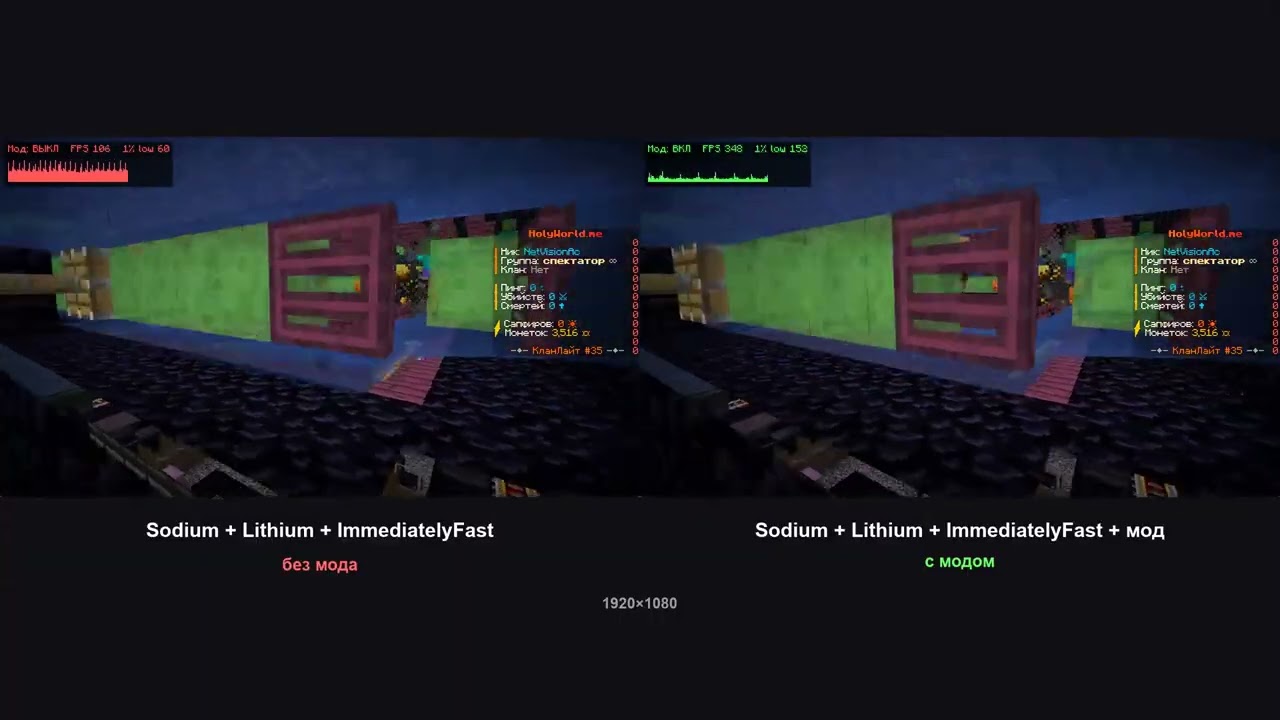
Left: Sodium + Lithium + ImmediatelyFast. Right: the same plus ZakoOpt. Same replay, same moment.
Same game session and same ReplayMod recordings, so every pass shows exactly the same scene. Each mode was measured over 4 runs, and the mod was switched on and off within the session.
| Scene | FPS without → with | 1% low without → with |
|---|---|---|
| Busy spawn (~55 players) | 549 → 993 (+81%) | 344 → 570 (+66%) |
| Mob farm (mobs, spawners, pistons, particles) | 125 → 438 (+251%) | 66 → 190 (+190%) |
| Flying over the world | 1346 → 2426 (+80%) | 761 → 1214 (+60%) |
With Iris + Complementary Reimagined shaders: spawn +65%, mob farm +115%, flying +57% FPS.
Baseline: Sodium 0.8.14 + Lithium 0.21.4 + ImmediatelyFast 1.14.3. Ryzen 9 7950X3D, RTX 5080, 854×480. Your numbers will differ with hardware and resolution. The more entities, block entities and particles on screen, the bigger the gain.
Entities and players
Block entities and farms
Particles
Rendering pipeline
Interface
Every optimization has its own toggle.
Everything is in Video Settings → ZakoOpt (Sodium's options screen):
Settings are saved in config/zakoopt.json.
Works with:
Client-side only: no server install needed, and it works on any server.
Does it change how the game looks? Only the LOD options do, and only at a distance. Each one can be turned off or have its distance raised, for example for high resolutions.
Is it safe on servers with anti-cheat? ZakoOpt only changes rendering and sends nothing to the server.
Found a bug or a crash? Send the crash report or latest.log to the author via Telegram.
Project description from CurseForge.
Pick your setup
Choose the version and loader you play, then open the matching release.
Check the dependencies, then try the file in a copied instance before changing a world you care about.
Recent files
9 Oct 2026
9 Oct 2026
9 Oct 2026
9 Oct 2026
9 Oct 2026
9 Oct 2026
9 Oct 2026
9 Oct 2026
9 Oct 2026
9 Oct 2026
9 Oct 2026
9 Oct 2026
Looking for an older file? The official CurseForge project page is in Resources.
 mod
modFully customize your first-person viewmodel with in-game controls for hand scale, position, and rotation.
 mod
modThis Mod Adds Source Engine Movement (Bhopping and Strafing) in Minecraft for a Better Parkour Experience. Includes a Speedometer, SSJ, Gauge, and Strafe Efficiency on the JHud.
 mod
modSimpleProtect is a lightweight and fully server-side Fabric mod that brings a simple, emerald-block-based protection system to your Minecraft world.