Minecraft version
Back to mods 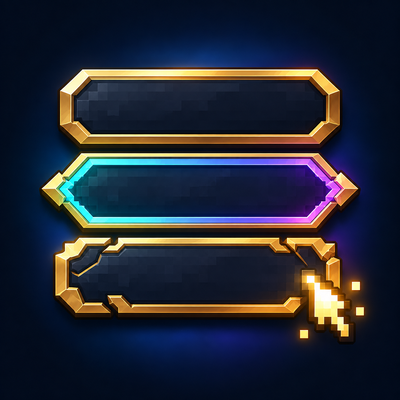
CurseForge · Minecraft mod
Menu Themes
Customize menus with different colors, shapes and presets.
Choose a version Pick your version below, then grab the matching file.
Quick answer
Which Menu Themes release should I use?
Latest stable file menuthemes-1.4.0.jar
Game version 1.21.1
Loader NeoForge
Menu Themes menuthemes-1.4.0.jar targets 1.21.1 with NeoForge. The project page does not say whether this file belongs on the client, dedicated server, or both. No extra mods listed for this file.
Where it goes
Is Menu Themes required on the client, server, or both?
The project page does not say whether this file belongs on the client, dedicated server, or both.
Client Source doesn’t say
Dedicated server Source doesn’t say
Loader for this release NeoForge
Required install it here Optional supported, not mandatory Not supported do not install here Source doesn’t say do not assume
The source does not explicitly classify this release as client-only or server-only.
What else does Menu Themes menuthemes-1.4.0.jar need?
menuthemes-1.4.0.jar. Change the file and its required mods may change too.
This file does not list any required mods. Do not add a library just because a different file uses it.
This file does not list any required or optional mods.
Before you install it
Add Menu Themes without breaking your instance.
Built for Menu Themes menuthemes-1.4.0.jar. Pick another file and the loader, install side or required mods may change.
- 01
Stick to this file
Use menuthemes-1.4.0.jar. It targets 1.21.1 with NeoForge; another release may have different loader, side or dependency requirements.
- 02
Bring the mods it needs
This file does not list any required mods. Do not add a library just because a different file uses it.
- 03
Put it on the correct side
The project page does not say whether this file belongs on the client, dedicated server, or both.
- 04
Pick the file you checked
Use the “Get this file” button beside menuthemes-1.4.0.jar. It opens that exact file at the source.
About this project
What does Menu Themes add?
Menu Themes
Make Minecraft’s menus your own.
Menu Themes brings a consistent appearance to the main menu, settings, controls, pause menu, and supported inventory panels. Choose a complete theme, customize any detail, and preview your changes before applying them.
Choose your style
- 17 coordinated themes: Midnight, Aurora, Crimson, Forest, Sandstone, Runic, Fractured, Rainbow, High Contrast, Blossom, Tidal, Autumn, Frost, Celestial, Dune, Obsidian, and Neon. Each combines a palette, button shape, surface artwork, background, hover effect, click sound, and loading style.
- 15 button shapes: choose pointed, rounded, slanted, diamond, chevron, ticket, shield, wave, leaf, runic, fractured, and more. Clickable regions follow the visible silhouettes.
- Custom colors: edit six palette colors with RGB and HSV sliders, a draggable color pad, or exact hex values.
- 9 scenic backgrounds: discover cherry groves at sunrise, tropical islands, autumn villages, moonlit desert ruins, snowy cabins, volcanic landscapes, and more. Choose a favorite or use the crossfading slideshow.
- Your own images: import PNG backgrounds and adjust fit, zoom, focus, dimming, tint, and vignette. Extend your chosen backdrop to other menus and loading screens.
- Smooth interactions: enjoy gentle menu fades, blended hover highlights, and button press effects. Adjust animation speed, enable optional background and rainbow drift, or use reduced motion.
- Matching panels and loading screens: supported vanilla inventories, chests, recipe-book tabs, creative tabs, text fields, and sliders share your palette. Choose Card, Minimal, or Segmented loading designs.
Go further with Advanced Theme Studio
Advanced editing lives in a separate menu, keeping everyday customization simple.
- Edit individual buttons: move, resize, rotate, flip, recolor, rename, and adjust their opacity and layering while keeping their original actions.
- Create custom artwork: cut silhouettes and openings with scissors, paint directly on buttons, erase strokes, or import PNG textures.
- Choose hover animations: Glow, Lift, Zoom, Bounce, Wiggle, Sweep, or None. Customize effects globally or per button.
- Change click sounds: select a built-in Minecraft sound or import your own OGG Vorbis clips. Adjust volume and pitch, or silence clicks entirely.
- Compose backgrounds: crop, arrange, rotate, and merge scenic or custom image layers into your own backdrop.
- Save and share: keep named presets and studio projects, undo and redo edits, and share configurations through JSON or complete ZIP packages containing custom images and sounds.
Custom button edits and reduced-motion preferences remain intact when switching themes. Restore a theme’s recommended sound and hover effect whenever you want.
Getting started
Click Menu Themes on the main, options, or pause menu—or press F8. Choose a theme, customize it, and click Save. Open Advanced… for detailed editing.
Client-side only—servers do not need the mod.
Project description from CurseForge.
Pick your setup
Menu Themes by Minecraft version and loader
Choose the version and loader you play, then open the matching release.
Minecraft version
1.20.1
1 loader buildCheck the dependencies, then try the file in a copied instance before changing a world you care about.
Recent files
Menu Themes versions and loaders
menuthemes-1.4.0.jar
12 Oct 2026
Client Source doesn’t say Server Source doesn’t say Dependencies No extras listed Listed on Release listing
Check the 1.21.1 · NeoForge setup 1.21.1NeoForge release
menuthemes-1.20.1-forge-1.4.0.jar
12 Oct 2026
Client Source doesn’t say Server Source doesn’t say Dependencies No extras listed Listed on Release listing
Check the 1.20.1 · Forge setup 1.20.1Forge release
menuthemes-1.20.1-forge-1.2.1.jar
9 Oct 2026
Client Source doesn’t say Server Source doesn’t say Dependencies No extras listed Listed on Release listing
Check the 1.20.1 · Forge setup 1.20.1Forge release
menuthemes-1.2.1.jar
7 Oct 2026
Client Source doesn’t say Server Source doesn’t say Dependencies No extras listed Listed on Release listing
Check the 1.21.1 · NeoForge setup 1.21.1NeoForge release
Looking for an older file? The official CurseForge project page is in Resources.
 mod
mod CurseForge + Modrinth · Minecraft
Resource Backpack's
Yet another Backpack's Mod
 mod
mod CurseForge + Modrinth · Minecraft
Fish Traps Remastered
Auto-fishing block for auto-fishing... with blocks
 mod
mod CurseForge · Minecraft
All Stone to Tools
You can use most stone types to craft stone tools and most things crafted with stone.