Minecraft version
Back to mods 
CurseForge · Minecraft mod
Identifiable
Identifies what you are looking at with custom settings and themes. Zoom feature and third party crosshair that can be toggled on and off.
Choose a version Pick your version below, then grab the matching file.
Quick answer
Which Identifiable release should I use?
Latest stable file identifiable-1.0.1.jar
Game version 26.3
Loader Fabric
identifiable-1.0.1.jar targets 26.3 with Fabric. The project page does not say whether this file belongs on the client, dedicated server, or both. No extra mods listed for this file.
Where it goes
Is Identifiable required on the client, server, or both?
The project page does not say whether this file belongs on the client, dedicated server, or both.
Client Source doesn’t say
Dedicated server Source doesn’t say
Loader for this release Fabric
Required install it here Optional supported, not mandatory Not supported do not install here Source doesn’t say do not assume
The source does not explicitly classify this release as client-only or server-only.
What else does identifiable-1.0.1.jar need?
identifiable-1.0.1.jar. Change the file and its required mods may change too.
This file does not list any required mods. Do not add a library just because a different file uses it.
This file does not list any required or optional mods.
Before you install it
Add Identifiable without breaking your instance.
Built for identifiable-1.0.1.jar. Pick another file and the loader, install side or required mods may change.
- 01
Stick to this file
Use identifiable-1.0.1.jar. It targets 26.3 with Fabric; another release may have different loader, side or dependency requirements.
- 02
Bring the mods it needs
This file does not list any required mods. Do not add a library just because a different file uses it.
- 03
Put it on the correct side
The project page does not say whether this file belongs on the client, dedicated server, or both.
- 04
Pick the file you checked
Use the “Get this file” button beside identifiable-1.0.1.jar. It opens that exact file at the source.
About this project
What does Identifiable add?
Identifiable
(Fabric)
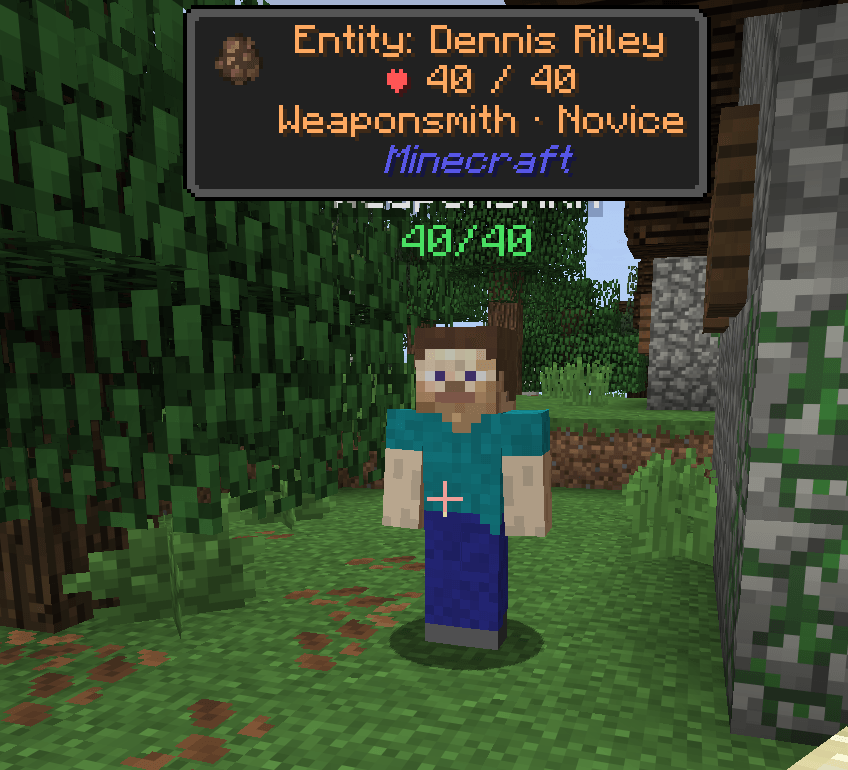
Know what you're looking at. A small panel names the block, creature or player
in front of you, even through water and lava, with health, harvest info, crop
growth, light level and more. Hold Z to zoom in and
identify things far away, and a crosshair can follow you into third person.
Fully customizable with many options.
FEATURES
What you see
- Look at something within range (5 blocks by default, up to 32) and a panel
names it. With every display option on:
[icon] Block: Wheat Crops
Growth: 57%
Light: 0 ⚠ Spawnable
minecraft:wheat
Minecraft - The first line is always the name: "Block: Stone", "Entity: Zombie",
"Player: Steve", "Item: Diamond ×3". Named creatures show their name. - Then one line per topic, then the id and the mod's name on their own lines
at the bottom. Lines with nothing to say are left out. - Updates 10 times a second and disappears when you look at nothing.
Display options (each can be turned on or off)
- Show ID: the id, e.g. minecraft:stone, so blocks and mobs from other mods
are easy to tell apart. - Mod name: the mod it comes from, in blue, e.g. Minecraft.
- Icon: a picture of the block or item (a creature's spawn egg).
- Health: a creature's health, "♥ 15 / 20", with golden hearts as "+8".
- Armor: a creature's armor points, "⛨ 2".
- Player health: other players' health and armor (off by default: some
servers see it as a PvP advantage). - Block details: crop growth, redstone power, honey level, cake slices,
compost and cauldron levels, repeater delay, note, lit, on/off,
open/closed. Crops from other mods show their growth too. - Harvest info: whether your tool can mine the block, and the tool it needs
(that tier or better): "✔ Stone Pickaxe", "✘ Diamond Pickaxe",
"✘ Pickaxe", or "Unbreakable". Nothing shows when anything can break it,
and nothing in creative. - Light level (off by default): the light where a mob would stand, "Light:
7", with "⚠ Spawnable" when monsters can spawn there (by each dimension's
own rule; sunlit spots only at night). - Villager job: the job and its trading level (Novice to Master),
"Librarian · Expert"; nitwits just "Nitwit". Nothing for villagers
without a job or babies. - Items: dropped items show their name and count; item frames and armor
stands show what they hold. - Spawner mob: which mob a spawner or trial spawner spawns.
- Breaking progress: a bar while you mine the block.
- Text align: lines start at the left, next to the icon (default), or sit in
the middle of the panel. - Long lines wrap; the panel is never wider than half the screen and shows at
most 8 lines (the id and mod name always stay). - Invisible creatures and players are never shown.
Hiding things
- Enabled (on the settings screen): turn Identifiable off completely.
- "Hide/show the panel" key: hides the panel until you press it again.
- "Hide/show what you look at" key: puts what you look at on a blacklist.
The panel then only says "Hidden: Short Grass"; press the key on it again
to show it again. Clear blacklist (Display Options) shows everything again. - Both keys have no key assigned at first: set them under Options > Controls
> Key Binds > Identifiable.
Sees through liquids
- Water and lava don't get in the way: you see the block or creature behind
them. - If there's nothing behind the liquid, the liquid itself is named.
Your look, your place
- Put the panel anywhere on screen (/idconfig > Position...): drag it with
the mouse, click it once and click again where you want it (handy on
trackpads and touchscreens), or nudge it with the arrow buttons. - Or line it up: Left (10% in from the left edge), Center, or Right (10% in
from the right edge, so longer names grow toward the middle). Lined up, it
only moves up and down. - 9 colors: white, yellow, red, green, blue, aqua, gold, light purple and
gray. - 4 sizes: Small, Normal, Large and Huge.
- 5 backgrounds, always sized to fit the text: Dark (a see-through dark box),
Button, Advancement and Tooltip (Minecraft's own frames, so resource packs
change them too) or None. The text also has a shadow. - The position follows the screen size, so it stays in the same spot when
you resize the window. The text and its background always stay on screen.
Zoom
- Hold Z to zoom in (4x), like a spyglass without the item. Let go to zoom
back out. - While zoomed, the mouse wheel zooms further in or out (2x to 10x) instead
of changing your hotbar slot. Every zoom starts again at 4x. - The zoom glides in smoothly, and turning the mouse slows down to match, so
aiming stays steady. - While zoomed, Identifiable reaches 128 blocks: zoom in on something far
away to see what it is. - Change the key under Options > Controls > Key Binds > Identifiable.
Third-person crosshair
- Optional: shows a crosshair in third person from behind, where Minecraft
normally shows none. - It is drawn on the exact spot you're aiming at, so it matches what you'd
hit or use and what the text names. - When you switch to third person it appears once the camera has settled,
so it doesn't jump into place.
COMMANDS
Z (hold) Zoom. The mouse wheel zooms further in or out.
/idconfig All the settings: Color, Size, Background, Range, Enabled and
Third-person crosshair; Position... and Display Options...
open their own pages; Reset goes back to the defaults (the
blacklist stays).
Position page: the game stays visible with a "[Config Mode]"
sample panel. Drag it with the mouse, or click it and click
again where it should go (it gets a yellow outline when you can
grab it), or use < ^ v > (2.5% of the screen per click) and
Align.
Display Options page: what the panel shows, Text align and
Clear blacklist.
SETTINGS
Change them with /idconfig. Saved in config/identifiable.json (just for you,
not shared with the server).
hud_x 0.2 Left edge of the text, as a fraction of the
screen width.
hud_y 0.05 Top edge of the text, as a fraction of the
screen height.
hud_color white white, yellow, red, green, blue, aqua,
gold, light_purple, gray
enabled true Identifiable on at all.
show_id true The id line.
text_align left left or center: where lines sit in the panel.
show_mod_name true The mod name line.
show_icon true The icon.
show_health true Creatures' health.
show_armor true Creatures' armor.
show_player_health false Other players' health and armor.
show_block_details true Growth, power, levels, on/off...
show_harvest true Harvest info.
show_light false Light level.
show_villager true Villager job and level.
show_items true Dropped items, item frames, armor stands.
show_spawner true A spawner's mob.
show_breaking true Breaking progress bar.
hidden [] The blacklist (set with the key).
align manual manual, left, center, right (left/right sit
10% in from the screen's edge)
text_size normal small, normal, large, huge
background_style dark dark, button, advancement, tooltip, none
range 5 How far things are identified: 5, 10, 16 or
32 blocks.
third_person_crosshair false Crosshair in third person from behind.
HQ COMPATIBILITY
With HQ installed, an "Identifiable" button in the HQ list opens /idconfig.
Without HQ the mod works exactly the same.
COMPATIBILITY & NOTES
- Client only: it doesn't need to be on the server.
- Creatures and players are only known to your game within roughly 48-128
blocks (depending on the mob), so when zoomed far out only blocks may show. - Z isn't used by vanilla Minecraft. (Many zoom mods use C, which vanilla
uses for saving creative hotbars.) - Works with blocks and mobs from other mods.
- Hidden with the rest of the HUD when you press F1.
CHANGELOG
1.0.1
- The text is now a panel: the name, then a line per topic, then the id and
the mod name on their own lines at the bottom. - New display options: mod name, icon, health, armor, player health, block
details, harvest info, light level, villager job, items, spawner mob and
breaking progress, and Text align (left or center), on a new Display
Options page in /idconfig. - New Enabled setting, a key to hide the panel and a key to blacklist what
you look at (no keys assigned at first); Clear blacklist. - Invisible creatures and players are no longer shown.
- Long lines wrap instead of running off.
- /idconfig has a Position page: place the panel over the game, with only a
few buttons in the way.
1.0.0 - look-at text for blocks, creatures and players, seeing through liquids, and /idconfig.
- New: drag the text with the mouse (or click to pick it up and click to
place it), text shadow, 4 more colors. - Shows the in-game name and the id (Show ID setting to hide the id).
- Text sizes, background styles (Dark, Button, Advancement, Tooltip, None),
a range setting (5, 10, 16 or 32 blocks) and alignment (manual, left,
center, right). - Optional crosshair in third person from behind (appears once the camera
has settled after switching). - Zoom: hold Z (scroll to adjust, 2x-10x); identifies things up to 128
blocks away while zoomed.
Project description from CurseForge.
Pick your setup
Identifiable by Minecraft version and loader
Choose the version and loader you play, then open the matching release.
Check the dependencies, then try the file in a copied instance before changing a world you care about.
Recent files
Identifiable versions and loaders
identifiable-1.0.1.jar
9 Oct 2026
Client Source doesn’t say Server Source doesn’t say Dependencies No extras listed Listed on Release listing
Check the 26.3 · Fabric setup Fabric26.3 release
identifiable-1.0.0.jar
7 Oct 2026
Client Source doesn’t say Server Source doesn’t say Dependencies No extras listed Listed on Release listing
Check the 26.3 · Fabric setup Fabric26.3 release
Looking for an older file? The official CurseForge project page is in Resources.
 mod
mod CurseForge · Minecraft
Skill Perks
Spend XP on passive perks
 mod
mod CurseForge + Modrinth · Minecraft
TLM: True POWER
A SlashBlade: Resharped and Touhou Little Maid crossover addon, designed to empower maids in wielding SlashBlades.
 mod
mod CurseForge · Minecraft
Airo's Commands+
Airo’s Commands+ adds essential server utility commands for homes, teleport requests, spawn travel, random teleporting, player coordinates, and admin-controlled command settings.