Minecraft version
Back to mods 
CurseForge · Minecraft mod
Best in Pack
Which food, armor, weapon, tool and fuel is the best in your modpack? Press B to see every item from every mod ranked by its real stats.
Choose a version Pick your version below, then grab the matching file.
Quick answer
Which Best in Pack release should I use?
Latest stable file Best in Pack 0.9.4 – NeoForge 26.3
Game version 26.3
Loader NeoForge
Best in Pack 0.9.4 – NeoForge 26.3 targets 26.3 with NeoForge. The project page does not say whether this file belongs on the client, dedicated server, or both. No extra mods listed for this file.
Where it goes
Is Best in Pack required on the client, server, or both?
The project page does not say whether this file belongs on the client, dedicated server, or both.
Client Source doesn’t say
Dedicated server Source doesn’t say
Loader for this release NeoForge
Required install it here Optional supported, not mandatory Not supported do not install here Source doesn’t say do not assume
The source does not explicitly classify this release as client-only or server-only.
What else does Best in Pack 0.9.4 – NeoForge 26.3 need?
Best in Pack 0.9.4 – NeoForge 26.3. Change the file and its required mods may change too.
This file does not list any required mods. Do not add a library just because a different file uses it.
This file does not list any required or optional mods.
Before you install it
Add Best in Pack without breaking your instance.
Built for Best in Pack 0.9.4 – NeoForge 26.3. Pick another file and the loader, install side or required mods may change.
- 01
Stick to this file
Use Best in Pack 0.9.4 – NeoForge 26.3. It targets 26.3 with NeoForge; another release may have different loader, side or dependency requirements.
- 02
Bring the mods it needs
This file does not list any required mods. Do not add a library just because a different file uses it.
- 03
Put it on the correct side
The project page does not say whether this file belongs on the client, dedicated server, or both.
- 04
Pick the file you checked
Use the “Get this file” button beside Best in Pack 0.9.4 – NeoForge 26.3. It opens that exact file at the source.
About this project
What does Best in Pack add?
Which food, armor, weapon, tool and fuel is the best in your modpack?
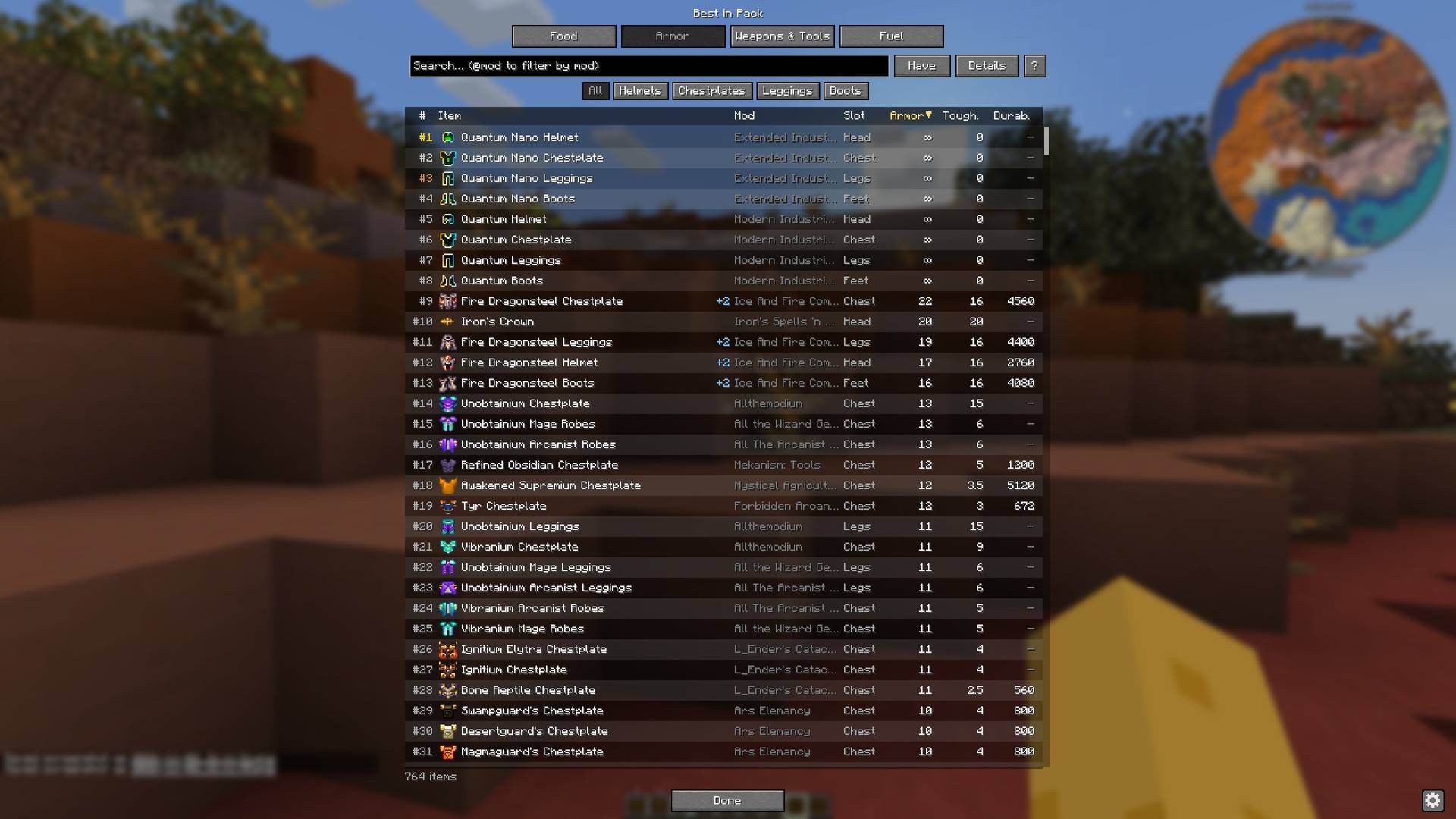
Press B and see every item from every mod, ranked by its real stats.
Big modpacks add hundreds of swords, chestplates, foods and fuels – and nothing tells you which one is actually better. Best in Pack reads the real stats of every item in your game and puts them in sortable tables.
Features
- Four tabs – Food, Armor, Weapons & Tools, Fuel – with every item from every mod, sorted by what matters (DPS, armor and toughness, hunger and saturation, burn time…). Click any column to sort by it.
- Search by name,
@modto show one mod,-wordto leave things out. - Details shows every stat, including special bonuses like flight or damage immunity.
- Have shows only the items in your inventory – items you have are green in every list.
- Shift tooltip rank – hold Shift over any item: Best in Pack: #2 of 14 weapons (by DPS).
- Jump to an item – hover an item in your inventory, JEI or REI and press B to open its row.
- JEI and REI – click a row to see how to craft it.
- Only real items – only items from the creative inventory are ranked (the same list JEI shows), so debug and technical items stay out.
- Client-only – works on any server, nothing to install there.
- Fabric, Forge and NeoForge, every Minecraft version from 1.20 to 26.3.
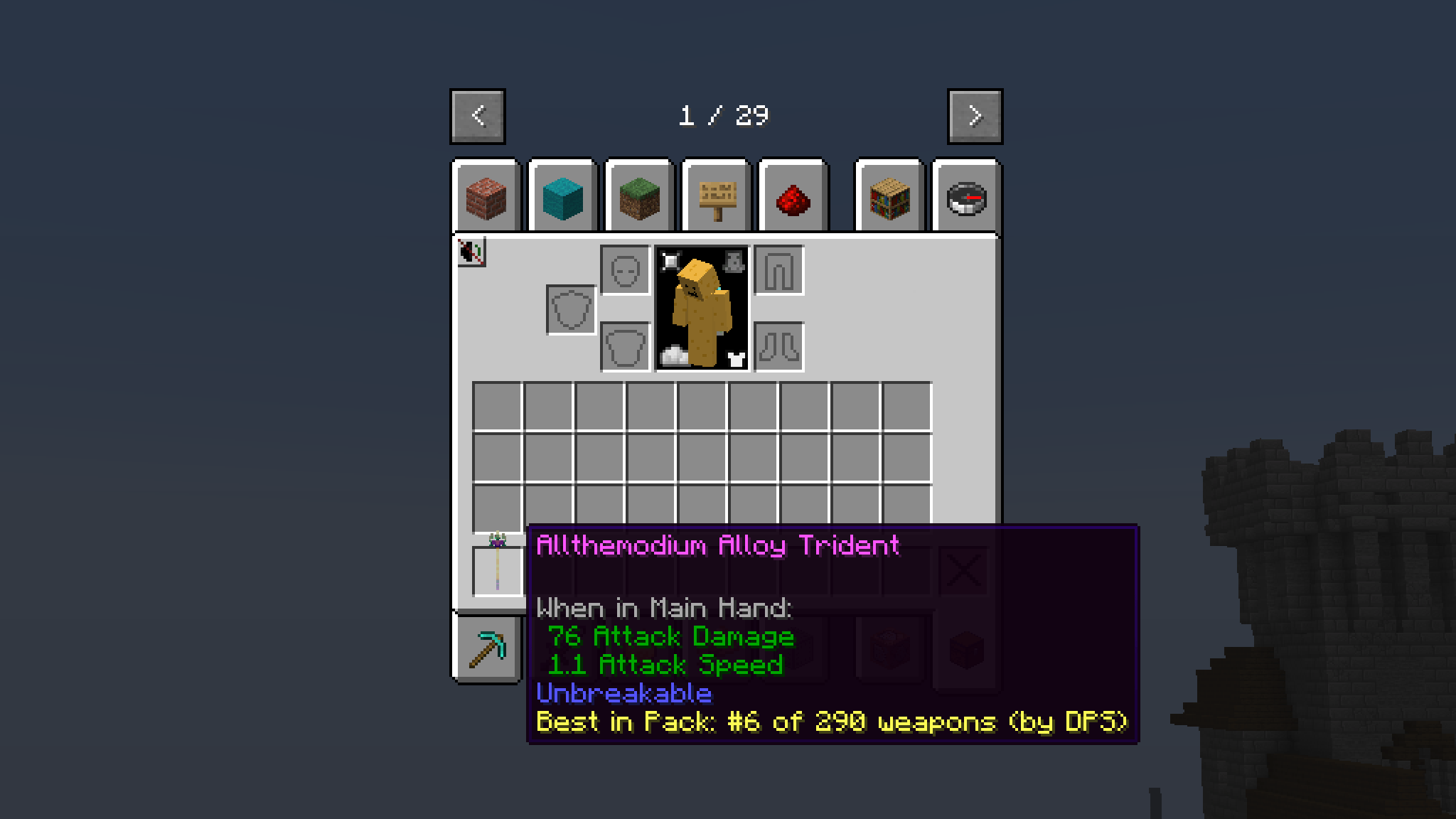
More screenshots – Weapons & Tools, Food, Fuel, Details and Have – are in the Gallery.
Which file do I need?
Pick the file for your loader and Minecraft version – the file name says both, for example BestInPack-neoforge-1.21-1.21.1-0.9.4.jar
| Minecraft | File |
|---|---|
| 1.20, 1.20.1 | …-1.20-1.20.1 (NeoForge 1.20.1: use the Forge file) |
| 1.20.2 | …-1.20.2 |
| 1.20.3, 1.20.4 | …-1.20.3-1.20.4 |
| 1.20.5, 1.20.6 | …-1.20.5-1.20.6 (Forge: 1.20.6) |
| 1.21, 1.21.1 | …-1.21-1.21.1 |
| 1.21.2 – 1.21.4 | …-1.21.2-1.21.4 (Forge: 1.21.3 and 1.21.4) |
| 1.21.5 | …-1.21.5 |
| 1.21.6 – 1.21.8 | …-1.21.6-1.21.8 |
| 1.21.9, 1.21.10 | …-1.21.9-1.21.10 |
| 1.21.11 | …-1.21.11 |
| 26.1 – 26.1.2 | …-26.1-26.1.2 |
| 26.2 | …-26.2 |
| 26.3 | …-26.3 |
Fabric needs Fabric API. JEI and REI are optional.
Settings and modpacks
Everything lives in config/bestinpack/ – bestinpack.json is explained in the README.txt next to it.
- Different default key for your modpack:
"openKey": "N"(also"F6","left alt","none"). It is used by new installs and by "Reset" in Controls; players can still change their key in Minecraft's Controls. welcomeMessage/keyConflictWarningswitch off the two chat messages.hiddenMods/hiddenItemsleave things out of the rankings; items hidden in JEI/REI are left out too.onlyCreativeItems: falseranks every registered item instead of only the creative-inventory ones.
You are welcome to include Best in Pack in any modpack.
Bugs, ideas and source code
- Found a bug or have an idea? Open an issue on GitHub – there are short forms for bug reports and for ideas. For a crash, please attach
logs/latest.logor the crash report; for a wrong ranking, name the item and the modpack. - Source code: github.com/Pokatocz/best-in-pack (MIT license)
Known limitations
- 26.3, multiplayer: Minecraft 26.3 computes some fuel burn times on the server only, so the Fuel tab shows a note instead of guessing. In single player everything works.
- 1.21.2 – 26.2, Fuel tab: burn times come from the world you are in, so the Fuel tab fills in after joining.
Project description from CurseForge.
Pick your setup
Best in Pack by Minecraft version and loader
Choose the version and loader you play, then open the matching release.
Minecraft version
26.2
3 loader buildsMinecraft version
26.1.2
3 loader buildsMinecraft version
26.1.1
3 loader buildsMinecraft version
26.1
3 loader buildsMinecraft version
1.21.11
3 loader buildsMinecraft version
1.21.10
3 loader buildsMinecraft version
1.21.9
3 loader buildsMinecraft version
1.21.8
3 loader buildsMinecraft version
1.21.7
3 loader buildsMinecraft version
1.21.6
3 loader buildsMinecraft version
1.21.5
3 loader buildsShowing the newest 12 of 24 game versions. Older files are in the list below.
Check the dependencies, then try the file in a copied instance before changing a world you care about.
Recent files
Best in Pack versions and loaders
Best in Pack 0.9.4 – NeoForge 26.3
BestInPack-neoforge-26.3-0.9.4.jar
14 Nov 2026
Client Source doesn’t say Server Source doesn’t say Dependencies No extras listed Listed on Release listing
Check the 26.3 · NeoForge setup NeoForge26.3 release
Best in Pack 0.9.4 – NeoForge 26.2
BestInPack-neoforge-26.2-0.9.4.jar
14 Nov 2026
Client Source doesn’t say Server Source doesn’t say Dependencies No extras listed Listed on Release listing
Check the 26.2 · NeoForge setup NeoForge26.2 release
Best in Pack 0.9.4 – NeoForge 26.1–26.1.2
BestInPack-neoforge-26.1-26.1.2-0.9.4.jar
14 Nov 2026
Client Source doesn’t say Server Source doesn’t say Dependencies No extras listed Listed on Release listing
Check the 26.1.2 · NeoForge setup NeoForge26.126.1.126.1.2 release
Best in Pack 0.9.4 – NeoForge 1.21.11
BestInPack-neoforge-1.21.11-0.9.4.jar
14 Nov 2026
Client Source doesn’t say Server Source doesn’t say Dependencies No extras listed Listed on Release listing
Check the 1.21.11 · NeoForge setup NeoForge1.21.11 release
Best in Pack 0.9.4 – NeoForge 1.21.9–1.21.10
BestInPack-neoforge-1.21.9-1.21.10-0.9.4.jar
14 Nov 2026
Client Source doesn’t say Server Source doesn’t say Dependencies No extras listed Listed on Release listing
Check the 1.21.10 · NeoForge setup NeoForge1.21.91.21.10 release
Best in Pack 0.9.4 – NeoForge 1.21.6–1.21.8
BestInPack-neoforge-1.21.6-1.21.8-0.9.4.jar
14 Nov 2026
Client Source doesn’t say Server Source doesn’t say Dependencies No extras listed Listed on Release listing
Check the 1.21.8 · NeoForge setup 1.21.81.21.61.21.7NeoForge release
Best in Pack 0.9.4 – NeoForge 1.21.5
BestInPack-neoforge-1.21.5-0.9.4.jar
14 Nov 2026
Client Source doesn’t say Server Source doesn’t say Dependencies No extras listed Listed on Release listing
Check the 1.21.5 · NeoForge setup 1.21.5NeoForge release
Best in Pack 0.9.4 – NeoForge 1.21.2–1.21.4
BestInPack-neoforge-1.21.2-1.21.4-0.9.4.jar
14 Nov 2026
Client Source doesn’t say Server Source doesn’t say Dependencies No extras listed Listed on Release listing
Check the 1.21.4 · NeoForge setup 1.21.41.21.3NeoForge1.21.2 release
Best in Pack 0.9.4 – NeoForge 1.20.5–1.20.6
BestInPack-neoforge-1.20.5-1.20.6-0.9.4.jar
14 Nov 2026
Client Source doesn’t say Server Source doesn’t say Dependencies No extras listed Listed on Release listing
Check the 1.20.6 · NeoForge setup 1.20.51.20.6NeoForge release
Best in Pack 0.9.4 – NeoForge 1.20.3–1.20.4
BestInPack-neoforge-1.20.3-1.20.4-0.9.4.jar
14 Nov 2026
Client Source doesn’t say Server Source doesn’t say Dependencies No extras listed Listed on Release listing
Check the 1.20.4 · NeoForge setup 1.20.4NeoForge1.20.3 release
Best in Pack 0.9.4 – NeoForge 1.20.2
BestInPack-neoforge-1.20.2-0.9.4.jar
14 Nov 2026
Client Source doesn’t say Server Source doesn’t say Dependencies No extras listed Listed on Release listing
Check the 1.20.2 · NeoForge setup 1.20.2NeoForge release
Best in Pack 0.9.4 – Fabric 26.3
BestInPack-fabric-26.3-0.9.4.jar
14 Nov 2026
Client Source doesn’t say Server Source doesn’t say Dependencies 1 required · 1 unchecked Listed on Release listing
Check the 26.3 · Fabric setup Fabric26.3 release
Looking for an older file? The official CurseForge project page is in Resources.
 mod
CurseForge · Minecraft
Dawn Star: Battle Mount
Transform vanilla mounts into fully customized combat companions with alloy armor, modular plugins, and unique skills.
 mod
CurseForge · Minecraft
SpringLotus
A streamlined library mod created by 404Setup. Includes network libraries, configuration libraries, and some UI libraries.
 mod
CurseForge · Minecraft
Sculk Apple
Expand Minecraft's Sculk ecosystem with a mysterious apple, unique abilities, experience-powered spreading, combat infections, chain explosions, and reversible terrain transformation.