Minecraft version
Back to mods 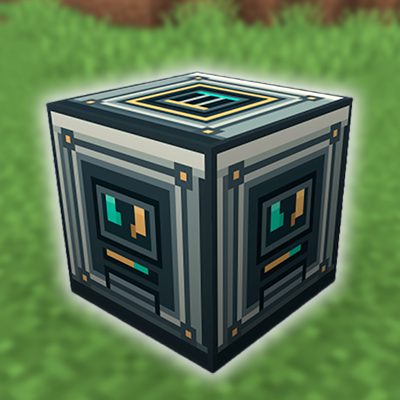
CurseForge · Minecraft mod
Universal Recycler
Recycle items back into the ingredients used to craft them.
Choose a version Pick your version below, then grab the matching file.
Quick answer
Which Universal Recycler release should I use?
Latest stable file universalrecycler-1.0.2-mc26.3-fabric.jar
Game version 26.3
Loader Fabric
Universal Recycler universalrecycler-1.0.2-mc26.3-fabric.jar targets 26.3 with Fabric. The project page does not say whether this file belongs on the client, dedicated server, or both. No extra mods listed for this file.
Where it goes
Is Universal Recycler required on the client, server, or both?
The project page does not say whether this file belongs on the client, dedicated server, or both.
Client Source doesn’t say
Dedicated server Source doesn’t say
Loader for this release Fabric
Required install it here Optional supported, not mandatory Not supported do not install here Source doesn’t say do not assume
The source does not explicitly classify this release as client-only or server-only.
What else does Universal Recycler universalrecycler-1.0.2-mc26.3-fabric.jar need?
universalrecycler-1.0.2-mc26.3-fabric.jar. Change the file and its required mods may change too.
This file does not list any required mods. Do not add a library just because a different file uses it.
This file does not list any required or optional mods.
Before you install it
Add Universal Recycler without breaking your instance.
Built for Universal Recycler universalrecycler-1.0.2-mc26.3-fabric.jar. Pick another file and the loader, install side or required mods may change.
- 01
Stick to this file
Use universalrecycler-1.0.2-mc26.3-fabric.jar. It targets 26.3 with Fabric; another release may have different loader, side or dependency requirements.
- 02
Bring the mods it needs
This file does not list any required mods. Do not add a library just because a different file uses it.
- 03
Put it on the correct side
The project page does not say whether this file belongs on the client, dedicated server, or both.
- 04
Pick the file you checked
Use the “Get this file” button beside universalrecycler-1.0.2-mc26.3-fabric.jar. It opens that exact file at the source.
About this project
What does Universal Recycler add?
Universal Recycler
Recycle all kind of unwanted items back into the ingredients used to craft them. Universal Recycler adds a simple in-game machine that looks up Minecraft's crafting recipes and returns their ingredients, so useful materials don't have to go to waste.
How to use
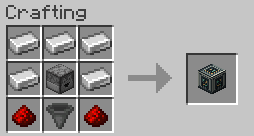
- Craft and place a Recycler.
- Open it and put an item in the input slot.
- Check the ingredient preview, then press
>>>to recycle one item. - Collect the returned ingredients from the output slots.
The preview is informational only; recycling happens when you press the button. The machine processes one input item per click and stops if there isn't enough room for the output.
Features
- Supports crafting recipes provided by the server's recipe manager.
- Shows a preview of the ingredients that will be returned.
- Handles recipes with ingredient alternatives by returning the first listed option.
- Skips recipes that leave crafting leftovers and does not attempt to assemble special recipes without a crafting grid.
- Includes configurable return multipliers, support for damaged items, and an item blacklist.
Crafting recipe
Configuration
The configuration file is generated at config/universalrecycler.json:
{
  "globalReturnMultiplier": 1.0,
  "allowDamagedItems": true,
  "blacklist": [
    "#minecraft:planks"
  ]
}
The blacklist accepts item IDs, such as "minecraft:diamond_sword", and item tags prefixed with #. By default, #minecraft:planks prevents planks from being recycled into logs. Configuration changes require a server restart.
Project description from CurseForge.
Pick your setup
Universal Recycler by Minecraft version and loader
Choose the version and loader you play, then open the matching release.
Minecraft version
26.2
2 loader buildsMinecraft version
26.1.2
2 loader buildsCheck the dependencies, then try the file in a copied instance before changing a world you care about.
Recent files
Universal Recycler versions and loaders
universalrecycler-1.0.2-mc26.3-fabric.jar
18 Oct 2026
Client Source doesn’t say Server Source doesn’t say Dependencies No extras listed Listed on Release listing
Check the 26.3 · Fabric setup Fabric26.3 release
universalrecycler-1.0.2-mc26.1.2-neoforge.jar
17 Oct 2026
Client Source doesn’t say Server Source doesn’t say Dependencies No extras listed Listed on Release listing
Check the 26.1.2 · NeoForge setup NeoForge26.1.2 release
universalrecycler-1.0.2-mc26.3-neoforge.jar
17 Oct 2026
Client Source doesn’t say Server Source doesn’t say Dependencies No extras listed Listed on Release listing
Check the 26.3 · NeoForge setup NeoForge26.3 release
universalrecycler-1.0.1-mc26.1.2-fabric.jar
17 Oct 2026
Client Source doesn’t say Server Source doesn’t say Dependencies 1 required · 1 unchecked Listed on Release listing
Check the 26.1.2 · Fabric setup Fabric26.1.2 release
universalrecycler-1.0.1-mc26.2-fabric.jar
17 Oct 2026
Client Source doesn’t say Server Source doesn’t say Dependencies 1 required · 1 unchecked Listed on Release listing
Check the 26.2 · Fabric setup Fabric26.2 release
universalrecycler-1.0.1-mc26.2-neoforge.jar
16 Oct 2026
Client Source doesn’t say Server Source doesn’t say Dependencies 1 required · 1 unchecked Listed on Release listing
Check the 26.2 · NeoForge setup NeoForge26.2 release
universalrecycler-1.0.1-mc26.3-neoforge.jar
16 Oct 2026
Client Source doesn’t say Server Source doesn’t say Dependencies 1 required · 1 unchecked Listed on Release listing
Check the 26.3 · NeoForge setup NeoForge26.3 release
universalrecycler-1.0.1-mc26.3-fabric.jar
15 Oct 2026
Client Source doesn’t say Server Source doesn’t say Dependencies 1 required · 1 unchecked Listed on Release listing
Check the 26.3 · Fabric setup Fabric26.3 release
universalrecycler-1.0.0-mc26.1.2-fabric.jar
14 Oct 2026
Client Source doesn’t say Server Source doesn’t say Dependencies 1 required · 1 unchecked Listed on Release listing
Check the 26.1.2 · Fabric setup Fabric26.1.2 release
universalrecycler-1.0.0-mc26.2-neoforge.jar
12 Oct 2026
Client Source doesn’t say Server Source doesn’t say Dependencies 1 required · 1 unchecked Listed on Release listing
Check the 26.2 · NeoForge setup NeoForge26.2 release
universalrecycler-1.0.0-mc26.2-fabric.jar
11 Oct 2026
Client Source doesn’t say Server Source doesn’t say Dependencies 1 required · 1 unchecked Listed on Release listing
Check the 26.2 · Fabric setup Fabric26.2 release
universalrecycler-1.0.0-mc26.3-neoforge.jar
11 Oct 2026
Client Source doesn’t say Server Source doesn’t say Dependencies 1 required · 1 unchecked Listed on Release listing
Check the 26.3 · NeoForge setup NeoForge26.3 release
Looking for an older file? The official CurseForge project page is in Resources.