Minecraft version
Back to mods 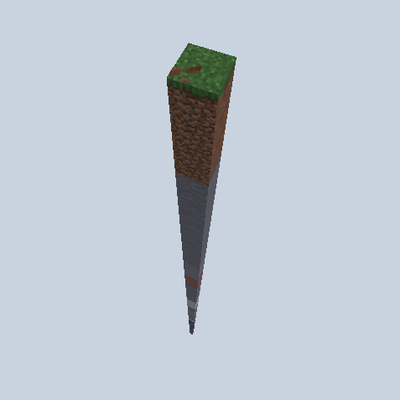
CurseForge · Minecraft mod
Expanding World
Start on a single block in the void - every Minecraft day the real world grows by one block layer on every side, forever.
Choose a version Pick your version below, then grab the matching file.
Quick answer
Which Expanding World release matches 26.3?
Best match for your filters ExpandingWorld-neoforge-26.3-1.0.0
Game version 26.3
Loader NeoForge
Expanding World ExpandingWorld-neoforge-26.3-1.0.0 targets 26.3 with NeoForge. The project page does not say whether this file belongs on the client, dedicated server, or both. No extra mods listed for this file.
Where it goes
Is Expanding World required on the client, server, or both?
The project page does not say whether this file belongs on the client, dedicated server, or both.
Client Source doesn’t say
Dedicated server Source doesn’t say
Loader for this release NeoForge
Required install it here Optional supported, not mandatory Not supported do not install here Source doesn’t say do not assume
The source does not explicitly classify this release as client-only or server-only.
What else does Expanding World ExpandingWorld-neoforge-26.3-1.0.0 need?
ExpandingWorld-neoforge-26.3-1.0.0 on 26.3. Every mod below is checked against that same setup.
This file does not list any required mods. Do not add a library just because a different file uses it.
This file does not list any required or optional mods.
Before you install it
Add Expanding World without breaking your instance.
Built for Expanding World ExpandingWorld-neoforge-26.3-1.0.0 on 26.3. Pick another file and the loader, install side or required mods may change.
- 01
Stick to this file
Use ExpandingWorld-neoforge-26.3-1.0.0. It targets 26.3 with NeoForge; another release may have different loader, side or dependency requirements.
- 02
Bring the mods it needs
This file does not list any required mods. Do not add a library just because a different file uses it.
- 03
Put it on the correct side
The project page does not say whether this file belongs on the client, dedicated server, or both.
- 04
Pick the file you checked
Use the “Get this file” button beside ExpandingWorld-neoforge-26.3-1.0.0. It opens that exact file at the source.
About this project
What does Expanding World add?
Expanding World
You start on one block, floating in the void.
Every Minecraft day the world grows by exactly one block layer on every side: 1×1 → 3×3 → 5×5 → 7×7 → 9×9 … and it never stops.
The land that appears is the real Minecraft world of your seed - hills, caves, ores, villages and structures - revealed ring by ring, with a cut-away cross-section of the terrain at the edge.
Features
- Start in a forest - on the ground, right next to a tree trunk, so the very first expansion gives you wood.
- Every world is different - a random seed plus a random starting point picked from a 20,000 × 20,000 block area.
- One ring per day - at the start of every Minecraft day, sleeping counts too. Saving, quitting or reconnecting never expands twice.
- No walls - build out over the void if you dare. Fall off the edge and you are gone.
- Your builds are safe - the land grows around what you built, it never overwrites it.
- Multiplayer - everyone spawns on the same single block.
- Grows to the real maximum - up to the largest world size Minecraft allows (about 60 million × 60 million blocks, roughly 1,141 years of 20-minute days). Then it stops and tells you.
- Real structures still work - Eyes of Ender,
/locateand explorer maps all point to real places. - No screen clutter - press F3 to see the day, world size, time until the next expansion, your distance to the edge and how many days are left. A chat line and a soft sound on every expansion.
/expandingworldshows everything.
How to play
Create a new world. The World Type is already set to Expanding World, just press Create.
Dedicated server: put level-type=expandingworld:expanding_world in server.properties before the world is generated.
Inspired by aCookieGod's expanding-world challenge.
Project description from CurseForge.
Pick your setup
Expanding World by Minecraft version and loader
Choose the version and loader you play, then open the matching release.
Minecraft version
26.2
3 loader buildsCheck the dependencies, then try the file in a copied instance before changing a world you care about.
Recent files
Expanding World versions and loaders
ExpandingWorld-neoforge-26.3-1.0.0
ExpandingWorld-neoforge-26.3-1.0.0.jar
14 Oct 2026
Client Source doesn’t say Server Source doesn’t say Dependencies No extras listed Listed on Release listing
Check the 26.3 · NeoForge setup NeoForge26.3 release
ExpandingWorld-forge-26.3-1.0.0
ExpandingWorld-forge-26.3-1.0.0.jar
14 Oct 2026
Client Source doesn’t say Server Source doesn’t say Dependencies No extras listed Listed on Release listing
Check the 26.3 · Forge setup Forge26.3 release
ExpandingWorld-fabric-26.3-1.0.0
ExpandingWorld-fabric-26.3-1.0.0.jar
14 Oct 2026
Client Source doesn’t say Server Source doesn’t say Dependencies 1 required · 1 unchecked Listed on Release listing
Check the 26.3 · Fabric setup Fabric26.3 release
Looking for an older file? The official CurseForge project page is in Resources.