Minecraft version
Back to mods 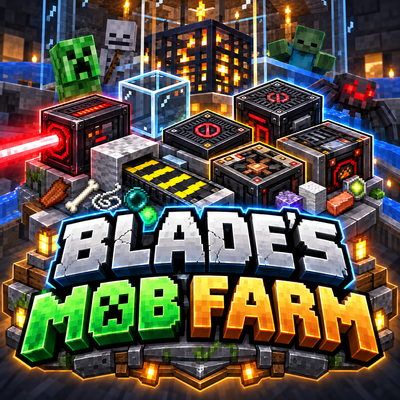
CurseForge · Minecraft mod
BLADE's Mob Farm
Spawner and Mob Farming just got easier.
Choose a version Pick your version below, then grab the matching file.
Quick answer
Which BLADE's Mob Farm release should I use?
Latest stable file blades-mob-farm-1.0.101.jar
Game version 26.3
Loader Fabric
BLADE's Mob Farm blades-mob-farm-1.0.101.jar targets 26.3 with Fabric. The project page does not say whether this file belongs on the client, dedicated server, or both. No extra mods listed for this file.
Where it goes
Is BLADE's Mob Farm required on the client, server, or both?
The project page does not say whether this file belongs on the client, dedicated server, or both.
Client Source doesn’t say
Dedicated server Source doesn’t say
Loader for this release Fabric
Required install it here Optional supported, not mandatory Not supported do not install here Source doesn’t say do not assume
The source does not explicitly classify this release as client-only or server-only.
What else does BLADE's Mob Farm blades-mob-farm-1.0.101.jar need?
blades-mob-farm-1.0.101.jar. Change the file and its required mods may change too.
This file does not list any required mods. Do not add a library just because a different file uses it.
This file does not list any required or optional mods.
Before you install it
Add BLADE's Mob Farm without breaking your instance.
Built for BLADE's Mob Farm blades-mob-farm-1.0.101.jar. Pick another file and the loader, install side or required mods may change.
- 01
Stick to this file
Use blades-mob-farm-1.0.101.jar. It targets 26.3 with Fabric; another release may have different loader, side or dependency requirements.
- 02
Bring the mods it needs
This file does not list any required mods. Do not add a library just because a different file uses it.
- 03
Put it on the correct side
The project page does not say whether this file belongs on the client, dedicated server, or both.
- 04
Pick the file you checked
Use the “Get this file” button beside blades-mob-farm-1.0.101.jar. It opens that exact file at the source.
About this project
What does BLADE's Mob Farm add?
BLADE’s Mob Utilities adds a collection of simple, useful blocks designed to make mob farms easier to build, automate, and control.
Mob Fan — Pushes mobs and players 8 blocks in the direction it faces (This can be changed by right clicking the fan). Hold shift click (crouch) to be able to walk infront of fans.
Recipe: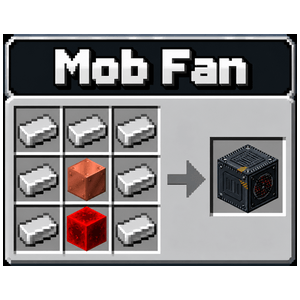
Mob Conveyor — Moves mobs, dropped items, and XP in one direction. Crafts 2 at a time.Hold shift click (crouch) to be able to walk on conveyors.
Recipe: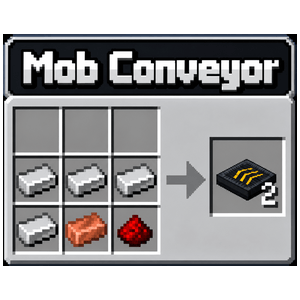
Mob Laser — Damages mobs down to 1 HP without killing them when they are in the laser which shoots out 7 blocks, making them easy to finish off.
Recipe: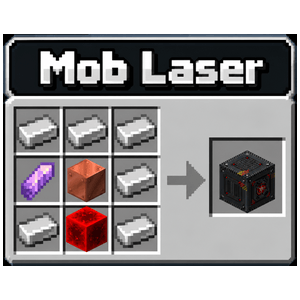
Mob Collector — Automatically collects nearby dropped items (as long as they are within 1 block of the Input Holes in the top, back and both sides), and XP into its internal storage. Any mobs of the same kind within its collection area will combine into 1 mob creating a stacked Mob to save on space and lag.
Recipe: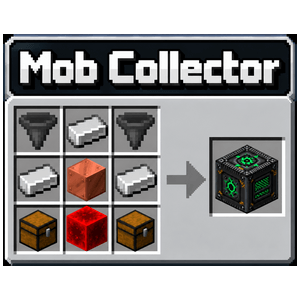
Mob Spawn Upgrader — Boosts nearby mob spawners 5 blocks out in any direction from the block, increasing their spawn count and nearby mob limit.
Recipe: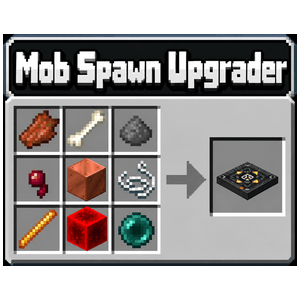
Mob Muffler — Silences mobs within 5 blocks in any direction from the block.
Recipe: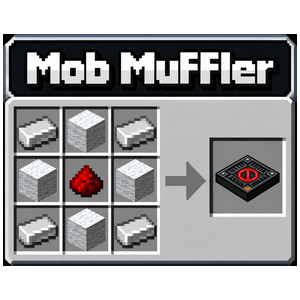
Mob Glass — Transparent glass that completely blocks light, perfect for viewing dark mob-spawning areas without lighting them up. Crafts 8 at a time.
Recipe: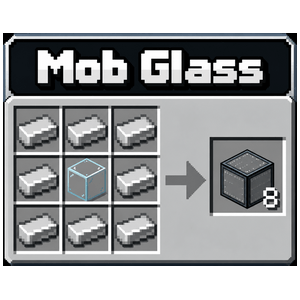
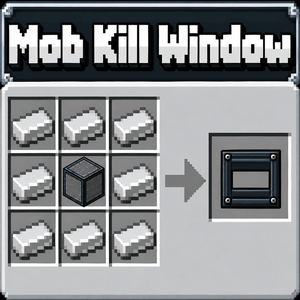
Mob Kill Window — Bunker typr window that allows the player to attack mobs through the window without letting light in.Recipe:
The Mob Muffler and Mob Spawn Upgrader can also be placed together to combine their effects into a single Muffled Mob Spawn Upgrader block. Mob Spawn Upgrader's function does not increase with more Upgraders.
Project description from CurseForge.
Pick your setup
BLADE's Mob Farm by Minecraft version and loader
Choose the version and loader you play, then open the matching release.
Check the dependencies, then try the file in a copied instance before changing a world you care about.
Recent files
BLADE's Mob Farm versions and loaders
blades-mob-farm-1.0.101.jar
12 Oct 2026
Client Source doesn’t say Server Source doesn’t say Dependencies No extras listed Listed on Release listing
Check the 26.3 · Fabric setup Fabric26.3 release
blades-mob-farm-1.0.99.jar
11 Oct 2026
Client Source doesn’t say Server Source doesn’t say Dependencies No extras listed Listed on Release listing
Check the 26.3 · Fabric setup Fabric26.3 release
blades-mob-farm-1.0.91.jar
9 Oct 2026
Client Source doesn’t say Server Source doesn’t say Dependencies No extras listed Listed on Release listing
Check the 26.3 · Fabric setup Fabric26.3 release
blades-mob-farm-1.0.85.jar
9 Oct 2026
Client Source doesn’t say Server Source doesn’t say Dependencies No extras listed Listed on Release listing
Check the 26.3 · Fabric setup Fabric26.3 release
blades-mob-farm-1.0.82.jar
9 Oct 2026
Client Source doesn’t say Server Source doesn’t say Dependencies No extras listed Listed on Release listing
Check the 26.3 · Fabric setup Fabric26.3 release
blades-mob-farm-1.0.79.jar
9 Oct 2026
Client Source doesn’t say Server Source doesn’t say Dependencies No extras listed Listed on Release listing
Check the 26.3 · Fabric setup Fabric26.3 release
blades-mob-farm-1.0.69.jar
9 Oct 2026
Client Source doesn’t say Server Source doesn’t say Dependencies No extras listed Listed on Release listing
Check the 26.3 · Fabric setup Fabric26.3 release
Looking for an older file? The official CurseForge project page is in Resources.
 mod
mod CurseForge · Minecraft
PrimalReborn
Primal Reborn is a prehistoric survival mod that overhauls early-game character progression mechanics, introducing thirst, flint knapping, primitive pottery, leather tanning, and bronze metallurgy. I drew inspiration for this mod from Terrafirmacraft.
 mod
mod CurseForge · Minecraft
Peeksy
Allows you to view other players' inventories
 mod
mod CurseForge + Modrinth · Minecraft
Quick Skin
Sick of wasting time with Minecraft’s slow launcher just to change your skin? Quick Skin lets you swap skins instantly even on “offline” servers and gives you access to every official Minecraft cape.