Minecraft version
Back to mods 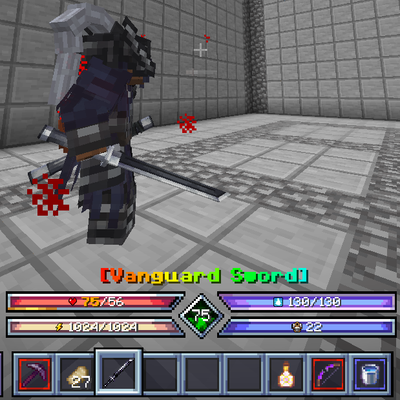
CurseForge · Minecraft mod
Sol's Ares Hud
Shows Sol's Item Rarity borders and name colors on Ares HUD's custom hotbar.
Choose a version Pick your version below, then grab the matching file.
Quick answer
Which Sol's Ares Hud release should I use?
Latest stable file sols_ares_hud-1.0.2.jar
Game version 1.20.1
Loader Forge
Sol's Ares Hud sols_ares_hud-1.0.2.jar targets 1.20.1 with Forge. The project page does not say whether this file belongs on the client, dedicated server, or both. No extra mods listed for this file.
Where it goes
Is Sol's Ares Hud required on the client, server, or both?
The project page does not say whether this file belongs on the client, dedicated server, or both.
Client Source doesn’t say
Dedicated server Source doesn’t say
Loader for this release Forge
Required install it here Optional supported, not mandatory Not supported do not install here Source doesn’t say do not assume
The source does not explicitly classify this release as client-only or server-only.
What else does Sol's Ares Hud sols_ares_hud-1.0.2.jar need?
sols_ares_hud-1.0.2.jar. Change the file and its required mods may change too.
This file does not list any required mods. Do not add a library just because a different file uses it.
This file does not list any required or optional mods.
Before you install it
Add Sol's Ares Hud without breaking your instance.
Built for Sol's Ares Hud sols_ares_hud-1.0.2.jar. Pick another file and the loader, install side or required mods may change.
- 01
Stick to this file
Use sols_ares_hud-1.0.2.jar. It targets 1.20.1 with Forge; another release may have different loader, side or dependency requirements.
- 02
Bring the mods it needs
This file does not list any required mods. Do not add a library just because a different file uses it.
- 03
Put it on the correct side
The project page does not say whether this file belongs on the client, dedicated server, or both.
- 04
Pick the file you checked
Use the “Get this file” button beside sols_ares_hud-1.0.2.jar. It opens that exact file at the source.
About this project
What does Sol's Ares Hud add?
Sol's Ares Hud
A small compatibility addon that makes Sol's Item Rarity and Ares HUD work together.
The problem
Ares HUD replaces the vanilla hotbar and the selected-item name with its own. Sol's Item Rarity draws its rarity visuals on top of those vanilla elements, so once Ares HUD takes over, they disappear:
- The rarity-colored square border around hotbar items is gone.
- The held item's name above the hotbar is no longer rarity-colored.
What this addon does
- Rarity borders on Ares HUD's hotbar. Every hotbar and offhand item gets the exact same border Sol's Item Rarity would draw: same style, same animation, same config options. It follows Ares HUD's layout, scale and selection animation automatically.
- Rarity-colored item name. The name Ares HUD shows when you switch items uses Sol's Item Rarity's name colors (including chroma effects).
- No duplicate name. Prevents Sol's Item Rarity's own name from being drawn a second time at the vanilla position.
Everything is controlled by Sol's Item Rarity's existing settings (borders on/off, animated borders, colored names, hotbar border toggle). This addon has no config of its own. If Ares HUD's hotbar is disabled, vanilla behavior is untouched.
Requirements
- Minecraft 1.20.1, Forge
- Sol's Item Rarity 1.7+
- Ares HUD 2.0+
Client-side only. Does not need to be installed on a server.
Notes
- Does not edit or replace any other mod's jar.
- Built against Ares HUD 2.0.5 and Sol's Item Rarity 1.7.2. If a future update changes their internals, the border simply stops drawing (one error in the log); the game will not crash.
Project description from CurseForge.
Pick your setup
Sol's Ares Hud by Minecraft version and loader
Choose the version and loader you play, then open the matching release.
Check the dependencies, then try the file in a copied instance before changing a world you care about.
Recent files
Sol's Ares Hud versions and loaders
sols_ares_hud-1.0.2.jar
24 Oct 2026
Client Source doesn’t say Server Source doesn’t say Dependencies No extras listed Listed on Release listing
Check the 1.20.1 · Forge setup 1.20.1Forge release
sols_ares_hud-1.0.1.jar
24 Oct 2026
Client Source doesn’t say Server Source doesn’t say Dependencies No extras listed Listed on Release listing
Check the 1.20.1 · Forge setup 1.20.1Forge release
sols_ares_hud-1.0.0.jar
9 Oct 2026
Client Source doesn’t say Server Source doesn’t say Dependencies No extras listed Listed on Release listing
Check the 1.20.1 · Forge setup 1.20.1Forge release
Looking for an older file? The official CurseForge project page is in Resources.
 mod
mod CurseForge · Minecraft
Beyond The End - Optimization and Fixes
Addon with optimizations and bugfixes for the Beyond The End Modpack
 mod
mod CurseForge · Minecraft
Sable Trees: Physics Tree Felling
Chop trees the real way: notch, back-cut and watch them fall with full Sable physics.
 mod
mod CurseForge · Minecraft
KubeGroovy
KubeGroovy is a fork of KubeJS running on Groovy instead of Javascript