SP Core Needed by SP VitalView sp-vitalview-0.9.1.jar
requiredMatching file found Matched file: sp-core-0.5.1.jar

CurseForge · Minecraft mod
Huge utility collection. Health bar, what i'am looking at and alot more awesome things.
Quick answer
SP VitalView sp-vitalview-0.9.1.jar targets 26.2 with Fabric. The project page does not say whether this file belongs on the client, dedicated server, or both. All 1 required mods have matching files.
Where it goes
The project page does not say whether this file belongs on the client, dedicated server, or both.
The source does not explicitly classify this release as client-only or server-only.
sp-vitalview-0.9.1.jar. Change the file and its required mods may change too.
Install SP Core first. We found matching files for this game-version and loader setup.
We only count dependency files that match this setup. A file for another loader does not fill the gap.
Before you install it
Built for SP VitalView sp-vitalview-0.9.1.jar. Pick another file and the loader, install side or required mods may change.
Use sp-vitalview-0.9.1.jar. It targets 26.2 with Fabric; another release may have different loader, side or dependency requirements.
Install SP Core first. We found matching files for this game-version and loader setup.
The project page does not say whether this file belongs on the client, dedicated server, or both.
Use the “Get this file” button beside sp-vitalview-0.9.1.jar. It opens that exact file at the source.
About this project

SP VitalView combines health information, combat feedback, value-colored loot and block identification in one configurable utility mod by xMrShadyx.
See what you hit, what you collect, and what you are looking at — with a consistent dark interface and personal settings.
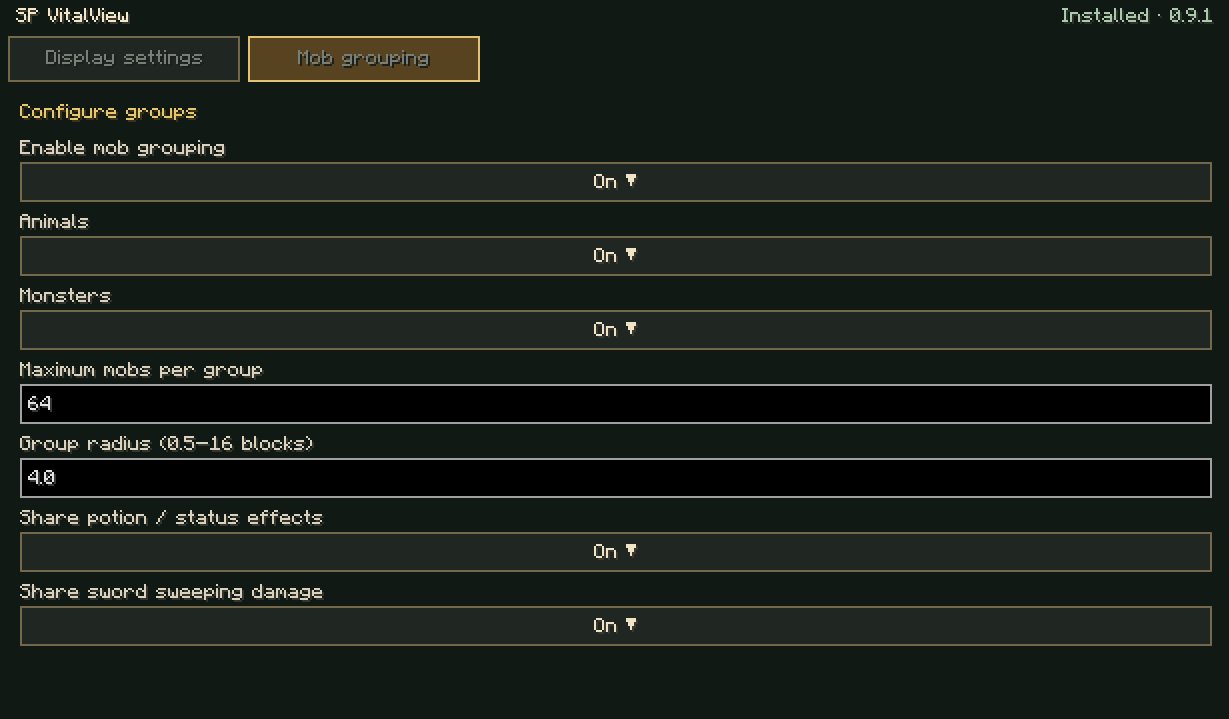
The maximum mob grouping radius is now 16 blocks. Configure it through /spadmin → SP VitalView → Mob grouping → Configure groups. The accepted range is 0.5–16 blocks; the default remains 2. Existing saved radius values are preserved.
Hold breeding food and right-click a grouped adult animal to feed all ready pairs the held food can cover. 10 adult sheep + 10 wheat = 5 lambs. Parents remain in the stack and receive vanilla breeding cooldowns. In Survival, each successful pair uses two food items. Odd food or unmatched adults remain unused; Creative consumes no food. Both hands work.
Offspring, genetics, breeding credit, XP and food remainders use vanilla methods. Babies form their own groups when eligible. Turtles retain normal nesting/egg interactions. A short English/Bulgarian message reports results or missing ready pairs/food.
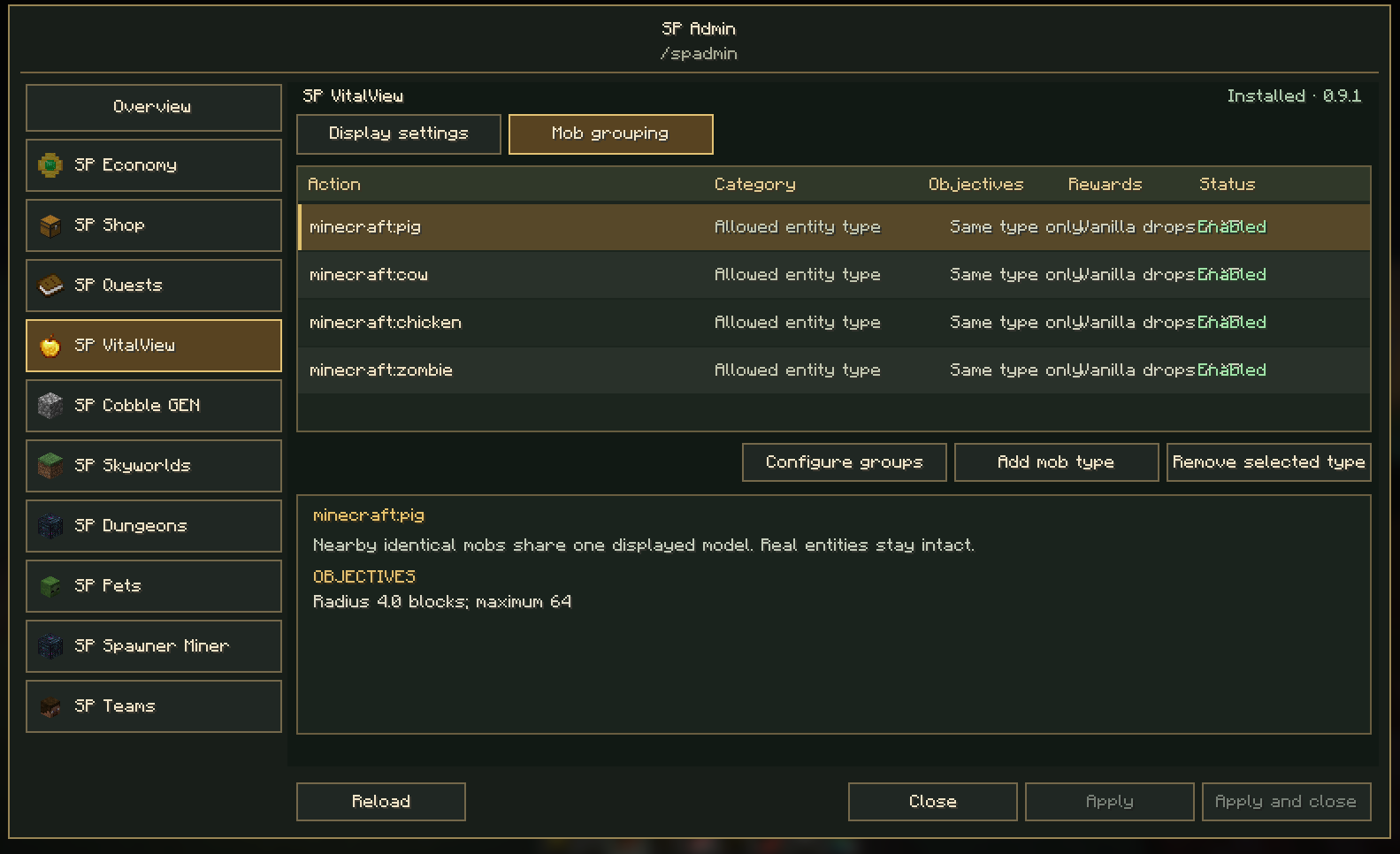
Sheep are included in fresh default grouping lists. Only the unchanged pre-0.9 default list is upgraded automatically; custom lists remain exact. Enable additional species through /spadmin → SP VitalView → Mob grouping → Add mob type.
Fixes grouped mobs splitting when their individual AI chose different directions. Only the leader now runs movement/attack AI. Followers stay at its position each tick, and a survivor takes over when the leader dies. Individual health, effects, data, loot and XP are retained.
No persistent NoAI flags are written. Disabling server grouping restores independent behavior. Internal pushing/cramming and independent follower creeper priming are suppressed. Existing groups stay linked while loaded even beyond the scan radius for new groups.
Existing settings and filters are preserved. Configure groups through /spadmin → SP VitalView → Mob grouping. Replace the previous VitalView JAR on the server and clients.
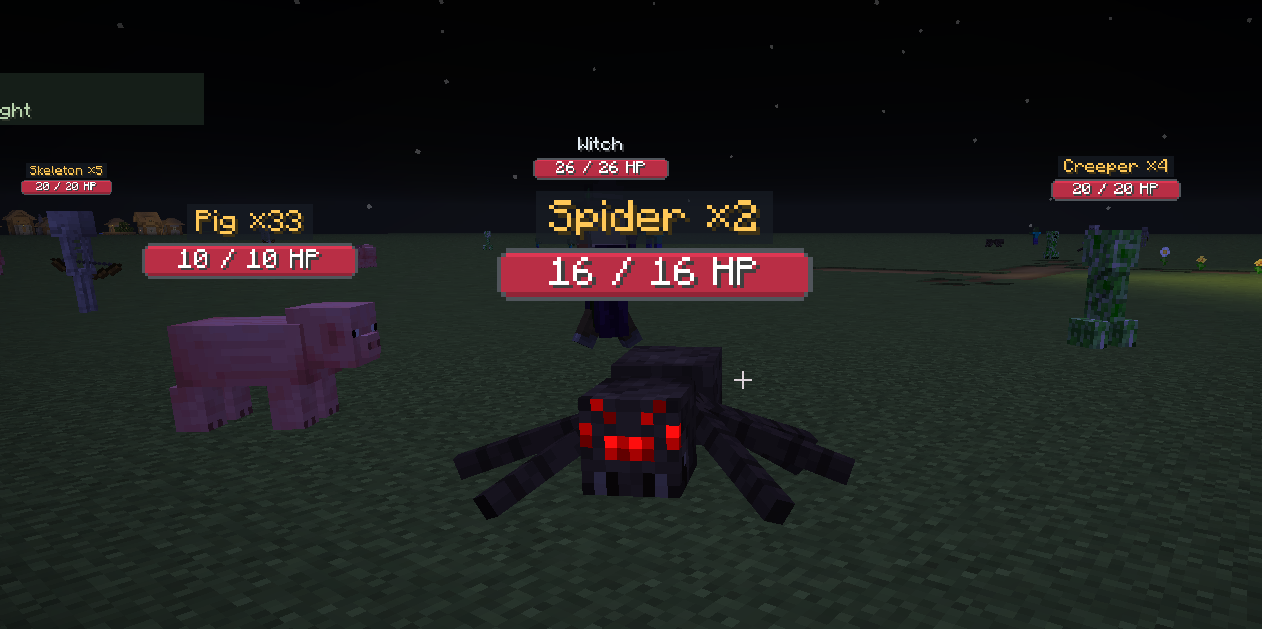
Nearby mobs of an allowed type show one model and a count (Pig ×10). One normal kill leaves Pig ×9. Real mobs retain individual health, AI, loot and XP. Poison/status effects and sword sweeping damage can affect all eligible members; duplicate sweep damage is prevented. Intra-group pushing is suppressed, and stable piles do not rotate representatives. Solid walls prevent grouping.
Server rules: /spadmin → SP VitalView → Mob grouping. Administrator permission required. Defaults: maximum 16, radius 2 blocks, animals and monsters enabled. Maximum is configurable from 2–64 and radius from 0.5–4. Add/remove entity IDs using registry search. Default types: pig, cow, chicken, zombie, skeleton, spider and creeper. Named/ownable families, vehicles, leashed mobs and explicit bosses are excluded.
Personal view and opacity: /spvitalview → Visibility. Turning off the view restores all models for you without changing server gameplay rules. Gameplay rules are saved in config/sp-vitalview/mob-stacking.json; personal preferences stay in settings.json. Mobs themselves are not deleted or replaced by counters.
DeathView adds a personal skull at your latest death with dropped items, their remaining loaded lifetime and distance. It clears within 3 blocks or when all tracked drops disappear. Tracks merges and persists per player/world across restarts. Unloaded chunks pause item aging. Settings: /spvitalview → DeathView (enabled, size, opacity).
Block information and pickup notifications — available through /sphud with SP Core 0.5.0+. Select an element, drag it or adjust X/Y, visibility, scale and opacity, then choose Save layout. Cancel discards the draft; Reset takes effect on Save. No OP or cheats are required. Only installed, registered elements are listed. The editor updates the existing personal settings file and preserves other preferences. Server feature restrictions still apply. These local preferences do not change rewards or gameplay data.
Settings command: /spvitalview
Use /sphud to edit Block information through SP Core 0.5.0. Drag the sample, set X/Y, scale or panel opacity, and hide/show the element. No OP or cheats are required. Save layout writes the existing personal VitalView fields; Cancel and Reset remain drafts until saved. Other VitalView preferences are preserved. Existing layouts load without migration. /spvitalview continues to edit the same settings. The global VitalView switch and opacity still apply during gameplay.
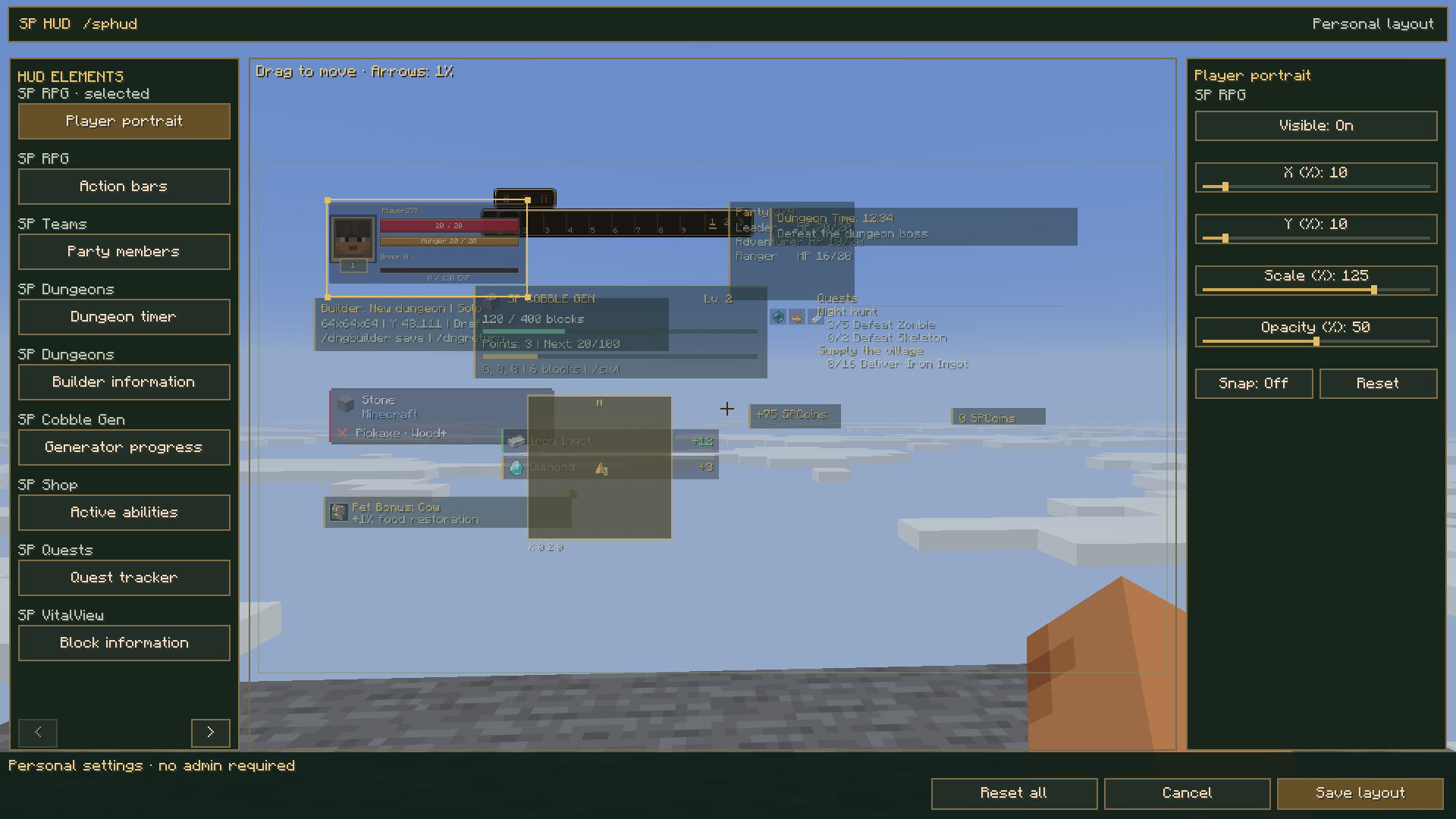
Block information and pickup notifications are both registered. Health bars and world-space combat/loot labels retain their existing target-relative controls.
DeathView: a personal skull, remaining item lifetime and distance at your latest death with dropped items.
Health above monsters, other players and animals: numbers, a smooth bar, or both.
Numbers fitted inside the bar, configurable dimensions, and fixed head placement with natural distance scaling.
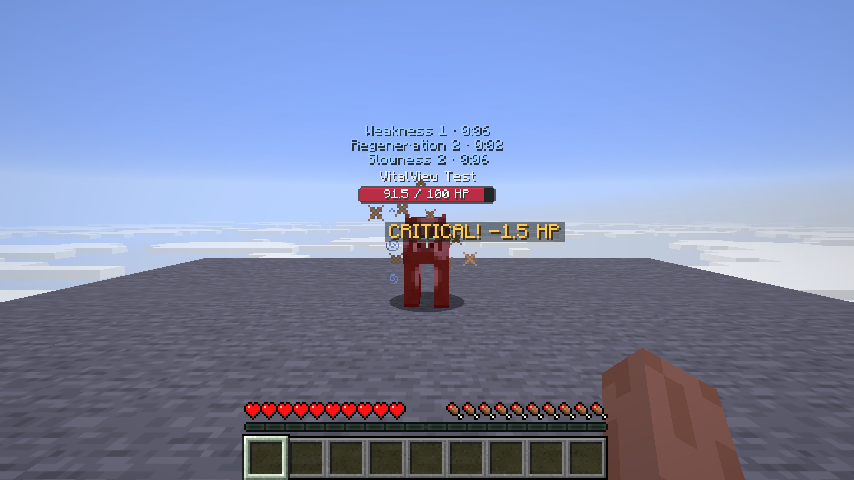
Actual damage, confirmed critical hits, healing, repeated regeneration and status-effect notifications.
Readable combat popups with body/head/crosshair anchors, independent size, offsets and screen-edge clamping.
Separate visibility for players, monsters, land animals and aquatic animals.
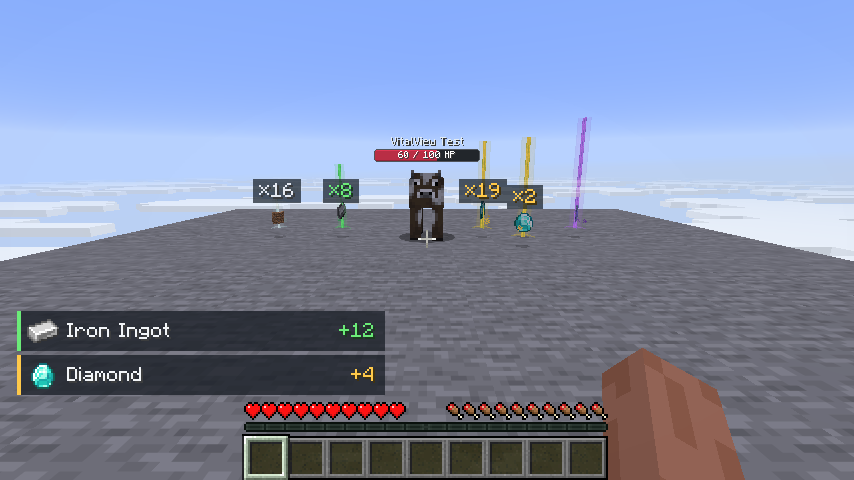
Four customizable loot tiers: Common → Resources → Valuables → Rare.
Colored beams, halos, sparkles and per-item category/color overrides.
Nearby identical stackable drops shown as one visual item with a combined count.
Exact pickup notifications with icons and names, including partial pickups.
A targeted-block panel with icon, name, source mod, tool recommendation and minimum tier when known.
A green check or red cross showing whether the held item satisfies the harvest requirement.
Draggable pickup and block panels, with size and position controls.
0–100% opacity globally and independently for every overlay category.
English and Bulgarian menus, preview, Save, Cancel and Restore defaults.
This visual utility does not change health, combat, mining requirements, block drops or actual item stacks.
A skull marks your latest death with dropped items. It shows distance and the remaining lifetime of the tracked drops. The server follows actual item ages (vanilla lifetime: 5 minutes of loaded ticks), pickups, destruction and item merges. The remaining time refers to the last surviving tracked stack; collecting some drops can shorten it. Unloaded chunks pause item aging, so the display does not incorrectly expire after five minutes of real time. An unlimited-lifetime item displays ∞.
The marker clears automatically when you come within 3 blocks of the original death position, or when all tracked drops disappear. A new death replaces your previous marker. Deaths without dropped items (including keepInventory) create no marker. The marker is personal, is shown only in its dimension, and remains visible through walls to guide recovery. Face its location to see it.
Enable or disable it and adjust size and opacity in /spvitalview → DeathView. Global opacity also applies. Preferences stay in the instance config; recovery data is stored per player inside the current world's data/sp-vitalview/deathview.json, including across server restarts. Install SP VitalView on the server and the client for authoritative DeathView tracking.
English in-game captures from October 22, 2026.
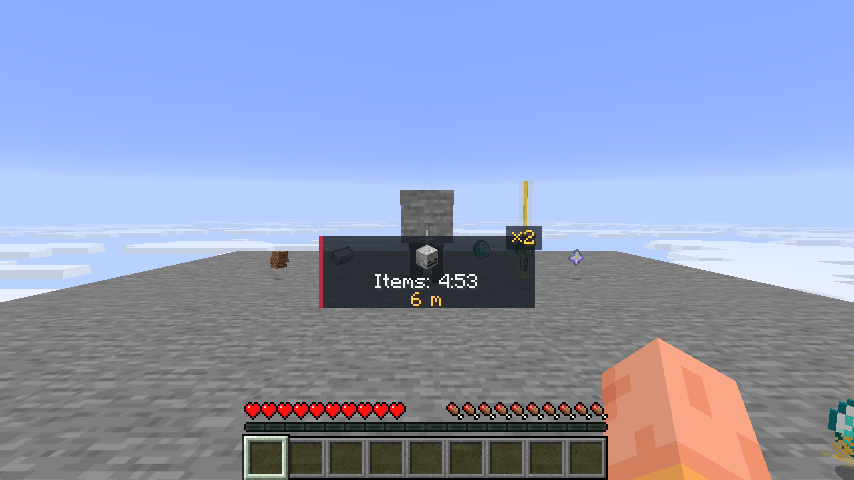
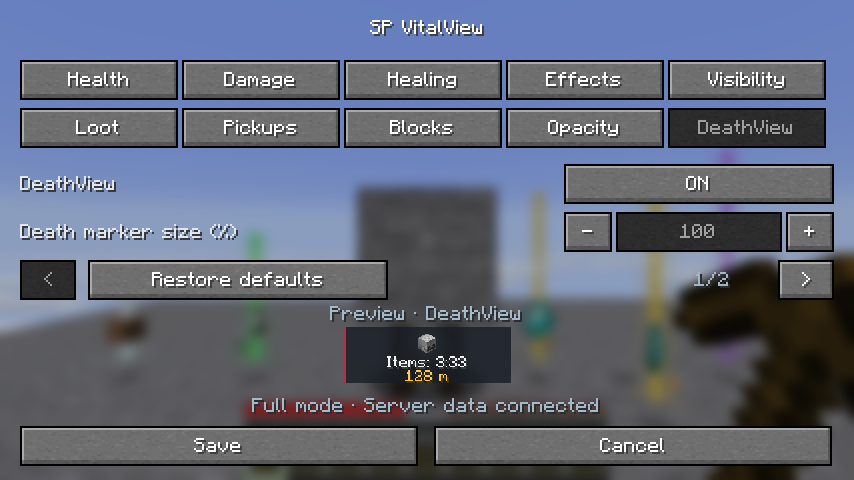
Screenshots captured in-game with the English interface on October 11, 2026 (version 0.4.3).
Aim at a block within normal interaction range. The indicator updates when the main-hand item changes.
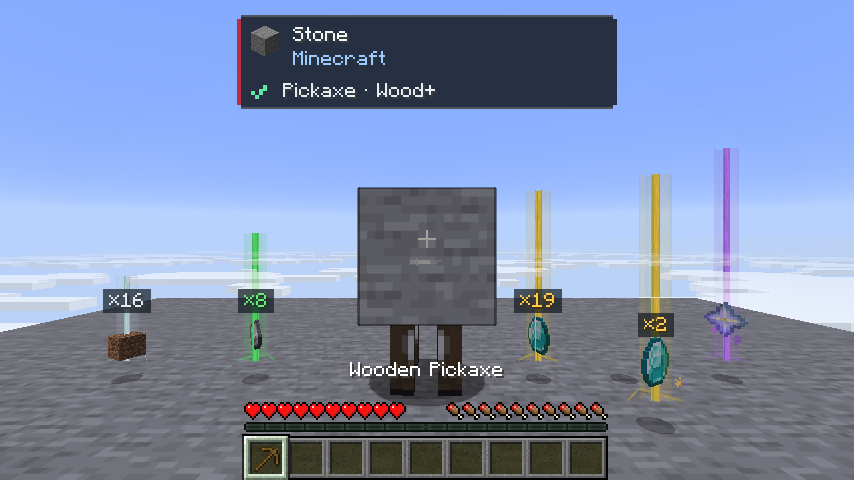
Opacity fades text, borders, backgrounds and icons together. Loot opacity includes the beam core, halo and sparkles.
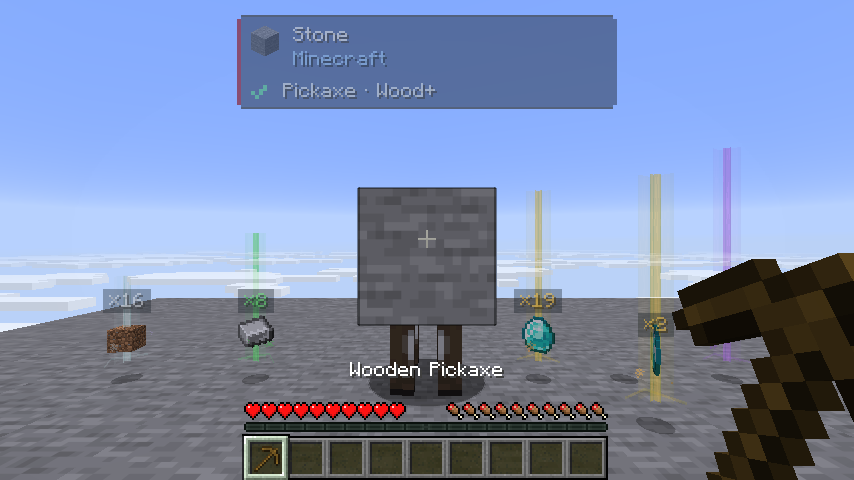
The test target has a deliberately increased maximum of 100 HP. Normal entity health is unchanged. One heart equals 2 HP; a usual ten-heart player has 20 HP.
The ×19 label combines separate diamond drops of 12 and 7. A differently named stack remains separate. A partial pickup of four diamonds is reported as +4.
Run /spvitalview. Categories use two rows to remain readable at the default GUI scale. The bottom preview follows the active category and uses unsaved draft settings. Damage shows a hit, Healing a health gain, Effects a potion effect, Visibility entity groups, Loot sample drops, Pickups a pickup feed, and Blocks the real block-panel drawing style. In Opacity, hover or edit a setting to preview that element. Previews fit inside their reserved area and never spawn entities or emit game events.
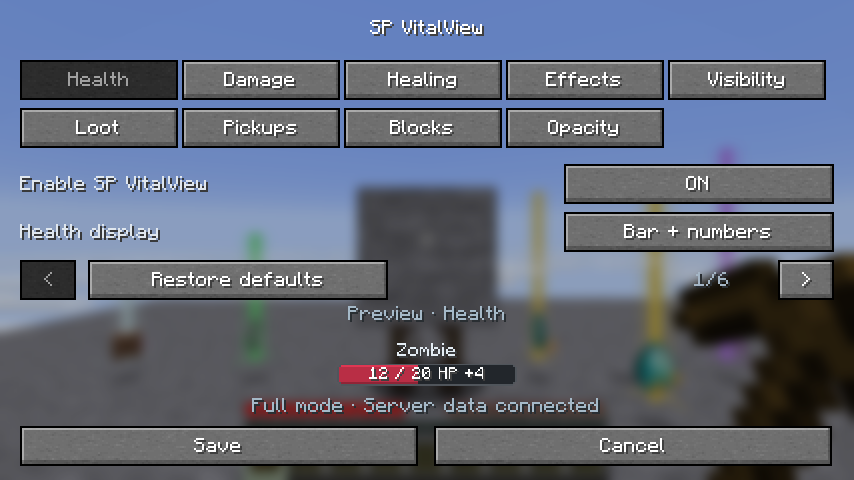
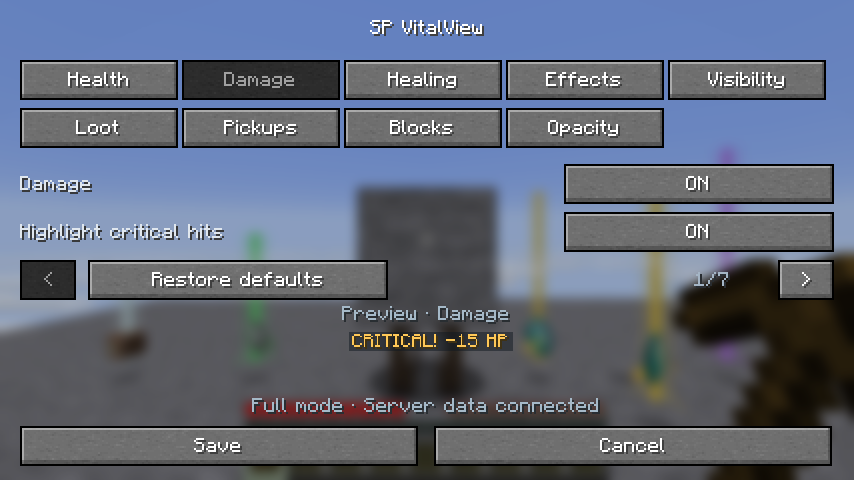
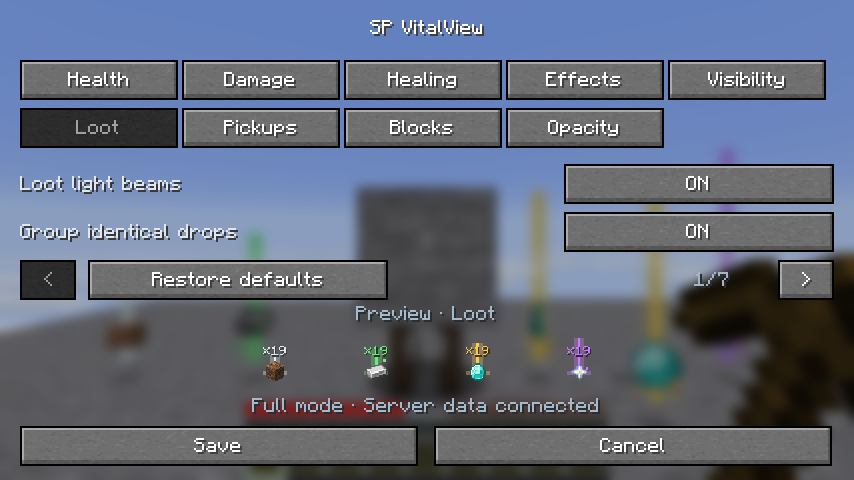
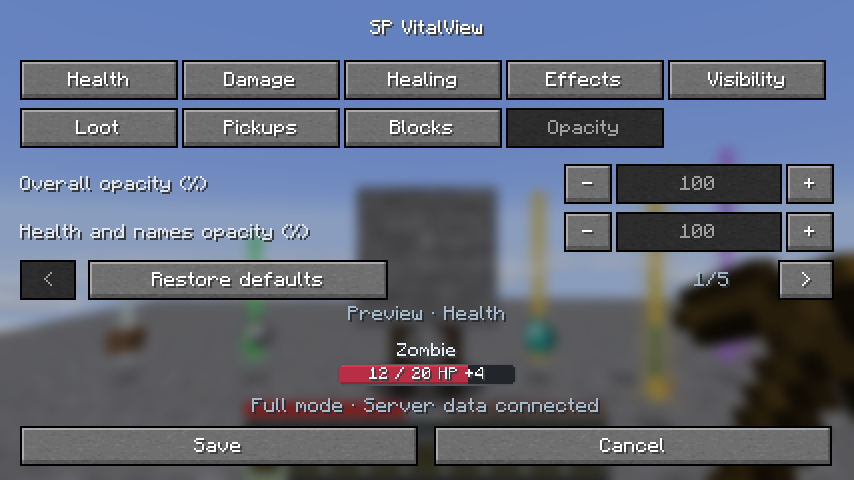
SP Core 0.5.0 or newer is required. Install it beside SP VitalView on clients and on servers running the mod. Administrators can open /spadmin → SP VitalView → Display settings. All players can still use /spvitalview without operator permissions; these are personal display preferences shared across worlds in the same instance.
Loot counts, light beams and visual grouping now require a clear view of the item itself and a nearby distance, 8 blocks by default. Adjust Loot → Nearby loot range (blocks) from 4 to 16 blocks. The existing Loot distance setting remains an upper limit. Older settings automatically receive the new 8-block default. Labels no longer use only the point above the item to decide visibility, preventing floating numbers above walls hiding the actual drop. Distant or hidden drops retain their normal Minecraft models without VitalView overlays or grouping.
Singleplayer includes the integrated-server functionality automatically. For complete multiplayer functionality, install the mod and Fabric API on the server and participating clients. Clients without SP VitalView are not sent custom packets. The settings command needs no cheats or operator permissions.
| Capability | Client and server | Client only |
|---|---|---|
| Mob health | Exact server reports | Health synchronized by vanilla |
| Other players' exact health | Supported | Hidden |
| Damage and healing | Individual actual changes | Observed changes; rapid events may combine |
| Confirmed criticals and only-your-damage filtering | Supported | Unavailable |
| Effect notifications and active-effect list | Supported | Unavailable |
| Loot beams, grouping and counts | Supported | Supported |
| Exact pickup notifications | Supported | Unavailable |
| Block information and held-tool check | Supported | Supported |
| Position, size and opacity | Supported | Supported |
The menu indicates whether full server data is connected.
| Category | Controls |
|---|---|
| Health | Master switch; numbers/bar/both; size, width, thickness, animation, names, percentages, absorption and colors |
| Damage | Damage/criticals; popup anchor, size, offsets, rise, screen clamping, duration, limit and colors; only your damage |
| Healing | Healing/regeneration popups and color |
| Effects | Notifications; up to three active effects; remaining time; color |
| Visibility | Entity categories; independent aquatic animals; combat-only display; range; head gap |
| Loot | Beams, sparkles, grouping, counts, range, radius, beam height, label size, tier colors and item rules |
| Pickups | Notifications, drag placement, position, size, duration and maximum rows |
| Blocks | Panel, drag placement, position, size, source-mod line and tool/status line |
| Opacity | Overall, health/names, damage/critical, healing, effects, loot light, counts, pickup panel and block panel |
Each value ranges from 0% to 100%. Overall opacity multiplies the category value: 50% overall and 50% health gives 25% health opacity. At 0%, the selected overlay is hidden. Settings controls remain readable.
Opacity affects complete SP VitalView elements, including text, icons and existing background alpha. Vanilla mobs, blocks, dropped-item models, the hotbar and other mods' interfaces remain unchanged. Damage and criticals share a value; healing and effects have separate values. Existing loot sparkles respond to changes too.
The panel follows Minecraft's actual crosshair target and disappears when aiming at the sky or an entity. It does not reveal blocks through walls. Names follow the game language. The source line uses installed mod metadata when the namespace matches a mod ID; otherwise it shows the namespace.
The check/cross reports harvest suitability, not guaranteed drops. Silk Touch, loot tables, block state and server rules can affect the result. Blocks needing no specific harvest tool may show a recommended faster tool. Unbreakable blocks are identified separately.
Minimum tiers are derived from which standard tools can harvest the current block. Modded requirements may have no standard tier label, but the held item's normal harvest check is still used. Creative mode does not override this informational Survival check.
Bars stay above heads and shrink with world perspective. Damage/healing/effect popups use an independent GUI size; their shared anchor and offsets do not move the health bar. Screen clamping preserves close-range visibility and shows the newest rows that fit.
Damage reports actual HP lost after defenses. Absorption is displayed separately. Full-health healing creates no popup; overhealing reports only the real gain. Regeneration reports each observed gain.
| Tier | Default color | Examples |
|---|---|---|
| Common | White | Dirt and ordinary items |
| Resources | Green | Iron ingots, coal, redstone, logs, ores |
| Valuables | Gold | Diamonds, emeralds, golden apples |
| Rare | Purple | Nether stars, elytra, enchanted items, ancient debris |
These are configurable value presets, not economy prices. Per-item rules take priority. Beams are visual effects and do not change block lighting.
Grouping affects rendering only. Actual entities, stack limits, ownership, despawning and pickup rules stay unchanged. Only stackable items with identical components group within the selected radius (default 1.5 blocks). Different names/enchantments remain separate; solid obstacles prevent grouping across a wall. Disable grouping to restore vanilla item copies.
The pickup feed reports actual full or partial pickups. Recent identical pickups combine; the newest row appears at the bottom.
| Setting | Range |
|---|---|
| Health / loot distance | 4–64 blocks |
| Health size | 25–200% |
| Bar width / thickness | 40–120 / 4–16 local units |
| Popup size | 50–200% |
| Popup X / Y offsets | −300 to 300 / −200 to 200 GUI pixels |
| Popup duration | 10–100 ticks |
| Group radius | 0.25–2 blocks |
| Beam height | 25–200% of tier height |
| Pickup / block panel size | 50–150%, fitted to the viewport |
| Pickup / block position | 0–100% of available screen space |
| Pickup duration / rows | 20–400 ticks / 1–8 rows |
| Opacity | 0–100% |
At normal speed, 20 ticks equal one second. Bar units represent 0.025 blocks at 100% size; combined mode adds space for its numbers.
Settings belong to the Minecraft instance, not to an individual world or server. Click Save to persist all display preferences. Copy the config/sp-vitalview folder to another instance to share them (with the game closed). Separate launcher profiles with different game directories have separate settings.
On first launch, existing config/sp-vitalview.json settings are migrated automatically, preserving the original file. The new file takes priority on later launches. Fresh installations create the settings file automatically. This mod has no wallet, purchases or persistent player progression; pickup notifications are temporary and cleared when changing worlds.
Settings are stored in config/sp-vitalview/settings.json across worlds in the same profile. Invalid files are preserved, defaults are used and the menu shows a notice. A successful Save writes valid settings. RGB configuration colors use decimal integers from 0 to 16777215; the item-rule editor accepts hexadecimal RGB.
Overlays respect F1 and line of sight. Health excludes the local player, spectators and entities invisible to the player. Hostile aquatic mobs remain under Monsters. Standard modded health/effect systems are supported; mods bypassing vanilla methods may need integration.
Health snapshots run every five server ticks; individual changes are sent each tick. Processing is bounded to 256 nearby living entities/events and 256 nearby drops. Excess notifications may be omitted under extreme load.
config/sp-vitalview folder, with automatic migration and first-launch creation.Configurable close-range popups; value-colored loot; visual grouping/counts; exact pickups; drag placement; per-item rules.
Perspective-correct head anchors, outlined bars, inside-bar numbers, aquatic visibility and expanded size controls.
Initial health, damage/critical, healing/regeneration, effect and command-opened settings release.
Project description from CurseForge.
Pick your setup
Choose the version and loader you play, then open the matching release.
Check the dependencies, then try the file in a copied instance before changing a world you care about.
Recent files
24 Oct 2026
22 Oct 2026
9 Oct 2026
Looking for an older file? The official CurseForge project page is in Resources.
 mod
modAn enchanted mob-loot wheel with complete drop bundles, probability-sized sectors, singleplayer pause and multiplayer protection.
 mod
modAdd 88 PianoNotes For Disc Jockey Plus. 为 Disc Jockey Plus 添加了 88 个钢琴音符。
 mod
modFoundation library for AE2 addons: high-scale amounts, multiblock contracts, transactional ports, guarded networking, AE2-style widgets, and an optional cooperative crafting planner.