Novaris
Version 1.1.1
Support development on Ko-fi
A standalone tech mod for NeoForge: power from sun, wind, steam and uranium, parallel-lane machines, cable networks, a full metal line and a clean, modern interface.
Novaris needs nothing but NeoForge. Every block speaks the standard FE, item and fluid capabilities, so it works with the cables, pipes and machines of other mods.
Power
| Source |
Output |
| Solar Array |
40 FE/t at noon (always faces south) |
| Solar Tracker |
160 FE/t all day, turns and tilts with the sun |
| Wind Turbines (small / normal / large / huge) |
up to 192 / 480 / 1,200 / 3,000 FE/t, more the higher they stand |
| Combustion Generator |
40 FE/t from any furnace fuel |
| Steam Turbine (multiblock) |
2,000 FE/t per rotor, up to 250,000 FE/t |
| Nuclear Reactor (multiblock) |
200 mB steam/t per fuel rod (800 FE/t in a turbine) |
Steam
Steam: a Water Intake pumps endless water, the Combustion Boiler or the Nuclear Reactor turns it into steam, and the Steam Turbine (3x3x3 to 7x7x7) turns steam into FE.
Nuclear Reactor
Nuclear Reactor: uranium fuel cells, water cooling, adjustable burn rate, redstone control and an automatic emergency shutdown at 1,000 °C (no explosions). Spent cells are crushed back into uranium.
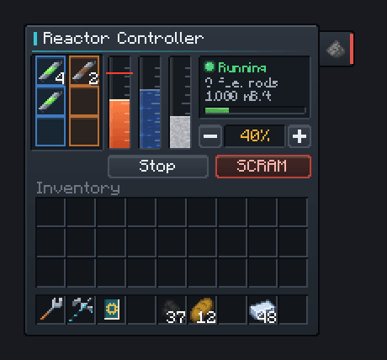
Reactor Controller with fuel, cooling, burn rate and emergency shutdown
Animated machinery
Wind rotors turn, Solar Trackers rotate and tilt, and working machines show moving mechanisms. Formed multiblock controllers display a moving cyan scan line while active and an amber indicator while idle.
Storage and cables
· Energy Cells (1 M / 4 M / 16 M FE) look like big batteries with a live charge gauge. The menu shows the charge, the net flow in FE/t and the time until full or empty. Settings: side modes, push to outputs, redstone, tier slot.
· Energy Accumulator multiblock: 4 M FE plus 16 M per cell inside.
· Energy cables (1,000 / 4,000 / 16,000 FE/t) form networks that feed machines first and store only the surplus.
· Item cable with per-side mode, redstone and whitelist / blacklist; items go to the nearest inventory first.
· Fluid cable for water, steam and any other fluid (16,000 mB/t).
· Cell and cable upgrade items upgrade placed blocks in place, a whole cable line at once.
Machines
· Furnace, Crusher, Alloy Forge with 3 / 5 / 7 parallel lanes (expansion kits), auto-sort, auto-eject, per-side configuration in a 3D view, item filter, redstone and speed / energy / muffling upgrades.
· Quarry with speed, energy and range upgrades (up to 41x41), silk touch and redstone control.
· Cobblestone Generator and Item Collector.
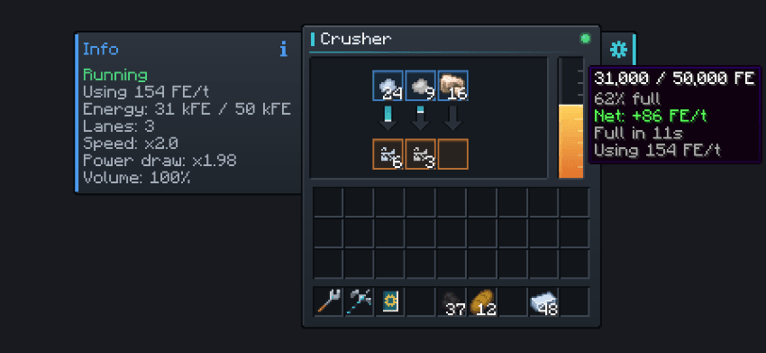
Crusher interface with the information panel and live energy tooltip
Interface
Every Novaris menu shares one dark, modern look, drawn in code so it stays crisp at any GUI scale.
· Side tabs like in the big tech mods: settings, a redstone tab (gunpowder = ignored, redstone = active with signal, torch = active without signal) and a slide-out info panel with status, power use, lanes and the effect of your upgrades.
· Live numbers: energy tooltips show fill level, net flow in FE/t and the time until full or empty; tanks show the real water and steam textures.
· Coloured slots: blue inputs, orange outputs, green charge, red discharge, purple upgrades; empty slots show what belongs in them.
· Switches for auto-sort, eject, redstone, filter, push and silk touch show their state at a glance.
· Side colours legend next to the 3D side view.
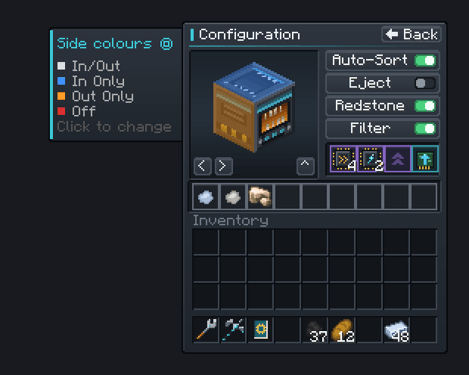
Side configuration, filtering and machine upgrades
Metals and gear
· Osmium, tin, lead, silver, nickel, platinum, aluminum, uranium, cryonite and pyrelume: ore, raw ore, ingot, nugget, dust and block, plus alloys.
· Ores drop raw ore like vanilla; ore heights and rarity follow the usual tech-mod values.
· Aurorite tools and 3D armor, the rechargeable Multitool (pickaxe, axe, shovel, hoe and sword in one) and the Wrench.
Compatibility
· Common c: tags for every metal. With All The Ores installed, its ores are used and the shared metals are not generated twice.
· JEI (optional) shows the crusher and alloy forge recipes and info pages for the multiblocks. Click a machine's progress arrows to see its recipes, or a generator's flame to see the fuels; JEI's overlays stay clear of the side tabs.
Handbook
Every player gets the handbook on first join: 15 chapters with turning 3D models, multiblocks shown layer by layer, and a catalogue of every item and block.
New in this release
Version 1.1.1 adds new processing options, workshop blocks and configurable Vein Mining while retaining existing machine, block and item identifiers.
Recycling Press and Stone Polisher
The animated Recycling Press recovers iron from common-tag iron plates, rails and cauldrons. The Stone Polisher processes stone, cobblestone and cobbled deepslate. Both support the existing sided item and energy interfaces, machine upgrades and automated transport.
Workshop blocks
Build with the craftable Workshop Floor and framed Workshop Light. Workshop Lights emit light level 15. Both blocks include inventory items, drops and pickaxe mining support.
Vein Mining
In Survival, sneak and right-click in the air to cycle a charged Powered Multitool into Vein Mining mode, then mine an ore normally. It follows connected ores of the same material, including ores using compatible common tags.
Defaults are 32 blocks, radius 8 and 100 FE per block. Mining stops when charge runs out and follows the server’s normal break and loot path. Server owners can configure config/novaris-vein-mining.properties and restart to apply changes. Other modes keep their usual single-block behavior.
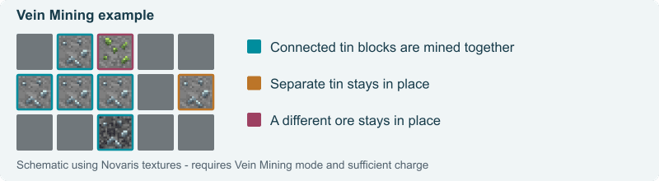
Vein Mining schematic using the original Novaris ore textures
Installation and loader support
The NeoForge edition described above remains available. Version 1.1.1 is also available for Fabric, Quilt and Forge on the maintained Minecraft targets. Install the same mod version on client and server. Fabric and Quilt require Fabric API; the energy API adapter is bundled. NeoForge 1.20.1 uses the shared Forge-compatible build.
Minecraft 1.20.1, 1.20.2 and 1.20.4 require Java 17. Minecraft 1.20.6, 1.21 and 1.21.1 require Java 21. Minecraft 26.1, 26.1.1, 26.1.2, 26.2 and 26.3 require Java 25. Choose the exact Minecraft version and loader; install shared files only once.
Common material and ore tags, including legacy tag bridges, help other mods use Novaris resources. Interoperation depends on the other mod’s interfaces and connection settings; not every combination is tested.
Project description from CurseForge.