Clicks attack, use and jump at the rhythm you set. Modules eat, refill the hotbar, swap tools, fish, farm and keep you safe while you are AFK.
🧩 4 loaders
Fabric · Quilt · NeoForge · Forge |
🎮 1.19 – 26.3
every version in between |
💻 Client-side
singleplayer and servers |
🌍 13 languages
English, Русский, Deutsch, 简体中文… |

① Put the jar for your loader and Minecraft version into mods (on Fabric and Quilt also Fabric API).
② In a world press O for the menu and I to turn the mod on or off.
③ Open Profiles → Presets, pick a setup and press I.
| ⚔️ Mob farm |
Hits on full charge with a small random delay, leaves passive mobs, pets and named mobs alone. Auto eat and anti-AFK on. |
| ⛏️ Mining |
Holds the attack key, auto tool picks the pickaxe, stops when the inventory is full. |
| 🎣 Fishing |
Auto fish reels in and casts again. Auto eat and anti-AFK on. |
| 🌾 Farming |
Auto farm harvests ripe crops around you and plants them again, hotbar refill brings more seeds. |

🖱️ Auto clicker
✦ Three channels — attack, use and jump. Each one clicks or holds its key, with its own speed, pause, random delay and hotkey.
✦ Your rhythm — speed in ticks or in clicks per second; the random delay is even, a bell curve or natural.
✦ Smart timing — waits for full weapon charge (turn it off for 1.8-style PvP) and pauses while you eat, block or draw a bow.
✦ Looting finishing blow — the killing hit is dealt with the best Looting weapon from the hotbar.
✦ Limits — start delay, attack and time limits. Works in the background when the game window is not focused.
🎯 Targets
✦ Pick who gets hit — players, hostile, neutral and passive mobs and other entities are switched separately.
✦ Leave them alone — babies, named mobs, pets and invisible mobs. For mining, blocks can be targets too.
❤️ Survival
✦ Safety — stop the mod or leave the server at low health, on any damage, or when a player comes near.
✦ Offhand — a totem at low health, food when you're hungry, a torch with a pickaxe, otherwise a shield.
✦ Auto eat — the best safe food from the hotbar. It never opens the chest, door or villager you look at.
✦ Auto potion — healing or regeneration at low health, fire resistance in fire or lava; drinks or throws.
✦ Auto respawn and Mending rotation — death coordinates in the chat; damaged Mending items take turns in the offhand.
⚙️ Automation
✦ Auto fish — reels in on a bite after the reaction time you set and casts again, stops before the rod breaks, shows whether the bobber is in open water where treasure is caught.
✦ Auto farm — wheat, carrots, potatoes, beetroots, nether wart, cocoa and sweet berries, harvested and planted again, with bone meal while nothing is ripe.
✦ Hotbar refill — used-up stacks and broken tools are replaced from the inventory; a tool is swapped out before it breaks, so Mending tools are kept.
✦ Anti-AFK — jump, sneak, swing, look around, step. Plus auto walk and an inventory cleaner for your junk list.
⛏️ Mining
✦ Block list — a whitelist or blacklist of blocks the clicker may break, edited with item icons.
✦ Auto tool — the fastest tool for the block, counting Efficiency and skipping nearly broken tools.
✦ Careful — stops when the inventory is full and protects the tool in hand.
🌙 Session
✦ Auto reconnect — joins the server again after a lost connection, loads its profile and turns the mod back on.
✦ Session goal — kills, catches, harvest, blocks, experience… up to a number, with a progress bar; the mod can stop when it is reached.
✦ Notifications — a chime for a full inventory, a tool about to break, no food, a player nearby, a fish caught. The important ones can also go to a Discord webhook.
👀 HUD and menu
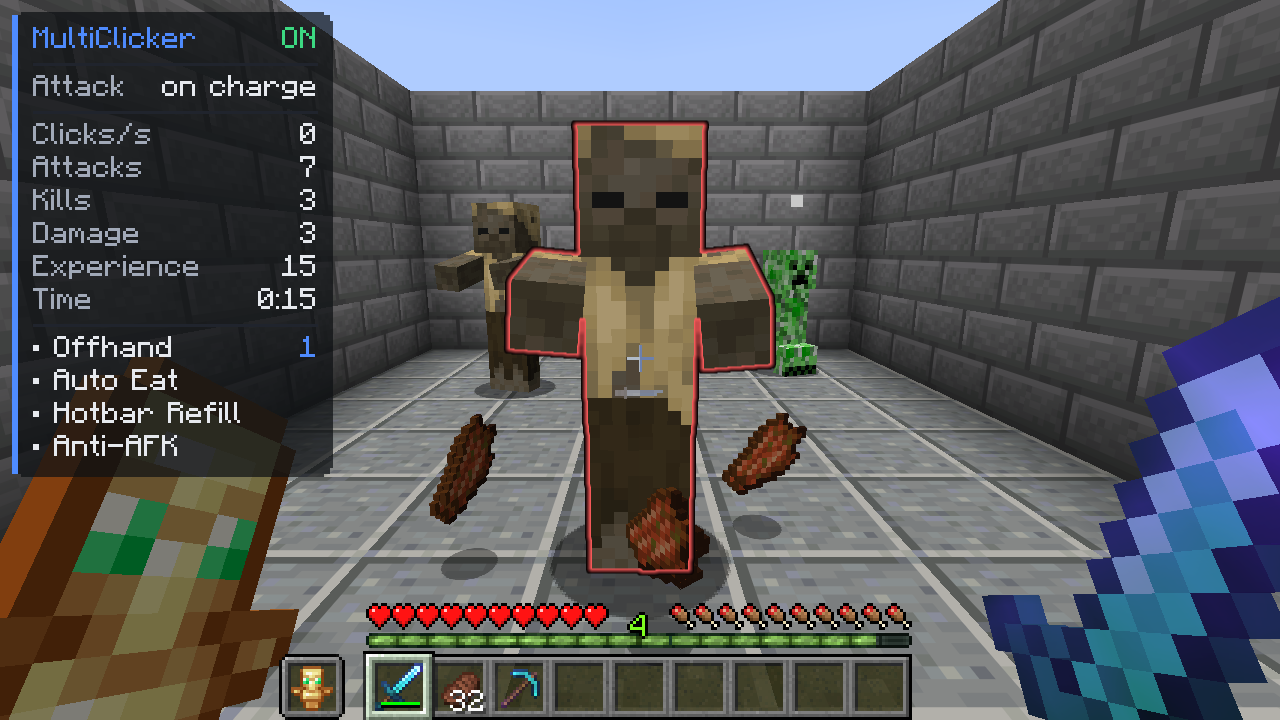
✦ Status panel — profile, CPS, attacks, kills, damage, catches, harvest, session time, goal, ping, TPS, FPS and active modules. Drag it anywhere in the HUD editor, any scale.
✦ Statistics — the session, each server and all time: kills by mob, exact damage and DPS, catches by kind, rates per hour, a live CPS graph, the last 20 sessions and CSV export.
✦ Target highlight — the target about to be hit is outlined, filled or glowing, in your color.
✦ A menu that stays out of the way — an overview page, search, foldable cards, tooltips with the default value, exact values, full keyboard control and hotkey conflict warnings. Fits any window size.
🔗 Also
✦ Hotkeys — for any module, channel or profile, side mouse buttons too.
✦ Profiles — load by themselves on a given server and are shared as one line of text.

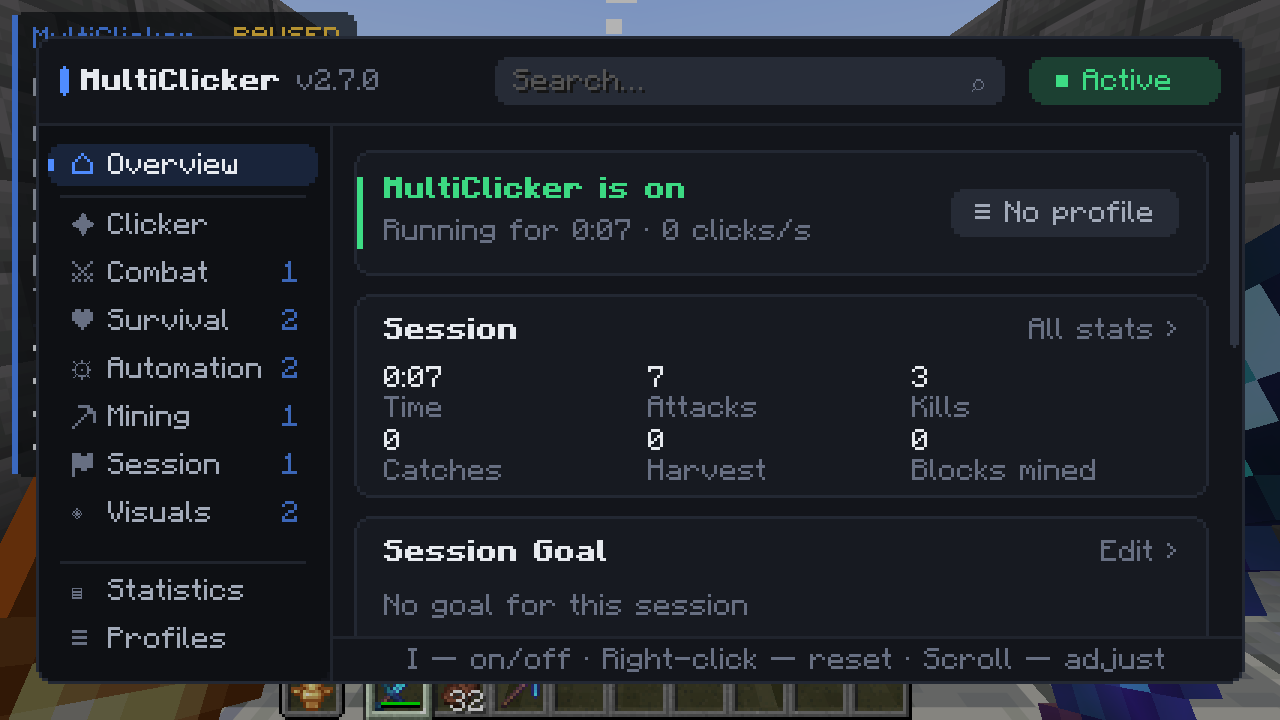
Overview: the mod, the session and its goal at a glance |
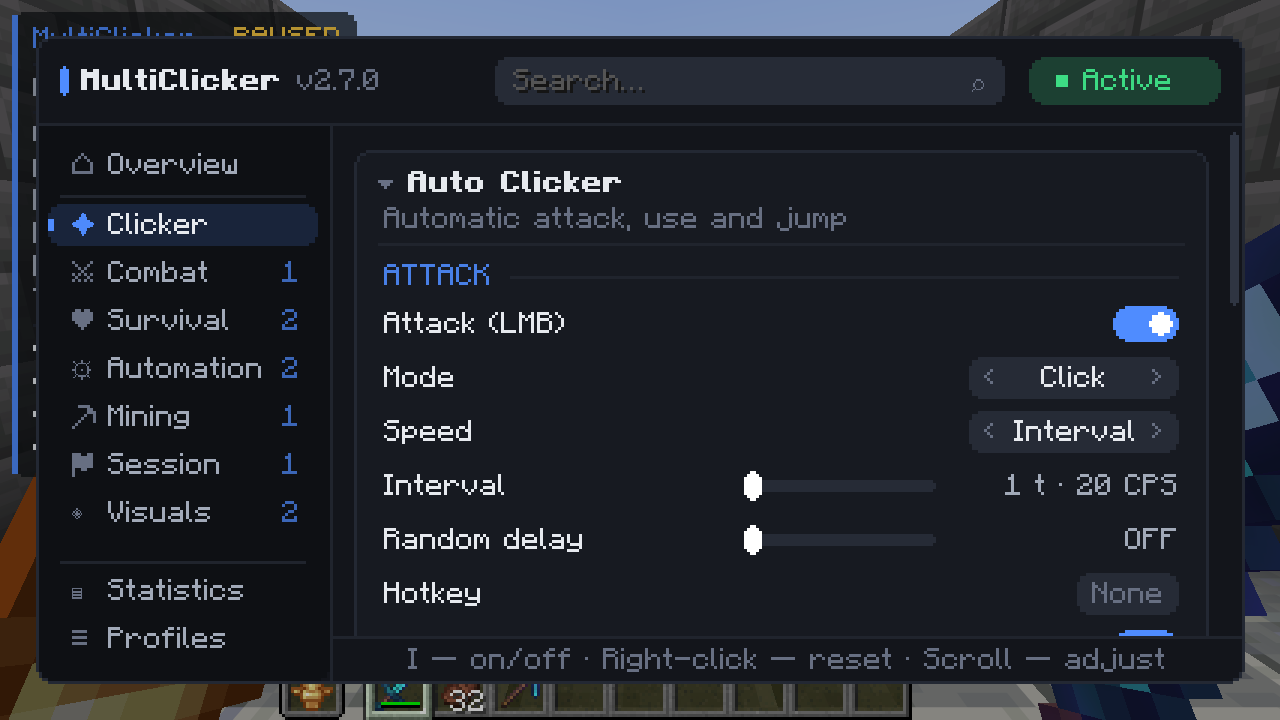
Every module is a card, every option has a tooltip |
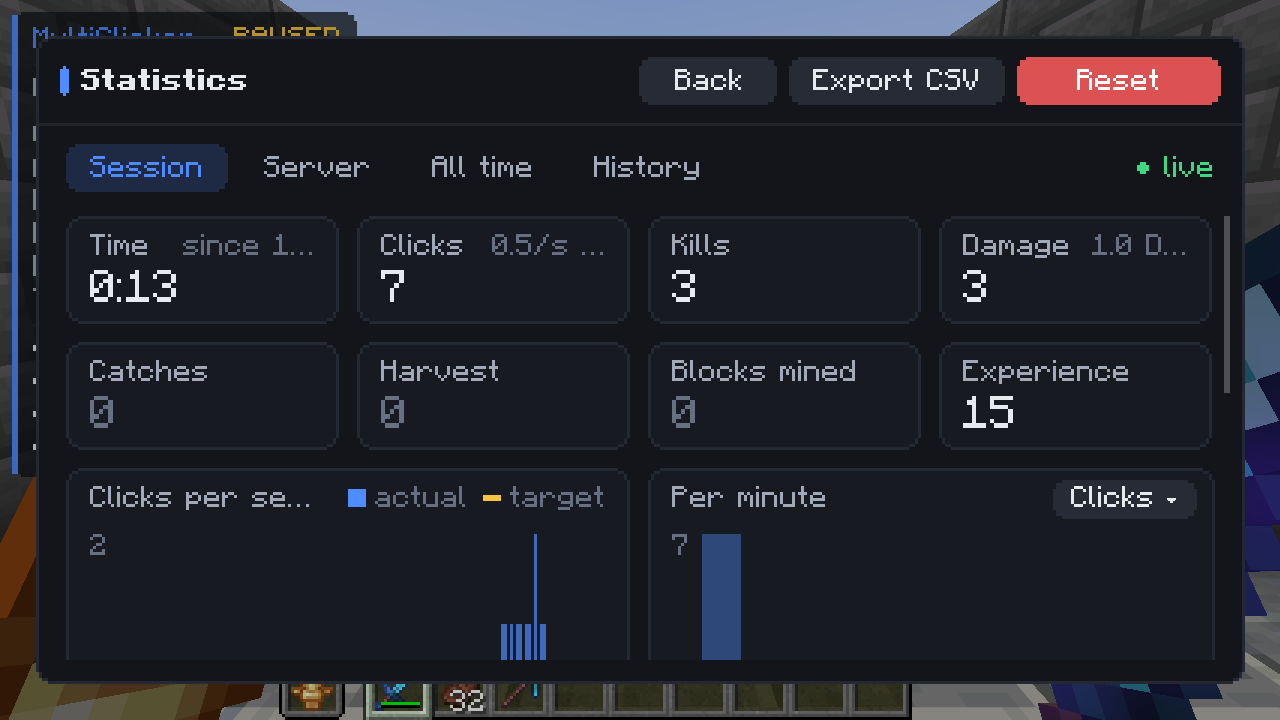
Statistics with graphs and rates per hour |
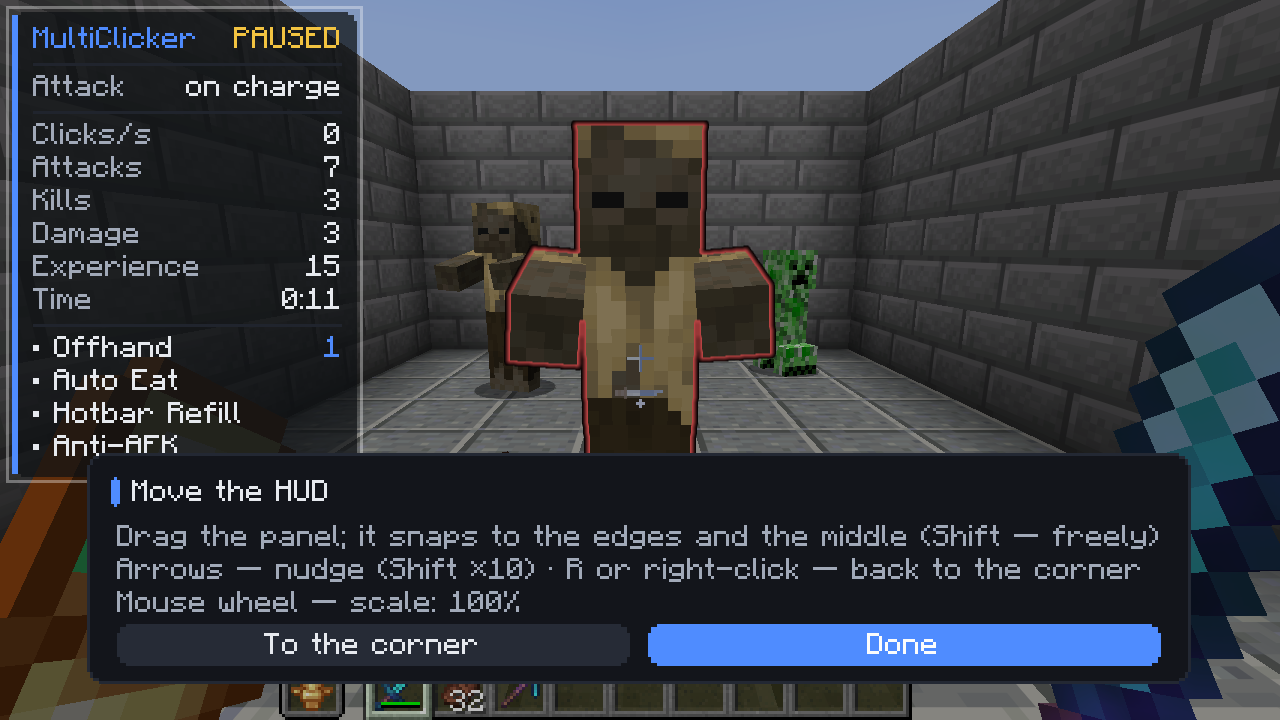
Drag and scale the status panel |
More in the Images tab.

| Fabric / Quilt 1.19 – 1.20.4 |
MultiClicker-fabric-…+1.19-1.20.4 + Fabric API |
| Fabric / Quilt 1.20.5 – 1.21.11 |
MultiClicker-fabric-…+1.20.5-1.21.11 + Fabric API |
| NeoForge 1.20.2 – 1.21.11 |
MultiClicker-neoforge-…+1.20.2-1.21.11 |
| Forge 1.19 – 1.20.1, NeoForge 1.20.1 |
MultiClicker-forge-…+1.19-1.20.1 |
| Forge 1.20.2 – 1.21.11 |
MultiClicker-forge-…+1.20.2-1.21.11 |
| 26.1 – 26.3, any loader |
MultiClicker-…+26.1-26.3 (+ Fabric API on Fabric and Quilt) |
Mod Menu is optional on Fabric and Quilt. Fabric 1.21.9+ needs Fabric Loader 0.17+, Quilt needs Quilt Loader 0.30+. On Fabric 1.21.9 only the glow highlight is drawn.

Does the server need it?
No. It is client-side: put it only into your own mods folder. It works in singleplayer and on any server.
Can I switch to another window while it runs?
Yes. Turn on Work in background in the clicker settings and the game keeps running when its window loses focus.
How do I change the I and O keys?
Options → Controls → Key Binds → MultiClicker. Hotkeys for modules, channels and profiles are set in the mod menu.
How do I share my setup?
In Profiles copy a profile as one line of text; a friend pastes it in their Profiles. Your hotkeys and servers stay with you.
Where are the settings?
config/multiclicker.json, profiles in config/multiclicker/profiles/, statistics in config/multiclicker/stats.json.
Found a bug or have an idea?
Open an issue on GitHub.
⚠ Many servers forbid auto clickers and AFK tools. Check the rules before using it there.
All settings and controls · Changelog · Report a bug
Нажимает атаку, использование и прыжок в заданном ритме. Модули едят, пополняют хотбар, меняют инструменты, рыбачат, фермерствуют и берегут вас, пока вы AFK.
🧩 4 загрузчика
Fabric · Quilt · NeoForge · Forge |
🎮 1.19 – 26.3
все версии между ними |
💻 Только клиент
одиночная игра и серверы |
🌍 13 языков
русский, українська, English… |

① Положите jar для своего загрузчика и версии Minecraft в mods (на Fabric и Quilt ещё Fabric API).
② В мире O открывает меню, I включает и выключает мод.
③ Откройте Профили → Пресеты, выберите набор и нажмите I.
| ⚔️ Моб-ферма |
Бьёт при полной зарядке со случайной задержкой, не трогает мирных мобов, питомцев и мобов с именем. Авто-еда и анти-АФК включены. |
| ⛏️ Копание |
Держит клавишу атаки, авто-инструмент берёт кирку, останавливается при полном инвентаре. |
| 🎣 Рыбалка |
Авто-рыбалка подсекает и забрасывает снова. Авто-еда и анти-АФК включены. |
| 🌾 Ферма |
Автоферма собирает созревший урожай вокруг и сажает заново, пополнение хотбара подкладывает семена. |

🖱️ Автокликер
✦ Три канала — атака, использование и прыжок. Каждый нажимает или удерживает свою клавишу, со своей скоростью, паузой, случайной задержкой и горячей клавишей.
✦ Свой ритм — скорость в тиках или в кликах в секунду; случайная задержка равномерная, колоколом или естественная.
✦ Умный тайминг — ждёт полной зарядки оружия (для PvP в стиле 1.8 можно выключить) и ставится на паузу, пока вы едите, закрываетесь щитом или натягиваете лук.
✦ Добивание с Добычей — смертельный удар наносится оружием с лучшей Добычей из хотбара.
✦ Лимиты — задержка старта, лимиты атак и времени. Работает в фоне, когда окно игры не в фокусе.
🎯 Цели
✦ Кого бить — игроки, враждебные, нейтральные и мирные мобы и прочие сущности включаются отдельно.
✦ Кого не трогать — детёнышей, мобов с именем, питомцев и невидимых. Для копания целью могут быть и блоки.
❤️ Выживание
✦ Безопасность — остановить мод или выйти с сервера при низком здоровье, при любом уроне или когда рядом игрок.
✦ Вторая рука — тотем при низком здоровье, еда при голоде, факел с киркой, иначе щит.
✦ Авто-еда — лучшая безопасная еда из хотбара. Никогда не открывает сундук, дверь или торговца, на которого вы смотрите.
✦ Авто-зелья — исцеление или регенерация при низком здоровье, огнестойкость в огне или лаве; пьёт или бросает.
✦ Авто-возрождение и «Починка» — координаты смерти в чате; повреждённые предметы с «Починкой» по очереди встают во вторую руку.
⚙️ Автоматизация
✦ Авто-рыбалка — подсекает при поклёвке через заданное время реакции и забрасывает снова, останавливается до поломки удочки, показывает, в открытой ли воде поплавок: только там ловятся сокровища.
✦ Автоферма — пшеница, морковь, картофель, свёкла, незерский нарост, какао и сладкие ягоды: собирает и сажает заново, а пока ничего не созрело, удобряет костной мукой.
✦ Пополнение хотбара — закончившиеся стаки и сломанные инструменты заменяются из инвентаря; инструмент меняется до поломки, так что вещи с «Починкой» сохраняются.
✦ Анти-АФК — прыжок, приседание, взмах, взгляд по сторонам, шаг. А ещё авто-ходьба и очистка инвентаря по списку мусора.
⛏️ Копание
✦ Список блоков — белый или чёрный список блоков, которые кликер может ломать, с иконками предметов.
✦ Авто-инструмент — самый быстрый инструмент для блока с учётом Эффективности, почти сломанные пропускаются.
✦ Аккуратно — останавливается при полном инвентаре и бережёт инструмент в руке.
🌙 Сессия
✦ Авто-переподключение — после потери связи снова заходит на сервер, загружает его профиль и включает мод.
✦ Цель сессии — убийства, улов, урожай, блоки, опыт… до заданного числа, с полосой прогресса; мод может остановиться, когда цель достигнута.
✦ Уведомления — звук при полном инвентаре, инструменте на грани поломки, нехватке еды, игроке рядом, пойманной рыбе. Важные можно отправлять и в Discord-вебхук.
👀 HUD и меню
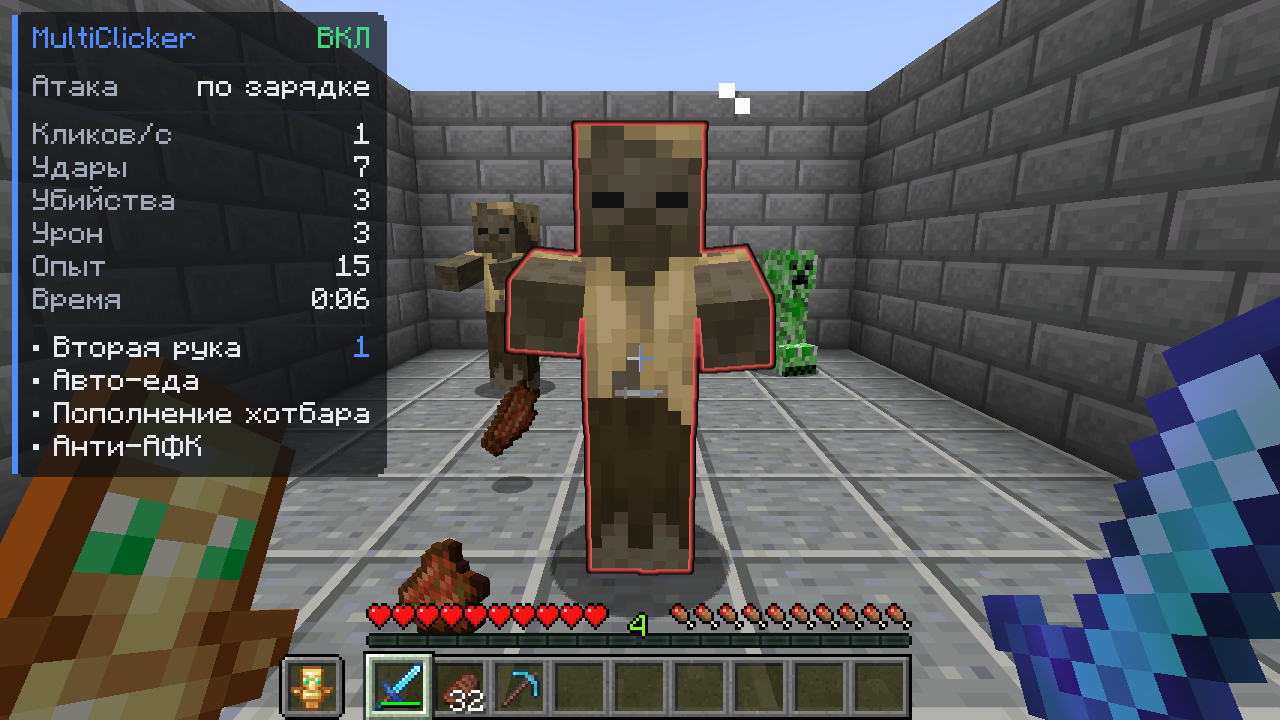
✦ Панель состояния — профиль, кл/с, удары, убийства, урон, улов, урожай, время сессии, цель, пинг, TPS, FPS и активные модули. Перетаскивается куда угодно в редакторе HUD, любой размер.
✦ Статистика — за сессию, по серверам и за всё время: убийства по мобам, точный урон и DPS, улов по видам, скорость в час, живой график кл/с, последние 20 сессий и экспорт в CSV.
✦ Подсветка цели — цель, которую сейчас ударят, обводится, заливается или светится вашим цветом.
✦ Меню, которое не мешает — страница обзора, поиск, сворачиваемые карточки, подсказки со значением по умолчанию, точные значения, полное управление с клавиатуры и предупреждения о конфликтах клавиш. Подстраивается под любое окно.
🔗 Ещё
✦ Горячие клавиши — для любого модуля, канала и профиля, и боковые кнопки мыши тоже.
✦ Профили — сами загружаются на нужном сервере и передаются одной строкой текста.

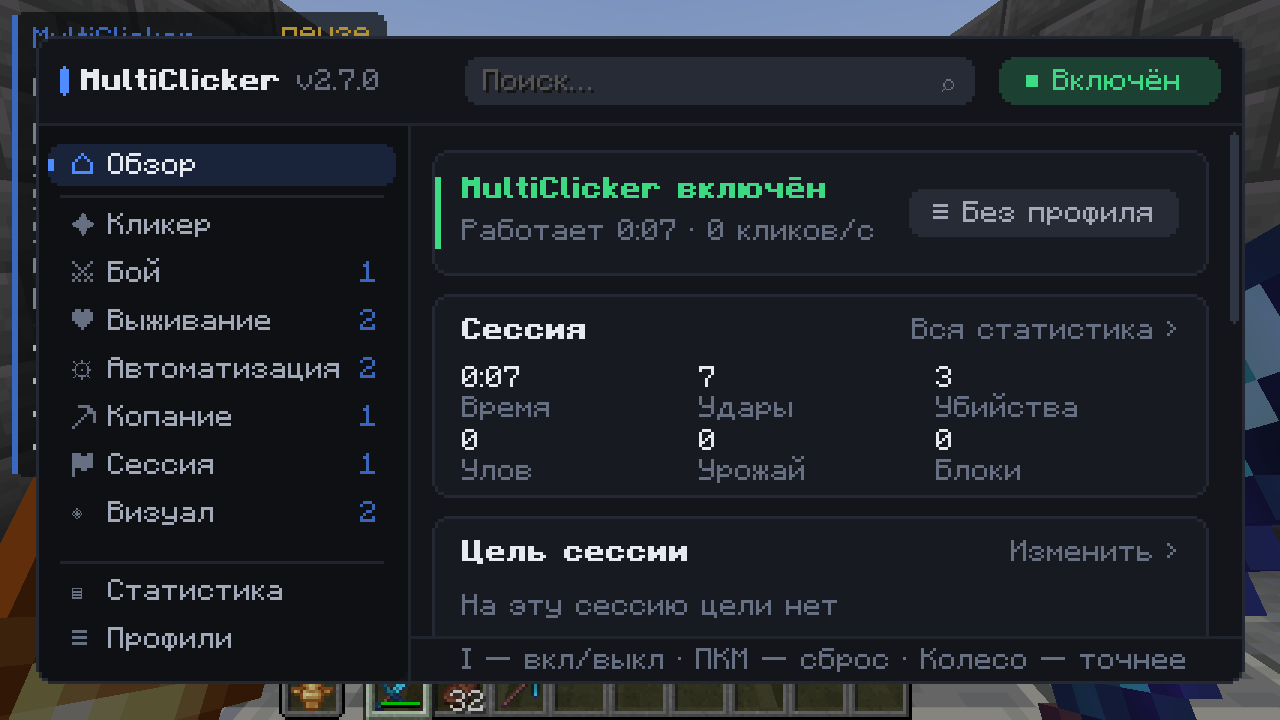
Обзор: мод, сессия и её цель на одном экране |
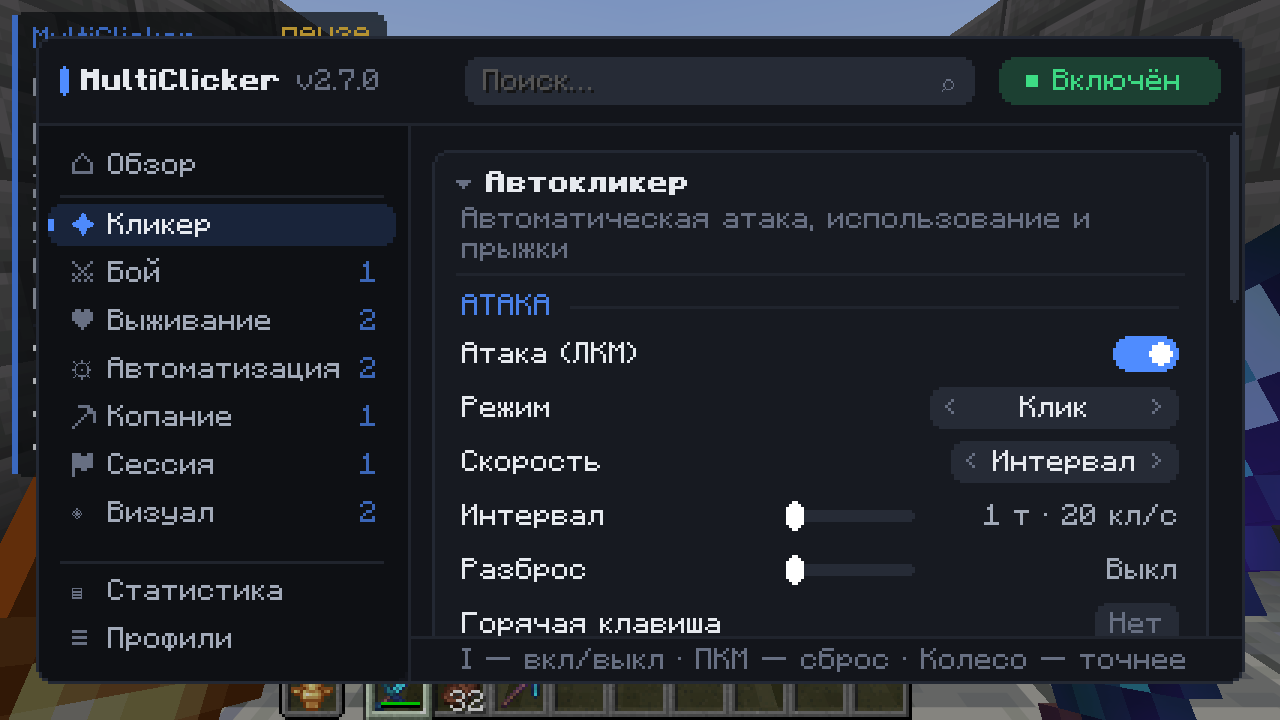
Каждый модуль — карточка, у каждой настройки есть подсказка |
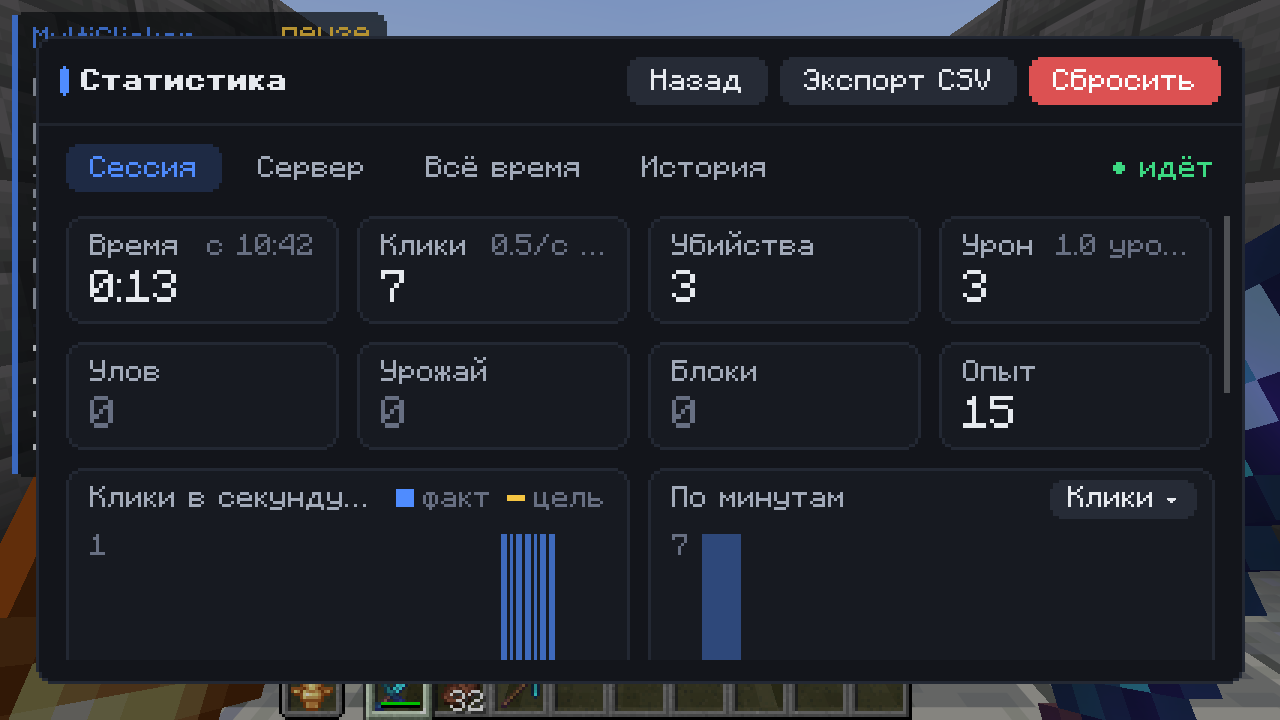
Статистика с графиками и скоростью в час |
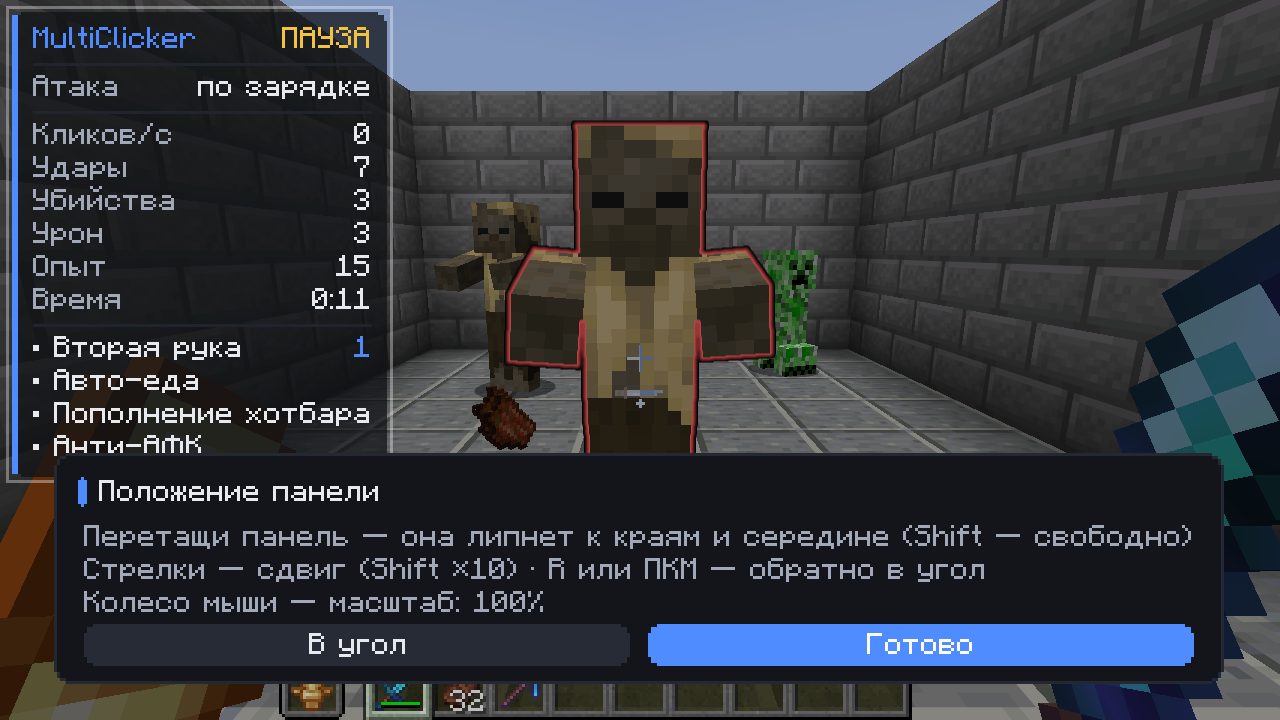
Перетаскивайте и масштабируйте панель состояния |
Ещё больше на вкладке Images.

| Fabric / Quilt 1.19 – 1.20.4 |
MultiClicker-fabric-…+1.19-1.20.4 + Fabric API |
| Fabric / Quilt 1.20.5 – 1.21.11 |
MultiClicker-fabric-…+1.20.5-1.21.11 + Fabric API |
| NeoForge 1.20.2 – 1.21.11 |
MultiClicker-neoforge-…+1.20.2-1.21.11 |
| Forge 1.19 – 1.20.1, NeoForge 1.20.1 |
MultiClicker-forge-…+1.19-1.20.1 |
| Forge 1.20.2 – 1.21.11 |
MultiClicker-forge-…+1.20.2-1.21.11 |
| 26.1 – 26.3, любой загрузчик |
MultiClicker-…+26.1-26.3 (+ Fabric API на Fabric и Quilt) |
Mod Menu на Fabric и Quilt — по желанию. Fabric 1.21.9+ требует Fabric Loader 0.17+, Quilt — Quilt Loader 0.30+. На Fabric 1.21.9 рисуется только подсветка «свечение».

Нужно ли ставить мод на сервер?
Нет. Мод клиентский: положите его только в свою папку mods. Работает в одиночной игре и на любом сервере.
Можно переключиться на другое окно, пока он работает?
Да. Включите Работать в фоне в настройках кликера, и игра не встанет на паузу, когда окно потеряет фокус.
Как сменить клавиши I и O?
Настройки → Управление → Назначение клавиш → MultiClicker. Горячие клавиши модулей, каналов и профилей задаются в меню мода.
Как поделиться своими настройками?
В Профилях скопируйте профиль одной строкой текста, друг вставит её у себя. Ваши клавиши и серверы при этом останутся у вас.
Где хранятся настройки?
config/multiclicker.json, профили — в config/multiclicker/profiles/, статистика — в config/multiclicker/stats.json.
Нашли ошибку или есть идея?
Напишите на GitHub, можно по-русски.
⚠ Многие серверы запрещают автокликеры и анти-АФК. Сначала проверьте правила.
Все настройки и управление · Список изменений · Сообщить об ошибке
Project description from CurseForge.