Minecraft version
Back to mods 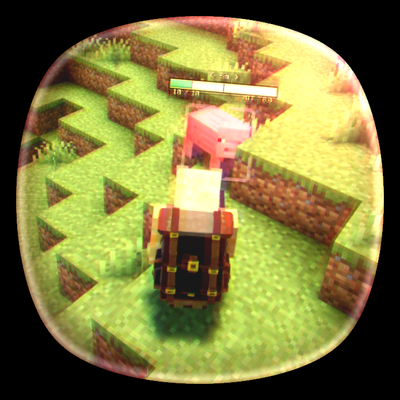
CurseForge · Minecraft mod
Better Combat View
A customizable third-person combat camera with smooth movement, zoom controls, and optional melee targeting assist.
Choose a version Pick your version below, then grab the matching file.
Quick answer
Which Better Combat View release matches 26.1?
beta file Better Combat View 0.2.2 - neoforge 26.1
Game version 26.1
Loader NeoForge
Better Combat View 0.2.2 - neoforge 26.1 targets 26.1 with NeoForge. The project page does not say whether this file belongs on the client, dedicated server, or both. No extra mods listed for this file.
Where it goes
Is Better Combat View required on the client, server, or both?
The project page does not say whether this file belongs on the client, dedicated server, or both.
Client Source doesn’t say
Dedicated server Source doesn’t say
Loader for this release NeoForge
Required install it here Optional supported, not mandatory Not supported do not install here Source doesn’t say do not assume
The source does not explicitly classify this release as client-only or server-only.
What else does Better Combat View 0.2.2 - neoforge 26.1 need?
Better Combat View 0.2.2 - neoforge 26.1 on 26.1. Every mod below is checked against that same setup.
This file does not list any required mods. Do not add a library just because a different file uses it.
This file does not list any required or optional mods.
Before you install it
Add Better Combat View without breaking your instance.
Built for Better Combat View 0.2.2 - neoforge 26.1 on 26.1. Pick another file and the loader, install side or required mods may change.
- 01
Stick to this file
Use Better Combat View 0.2.2 - neoforge 26.1. It targets 26.1 with NeoForge; another release may have different loader, side or dependency requirements.
- 02
Bring the mods it needs
This file does not list any required mods. Do not add a library just because a different file uses it.
- 03
Put it on the correct side
The project page does not say whether this file belongs on the client, dedicated server, or both.
- 04
Pick the file you checked
Use the “Get this file” button beside Better Combat View 0.2.2 - neoforge 26.1. It opens that exact file at the source.
About this project
What does Better Combat View add?
Better Combat View
Better Combat View improves Minecraft's third-person camera for combat, exploration, and general gameplay.
Instead of using a fixed vanilla third-person view, the mod lets you customize the camera's distance, height, horizontal shoulder offset, zoom, field of view, viewing angle, and vertical movement smoothing.
The camera automatically handles nearby blocks so it moves closer to the player instead of clipping through walls.
Camera Calibration
Press F8 at any time in-game to open the camera calibration screen.
The same screen can also be opened from the pause menu.
Camera settings can be adjusted live while viewing your character in third person, making it easy to find a comfortable perspective without repeatedly editing configuration files.
You can adjust the camera's distance behind the player, vertical position, left or right shoulder offset, pitch, FOV, zoom level, and vertical movement lag.
Changes can be tested immediately and saved when you are satisfied with the result.
Smooth Movement
Better Combat View includes optional vertical camera smoothing.
When jumping, falling, or moving across uneven terrain, the camera can follow vertical movement more gradually instead of being rigidly attached to the player's position.
The smoothing amount can be adjusted or disabled through the calibration screen.
Large position changes such as teleports are handled immediately instead of slowly interpolating from the previous position.
Zoom Controls
The mod adds configurable key bindings for camera zoom in and zoom out.
Zoom changes the third-person camera distance without changing the configured FOV, allowing you to quickly move between a wider combat view and a closer character view.
The zoom level is limited to a safe configurable range and can also be adjusted directly from the calibration screen.
Melee Assist
Better Combat View includes an optional melee targeting assist designed for offset third-person cameras.
When your crosshair does not directly hit an entity, the mod can select a valid hostile or neutral mob within a 90-degree area in front of the player.
The assist does not increase your normal attack reach and does not target entities through blocks.
Targets outside your normal interaction range, targets behind you, invisible or obstructed targets, allied mobs, and your own tamed animals are ignored.
The system also slightly favors the previous target during repeated attacks to reduce unwanted target switching.
Hold Sneak while attacking to temporarily disable melee assist for precise manual targeting.
Melee assist can be completely enabled or disabled from the camera calibration screen.
Client Side
Better Combat View is a client-side camera mod. Its camera position, visual settings, zoom controls, and melee assistance are handled locally without changing normal server-side attack reach.
Project description from CurseForge.
Pick your setup
Better Combat View by Minecraft version and loader
Choose the version and loader you play, then open the matching release.
Minecraft version
26.2
2 loader buildsMinecraft version
26.1.2
2 loader buildsMinecraft version
26.1.1
2 loader buildsMinecraft version
26.1
2 loader buildsMinecraft version
1.21.11
2 loader buildsMinecraft version
1.21.10
2 loader buildsMinecraft version
1.21.9
2 loader buildsMinecraft version
1.21.8
2 loader buildsMinecraft version
1.21.7
2 loader buildsMinecraft version
1.21.6
2 loader buildsMinecraft version
1.21.5
2 loader buildsShowing the newest 12 of 17 game versions. Older files are in the list below.
Check the dependencies, then try the file in a copied instance before changing a world you care about.
Recent files
Better Combat View versions and loaders
Better Combat View 0.2.2 - neoforge 26.1
better_combat_view-26.1-neoforge-0.2.2.jar
10 Oct 2026
Client Source doesn’t say Server Source doesn’t say Dependencies No extras listed Listed on Release listing
Check the 26.1 · NeoForge setup NeoForge26.1 beta
Better Combat View 0.2.2 - fabric 26.1
better_combat_view-26.1-fabric-0.2.2.jar
10 Oct 2026
Client Source doesn’t say Server Source doesn’t say Dependencies 1 required · 1 unchecked Listed on Release listing
Check the 26.1 · Fabric setup Fabric26.1 beta
Looking for an older file? The official CurseForge project page is in Resources.
 mod
CurseForge + Modrinth · Minecraft
[VSE]Visual Set Edit
This mod lets you edit custom set effects through a visual GUI with intuitive operations.
 mod
CurseForge + Modrinth · Minecraft
Better Creeper Consent
Make creepers ask for permission before blowing up everything around you!
 mod
CurseForge · Minecraft
Compact Mob Health Bar
Displays health bars and damage prediction for living entities.