Quick answer
Which Stowage release should I use?
Latest stable file Stowage 1.9.0
Game version 26.3
Loader Fabric
Stowage 1.9.0 targets 26.3 with Fabric. The project page does not say whether this file belongs on the client, dedicated server, or both. All 1 required mods have matching files.
Where it goes
Is Stowage required on the client, server, or both?
The project page does not say whether this file belongs on the client, dedicated server, or both.
Client Source doesn’t say
Dedicated server Source doesn’t say
Loader for this release Fabric
Required install it here Optional supported, not mandatory Not supported do not install here Source doesn’t say do not assume
The source does not explicitly classify this release as client-only or server-only.
What else does Stowage 1.9.0 need?
Stowage 1.9.0. Change the file and its required mods may change too.
Install Fabric API first. We found matching files for this game-version and loader setup.
Matching file found Matched file: [26.3] Fabric API 0.164.0+26.3
We only count dependency files that match this setup. A file for another loader does not fill the gap.
Before you install it
Add Stowage without breaking your instance.
Built for Stowage 1.9.0. Pick another file and the loader, install side or required mods may change.
- 01
Stick to this file
Use Stowage 1.9.0. It targets 26.3 with Fabric; another release may have different loader, side or dependency requirements.
- 02
Bring the mods it needs
Install Fabric API first. We found matching files for this game-version and loader setup.
- 03
Put it on the correct side
The project page does not say whether this file belongs on the client, dedicated server, or both.
- 04
Pick the file you checked
Use the “Get this file” button beside Stowage 1.9.0. It opens that exact file at the source.
About this project
What does Stowage add?
Stowage
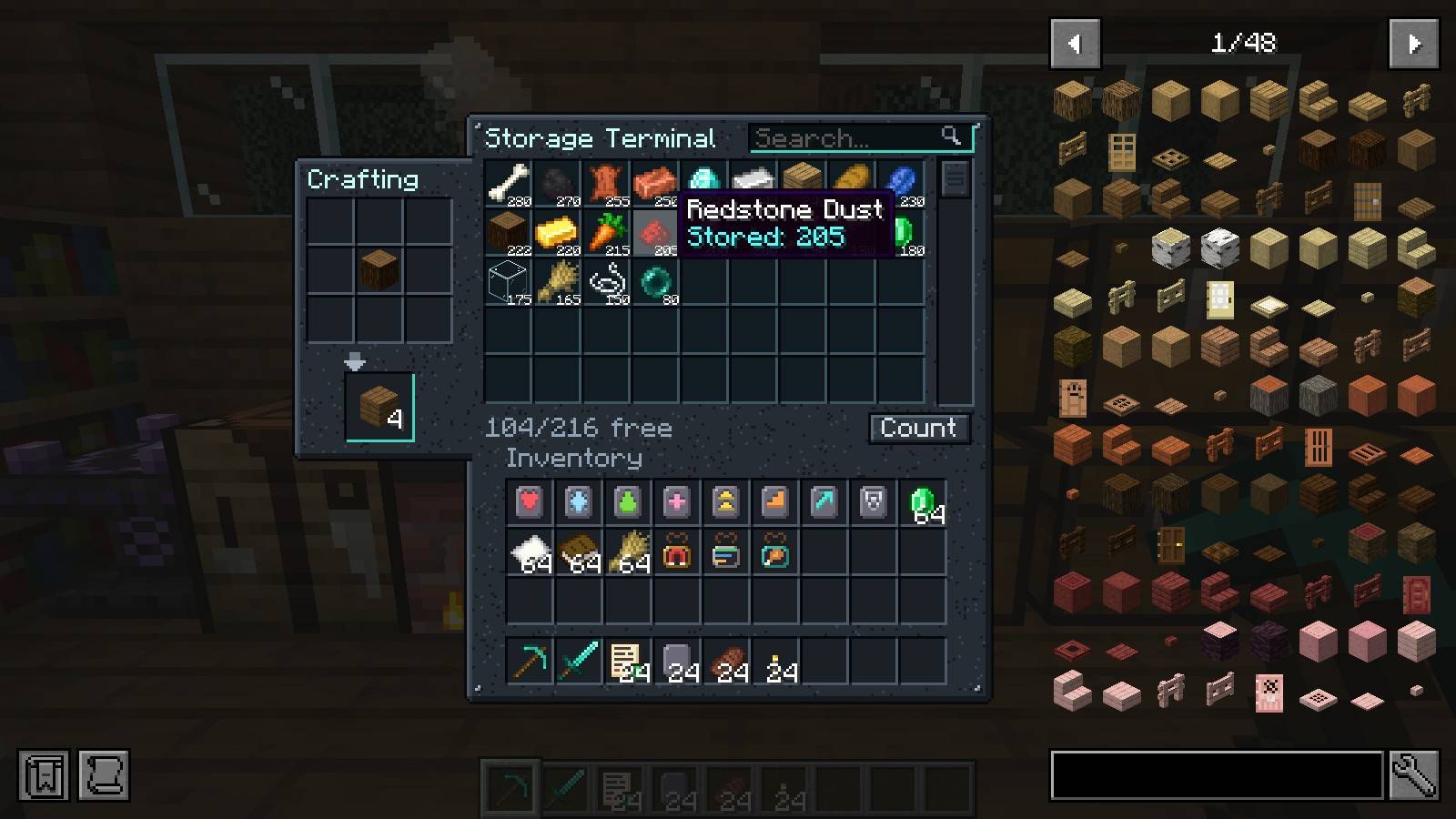
Turn the chests you already have into one searchable storage network, and craft straight from it.
What it does
- Put a Storage Terminal against your chests. Every chest, barrel and shulker box touching it, each other, or a Storage Conduit becomes one searchable list.
- Search box, sort by amount or name, scroll through everything you own.
- Click to take a stack, right-click for half, shift-click your own items to store them. Items go to the chest that already holds that item.
- Craft straight from the network: the 3x3 grid refills itself from storage, shift-click crafts until you run out.
- Recipe "+" button: with a terminal open, the plus on any crafting recipe in Itemwise (or JEI) lays that recipe out on the grid from storage. Shift-click it for as many as you have items for.
- Recipe keys work on stored items: point at anything in the list and press R for its recipes or U for its uses. The terminal is listed as a place to craft.
- Compact button: packs every nine ingots, gems, nuggets and the like in storage into their block.
- Works with the mods around it: Crafting Tweaks buttons rotate, balance and clear the grid, Farmer's Delight cabinets and baskets count as storage, and Lootr chests are left alone.
- Hoppers feed it: point a hopper at the terminal and whatever it pushes is sorted into the network. A full network leaves the items in the hopper.
- Nothing is stored in the terminal. Break it and every item is still in its chest.
- Wireless Terminal: use it on a Storage Terminal to link it, then open that network from anywhere in the same dimension.
- Storage Exporter: set it against a furnace, dropper or chest and use an item on it: it keeps sending that item out of storage into the block. Redstone pauses it.
- An Exporter with no item chosen pulls instead: a furnace's results, a brewing stand's potions or a dropper's contents go into storage.
- Search by mod: type
@minecraft or @farmersdelight in the search box to list only what comes from that mod.
Needs
- Minecraft 26.3, Fabric Loader, Fabric API
- Installed on both the client and the server (it adds blocks, items and its own screens)
- Optional: with Itemwise or JEI installed, their item lists move aside for this mod's side tab
Made for Emberwild Journey
Stowage is one of the original mods written for the Emberwild Journey modpack: waystones, backpacks, runes, networked storage, villager trading, vein mining, sorting and travel, made to fit together. It also works on its own.
MIT licensed. Found a bug? Include logs/latest.log.
Project description from CurseForge.
Pick your setup
Stowage by Minecraft version and loader
Choose the version and loader you play, then open the matching release.
Minecraft version
26.3
1
loader build Check the dependencies, then try the file in a copied instance before changing a world you care about.
Recent files
Stowage versions and loaders
stowage-fabric-26.3-1.9.0.jar
21 Oct 2026
Client Source doesn’t say Server Source doesn’t say Dependencies 1 required · matched Listed on Release listing
Check the 26.3 · Fabric setup → stowage-fabric-26.3-1.8.0.jar
16 Oct 2026
Client Source doesn’t say Server Source doesn’t say Dependencies 1 required · 1 unchecked Listed on Release listing
Check the 26.3 · Fabric setup → stowage-fabric-26.3-1.7.0.jar
15 Oct 2026
Client Source doesn’t say Server Source doesn’t say Dependencies 1 required · 1 unchecked Listed on Release listing
Check the 26.3 · Fabric setup → stowage-fabric-26.3-1.5.0.jar
14 Oct 2026
Client Source doesn’t say Server Source doesn’t say Dependencies 1 required · 1 unchecked Listed on Release listing
Check the 26.3 · Fabric setup → stowage-fabric-26.3-1.4.0.jar
14 Oct 2026
Client Source doesn’t say Server Source doesn’t say Dependencies 1 required · 1 unchecked Listed on Release listing
Check the 26.3 · Fabric setup → stowage-fabric-26.3-1.3.0.jar
13 Oct 2026
Client Source doesn’t say Server Source doesn’t say Dependencies 1 required · 1 unchecked Listed on Release listing
Check the 26.3 · Fabric setup → stowage-fabric-26.3-1.2.0.jar
12 Oct 2026
Client Source doesn’t say Server Source doesn’t say Dependencies 1 required · 1 unchecked Listed on Release listing
Check the 26.3 · Fabric setup → stowage-fabric-26.3-1.1.0.jar
12 Oct 2026
Client Source doesn’t say Server Source doesn’t say Dependencies 1 required · 1 unchecked Listed on Release listing
Check the 26.3 · Fabric setup → stowage-fabric-26.3-1.0.1.jar
12 Oct 2026
Client Source doesn’t say Server Source doesn’t say Dependencies 1 required · 1 unchecked Listed on Release listing
Check the 26.3 · Fabric setup → 11 Oct 2026
Client Source doesn’t say Server Source doesn’t say Dependencies 1 required · 1 unchecked Listed on Release listing
Check the 26.3 · Fabric setup → 
 mod
mod mod
mod mod
mod