Minecraft version
Back to mods 
CurseForge · Minecraft mod
MigrateVillager
Send villagers through a new portal to your other worlds!
Choose a version Pick your version below, then grab the matching file.
Quick answer
Which MigrateVillager release matches 26.3?
Best match for your filters migrate-villager-neoforge-26.3-18.0
Game version 26.3
Loader NeoForge
MigrateVillager migrate-villager-neoforge-26.3-18.0 targets 26.3 with NeoForge. The project page does not say whether this file belongs on the client, dedicated server, or both. No extra mods listed for this file.
Where it goes
Is MigrateVillager required on the client, server, or both?
The project page does not say whether this file belongs on the client, dedicated server, or both.
Client Source doesn’t say
Dedicated server Source doesn’t say
Loader for this release NeoForge
Required install it here Optional supported, not mandatory Not supported do not install here Source doesn’t say do not assume
The source does not explicitly classify this release as client-only or server-only.
What else does MigrateVillager migrate-villager-neoforge-26.3-18.0 need?
migrate-villager-neoforge-26.3-18.0 on 26.3. Every mod below is checked against that same setup.
This file does not list any required mods. Do not add a library just because a different file uses it.
This file does not list any required or optional mods.
Before you install it
Add MigrateVillager without breaking your instance.
Built for MigrateVillager migrate-villager-neoforge-26.3-18.0 on 26.3. Pick another file and the loader, install side or required mods may change.
- 01
Stick to this file
Use migrate-villager-neoforge-26.3-18.0. It targets 26.3 with NeoForge; another release may have different loader, side or dependency requirements.
- 02
Bring the mods it needs
This file does not list any required mods. Do not add a library just because a different file uses it.
- 03
Put it on the correct side
The project page does not say whether this file belongs on the client, dedicated server, or both.
- 04
Pick the file you checked
Use the “Get this file” button beside migrate-villager-neoforge-26.3-18.0. It opens that exact file at the source.
About this project
What does MigrateVillager add?
Migrate Villagers
Give your villagers a ticket to their next adventure! Migrate Villagers adds migration portals, personal invitation tickets, and four copper bells with nice custom made audio samples to Minecraft.
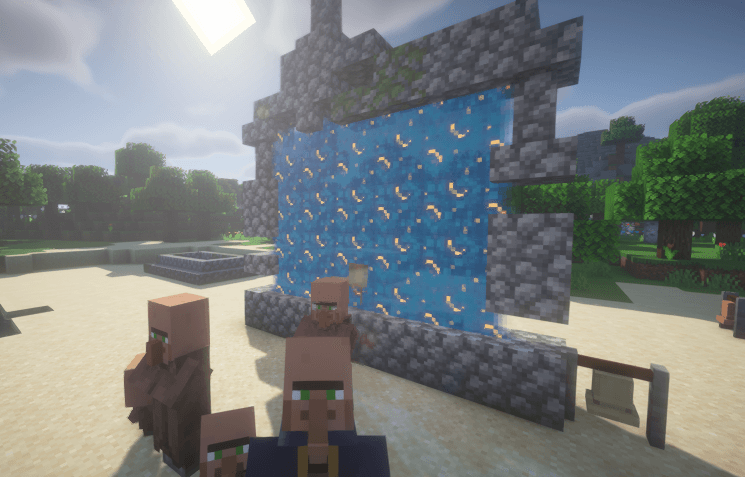
Migration Portals
Build a complete cobblestone frame (even slabs and stairs) and activate it with flint.
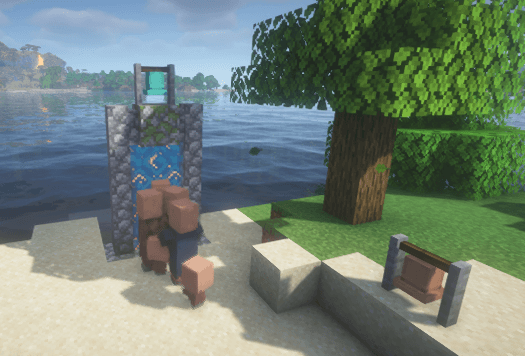
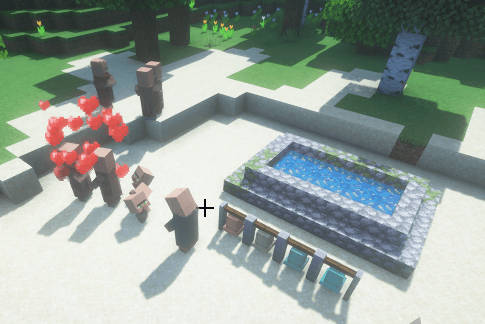
Only Villagers may enter an active portal, to be saved to a migration file and fade out of the current world for good, just to be reborn at diffrent site or differnet world.
But be warned: Interdimensional travel can be disorienting, so villagers you call back may settle in the first suitable spot near the portal instead of returning to their original homes.
Tickets 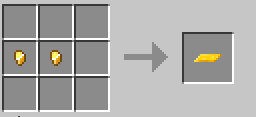
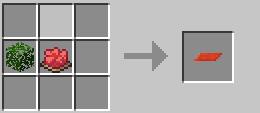
Hand over a ticket to special villagers:
- Golden tickets mark a villager as invited by you.
- Red tickets exclude a villager from your summons.
Recently given tickets replace older ones.
Ticket assignments are stored internally and remain associated with the player who gave them.
Copper Bells
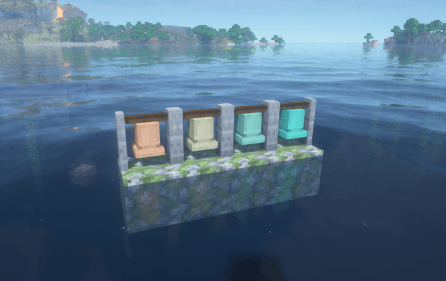
Four different copper bells to determine the range:
- copper: calls all known villagers in the selected dimensions.
- Exposed copper: calls in 512-chunk radius.
- Weathered copper: calls in 64-chunk radius.
- Oxidized copper: calls in 8-chunk radius.
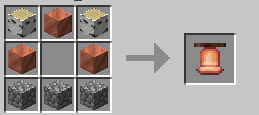
- Ring it once to call them.
- Ring it two times to send them through the portal.
- Ring it three times to send them back home.
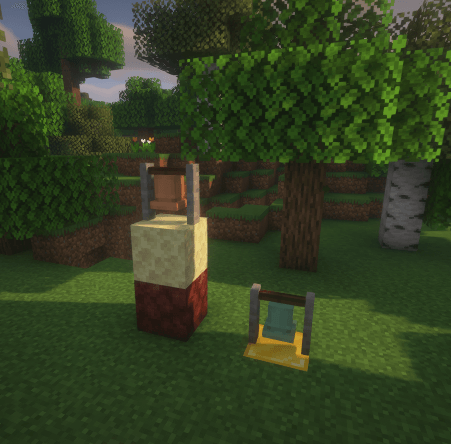
Stack blocks beneath a bell to combine dimension selections and optional filters. Gold selects invited villagers; (emerald selects House of Habsborough villagers, wich may come from a secondary related mod). Up to five blocks are checked, and two identical consecutive blocks stop the scan.
Commands
/migrate obj— Unlock the mod’s crafting recipes./migrate buy— Receive a stack of every mod item.
(in the Screenshots: "BSL Shaders")
License
You may download, install, and use this mod for personal and commercial gameplay purposes.
The following activities are explicitly permitted:
Creating, publishing, and monetizing videos, livestreams, screenshots, and other gameplay-related content featuring this mod.
Sharing links to the mod's official download page.
Using the mod on public and private game servers.
You may not redistribute, reupload, sell, modify, or incorporate this mod or its assets into other projects or modpacks without prior permission from the copyright holder.
All rights not expressly granted are reserved by the copyright holder.
This mod is provided "as is", without warranty of any kind.
Project description from CurseForge.
Pick your setup
MigrateVillager by Minecraft version and loader
Choose the version and loader you play, then open the matching release.
Minecraft version
26.2
2 loader buildsMinecraft version
1.21.11
2 loader buildsCheck the dependencies, then try the file in a copied instance before changing a world you care about.
Recent files
MigrateVillager versions and loaders
migrate-villager-neoforge-26.3-18.0
migrate-villager-neoforge-26.3-0.18.0.jar
4 Nov 2026
Client Source doesn’t say Server Source doesn’t say Dependencies No extras listed Listed on Release listing
Check the 26.3 · NeoForge setup NeoForge26.3 release
migrate-villager-fabric-26.3-18.0
migrate-villager-fabric-26.3-0.18.0.jar
4 Nov 2026
Client Source doesn’t say Server Source doesn’t say Dependencies No extras listed Listed on Release listing
Check the 26.3 · Fabric setup Fabric26.3 release
Looking for an older file? The official CurseForge project page is in Resources.
 mod
CurseForge + Modrinth · Minecraft
Lost Loot Upgraded
Saves despawned items so players can fish them up or brush them out of suspicious sand/gravel. With admin tools and optional filters and limits.
 mod
CurseForge + Modrinth · Minecraft
PPE Essentials
A lightweight mod that adds useful commands (like /tpa /repeat) and tweaks
 mod
CurseForge · Minecraft
Convenient Cushions
Cushions are a tad clunky, shall we make them a bit more convenient?