Minecraft version
Back to mods 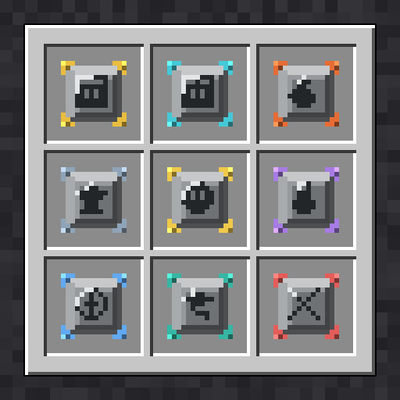
CurseForge · Minecraft mod
Modular Inventory
Start with only a hotbar. Craft and find modules that unlock storage slots and built-in furnace, anvil and brewing tabs.
Choose a version Pick your version below, then grab the matching file.
Quick answer
Which Modular Inventory release should I use?
Latest stable file Modular Inventory - 2.0.0
Game version 1.20.1
Loader Forge
Modular Inventory - 2.0.0 targets 1.20.1 with Forge. The project page does not say whether this file belongs on the client, dedicated server, or both. No extra mods listed for this file.
Where it goes
Is Modular Inventory required on the client, server, or both?
The project page does not say whether this file belongs on the client, dedicated server, or both.
Client Source doesn’t say
Dedicated server Source doesn’t say
Loader for this release Forge
Required install it here Optional supported, not mandatory Not supported do not install here Source doesn’t say do not assume
The source does not explicitly classify this release as client-only or server-only.
What else does Modular Inventory - 2.0.0 need?
Modular Inventory - 2.0.0. Change the file and its required mods may change too.
This file does not list any required mods. Do not add a library just because a different file uses it.
This file does not list any required or optional mods.
Before you install it
Add Modular Inventory without breaking your instance.
Built for Modular Inventory - 2.0.0. Pick another file and the loader, install side or required mods may change.
- 01
Stick to this file
Use Modular Inventory - 2.0.0. It targets 1.20.1 with Forge; another release may have different loader, side or dependency requirements.
- 02
Bring the mods it needs
This file does not list any required mods. Do not add a library just because a different file uses it.
- 03
Put it on the correct side
The project page does not say whether this file belongs on the client, dedicated server, or both.
- 04
Pick the file you checked
Use the “Get this file” button beside Modular Inventory - 2.0.0. It opens that exact file at the source.
About this project
What does Modular Inventory add?
Modular Inventory
You spawn with only your hotbar. Everything else, including storage, crafting stations and quality-of-life tools, comes from modules that you craft or find, then drag into a bar of 14 module slots.
How it works
- Press E to open the Modular Inventory. In Creative, press M or use the button next to the creative tabs.
- Drag a module into the module bar (or right-click it in hand) to equip it.
- Slot modules add inventory slots. Station modules add built-in tabs on the right of the inventory.
- Unlocked slots are shown. Locked slots stay completely hidden.
- Use the page arrows to browse unlimited extra pages of slots.
Every module has a limit. Each equip uses up one of the module's equips. Modules never break or vanish. Station modules (furnace, anvil and so on) are single-use. Once a module has no equips left, it stays installed.
Storage modules
- Standard Storage (+9), Expanded (+18), Advanced Storage (+36, found only), Pocket (+3), Compact (+6)
- Tool Rack (tools and weapons only), Builders (blocks only), Herbalist (plants and seeds only)
Built-in tabs, usable anywhere
- Furnace and Brewing (they keep working while your inventory is closed), Anvil, Smithing Table, Grindstone, Stonecutter, Cartography Table, 3x3 Crafting Table, and Ender Link (your Ender Chest)
Utility modules
- Auto Sort (sort button), Disposal (delete slot with confirmation), Loot Filter (auto-deletes junk, configurable), Miners (Haste), Navigation (coordinates HUD), Chromatic Theme (recolor the GUI), Reinforced (keep stored items on death), Recovery (death drops never despawn)
Getting modules
- Most modules are craftable with vanilla items. Every recipe fits the 2x2 inventory grid.
- Six modules are find-only and appear in dungeons, mineshafts, strongholds, bastions, ancient cities and other structure chests: Advanced Storage, Ender Link, Loot Filter, Miners, Reinforced, Recovery.
Compatibility
- Works in Survival and Creative
- JEI recipe transfer and info pages for every module
- Server-safe: data is saved per player
Config
modularinventory-common.toml: edit the Loot Filter item list and the chance of find-only modules in structure chests.
Project description from CurseForge.
Pick your setup
Modular Inventory by Minecraft version and loader
Choose the version and loader you play, then open the matching release.
Check the dependencies, then try the file in a copied instance before changing a world you care about.
Recent files
Modular Inventory versions and loaders
Modular Inventory - 2.0.0
modularinventory-1.20.1-1.3.0.jar
15 Oct 2026
Client Source doesn’t say Server Source doesn’t say Dependencies No extras listed Listed on Release listing
Check the 1.20.1 · Forge setup 1.20.1Forge release
modularinventory-1.20.1-1.0.0.jar
11 Oct 2026
Client Source doesn’t say Server Source doesn’t say Dependencies No extras listed Listed on Release listing
Check the 1.20.1 · Forge setup 1.20.1Forge release
Looking for an older file? The official CurseForge project page is in Resources.