Minecraft version
Back to mods 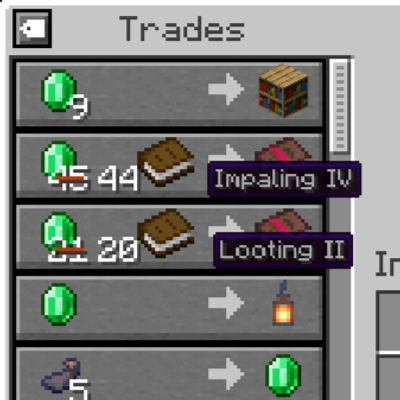
CurseForge · Minecraft mod
Villager Trade Labels
See villager trade enchantments and explorer map names right in the trading screen, without hovering over each item.
Choose a version Pick your version below, then grab the matching file.
Quick answer
Which Villager Trade Labels release should I use?
Latest stable file villagertradelabels-neoforge-26.3-1.0.0.jar
Game version 26.3
Loader NeoForge
Villager Trade Labels villagertradelabels-neoforge-26.3-1.0.0.jar targets 26.3 with NeoForge. The project page does not say whether this file belongs on the client, dedicated server, or both. No extra mods listed for this file.
Where it goes
Is Villager Trade Labels required on the client, server, or both?
The project page does not say whether this file belongs on the client, dedicated server, or both.
Client Source doesn’t say
Dedicated server Source doesn’t say
Loader for this release NeoForge
Required install it here Optional supported, not mandatory Not supported do not install here Source doesn’t say do not assume
The source does not explicitly classify this release as client-only or server-only.
What else does Villager Trade Labels villagertradelabels-neoforge-26.3-1.0.0.jar need?
villagertradelabels-neoforge-26.3-1.0.0.jar. Change the file and its required mods may change too.
This file does not list any required mods. Do not add a library just because a different file uses it.
This file does not list any required or optional mods.
Before you install it
Add Villager Trade Labels without breaking your instance.
Built for Villager Trade Labels villagertradelabels-neoforge-26.3-1.0.0.jar. Pick another file and the loader, install side or required mods may change.
- 01
Stick to this file
Use villagertradelabels-neoforge-26.3-1.0.0.jar. It targets 26.3 with NeoForge; another release may have different loader, side or dependency requirements.
- 02
Bring the mods it needs
This file does not list any required mods. Do not add a library just because a different file uses it.
- 03
Put it on the correct side
The project page does not say whether this file belongs on the client, dedicated server, or both.
- 04
Pick the file you checked
Use the “Get this file” button beside villagertradelabels-neoforge-26.3-1.0.0.jar. It opens that exact file at the source.
About this project
What does Villager Trade Labels add?
Villager Trade Labels
See what a villager is selling without hovering over every trade.
Looking for Mending in a hall full of librarians means hovering over book after book. Villager Trade Labels shows the enchantment of every enchanted book, the enchantments of enchanted gear, and the name of every explorer map right below the item in the vanilla trading screen.
Features
- Enchanted books. The stored enchantment and its level, for example Mending or Sharpness V.
- Enchanted gear. The first enchantment of armor, weapons and tools, plus how many more there are, for example Protection III +1.
- Explorer maps. The map name, for example Ocean Explorer Map.
- Looks like vanilla. Labels use the vanilla tooltip style and colors: grey enchantments, red curses, map names in their item color.
- Always readable. Long names are shortened with "…", but the level is always shown.
- No spoilers. Only information the vanilla tooltip already shows. Hidden details stay hidden.
- Toggle. A small button at the top left of the trade list hides or shows the labels and remembers your choice.
- Client-side only. Install it on your client and use it on any server, including servers without mods.
Better together
- Villager Trade Peek: locked future trades get labels too, so you can see that a librarian will offer Mending at Journeyman before you level it up.
- Villager Trade Swap: swap a trade and read the new one instantly, no hovering needed.
Both are optional. Villager Trade Labels works on its own.
Versions
| Minecraft | Loader | Requires | File |
|---|---|---|---|
| 1.21.1 | NeoForge | NeoForge 21.1.1 or newer | villagertradelabels-neoforge-1.21.1 |
| 1.21.1 | Forge | Forge 52.0.0 or newer | villagertradelabels-forge-1.21.1 |
| 1.21 – 1.21.1 | Fabric | Fabric Loader 0.15.11+, Fabric API 0.102.0+ | villagertradelabels-fabric-1.21-1.21.1 |
| 1.20.1 | Forge and NeoForge | Forge 47.1.0 or newer, or NeoForge 1.20.1 | villagertradelabels-forge-1.20.1 |
| 1.20 – 1.20.1 | Fabric | Fabric Loader 0.14.21+, Fabric API 0.83.0+ | villagertradelabels-fabric-1.20-1.20.1 |
Pick the file that matches your loader. On Minecraft 1.21.1, NeoForge and Forge are separate loaders, so each has its own file. On Minecraft 1.20.1, the single Forge file runs on both Forge and NeoForge.
Configuration
config/villagertradelabels-client.json stores whether labels are shown, for example {"showLabels": true}. You normally change it with the toggle in the trading screen.
FAQ
Do I need it on the server? No. It only changes what your own trading screen shows.
Does it work with wandering traders? Yes, labels work in every trading screen.
Can I use it in my modpack? Yes, go ahead. The mod is licensed under MIT.
Links
- Source code: https://github.com/emberbocor/villagertradelabels
- Bug reports and suggestions: https://github.com/emberbocor/villagertradelabels/issues
When reporting a bug, please include your Minecraft version, loader, mod version and your log file.
Project description from CurseForge.
Pick your setup
Villager Trade Labels by Minecraft version and loader
Choose the version and loader you play, then open the matching release.
Minecraft version
26.2
3 loader buildsMinecraft version
26.1.2
3 loader buildsMinecraft version
26.1.1
3 loader buildsMinecraft version
26.1
3 loader buildsMinecraft version
1.21.11
3 loader buildsMinecraft version
1.21.1
3 loader buildsMinecraft version
1.21
1 loader buildMinecraft version
1.20.1
3 loader buildsMinecraft version
1.20
1 loader buildCheck the dependencies, then try the file in a copied instance before changing a world you care about.
Recent files
Villager Trade Labels versions and loaders
villagertradelabels-neoforge-26.3-1.0.0.jar
17 Oct 2026
Client Source doesn’t say Server Source doesn’t say Dependencies No extras listed Listed on Release listing
Check the 26.3 · NeoForge setup NeoForge26.3 release
villagertradelabels-forge-26.3-1.0.0.jar
17 Oct 2026
Client Source doesn’t say Server Source doesn’t say Dependencies No extras listed Listed on Release listing
Check the 26.3 · Forge setup Forge26.3 release
villagertradelabels-fabric-26.3-1.0.0.jar
17 Oct 2026
Client Source doesn’t say Server Source doesn’t say Dependencies 1 required · 1 unchecked Listed on Release listing
Check the 26.3 · Fabric setup Fabric26.3 release
villagertradelabels-neoforge-26.2-1.0.0.jar
17 Oct 2026
Client Source doesn’t say Server Source doesn’t say Dependencies No extras listed Listed on Release listing
Check the 26.2 · NeoForge setup NeoForge26.2 release
villagertradelabels-forge-26.2-1.0.0.jar
17 Oct 2026
Client Source doesn’t say Server Source doesn’t say Dependencies No extras listed Listed on Release listing
Check the 26.2 · Forge setup Forge26.2 release
villagertradelabels-fabric-26.2-1.0.0.jar
17 Oct 2026
Client Source doesn’t say Server Source doesn’t say Dependencies 1 required · 1 unchecked Listed on Release listing
Check the 26.2 · Fabric setup Fabric26.2 release
villagertradelabels-neoforge-26.1-26.1.2-1.0.0.jar
17 Oct 2026
Client Source doesn’t say Server Source doesn’t say Dependencies No extras listed Listed on Release listing
Check the 26.1.2 · NeoForge setup NeoForge26.126.1.126.1.2 release
villagertradelabels-forge-26.1-26.1.2-1.0.0.jar
17 Oct 2026
Client Source doesn’t say Server Source doesn’t say Dependencies No extras listed Listed on Release listing
Check the 26.1.2 · Forge setup Forge26.126.1.126.1.2 release
villagertradelabels-fabric-26.1-26.1.2-1.0.0.jar
17 Oct 2026
Client Source doesn’t say Server Source doesn’t say Dependencies 1 required · 1 unchecked Listed on Release listing
Check the 26.1.2 · Fabric setup Fabric26.126.1.126.1.2 release
villagertradelabels-neoforge-1.21.11-1.0.0.jar
17 Oct 2026
Client Source doesn’t say Server Source doesn’t say Dependencies No extras listed Listed on Release listing
Check the 1.21.11 · NeoForge setup NeoForge1.21.11 release
villagertradelabels-forge-1.21.11-1.0.0.jar
17 Oct 2026
Client Source doesn’t say Server Source doesn’t say Dependencies No extras listed Listed on Release listing
Check the 1.21.11 · Forge setup Forge1.21.11 release
villagertradelabels-fabric-1.21.11-1.0.0.jar
17 Oct 2026
Client Source doesn’t say Server Source doesn’t say Dependencies 1 required · 1 unchecked Listed on Release listing
Check the 1.21.11 · Fabric setup Fabric1.21.11 release
Looking for an older file? The official CurseForge project page is in Resources.
 mod
CurseForge + Modrinth · Minecraft
Asgard Shield: Reloaded
A Minecraft mod that adds giant swords and shields to the game. A re-make of the original Asgard Shield, made popular by the 1.5 modpack Hexxit.
 mod
CurseForge · Minecraft
Mochos Misiones (Missions)
Addon for Mochos Esenciales: missions that guide players through all of Minecraft up to the Ender Dragon. A mission tree with story, objectives, rewards and optional progression locks, editable in game.
 mod
CurseForge · Minecraft
Claim Zones
Claim chunks to protect your builds, invite friends with custom roles and permissions, and see every claim on Xaero's Map and JourneyMap.