Fabric API Needed by Teleportals Are Here teleportals-are-here-1.9.2-v1.21.1-fabric.jar
requiredMatching file found Matched file: [1.21.1] Fabric API 0.116.17+1.21.1

CurseForge · Minecraft mod
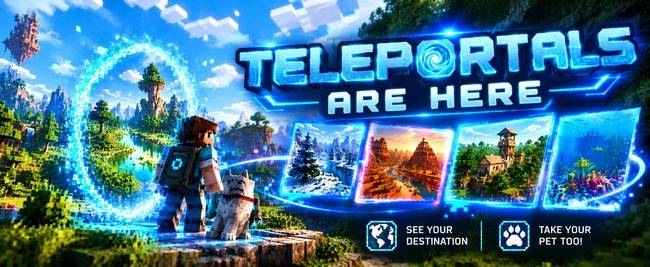
Use our beautiful Teleportals to travel across your world, See your destination before you leave. Take your Pet too!
Quick answer
Teleportals Are Here teleportals-are-here-1.9.2-v1.21.1-fabric.jar targets 1.21.1 with Fabric. The project page does not say whether this file belongs on the client, dedicated server, or both. All 1 required mods have matching files.
Where it goes
The project page does not say whether this file belongs on the client, dedicated server, or both.
The source does not explicitly classify this release as client-only or server-only.
teleportals-are-here-1.9.2-v1.21.1-fabric.jar. Change the file and its required mods may change too.
Install Fabric API first. We found matching files for this game-version and loader setup.
We only count dependency files that match this setup. A file for another loader does not fill the gap.
Before you install it
Built for Teleportals Are Here teleportals-are-here-1.9.2-v1.21.1-fabric.jar. Pick another file and the loader, install side or required mods may change.
Use teleportals-are-here-1.9.2-v1.21.1-fabric.jar. It targets 1.21.1 with Fabric; another release may have different loader, side or dependency requirements.
Install Fabric API first. We found matching files for this game-version and loader setup.
The project page does not say whether this file belongs on the client, dedicated server, or both.
Use the “Get this file” button beside teleportals-are-here-1.9.2-v1.21.1-fabric.jar. It opens that exact file at the source.
About this project
 Teleportals are Here
Step onto a glowing quartz pad, see where you're going before you leave, and take your pet with you.
Teleportals are Here is a fast-travel mod built to be easy to use. Each pad has a shimmering portal above it, and inside that portal you can see pictures of the place it leads to. You can find every portal in the world from one searchable list, with no flicking through pages. And it's cheap to make: no ender pearls needed!
Every Teleportal is a nether quartz pad with a glowing portal window floating above it.
Each portal shows pictures of the place it takes you to, fading slowly from one to the next every few seconds. You can see what's waiting on the other side before you step through.
Animals on a lead travel with you and are still on the lead when you arrive, even between dimensions. Your dog, horse or llama can come along for the adventure.
Mobs never use Teleportals on their own, so no creepers will follow you home.
Right-click a Teleportal to open its screen:
Choose from 10 portal window shapes, each with a live preview on the portal screen:
Oval · Circle · Arch · Window · Diamond · Hexagon · Shield · Heart · Keyhole · Star
The pictures fill the shape neatly like a photo in a frame, and the glowing rim follows the outline. Your choice is just for you: on a server, every player picks the shape they like without changing what anyone else sees.
If you have Xaero's Minimap or Xaero's World Map installed, every Teleportal automatically shows up as a waypoint in the right dimension and in a colour close to its glow. Waypoints follow renames and disappear when a portal is broken, and they never clutter your own waypoint lists.
Xaero's is optional: Teleportals works fine without it.
Makes 2 x Teleportals, which is enough for one there-and-back link:
| Nether Quartz | Glowstone Dust | Nether Quartz |
| Stone Bricks | Stone Bricks | Stone Bricks |
Does it need to be on the server? Yes. Install it on the server and on every player's game.
Does it use ender pearls? No! Just nether quartz, glowstone dust and stone bricks.
Can I travel to the Nether or the End? Yes, as long as allowCrossDimension is left on (it is by default).
Does breaking a Teleportal cause problems? No. It's removed from the list, any portals linked to it clear themselves, and its pictures are deleted.
Can I use it in a modpack? Of course! Feel free to include it in your modpacks.
Made by AndyMFA (C) Many Fun Adventures
Project description from CurseForge.
Pick your setup
Choose the version and loader you play, then open the matching release.
Check the dependencies, then try the file in a copied instance before changing a world you care about.
Recent files
25 Oct 2026
25 Oct 2026
24 Oct 2026
13 Oct 2026
13 Oct 2026
13 Oct 2026
13 Oct 2026
13 Oct 2026
13 Oct 2026
teleporters-are-here-1.9.2-v1.16.5-forge.jar
13 Oct 2026
teleportals-1.9.2.jar
13 Oct 2026
Looking for an older file? The official CurseForge project page is in Resources.
 mod
Completely removes recipe book from the game, optimizing player data.
 mod
A TaCZ derivative, keeping custom guns continued indefinitely
 mod
Oreganized is a mod that adds two new metals to minecraft, Lead, Silver, and the alloy Electrum. All with their unique uses and abilities and not just a new meaningless toolset.