Minecraft version
Back to mods 
CurseForge · Minecraft mod
Immersive Day Counter
Adds an on-screen day counter with announcements, sounds, objectives and advancements for days 1, 100, 1000 and 10000.
Choose a version Pick your version below, then grab the matching file.
Quick answer
Which Immersive Day Counter release matches 26.2?
Best match for your filters idc-neoforge-1.5.1+mc26.2.jar
Game version 26.2
Loader NeoForge
Immersive Day Counter idc-neoforge-1.5.1+mc26.2.jar targets 26.2 with NeoForge. The project page does not say whether this file belongs on the client, dedicated server, or both. No extra mods listed for this file.
Where it goes
Is Immersive Day Counter required on the client, server, or both?
The project page does not say whether this file belongs on the client, dedicated server, or both.
Client Source doesn’t say
Dedicated server Source doesn’t say
Loader for this release NeoForge
Required install it here Optional supported, not mandatory Not supported do not install here Source doesn’t say do not assume
The source does not explicitly classify this release as client-only or server-only.
What else does Immersive Day Counter idc-neoforge-1.5.1+mc26.2.jar need?
idc-neoforge-1.5.1+mc26.2.jar on 26.2. Every mod below is checked against that same setup.
This file does not list any required mods. Do not add a library just because a different file uses it.
This file does not list any required or optional mods.
Before you install it
Add Immersive Day Counter without breaking your instance.
Built for Immersive Day Counter idc-neoforge-1.5.1+mc26.2.jar on 26.2. Pick another file and the loader, install side or required mods may change.
- 01
Stick to this file
Use idc-neoforge-1.5.1+mc26.2.jar. It targets 26.2 with NeoForge; another release may have different loader, side or dependency requirements.
- 02
Bring the mods it needs
This file does not list any required mods. Do not add a library just because a different file uses it.
- 03
Put it on the correct side
The project page does not say whether this file belongs on the client, dedicated server, or both.
- 04
Pick the file you checked
Use the “Get this file” button beside idc-neoforge-1.5.1+mc26.2.jar. It opens that exact file at the source.
About this project
What does Immersive Day Counter add?
Immersive Day Counter
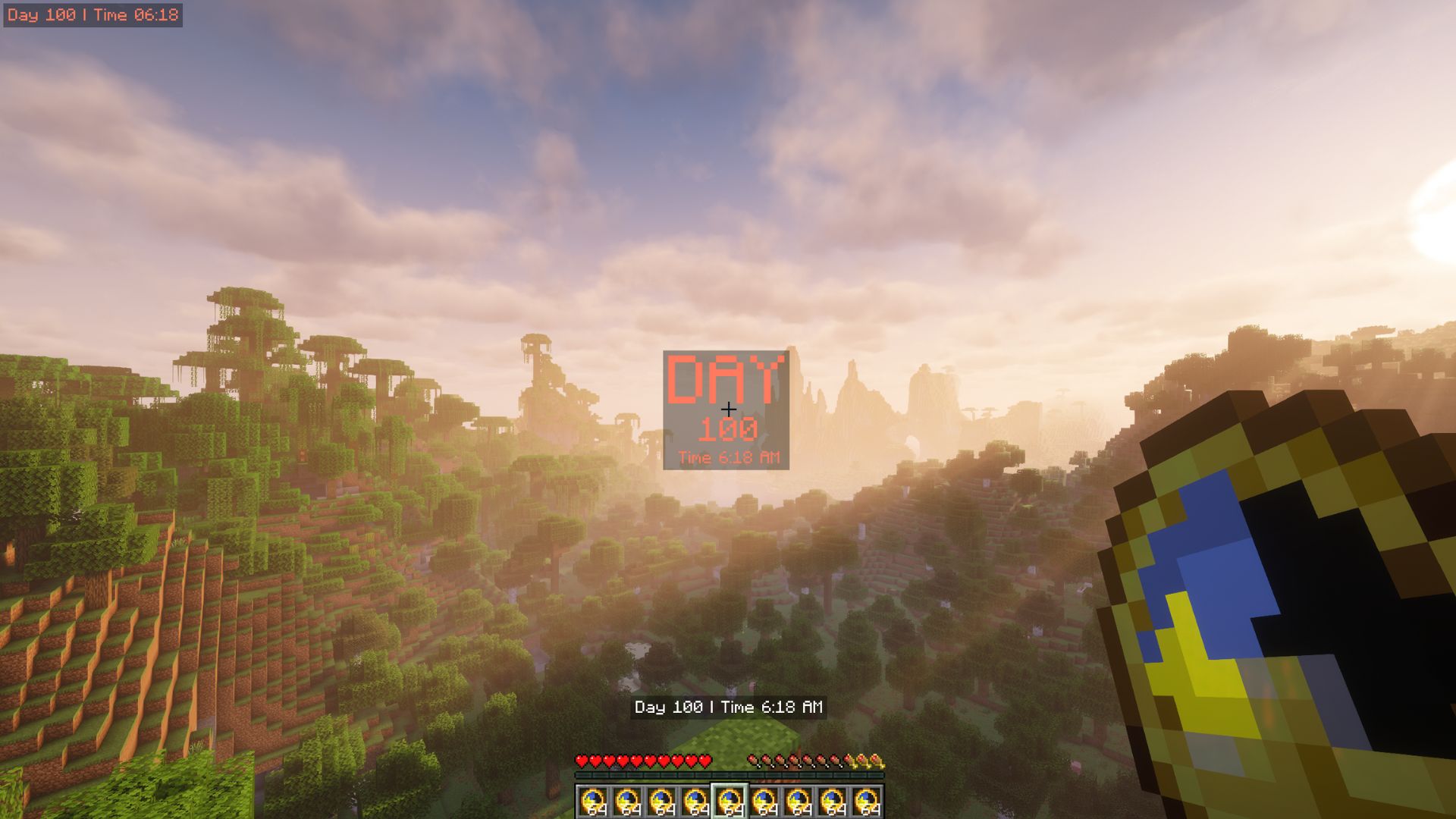
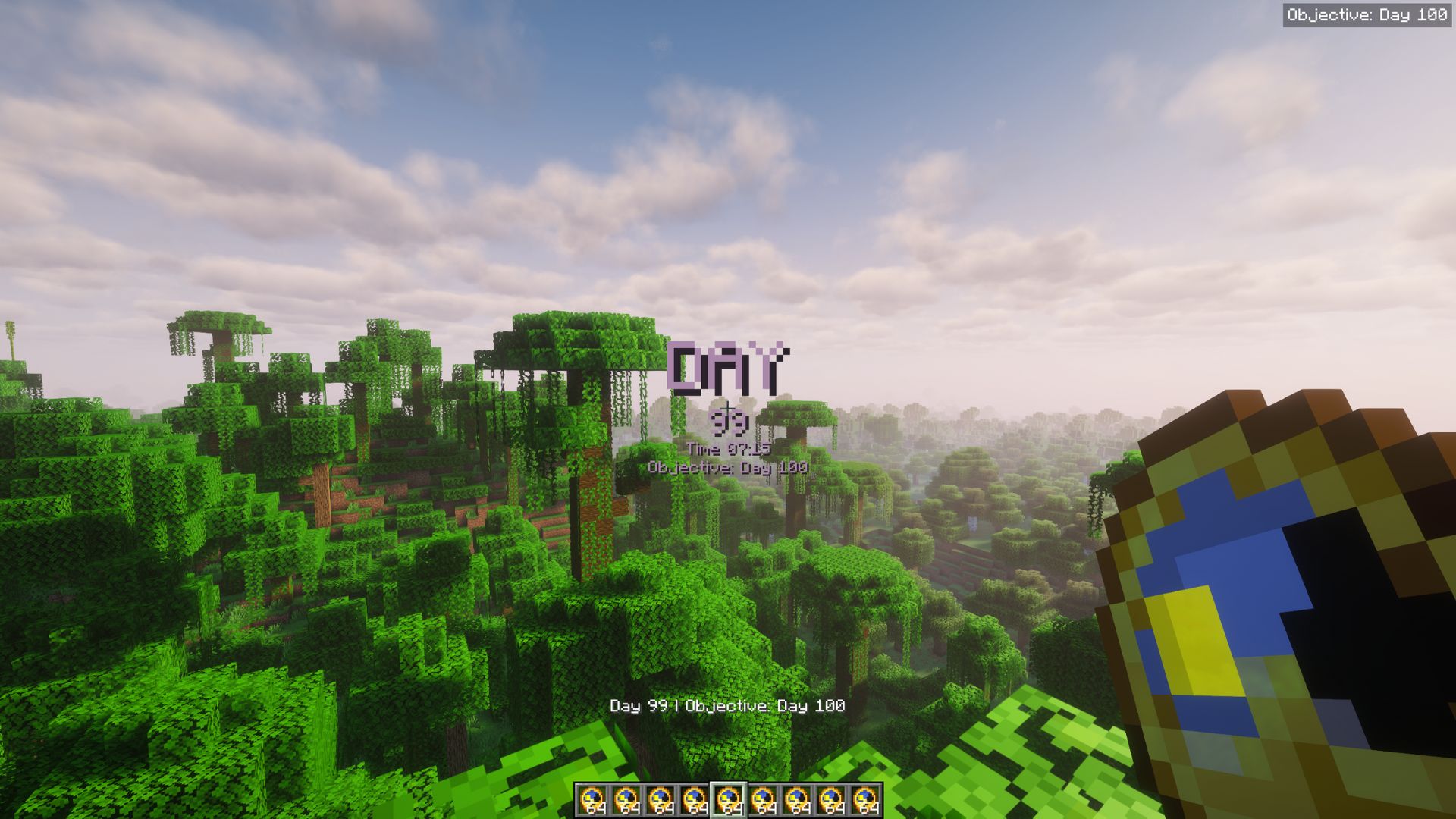
A lightweight mod that tracks the in-game day and announces every new day with a title, HUD display, sounds and milestone advancements, fully configurable. It also includes Lumen, an optional client-side full-bright toggle, and a client-side Day Objective.
🌐 Multilingual
| Language | Main | Variants |
|---|---|---|
| English | en_us |
None |
| Español | es_es |
es_mx es_ar es_cl |
| Deutsch | de_de |
de_at de_ch |
| Français | fr_fr |
None |
| Italiano | it_it |
None |
| Português | pt_pt |
pt_br |
| Русский | ru_ru |
None |
| 简体中文 | zh_cn |
None |
| 繁體中文 | zh_tw |
None |
| 日本語 | ja_jp |
None |
| 한국어 | ko_kr |
None |
⚡ Features
📆 Day tracking
The day is resolved live from the world clock, so nothing is stored and it always matches the world.
Note: this counter is not the same as F3. F3 shows the day starting at 0, while this mod counts the first day as Day 1. That means the mod is always F3's Day plus 1.
Version 1.21.11: on these versions the day comes straight from the world time, so /time set (day, noon, night, midnight) resets the counter to Day 1. To set the day, use /idc set day n. (OP needed)
🖥️ Display styles
Three independent styles, each fully configurable:
| Style | Where | Behaviour |
|---|---|---|
| Center Display | Middle of the screen | Permanent or timed. Large "DAY" title shown for a few seconds, then it fades out (can also show only the time) |
| Hotbar Display | Above the hotbar | Permanent or timed |
| Corner Display | A screen corner | Permanent or timed, with a configurable corner |
⏰ Day and time content
Each style can show the day, the time, both, or only the objective via the content option (day / time / day_and_time / only_objective). The clock uses a 24-hour or 12-hour (AM/PM) format.
🎨 Colors and special days
A text color per style, plus a special color on every 100th day (100, 200, 300, …, 1000, …). Each style can also show a translucent black background behind the text.
🏆 Advancements
Days 1, 100, 1000 and 10000 are granted as challenge advancements.
🔊 Sounds
A sound plays on each day change. It can be toggled off.
- Note-block pling (default)
- Creeper hiss
- Click
- Item pickup sound
- Experience orb
- Experience level-up
- Short bell
- Random (picks one of the other sounds at random each day)
💡 Lumen (full bright)
An optional client-side full-bright toggle. Press Z (by default) to brighten the world and clear water, Nether and End fog. A click and an on-screen message ("Lumen enabled" / "Lumen disabled") confirm the change.
- Brightness (0–15) and fog clearing are adjustable in the Lumen tab of the config screen.
- Works on any server.
- Lumen may not work with some Shaders.
🎯 Day Objective
A client-side objective shown in the HUD. By default it is Day 100. When the current day reaches it, the HUD shows Reached! in green. The check is live: if the day is set back below the objective it stops being reached, and if the day is at or past it, it stays reached.
- Change it with
/idcclient objective n(no OP needed) or in the Objective tab of the config screen. - Each style has a Show objective toggle.
- Set Show to Only Objective to display just the objective (without day or time).
- The Default Day 100 Objective toggle uses Day 100. Setting a custom objective turns it off.
⌨️ Command
| Command | Description |
|---|---|
/idc set day n |
OP only. Sets the world day to n (1 to 1,000,000). |
/idc set day reset |
OP only. Resets the world day to 1. |
/idcclient objective n |
Client-side, no OP. Sets the objective to n (1 to 1,000,000). |
/idcclient config |
Client-side, no OP. Opens the mod config screen. |
⚙️ Configuration
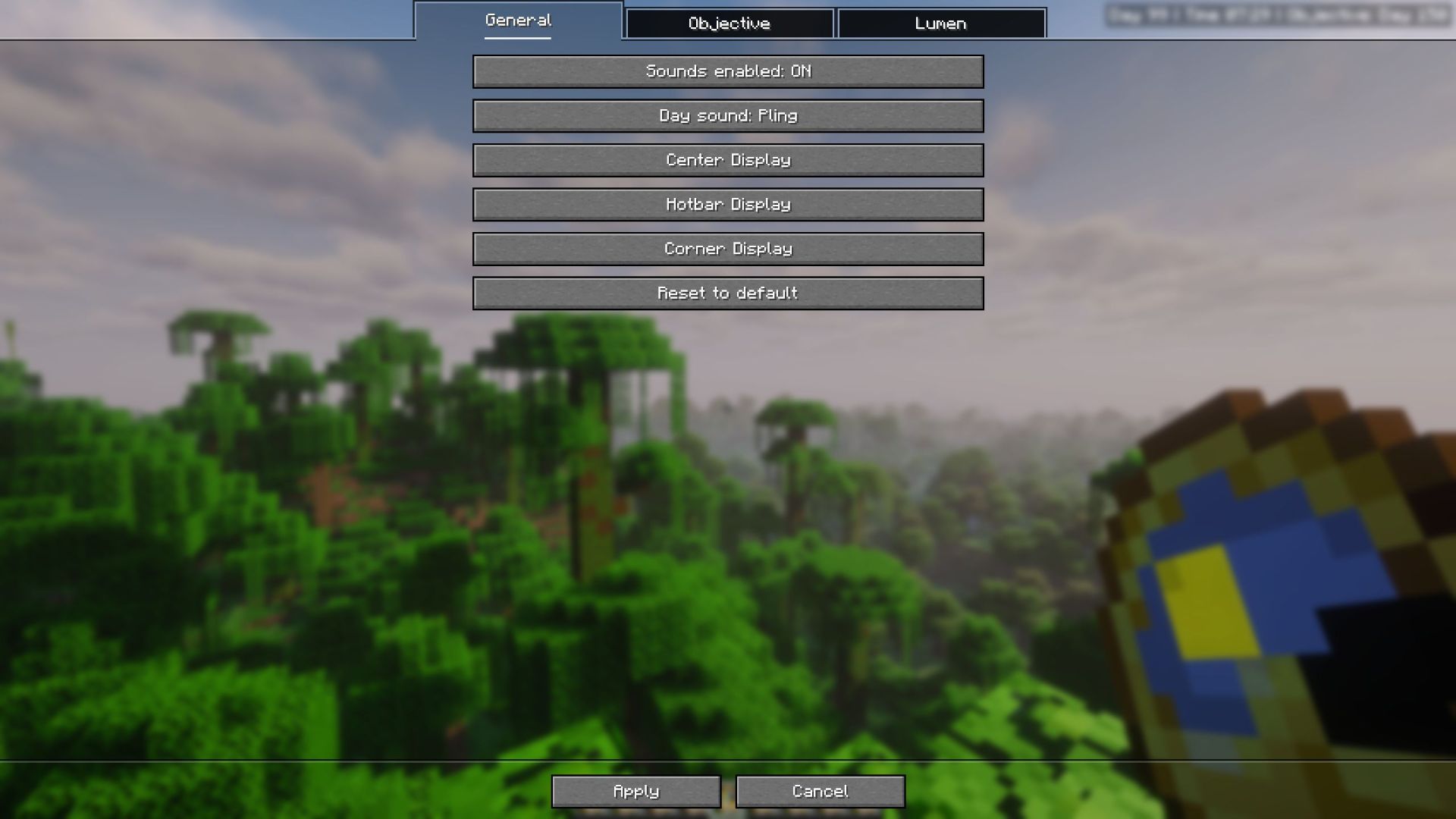
The easiest way is in game: open Mod Menu (Fabric) or the Config button in the mods list (NeoForge).
The General tab has the sound settings, one button per display style, and a Reset to default action.
The Objective tab has the default Day 100 toggle and the objective day.
The Lumen tab has the brightness and fog settings.
No game restart needed.
If you prefer editing the file manually:
config/immersive-day-counter.json
{
  "sounds": { "enabled": true, "sound": "pling" },
  "display": {
    "center": { "enabled": true,  "permanent": false, "durationSeconds": 3.0, "fadeSeconds": 0.6, "background": false, "showObjective": false, "textColor": "#FFFFFF", "specialDayText": true, "specialDayTextColor": "#FF7A5E", "content": "day", "dayTimeFormat": "24h" },
    "hotbar": { "enabled": true,  "permanent": true,  "durationSeconds": 3.0, "fadeSeconds": 0.6, "background": false, "showObjective": true,  "textColor": "#FFFFFF", "specialDayText": true, "specialDayTextColor": "#FF7A5E", "content": "day_and_time", "dayTimeFormat": "24h" },
    "corner": { "enabled": false, "permanent": true,  "durationSeconds": 3.0, "fadeSeconds": 0.6, "background": true,  "showObjective": false, "position": "top_left", "textColor": "#FFFFFF", "specialDayText": true, "specialDayTextColor": "#FF7A5E", "content": "day", "dayTimeFormat": "24h" }
  },
  "lumen": { "brightness": 15.0, "clearFog": true },
  "objective": { "defaultDay100": true, "day": 100 }
}
| Option | Values | Default | Description |
|---|---|---|---|
sounds.enabled |
true / false |
true |
Daily sound on each day change. Milestones use the vanilla advancement sound regardless. |
sounds.sound |
click / experience / level_up / bell / pickup / pling / creeper / random |
pling |
Sound played when a new day starts. random picks one of the other sounds each day. |
enabled |
true / false |
center and hotbar true, corner false |
Show that style. |
permanent |
true / false |
hotbar and corner true |
Permanent instead of timed. |
durationSeconds |
0.5 to 15.0 | 3.0 |
How long a timed display stays. |
fadeSeconds |
0.0 to 5.0 | 0.6 |
Fade in and out duration. |
background |
true / false |
corner true |
Translucent black panel behind the text. |
textColor |
#RRGGBB |
#FFFFFF |
Text color. |
specialDayText |
true / false |
true |
Use the special color on every 100th day. |
specialDayTextColor |
#RRGGBB |
#FF7A5E |
Special day color. |
content |
day / time / day_and_time / only_objective |
center/corner day, hotbar day_and_time |
What each style shows: the day, the time, both, or only the objective. |
dayTimeFormat |
24h / 12h |
24h |
Time format (24-hour, or 12-hour with AM/PM). |
showObjective |
true / false |
hotbar true, center/corner false |
Show the objective in that style. |
lumen.brightness |
0.0 to 15.0 | 15.0 |
World brightness while Lumen is on. |
lumen.clearFog |
true / false |
true |
Clear water and Nether/End fog while Lumen is on. |
objective.defaultDay100 |
true / false |
true |
Use the default Day 100 objective. |
objective.day |
1 to 1,000,000 | 100 |
Custom objective day (used when defaultDay100 is false). |
corner.position |
top_left / top_right / bottom_right / bottom_left |
top_left |
Corner used by the Corner Display. |
Reset to default resets sounds and display styles but keeps the Lumen and Objective settings. Lumen's on/off state is not stored; toggle it with Z (or the key you bind in Controls).
📦 Requirements
Fabric
- Fabric API
- Mod Menu (optional)
- (26.x) Java 25 or newer
NeoForge
- (26.x) Java 25 or newer
💬 Suggestions & Issues
If you have an idea, a suggestion, or found a bug, feel free to leave a comment on the CurseForge page or open an issue on the GitHub repository.
❓ FAQ
Can I use this mod in a public modpack?
Yes! You're free to include it in any public or private modpack, no permission needed.
📜 License
This project is licensed under the MIT License.
Project description from CurseForge.
Pick your setup
Immersive Day Counter by Minecraft version and loader
Choose the version and loader you play, then open the matching release.
Minecraft version
26.2
2 loader buildsMinecraft version
26.1.2
2 loader buildsMinecraft version
1.21.11
2 loader buildsCheck the dependencies, then try the file in a copied instance before changing a world you care about.
Recent files
Immersive Day Counter versions and loaders
idc-neoforge-1.5.1+mc26.2.jar
idc-neoforge-1.5.1-mc26.2.jar
20 Nov 2026
Client Source doesn’t say Server Source doesn’t say Dependencies No extras listed Listed on Release listing
Check the 26.2 · NeoForge setup NeoForge26.2 release
idc-fabric-1.5.1+mc26.2.jar
idc-fabric-1.5.1-mc26.2.jar
20 Nov 2026
Client Source doesn’t say Server Source doesn’t say Dependencies No extras listed Listed on Release listing
Check the 26.2 · Fabric setup Fabric26.2 release
idc-neoforge-1.4.1+mc26.2.jar
idc-neoforge-1.4.1-mc26.2.jar
12 Nov 2026
Client Source doesn’t say Server Source doesn’t say Dependencies No extras listed Listed on Release listing
Check the 26.2 · NeoForge setup NeoForge26.2 release
idc-fabric-1.4.1+mc26.2.jar
idc-fabric-1.4.1-mc26.2.jar
12 Nov 2026
Client Source doesn’t say Server Source doesn’t say Dependencies No extras listed Listed on Release listing
Check the 26.2 · Fabric setup Fabric26.2 release
idc-neoforge-1.3.1+mc26.2.jar
idc-neoforge-1.3.1-mc26.2.jar
31 Oct 2026
Client Source doesn’t say Server Source doesn’t say Dependencies No extras listed Listed on Release listing
Check the 26.2 · NeoForge setup NeoForge26.2 release
idc-fabric-1.3.1+mc26.2.jar
idc-fabric-1.3.1-mc26.2.jar
31 Oct 2026
Client Source doesn’t say Server Source doesn’t say Dependencies No extras listed Listed on Release listing
Check the 26.2 · Fabric setup Fabric26.2 release
idc-neoforge-1.2.1+mc26.2.jar
23 Oct 2026
Client Source doesn’t say Server Source doesn’t say Dependencies No extras listed Listed on Release listing
Check the 26.2 · NeoForge setup NeoForge26.2 release
idc-fabric-1.2.1+mc26.2.jar
23 Oct 2026
Client Source doesn’t say Server Source doesn’t say Dependencies 1 required · 1 unchecked Listed on Release listing
Check the 26.2 · Fabric setup Fabric26.2 release
idc-neoforge-1.1.1+mc26.2.jar
19 Oct 2026
Client Source doesn’t say Server Source doesn’t say Dependencies No extras listed Listed on Release listing
Check the 26.2 · NeoForge setup NeoForge26.2 release
idc-fabric-1.1.1+mc26.2.jar
19 Oct 2026
Client Source doesn’t say Server Source doesn’t say Dependencies 1 required · 1 unchecked Listed on Release listing
Check the 26.2 · Fabric setup Fabric26.2 release
idc-neoforge-1.0.1+mc26.2.jar
16 Oct 2026
Client Source doesn’t say Server Source doesn’t say Dependencies No extras listed Listed on Release listing
Check the 26.2 · NeoForge setup NeoForge26.2 release
idc-fabric-1.0.1+mc26.2.jar
16 Oct 2026
Client Source doesn’t say Server Source doesn’t say Dependencies 1 required · 1 unchecked Listed on Release listing
Check the 26.2 · Fabric setup Fabric26.2 release
Looking for an older file? The official CurseForge project page is in Resources.
 mod
CurseForge + Modrinth · Minecraft
Agritech (AT2)
Farming automation mod. Planters and raised beds grow your crops and trees for you.
 mod
CurseForge + Modrinth · Minecraft
Pride Land (LGBTQIA+)
Adds a handful of lgbt / lgbtqia themed blocks, decorations, and tools making the gameplay more multihued
 mod
CurseForge + Modrinth · Minecraft
[AdvancedChatHUD] Simply Updated
An update of the original Advanced Chat HUD(With fixes). A brand new chat HUD design for Minecraft with tons of features.