Minecraft version
Back to mods 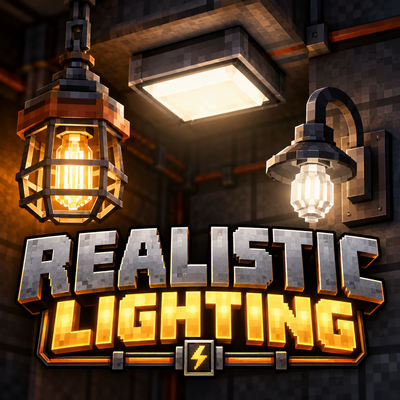
CurseForge · Minecraft mod
Realistic Lighting
Bring realistic, powered lighting to Minecraft with replaceable bulbs, customizable fixtures, and tech-mod integration.
Choose a version Pick your version below, then grab the matching file.
Quick answer
Which Realistic Lighting release should I use?
Latest stable file realistic_lighting-1.1.1.jar
Game version 1.20.1
Loader Forge
Realistic Lighting realistic_lighting-1.1.1.jar targets 1.20.1 with Forge. The project page does not say whether this file belongs on the client, dedicated server, or both. No extra mods listed for this file.
Where it goes
Is Realistic Lighting required on the client, server, or both?
The project page does not say whether this file belongs on the client, dedicated server, or both.
Client Source doesn’t say
Dedicated server Source doesn’t say
Loader for this release Forge
Required install it here Optional supported, not mandatory Not supported do not install here Source doesn’t say do not assume
The source does not explicitly classify this release as client-only or server-only.
What else does Realistic Lighting realistic_lighting-1.1.1.jar need?
realistic_lighting-1.1.1.jar. Change the file and its required mods may change too.
This file does not list any required mods. Do not add a library just because a different file uses it.
This file does not list any required or optional mods.
Before you install it
Add Realistic Lighting without breaking your instance.
Built for Realistic Lighting realistic_lighting-1.1.1.jar. Pick another file and the loader, install side or required mods may change.
- 01
Stick to this file
Use realistic_lighting-1.1.1.jar. It targets 1.20.1 with Forge; another release may have different loader, side or dependency requirements.
- 02
Bring the mods it needs
This file does not list any required mods. Do not add a library just because a different file uses it.
- 03
Put it on the correct side
The project page does not say whether this file belongs on the client, dedicated server, or both.
- 04
Pick the file you checked
Use the “Get this file” button beside realistic_lighting-1.1.1.jar. It opens that exact file at the source.
About this project
What does Realistic Lighting add?
Realistic Lighting
Bring realistic electrical lighting to your Minecraft world!
Realistic Lighting introduces powered light fixtures, replaceable bulbs, realistic energy consumption, and electrical controls to Minecraft Java Edition.
Designed for builders, engineers, and technology enthusiasts, the mod adds functional lighting that integrates with Immersive Engineering and Ender IO while remaining usable without either mod installed.
Three Customizable Light Fixtures
- Industrial Cage Fixture — An industrial-style light with a protective cage, suitable for factories, workshops, and warehouses.
- Square Flush-Mount Ceiling Light — A compact ceiling fixture for modern interiors, offices, and laboratories.
- Wall-Mounted Sconce — A decorative wall light featuring a curved arm and exposed bulb.
All three fixtures are available in 16 dye colors.
Four Realistic Bulb Types
| Bulb | Energy Usage | Active Lifespan |
|---|---|---|
| Incandescent | 20 FE/t | 30 Minecraft days |
| Fluorescent | 10 FE/t | 90 Minecraft days |
| LED | 5 FE/t | 300 Minecraft days |
| Grow Bulb | 15 FE/t | 90 Minecraft days |
Bulbs wear out only while illuminated and can be replaced through the fixture's interface.
Each fixture has a 100 FE internal energy buffer.
Lighting Controls
Every fixture includes an interactive GUI with:
- Replaceable bulb slot
- Energy storage and consumption information
- Remaining bulb lifespan
- On, Off, and Redstone operating modes
- Redstone signal status
Technology Mod Integration
Immersive Engineering
Connect compatible fixtures directly to Immersive Engineering LV wires, without separate wire connectors.
Ender IO
Power fixtures using Ender IO energy conduits and control lighting using redstone conduits.
Both integrations are optional.
Adaptive Crafting Recipes
Realistic Lighting automatically adjusts its crafting recipes based on your installed technology mods.
Supported configurations:
- Immersive Engineering + Ender IO
- Immersive Engineering only
- Ender IO only
- Neither mod (vanilla-material recipes)
All six crafting recipes adapt to the installed mods, creating a more integrated technology progression.
Language Support
- English
- Spanish (Spain)
- Russian
Requirements
- Minecraft Java Edition 1.20.1
- Minecraft Forge 47.2.0 or newer
- Java 17
Optional integrations: Immersive Engineering, Ender IO, and Just Enough Items (JEI).
Tested integration versions include Immersive Engineering 10.2.0-183 and Ender IO 6.2.18-beta.
Installation
Install Minecraft Forge for Minecraft 1.20.1.
Download Realistic Lighting.
Place the mod JAR in your Minecraft
modsfolder.Optionally install Immersive Engineering, Ender IO, and JEI.
Launch Minecraft and enjoy your new lighting options!
Credits
Created by Gunner76th.
Immersive Engineering by BluSunrize and its contributors.
Ender IO by its respective development team and contributors.
Realistic Lighting is an independent mod and is not officially affiliated with either project.
License: MIT.
Project description from CurseForge.
Pick your setup
Realistic Lighting by Minecraft version and loader
Choose the version and loader you play, then open the matching release.
Check the dependencies, then try the file in a copied instance before changing a world you care about.
Recent files
Realistic Lighting versions and loaders
realistic_lighting-1.1.1.jar
15 Oct 2026
Client Source doesn’t say Server Source doesn’t say Dependencies No extras listed Listed on Release listing
Check the 1.20.1 · Forge setup 1.20.1Forge release
realistic_lighting-1.1.0.jar
13 Oct 2026
Client Source doesn’t say Server Source doesn’t say Dependencies No extras listed Listed on Release listing
Check the 1.20.1 · Forge setup 1.20.1Forge release
Looking for an older file? The official CurseForge project page is in Resources.