Minecraft version
Back to mods 
CurseForge · Minecraft mod
Voxel Particles
Makes every particle 3D, even modded ones
Choose a version Pick your version below, then grab the matching file.
Quick answer
Which Voxel Particles release should I use?
Latest stable file voxelparticles-0.2.0+1.20.1-forge.jar
Game version 1.20.1
Loader Forge, NeoForge
Voxel Particles voxelparticles-0.2.0+1.20.1-forge.jar targets 1.20.1 with Forge, NeoForge. The project page does not say whether this file belongs on the client, dedicated server, or both. No extra mods listed for this file.
Where it goes
Is Voxel Particles required on the client, server, or both?
The project page does not say whether this file belongs on the client, dedicated server, or both.
Client Source doesn’t say
Dedicated server Source doesn’t say
Loader for this release Forge, NeoForge
Required install it here Optional supported, not mandatory Not supported do not install here Source doesn’t say do not assume
The source does not explicitly classify this release as client-only or server-only.
What else does Voxel Particles voxelparticles-0.2.0+1.20.1-forge.jar need?
voxelparticles-0.2.0+1.20.1-forge.jar. Change the file and its required mods may change too.
This file does not list any required mods. Do not add a library just because a different file uses it.
This file does not list any required or optional mods.
Before you install it
Add Voxel Particles without breaking your instance.
Built for Voxel Particles voxelparticles-0.2.0+1.20.1-forge.jar. Pick another file and the loader, install side or required mods may change.
- 01
Stick to this file
Use voxelparticles-0.2.0+1.20.1-forge.jar. It targets 1.20.1 with Forge, NeoForge; another release may have different loader, side or dependency requirements.
- 02
Bring the mods it needs
This file does not list any required mods. Do not add a library just because a different file uses it.
- 03
Put it on the correct side
The project page does not say whether this file belongs on the client, dedicated server, or both.
- 04
Pick the file you checked
Use the “Get this file” button beside voxelparticles-0.2.0+1.20.1-forge.jar. It opens that exact file at the source.
About this project
What does Voxel Particles add?



Vanilla particles are flat cards that always face the camera. Voxel Particles turns each one into a small 3D model built from the sprite's own pixels.
Every sprite particle, vanilla or modded, is picked up automatically (even resourcepacks).
Showcase
Break block particles

Campfire smoke with real depth

Crumbs of the food you eat

Potion effect particles

Modded particles (example: Fire Staff from Wizards)

On and off comparison

In-game settings
Features
- Any particle, any mod. Vanilla and modded sprite particles become 3D with no extra support.
- Real crumbs. Block and item particles keep their own piece of the texture and its shape.
- Four motions. None, gentle sway (default), spin and tumble.
- Physical debris. Falling crumbs tumble in the air and land flat on the ground.
- Any resource pack. Custom textures turn 3D just like the vanilla ones.
- Knows when to back off. Distant and tiny particles stay flat, meshes are cached, and a watchdog pauses the effect for a few seconds if it ever gets too expensive.
Compatibility
| Mod or content | Status |
|---|---|
| Sodium | Works |
| Iris and shader packs | Works |
| Custom resource packs | Works |
| Particles from other mods | Works |
One exception: particles that draw their own geometry instead of a sprite stay as they are. For example, the slash effects of Better Combat remain flat.
Configuration
Change settings in game through Mod Menu, or edit config/voxelparticles.json.
Global options
| Option | Default | What it does |
|---|---|---|
enabled |
true |
Turns the whole effect on and off |
maxResolution |
16 |
Detail: the largest model size per side, 4 to 64 |
lodDistance |
64 |
Particles farther than this many blocks are drawn flat, 0 for no limit |
excludedSprites |
see below | Sprite ids that always stay flat, * works as a wildcard |
Per-type options
Block, item and other particles each have their own section: blocks, items and particles. They take the same options:
| Option | Default | What it does |
|---|---|---|
enabled |
true |
Makes this kind of particle 3D |
motion |
SWAY |
BILLBOARD (faces the camera like vanilla), SWAY, SPIN or TUMBLE |
depth |
1.0 (3.0 for blocks) |
Thickness, 0.1 to 4. At 1.0 every pixel is a cube |
shading |
1.0 |
How much darker the sides are than the front, 0 to 1 |
motionSpeed |
1.0 |
Speed of sway, spin and tumble, 0 to 5 |
tumbleDebris |
true |
Crumbs tumble in the air and land flat (blocks and items only) |
Example:
{
  "blocks": { "depth": 3.0, "motion": "TUMBLE" },
  "items": { "depth": 1.0, "motion": "TUMBLE" },
  "particles": { "depth": 0.3, "motion": "SWAY" }
}
Keeping a particle flat
Big effects like sweeps and explosions look better flat, so a few sprites are excluded out of the box:
"excludedSprites": [
  "minecraft:sweep_*",
  "minecraft:sonic_boom_*",
  "minecraft:flash",
  "minecraft:explosion_*",
  "minecraft:shriek",
  "minecraft:vibration",
  "minecraft:missingno"
]
Add the id of any other particle sprite you want to keep flat, for example "somemod:glow".
Building from source
Gradle has to run on Java 25 (the Loom version used requires it). The mod itself targets Java 21 or 25 depending on the Minecraft version.
./gradlew dist                            # every target, jars go to dist/
./gradlew build -Ptargets=1.21.4-fabric   # a single target
| Path | Contents |
|---|---|
core/ |
Code that does not touch Minecraft |
mc/<name>/ |
API layers shared by several Minecraft versions |
loader/ |
Loader entry points |
versions/<minecraft>/ |
One target each; version.properties lists the layers it uses |
Project description from CurseForge.
Pick your setup
Voxel Particles by Minecraft version and loader
Choose the version and loader you play, then open the matching release.
Minecraft version
26.1.2
2 loader buildsMinecraft version
26.1.1
2 loader buildsMinecraft version
26.1
2 loader buildsMinecraft version
1.21.11
2 loader buildsMinecraft version
1.21.8
2 loader buildsMinecraft version
1.21.7
2 loader buildsMinecraft version
1.21.6
2 loader buildsMinecraft version
1.21.5
2 loader buildsMinecraft version
1.21.4
2 loader buildsMinecraft version
1.21.1
2 loader buildsMinecraft version
1.20.4
3 loader buildsShowing the newest 12 of 13 game versions. Older files are in the list below.
Check the dependencies, then try the file in a copied instance before changing a world you care about.
Recent files
Voxel Particles versions and loaders
voxelparticles-0.2.0+1.20.1-forge.jar
24 Oct 2026
Client Source doesn’t say Server Source doesn’t say Dependencies No extras listed Listed on Release listing
Check the 1.20.1 · Forge setup 1.20.1ForgeNeoForge release
voxelparticles-0.2.0+1.21.1-neoforge.jar
23 Oct 2026
Client Source doesn’t say Server Source doesn’t say Dependencies No extras listed Listed on Release listing
Check the 1.21.1 · NeoForge setup 1.21.1NeoForge release
voxelparticles-0.2.0+1.21.1-fabric.jar
23 Oct 2026
Client Source doesn’t say Server Source doesn’t say Dependencies 2 required · 2 unchecked Listed on Release listing
Check the 1.21.1 · Fabric setup Fabric1.21.1 release
voxelparticles-0.2.0+1.20.4-neoforge.jar
23 Oct 2026
Client Source doesn’t say Server Source doesn’t say Dependencies No extras listed Listed on Release listing
Check the 1.20.4 · NeoForge setup 1.20.4NeoForge release
voxelparticles-0.2.0+1.20.4-forge.jar
23 Oct 2026
Client Source doesn’t say Server Source doesn’t say Dependencies No extras listed Listed on Release listing
Check the 1.20.4 · Forge setup Forge1.20.4 release
voxelparticles-0.2.0+1.20.4-fabric.jar
23 Oct 2026
Client Source doesn’t say Server Source doesn’t say Dependencies 2 required · 2 unchecked Listed on Release listing
Check the 1.20.4 · Fabric setup Fabric1.20.4 release
voxelparticles-0.2.0+1.20.1-fabric.jar
23 Oct 2026
Client Source doesn’t say Server Source doesn’t say Dependencies 2 required · 2 unchecked Listed on Release listing
Check the 1.20.1 · Fabric setup Fabric1.20.1 release
voxelparticles-0.1.0+1.21.1-neoforge.jar
15 Oct 2026
Client Source doesn’t say Server Source doesn’t say Dependencies No extras listed Listed on Release listing
Check the 1.21.1 · NeoForge setup 1.21.1NeoForge release
voxelparticles-0.1.0+1.20.4-neoforge.jar
15 Oct 2026
Client Source doesn’t say Server Source doesn’t say Dependencies No extras listed Listed on Release listing
Check the 1.20.4 · NeoForge setup 1.20.4NeoForge release
voxelparticles-0.1.0+1.21.1-fabric.jar
15 Oct 2026
Client Source doesn’t say Server Source doesn’t say Dependencies No extras listed Listed on Release listing
Check the 1.21.1 · Fabric setup Fabric1.21.1 release
voxelparticles-0.1.0+1.20.4-fabric.jar
15 Oct 2026
Client Source doesn’t say Server Source doesn’t say Dependencies No extras listed Listed on Release listing
Check the 1.20.4 · Fabric setup Fabric1.20.4 release
voxelparticles-0.1.0+26.2-neoforge.jar
13 Oct 2026
Client Source doesn’t say Server Source doesn’t say Dependencies No extras listed Listed on Release listing
Check the 26.2 · NeoForge setup NeoForge26.2 release
Looking for an older file? The official CurseForge project page is in Resources.
 mod
CurseForge + Modrinth · Minecraft
Lost Loot Upgraded
Saves despawned items so players can fish them up or brush them out of suspicious sand/gravel. With admin tools and optional filters and limits.
 mod
CurseForge · Minecraft
Noted
A clean, fully customizable client-side task manager and hud overlay to track your build,farms and gools diractly in-game
 mod
CurseForge · Minecraft
Color Accurate Maps
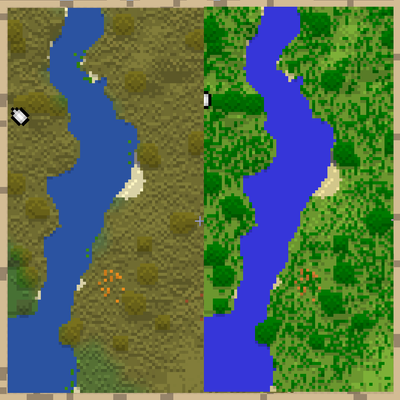
Lightweight Quality of Life mod that give maps a more color accurate to the minecraft world