Minecraft version
Back to mods 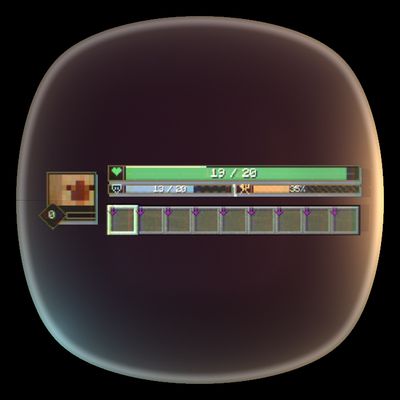
CurseForge · Minecraft mod
Enhanced HUD
Replaces Minecraft's standard survival HUD with compact player bars, status effects, a character portrait, and responsive damage feedback.
Choose a version Pick your version below, then grab the matching file.
Quick answer
Which Enhanced HUD release should I use?
Latest stable file Player Bar HUD 0.4.1 - NeoForge 26.3
Game version 26.3
Loader NeoForge
Enhanced HUD Player Bar HUD 0.4.1 - NeoForge 26.3 targets 26.3 with NeoForge. The project page does not say whether this file belongs on the client, dedicated server, or both. No extra mods listed for this file.
Where it goes
Is Enhanced HUD required on the client, server, or both?
The project page does not say whether this file belongs on the client, dedicated server, or both.
Client Source doesn’t say
Dedicated server Source doesn’t say
Loader for this release NeoForge
Required install it here Optional supported, not mandatory Not supported do not install here Source doesn’t say do not assume
The source does not explicitly classify this release as client-only or server-only.
What else does Enhanced HUD Player Bar HUD 0.4.1 - NeoForge 26.3 need?
Player Bar HUD 0.4.1 - NeoForge 26.3. Change the file and its required mods may change too.
This file does not list any required mods. Do not add a library just because a different file uses it.
This file does not list any required or optional mods.
Before you install it
Add Enhanced HUD without breaking your instance.
Built for Enhanced HUD Player Bar HUD 0.4.1 - NeoForge 26.3. Pick another file and the loader, install side or required mods may change.
- 01
Stick to this file
Use Player Bar HUD 0.4.1 - NeoForge 26.3. It targets 26.3 with NeoForge; another release may have different loader, side or dependency requirements.
- 02
Bring the mods it needs
This file does not list any required mods. Do not add a library just because a different file uses it.
- 03
Put it on the correct side
The project page does not say whether this file belongs on the client, dedicated server, or both.
- 04
Pick the file you checked
Use the “Get this file” button beside Player Bar HUD 0.4.1 - NeoForge 26.3. It opens that exact file at the source.
About this project
What does Enhanced HUD add?
Enhanced HUD
Enhanced HUD replaces Minecraft's standard survival indicators with a clean, modern bar-based interface.
Health, armor, hunger, experience, oxygen, and status effects are displayed at a glance while preserving vanilla survival mechanics.
Health and Survival Bars
Health is displayed as a bar showing current and maximum HP. Absorption adds an extra value (+X) and a yellow sub-bar.
Armor (X / 20) and hunger (X%) appear below the health bar, while an oxygen bar automatically appears underwater.
The health bar changes color at 50% and 25% HP to indicate dangerous health levels.
Damage Feedback
Taking damage leaves a highlighted trail on the health bar that gradually fades away.
A temporary colored vignette appears around the screen edges, including when absorption hearts take damage.
Repeated hits refresh the effect, while healing immediately clears the damage trail.
Status Effects
Active status effects appear in a grid above the health bar, automatically sorted into harmful, beneficial, and neutral categories.
Effects use distinct outline colors, with level badges for amplified effects. When space is limited, a +N indicator prevents overlapping icons.
Poison, Wither, and freezing change the health bar's color and pattern, while Hunger changes the food bar's appearance.
Player Portrait and Experience
A live 3D player portrait appears beside the hotbar.
The portrait includes an experience level badge and a compact XP progress bar, replacing the vanilla experience display.
Responsive Layout
The HUD automatically adapts to different window sizes and GUI scales.
Elements such as the hotbar, offhand slot, oxygen bar, item tooltips, and mount health are repositioned to prevent overlapping.
Vanilla Survival Mechanics
Enhanced HUD is a purely visual interface overhaul.
Health, hunger, armor, regeneration, absorption, experience, and status effects continue to use Minecraft's standard gameplay mechanics.
Project description from CurseForge.
Pick your setup
Enhanced HUD by Minecraft version and loader
Choose the version and loader you play, then open the matching release.
Minecraft version
26.2
2 loader buildsMinecraft version
26.1.2
2 loader buildsMinecraft version
26.1.1
2 loader buildsMinecraft version
26.1
2 loader buildsMinecraft version
1.21.11
2 loader buildsMinecraft version
1.21.10
2 loader buildsMinecraft version
1.21.9
2 loader buildsMinecraft version
1.21.8
2 loader buildsMinecraft version
1.21.7
2 loader buildsMinecraft version
1.21.6
2 loader buildsMinecraft version
1.21.5
2 loader buildsShowing the newest 12 of 16 game versions. Older files are in the list below.
Check the dependencies, then try the file in a copied instance before changing a world you care about.
Recent files
Enhanced HUD versions and loaders
Player Bar HUD 0.4.1 - NeoForge 26.3
player-bar-hud-26.3-neoforge-0.4.1.jar
18 Oct 2026
Client Source doesn’t say Server Source doesn’t say Dependencies No extras listed Listed on Release listing
Check the 26.3 · NeoForge setup NeoForge26.3 release
Player Bar HUD 0.4.1 - Fabric 26.3
player-bar-hud-26.3-fabric-0.4.1.jar
18 Oct 2026
Client Source doesn’t say Server Source doesn’t say Dependencies 1 required · 1 unchecked Listed on Release listing
Check the 26.3 · Fabric setup Fabric26.3 release
Player Bar HUD 0.4.1 - NeoForge 26.2
player-bar-hud-26.2-neoforge-0.4.1.jar
18 Oct 2026
Client Source doesn’t say Server Source doesn’t say Dependencies No extras listed Listed on Release listing
Check the 26.2 · NeoForge setup NeoForge26.2 release
Player Bar HUD 0.4.1 - Fabric 26.2
player-bar-hud-26.2-fabric-0.4.1.jar
18 Oct 2026
Client Source doesn’t say Server Source doesn’t say Dependencies 1 required · 1 unchecked Listed on Release listing
Check the 26.2 · Fabric setup Fabric26.2 release
Player Bar HUD 0.4.1 - NeoForge 26.1.2
player-bar-hud-26.1.2-neoforge-0.4.1.jar
18 Oct 2026
Client Source doesn’t say Server Source doesn’t say Dependencies No extras listed Listed on Release listing
Check the 26.1.2 · NeoForge setup NeoForge26.1.2 release
Player Bar HUD 0.4.1 - Fabric 26.1.2
player-bar-hud-26.1.2-fabric-0.4.1.jar
18 Oct 2026
Client Source doesn’t say Server Source doesn’t say Dependencies 1 required · 1 unchecked Listed on Release listing
Check the 26.1.2 · Fabric setup Fabric26.1.2 release
Player Bar HUD 0.4.1 - NeoForge 26.1.1
player-bar-hud-26.1.1-neoforge-0.4.1.jar
18 Oct 2026
Client Source doesn’t say Server Source doesn’t say Dependencies No extras listed Listed on Release listing
Check the 26.1.1 · NeoForge setup NeoForge26.1.1 release
Player Bar HUD 0.4.1 - Fabric 26.1.1
player-bar-hud-26.1.1-fabric-0.4.1.jar
18 Oct 2026
Client Source doesn’t say Server Source doesn’t say Dependencies 1 required · 1 unchecked Listed on Release listing
Check the 26.1.1 · Fabric setup Fabric26.1.1 release
Player Bar HUD 0.4.1 - NeoForge 26.1
player-bar-hud-26.1-neoforge-0.4.1.jar
18 Oct 2026
Client Source doesn’t say Server Source doesn’t say Dependencies No extras listed Listed on Release listing
Check the 26.1 · NeoForge setup NeoForge26.1 release
Player Bar HUD 0.4.1 - Fabric 26.1
player-bar-hud-26.1-fabric-0.4.1.jar
18 Oct 2026
Client Source doesn’t say Server Source doesn’t say Dependencies 1 required · 1 unchecked Listed on Release listing
Check the 26.1 · Fabric setup Fabric26.1 release
Player Bar HUD 0.4.1 - NeoForge 1.21.11
player-bar-hud-1.21.11-neoforge-0.4.1.jar
18 Oct 2026
Client Source doesn’t say Server Source doesn’t say Dependencies No extras listed Listed on Release listing
Check the 1.21.11 · NeoForge setup NeoForge1.21.11 release
Player Bar HUD 0.4.1 - Fabric 1.21.11
player-bar-hud-1.21.11-fabric-0.4.1.jar
18 Oct 2026
Client Source doesn’t say Server Source doesn’t say Dependencies 1 required · 1 unchecked Listed on Release listing
Check the 1.21.11 · Fabric setup Fabric1.21.11 release
Looking for an older file? The official CurseForge project page is in Resources.