CurseForge · Minecraft mod
buildertools
Client-side building toolkit: select areas, save and load .schem, .litematic and .nbt schematics, and build from ghost-block placements with a material checker.
Quick answer
Which buildertools release matches Fabric?
buildertools client-builder-tools-1.1.1-mc26.3-fabric-java25.jar targets 26.3 with Fabric. The project page does not say whether this file belongs on the client, dedicated server, or both. No extra mods listed for this file.
Where it goes
Is buildertools required on the client, server, or both?
The project page does not say whether this file belongs on the client, dedicated server, or both.
The source does not explicitly classify this release as client-only or server-only.
What else does buildertools client-builder-tools-1.1.1-mc26.3-fabric-java25.jar need?
client-builder-tools-1.1.1-mc26.3-fabric-java25.jar on Fabric. Every mod below is checked against that same setup.
This file does not list any required mods. Do not add a library just because a different file uses it.
This file does not list any required or optional mods.
Before you install it
Add buildertools without breaking your instance.
Built for buildertools client-builder-tools-1.1.1-mc26.3-fabric-java25.jar on Fabric. Pick another file and the loader, install side or required mods may change.
- 01
Stick to this file
Use client-builder-tools-1.1.1-mc26.3-fabric-java25.jar. It targets 26.3 with Fabric; another release may have different loader, side or dependency requirements.
- 02
Bring the mods it needs
This file does not list any required mods. Do not add a library just because a different file uses it.
- 03
Put it on the correct side
The project page does not say whether this file belongs on the client, dedicated server, or both.
- 04
Pick the file you checked
Use the “Get this file” button beside client-builder-tools-1.1.1-mc26.3-fabric-java25.jar. It opens that exact file at the source.
About this project
What does buildertools add?
Client Builder Tools
Version 1.1.1 | Client-side building tools
Plan builds with schematic previews, check missing materials, and work through your structure one layer at a time. Client Builder Tools runs on your client; the server does not need the mod.
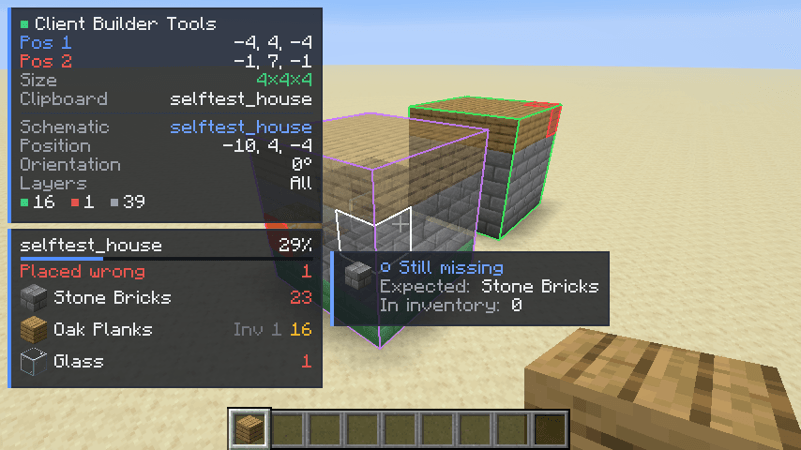
Schematic preview with block comparison and a live material list.
Main features
· Load and save Sponge .schem, Litematica .litematic and Java structure .nbt files. Import legacy .schematic and Bedrock .mcstructure files; some Bedrock blocks have no exact Java equivalent.
· Move, rotate and mirror ghost previews, with adjustable opacity and brightness. Loading a schematic creates a preview rather than pasting a structure.
· Display all layers, a single layer, layers below a height or a custom range. Check block states and inspect the expected block under your crosshair.
· Track required and missing materials against your inventory, optionally including shulker boxes and bundles. Use the HUD, filters and text or CSV export.
· Use five menu tabs for Schematics, Placement, Selection, Materials and Settings, including automatic layer advancement and display options.
· Optionally replace one nearby block in Creative, or with existing administrator permissions and the corresponding setting.
Getting started
Press R in a world to open the Builder Menu. Load a file from the game’s schematics folder, then use Placement to adjust the preview and Materials to check your supplies.
To save your own build, press B for Builder Mode, select two corners and use Selection to copy and save. All key bindings can be changed under Options > Controls > Key Binds > Client Builder Tools.
Controls
Default keys: R opens the menu; B toggles Builder Mode; M moves the preview to the crosshair; G toggles ghosts; Home changes layer mode. Use Page Up / Page Down or Alt + mouse wheel to change layers.
Commands include //pos1, //pos2, //copy, //schem, //placement, //layer and //material.
Block replacement
In R > Settings, enable block replacement. Assign Replace aimed block in Key Binds, or use //builder replace. Hold the replacement block in your main hand and aim within five blocks of your eyes.
Creative replacement uses normal server-validated break and placement actions. Unbreakable blocks are excluded. Outside Creative, Allow administrator replacement must be enabled and the server must already grant /setblock permission. The setting does not grant permissions.
Installation
Minecraft 26.1, 26.1.1, 26.1.2, 26.2 and 26.3; Fabric, Quilt, Forge and NeoForge; Java 25. Install on the client only. Fabric and Quilt require Fabric API. Choose the exact Minecraft version and the matching loader file.
Project description from CurseForge.
Pick your setup
buildertools by Minecraft version and loader
Choose the version and loader you play, then open the matching release.
26.2
4 loader builds26.1.2
4 loader builds26.1.1
4 loader builds26.1
4 loader buildsCheck the dependencies, then try the file in a copied instance before changing a world you care about.
Recent files
buildertools versions and loaders
client-builder-tools-1.1.1-mc26.3-fabric-java25.jar
24 Nov 2026
client-builder-tools-1.1.1-mc26.2-fabric-java25.jar
24 Nov 2026
client-builder-tools-1.1.1-mc26.1.2-fabric-java25.jar
24 Nov 2026
client-builder-tools-1.1.1-mc26.1-fabric-java25.jar
24 Nov 2026
client-builder-tools-1.1.1-mc26.1.1-fabric.jar
24 Nov 2026
client-builder-tools-1.1.0-mc26.3-fabric.jar
12 Nov 2026
client-builder-tools-1.1.0-mc26.2-fabric.jar
12 Nov 2026
client-builder-tools-1.1.0-mc26.1.2-fabric.jar
12 Nov 2026
client-builder-tools-1.1.0-mc26.1.1-fabric.jar
12 Nov 2026
client-builder-tools-1.1.0-mc26.1-fabric.jar
12 Nov 2026
client-builder-tools-1.0.0-fabric.jar
13 Oct 2026
Looking for an older file? The official CurseForge project page is in Resources.
