Minecraft version
Back to mods 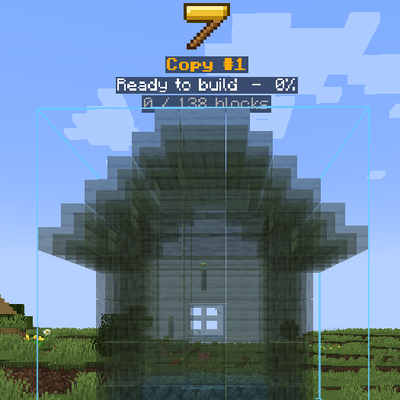
CurseForge · Minecraft mod
Builder Holograms
Copy any structure, place it as a hologram, edit it, and build it — by yourself or with your workers.
Choose a version Pick your version below, then grab the matching file.
Quick answer
Which Builder Holograms release should I use?
Latest stable file builderholograms-1.0.0.jar
Game version 1.20.1
Loader Forge
Builder Holograms builderholograms-1.0.0.jar targets 1.20.1 with Forge. The project page does not say whether this file belongs on the client, dedicated server, or both. No extra mods listed for this file.
Where it goes
Is Builder Holograms required on the client, server, or both?
The project page does not say whether this file belongs on the client, dedicated server, or both.
Client Source doesn’t say
Dedicated server Source doesn’t say
Loader for this release Forge
Required install it here Optional supported, not mandatory Not supported do not install here Source doesn’t say do not assume
The source does not explicitly classify this release as client-only or server-only.
What else does Builder Holograms builderholograms-1.0.0.jar need?
builderholograms-1.0.0.jar. Change the file and its required mods may change too.
This file does not list any required mods. Do not add a library just because a different file uses it.
This file does not list any required or optional mods.
Before you install it
Add Builder Holograms without breaking your instance.
Built for Builder Holograms builderholograms-1.0.0.jar. Pick another file and the loader, install side or required mods may change.
- 01
Stick to this file
Use builderholograms-1.0.0.jar. It targets 1.20.1 with Forge; another release may have different loader, side or dependency requirements.
- 02
Bring the mods it needs
This file does not list any required mods. Do not add a library just because a different file uses it.
- 03
Put it on the correct side
The project page does not say whether this file belongs on the client, dedicated server, or both.
- 04
Pick the file you checked
Use the “Get this file” button beside builderholograms-1.0.0.jar. It opens that exact file at the source.
About this project
What does Builder Holograms add?
> **This is a new mod!**If you find any bugs or issues, please let me know in the comments and I'll fix them as soon as possible.
🏗 Builder Holograms
Copy any build in your world, place it anywhere as a **see-through hologram**, edit it, and build it block by block — or **instantly** if you already have all the materials.
🪓 Getting the Builder
The **Builder** is a golden axe with special powers, and it **can't be crafted** — the only way to get it is **trading with villagers**:
- Every villager who reaches **Master** level has a small chance to sell it.
- **Smiths** (weaponsmith, toolsmith and armorer) have a much higher chance.
- Price: **12–36 diamonds** — cheap ones are very rare!
| Action | What it does |
|---|---|
| **Right-click** | Opens the **Builder menu** |
| **Sneak + right-click** | Removes the nearest hologram |
📋 Step 1 – COPY
- Open the Builder menu and press **+ COPY** — you get a **Marker**.
- **Right-click two blocks** — the two opposite corners of the area you want to copy.
- Done! The copy is saved in your **Copies** tab.
*Left-click with the Marker resets the selection.*
📍 Step 2 – PLACE (Paste)
In the **Copies** tab, press **Place** next to a copy. You get a Marker that shows the hologram in front of you:
| Action | What it does |
|---|---|
| **Left-click** | Rotate the hologram |
| **Right-click** | Place it / confirm |
When you confirm, a **golden hammer** sign appears above the hologram, with its name and progress — *"Ready to build – 45%"*.
🧱 Step 3 – BUILD
- **Instant build:** if you have **all the materials** in your inventory, the whole structure is built **instantly**!
- **Build by hand:** place the blocks yourself — every block you place in the right spot **disappears from the hologram**, so you always see what's left.
- When everything is built, you get a **"Build complete!"** message.
🗂 The Builder Menu
Copies tab
| Button | What it does |
|---|---|
| **Place** | Place this copy as a hologram |
| **Name** | Rename the copy |
| **Save edit** | A hologram of this copy was edited — save the changes back into the copy |
Holograms tab
Every hologram you placed, with its **progress %**.
| Button | What it does |
|---|---|
| **Details** | Progress and a full **materials list** — ✔ what you have, ✘ what's missing |
| **Teleport** | Teleport right next to the hologram, facing it |
| **Name** | Rename the hologram |
| **Edit** | Change the hologram (see below) |
| **Worker** | Give the hologram to one of your builder workers (needs Workers & Warriors) |
| **Delete** | Remove the hologram |
✏ Editing a Hologram
Press **Edit** on a hologram:
- **EDIT RT (real time)** — edit the hologram right in the world:
- **Hold a block + right-click** → add it to the hologram.
- **Left-click a hologram block** → remove it.
- **Right-click with the Marker** → done.
- **Change** — replace **every** block of one type with another (with a search box).
- **Remove all** — remove every block of that type from the hologram.
Then go back to the **Copies** tab and press **Save edit** to keep the changes in your copy.
👷 Works with Workers & Warriors (optional)
Install **Workers & Warriors** and let your **builder workers** do the work for you:
- Press **Worker** on a hologram — you get a Marker.
- **Right-click one of your builder workers**.
- He takes the materials from his chest and **builds the whole structure** for you!
Edit the hologram and he **updates his work automatically**. The hologram card shows which worker is building it.
Project description from CurseForge.
Pick your setup
Builder Holograms by Minecraft version and loader
Choose the version and loader you play, then open the matching release.
Check the dependencies, then try the file in a copied instance before changing a world you care about.
Recent files
Builder Holograms versions and loaders
builderholograms-1.0.0.jar
14 Oct 2026
Client Source doesn’t say Server Source doesn’t say Dependencies No extras listed Listed on Release listing
Check the 1.20.1 · Forge setup 1.20.1Forge release
Looking for an older file? The official CurseForge project page is in Resources.
 mod
mod CurseForge + Modrinth · Minecraft
[VSE]Visual Set Edit
This mod lets you edit custom set effects through a visual GUI with intuitive operations.
 mod
mod CurseForge · Minecraft
Tick Weave
An experimental multicore entity mod, aimed at easing server lag when worlds have many mobs and players.
 mod
mod CurseForge + Modrinth · Minecraft
Better Statistics Screen
A Minecraft mod that improves the statistics screen and makes it more useful.