Fabric API Needed by ForgeWorks Elemental Blades (add on) forgeworks-elemental-fabric-26.3-1.0.1.jar
requiredMatching file found Matched file: [26.3] Fabric API 0.164.0+26.3
CurseForge · Minecraft mod
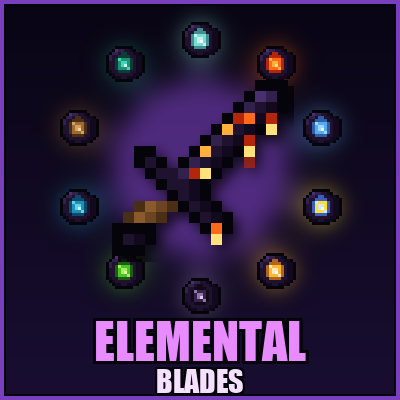
Add-on for ForgeWorks: forge your Crying Alloy Sword into one of ten Elemental Blades — Wind, Fire, Frost, Lightning, Radiant, Void, Venom, Tide, Earth and Ender — each with its own on-hit power and right-click ability.
Quick answer
ForgeWorks Elemental Blades (add on) forgeworks-elemental-fabric-26.3-1.0.1.jar targets 26.3 with Fabric. The project page does not say whether this file belongs on the client, dedicated server, or both. All 2 required mods have matching files.
Where it goes
The project page does not say whether this file belongs on the client, dedicated server, or both.
The source does not explicitly classify this release as client-only or server-only.
forgeworks-elemental-fabric-26.3-1.0.1.jar. Change the file and its required mods may change too.
Install Fabric API, ForgeWorks Crying Obsidian Armor & Tools first. We found matching files for this game-version and loader setup.
We only count dependency files that match this setup. A file for another loader does not fill the gap.
Before you install it
Built for ForgeWorks Elemental Blades (add on) forgeworks-elemental-fabric-26.3-1.0.1.jar. Pick another file and the loader, install side or required mods may change.
Use forgeworks-elemental-fabric-26.3-1.0.1.jar. It targets 26.3 with Fabric; another release may have different loader, side or dependency requirements.
Install Fabric API, ForgeWorks Crying Obsidian Armor & Tools first. We found matching files for this game-version and loader setup.
The project page does not say whether this file belongs on the client, dedicated server, or both.
Use the “Get this file” button beside forgeworks-elemental-fabric-26.3-1.0.1.jar. It opens that exact file at the source.
About this project
ForgeWorks Elemental Blades is an add‑on for ForgeWorks that turns your Crying Alloy Sword into one of ten elemental weapons. Each blade keeps everything that makes the Crying sword great (40,000 durability, fire‑proof, near‑unbreakable) and adds +3 elemental damage, a faster swing, an on‑hit power and, for most blades, a right‑click ability. The blades drip with their element’s colour in an animated texture.
How to make one
Craft an Elemental Core: four Crying Alloy Ingots in the corners, the element’s ingredient in the centre, and its edge material around it. Then place your Crying Alloy Sword and the core anywhere in a crafting grid. Your enchantments, durability and custom name carry over to the new blade, so you never lose a sword you’ve invested in.
The ten blades
Abilities have short cooldowns and cost 2 durability per use.
Requirements
Requires ForgeWorks (Crying Obsidian Armor & Tools) 1.0.0 or newer. Get ForgeWorks here. Install on both server and client. Available for Minecraft 26.3 (NeoForge, Forge and Fabric), 1.21.1 (NeoForge, Forge and Fabric) and 1.20.1 (Forge). The Fabric versions also need Fabric API and the Fabric version of ForgeWorks. On 1.20.1, the Gale Core uses a Phantom Membrane and the Quake Core uses an Iron Block, since breeze rods and heavy cores don’t exist in that version.
Modpacks: free to include in any CurseForge modpack.
Website: recipes, screenshots and guides for all DNARWI23 mods at dnarwimods.com.
Project description from CurseForge.
Pick your setup
Choose the version and loader you play, then open the matching release.
Check the dependencies, then try the file in a copied instance before changing a world you care about.
Recent files
15 Oct 2026
15 Oct 2026
14 Oct 2026
14 Oct 2026
14 Oct 2026
13 Oct 2026
13 Oct 2026
Looking for an older file? The official CurseForge project page is in Resources.