Minecraft version
Back to mods 
CurseForge · Minecraft mod
ServerListPlus
Organize your multiplayer server list with folder tabs, search filters, sorting, pinning, notes, tags and playtime tracking.
Choose a version Pick your version below, then grab the matching file.
Quick answer
Which ServerListPlus release should I use?
Latest stable file ServerListPlus 1.1.1 for NeoForge 26.3
Game version 26.3
Loader NeoForge
ServerListPlus 1.1.1 for NeoForge 26.3 targets 26.3 with NeoForge. The project page does not say whether this file belongs on the client, dedicated server, or both. No extra mods listed for this file.
Where it goes
Is ServerListPlus required on the client, server, or both?
The project page does not say whether this file belongs on the client, dedicated server, or both.
Client Source doesn’t say
Dedicated server Source doesn’t say
Loader for this release NeoForge
Required install it here Optional supported, not mandatory Not supported do not install here Source doesn’t say do not assume
The source does not explicitly classify this release as client-only or server-only.
What else does ServerListPlus 1.1.1 for NeoForge 26.3 need?
ServerListPlus 1.1.1 for NeoForge 26.3. Change the file and its required mods may change too.
This file does not list any required mods. Do not add a library just because a different file uses it.
This file does not list any required or optional mods.
Before you install it
Add ServerListPlus without breaking your instance.
Built for ServerListPlus 1.1.1 for NeoForge 26.3. Pick another file and the loader, install side or required mods may change.
- 01
Stick to this file
Use ServerListPlus 1.1.1 for NeoForge 26.3. It targets 26.3 with NeoForge; another release may have different loader, side or dependency requirements.
- 02
Bring the mods it needs
This file does not list any required mods. Do not add a library just because a different file uses it.
- 03
Put it on the correct side
The project page does not say whether this file belongs on the client, dedicated server, or both.
- 04
Pick the file you checked
Use the “Get this file” button beside ServerListPlus 1.1.1 for NeoForge 26.3. It opens that exact file at the source.
About this project
What does ServerListPlus add?
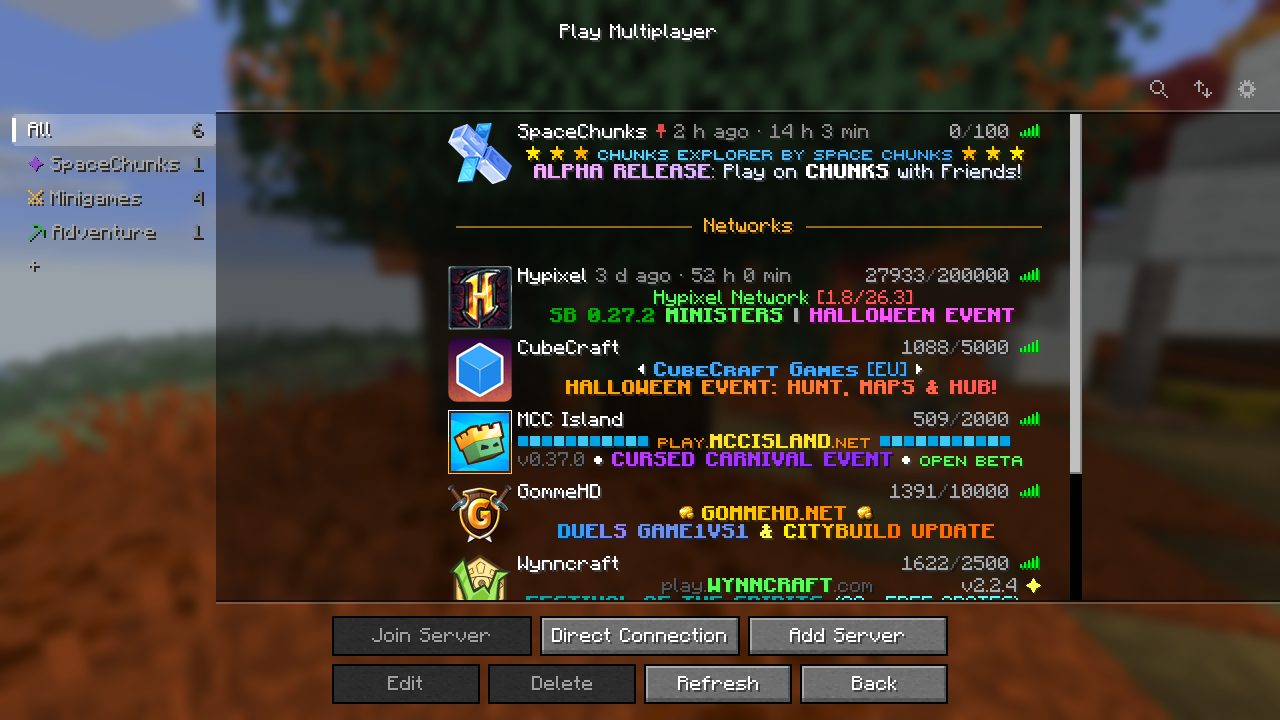
A client-side mod that makes the multiplayer server list actually manageable: folders as tabs, search with filters, sorting, pinning, notes, tags and playtime, all without touching servers.dat. Remove the mod and your server list is exactly as before.
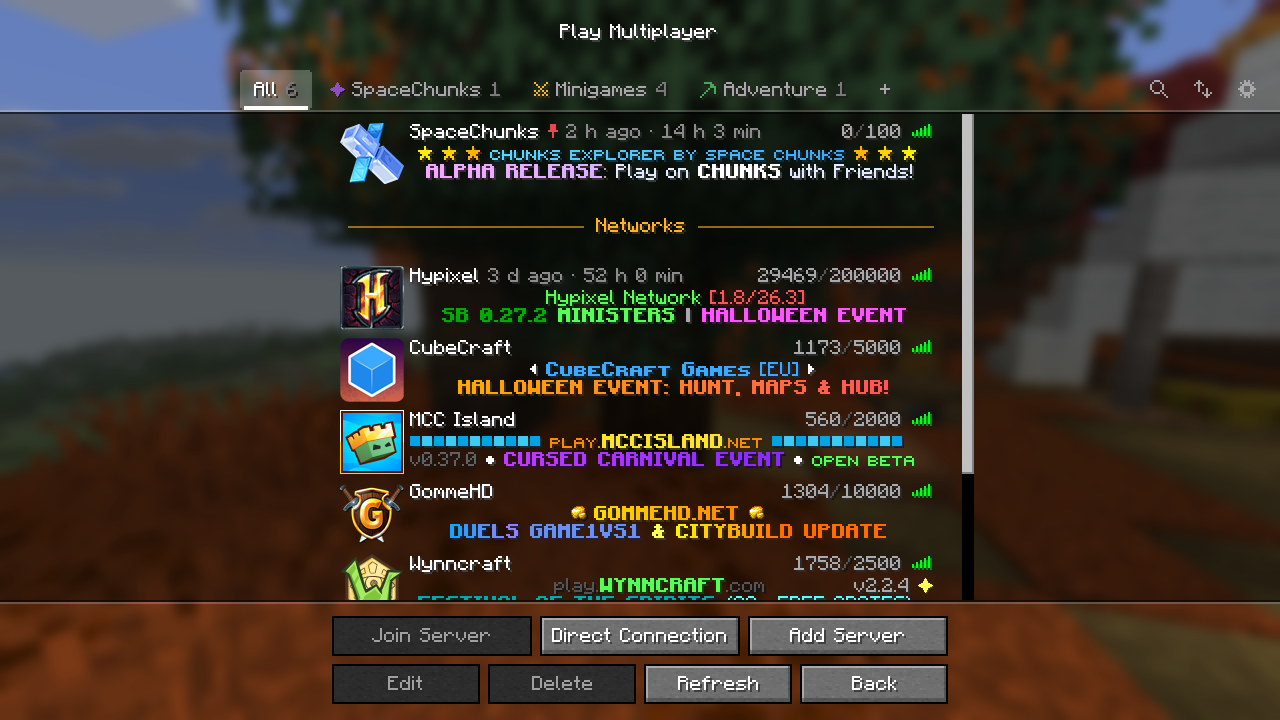
Features
- Tabs for folders: "All" plus one tab per folder, as a row above the list or as a sidebar. A server can be in any number of folders; drag it onto a tab to put it there.
- Smart folders: save a search as a folder that fills itself, e.g.
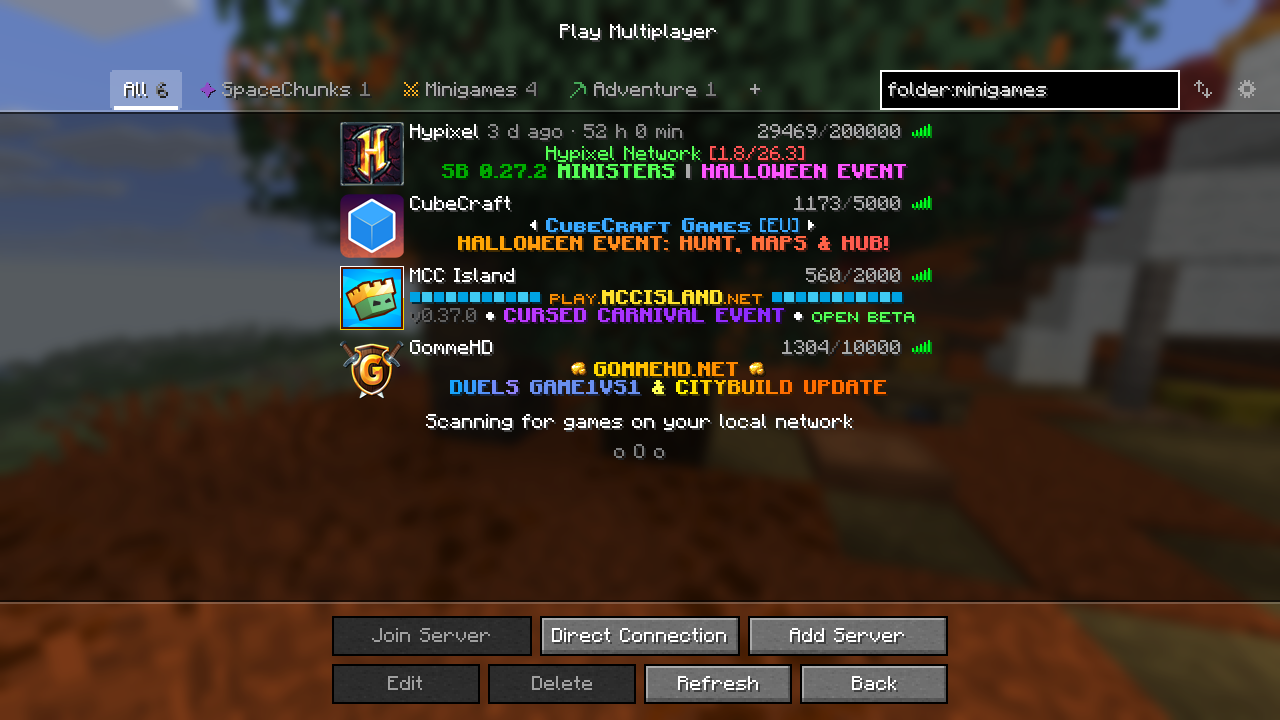
tag:pvp ping:<80. - Search and filters: by name, address and MOTD, plus
tag:,folder:,ping:,players:,domain:,is:pinnedandis:hidden. - Sorting: manually by drag and drop, or by name, ping, players or last played.
- Pinning: keep servers at the top of a tab, also while sorting automatically.
- Dividers: titled, colored separators to group servers within a tab.
- Hiding: keep servers out of "All" without deleting them.
- Notes, tags and history: per server notes and tags; last join and total playtime per address.
- Colored names: MiniMessage tags in server names, e.g.
<gradient:#ff5555:#ffaa00>Hypixel</gradient> <gray>Lobby. - Direct Connection: a live preview of the typed server and the addresses you joined last.
- Auto refresh: re-ping the shown servers every few seconds, without the list flickering.
- Looks: tab colors and symbols, background gradients or your own pictures per tab.
Requirements
- Fabric with Fabric API, or NeoForge
- Client only, not needed on servers
- Minecraft 1.20.5 – 1.20.6, 1.21 – 1.21.11 and 26.1 – 26.3
Usage
| To | Do |
|---|---|
| Create a folder | Click + next to the tabs |
| Rename a tab or divider | Double click it |
| Change a tab's color, symbol or background | Right click the tab |
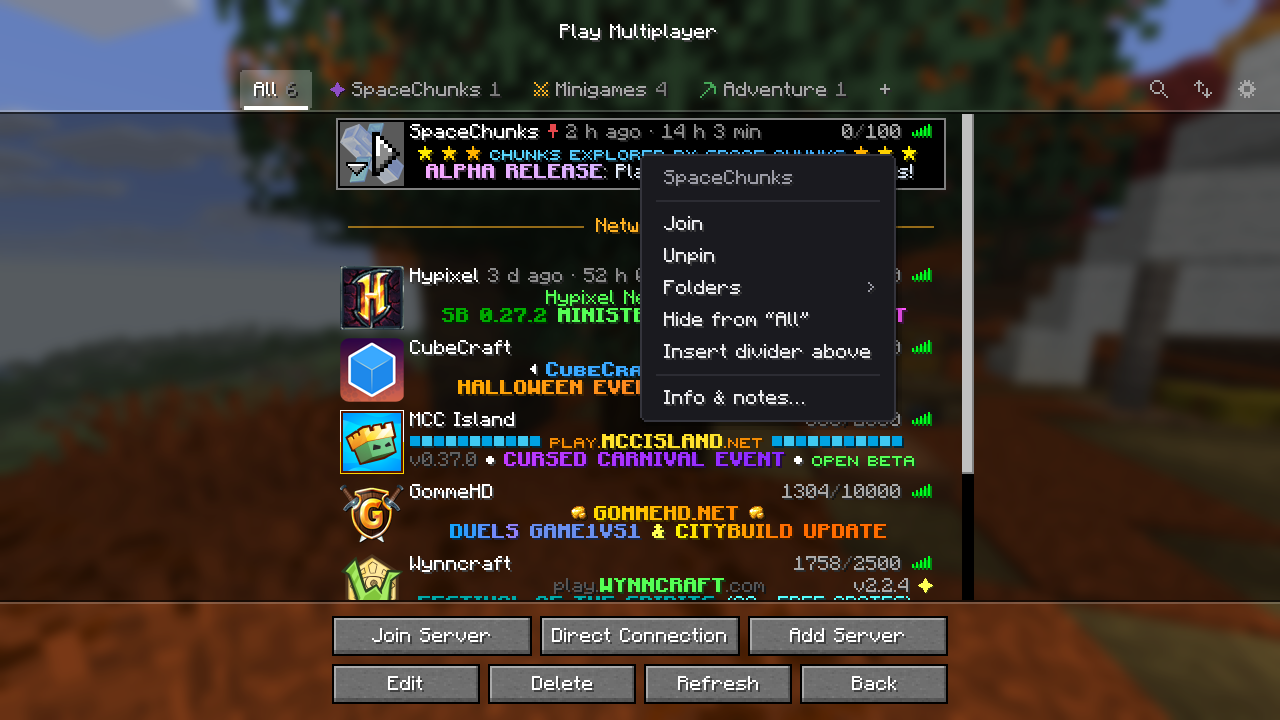
| Put a server into folders | Right click it → Folders, or drag it onto a tab |
| Pin, hide or annotate a server | Right click it |
| Add a divider | Right click a server → Insert divider above |
| Search | Click the magnifier or press Ctrl+F |
| Change sorting | Click the arrows next to the search |
| Move the selected server | Drag it, or Shift+↑/↓ |
| Settings | Click the gear |
A server named Friends/Survival SMP is put into the folder "Friends" (created if needed) and named "Survival SMP".
Search
All terms must match. Case and Minecraft color codes are ignored.
| Term | Matches |
|---|---|
survival |
name, address or MOTD contains the word |
"mini games" |
the exact phrase |
tag:pvp |
a tag starting with "pvp" |
folder:friends |
one of its folders contains "friends" |
is:pinned / is:hidden |
pinned in any tab / hidden from "All" |
ping:<100, players:>10 |
compares ping or online players with <, > or = |
domain:example.com |
that domain and its subdomains |
-term |
negates any term, e.g. -tag:modded |
Your data
Everything ServerListPlus adds is stored in config/serverlistplus/servers.json. The vanilla servers.dat only changes the way it would without the mod. Data of a deleted server is kept for 30 days in case it comes back.
Bugs and ideas
Please report bugs and suggest features on GitHub. The source code is available under the MIT license.
Project description from CurseForge.
Pick your setup
ServerListPlus by Minecraft version and loader
Choose the version and loader you play, then open the matching release.
Minecraft version
26.2
2 loader buildsMinecraft version
26.1.2
2 loader buildsMinecraft version
26.1.1
2 loader buildsMinecraft version
26.1
2 loader buildsMinecraft version
1.21.11
2 loader buildsMinecraft version
1.21.10
2 loader buildsMinecraft version
1.21.9
2 loader buildsMinecraft version
1.21.8
2 loader buildsMinecraft version
1.21.7
2 loader buildsMinecraft version
1.21.6
2 loader buildsMinecraft version
1.21.5
2 loader buildsShowing the newest 12 of 19 game versions. Older files are in the list below.
Check the dependencies, then try the file in a copied instance before changing a world you care about.
Recent files
ServerListPlus versions and loaders
ServerListPlus 1.1.1 for NeoForge 26.3
serverlistplus-neoforge-1.1.1+26.3.jar
17 Oct 2026
Client Source doesn’t say Server Source doesn’t say Dependencies No extras listed Listed on Release listing
Check the 26.3 · NeoForge setup NeoForge26.3 release
ServerListPlus 1.1.1 for Fabric 26.3
serverlistplus-fabric-1.1.1+26.3.jar
17 Oct 2026
Client Source doesn’t say Server Source doesn’t say Dependencies 1 required · 1 unchecked Listed on Release listing
Check the 26.3 · Fabric setup Fabric26.3 release
ServerListPlus 1.1.1 for NeoForge 26.2
serverlistplus-neoforge-1.1.1+26.2.jar
17 Oct 2026
Client Source doesn’t say Server Source doesn’t say Dependencies No extras listed Listed on Release listing
Check the 26.2 · NeoForge setup NeoForge26.2 release
ServerListPlus 1.1.1 for Fabric 26.2
serverlistplus-fabric-1.1.1+26.2.jar
17 Oct 2026
Client Source doesn’t say Server Source doesn’t say Dependencies 1 required · 1 unchecked Listed on Release listing
Check the 26.2 · Fabric setup Fabric26.2 release
ServerListPlus 1.1.1 for NeoForge 26.1–26.1.2
serverlistplus-neoforge-1.1.1+26.1.2.jar
17 Oct 2026
Client Source doesn’t say Server Source doesn’t say Dependencies No extras listed Listed on Release listing
Check the 26.1.2 · NeoForge setup NeoForge26.126.1.126.1.2 release
ServerListPlus 1.1.1 for Fabric 26.1–26.1.2
serverlistplus-fabric-1.1.1+26.1.2.jar
17 Oct 2026
Client Source doesn’t say Server Source doesn’t say Dependencies 1 required · 1 unchecked Listed on Release listing
Check the 26.1.2 · Fabric setup Fabric26.126.1.126.1.2 release
ServerListPlus 1.1.1 for NeoForge 1.21.6–1.21.8
serverlistplus-neoforge-1.1.1+1.21.8.jar
17 Oct 2026
Client Source doesn’t say Server Source doesn’t say Dependencies No extras listed Listed on Release listing
Check the 1.21.8 · NeoForge setup 1.21.81.21.61.21.7NeoForge release
ServerListPlus 1.1.1 for Fabric 1.21.6–1.21.8
serverlistplus-fabric-1.1.1+1.21.8.jar
17 Oct 2026
Client Source doesn’t say Server Source doesn’t say Dependencies 1 required · 1 unchecked Listed on Release listing
Check the 1.21.8 · Fabric setup Fabric1.21.81.21.61.21.7 release
ServerListPlus 1.1.1 for NeoForge 1.21.5
serverlistplus-neoforge-1.1.1+1.21.5.jar
17 Oct 2026
Client Source doesn’t say Server Source doesn’t say Dependencies No extras listed Listed on Release listing
Check the 1.21.5 · NeoForge setup 1.21.5NeoForge release
ServerListPlus 1.1.1 for Fabric 1.21.5
serverlistplus-fabric-1.1.1+1.21.5.jar
17 Oct 2026
Client Source doesn’t say Server Source doesn’t say Dependencies 1 required · 1 unchecked Listed on Release listing
Check the 1.21.5 · Fabric setup Fabric1.21.5 release
ServerListPlus 1.1.1 for NeoForge 1.21.4
serverlistplus-neoforge-1.1.1+1.21.4.jar
17 Oct 2026
Client Source doesn’t say Server Source doesn’t say Dependencies No extras listed Listed on Release listing
Check the 1.21.4 · NeoForge setup 1.21.4NeoForge release
ServerListPlus 1.1.1 for Fabric 1.21.4
serverlistplus-fabric-1.1.1+1.21.4.jar
17 Oct 2026
Client Source doesn’t say Server Source doesn’t say Dependencies 1 required · 1 unchecked Listed on Release listing
Check the 1.21.4 · Fabric setup Fabric1.21.4 release
Looking for an older file? The official CurseForge project page is in Resources.
 mod
mod CurseForge · Minecraft
Upgrade Crystals
A mod adding rare gems that upgrade your stats. Recommended to be used with AttributeFix.
 mod
mod CurseForge · Minecraft
ClientMinigames
This mod adds some cool minigames.
 mod
mod CurseForge · Minecraft
Crop Symphony
Tiered radius right-click harvesting, smart auto-replanting from drops, inventory vacuum, and farmland trample protection.