Minecraft version
Back to mods 
CurseForge · Minecraft mod
Entity Manager - Configurable Abilities, Effects, Leveling and more
Customize any mob's stats, abilities, loot, gear and variants through an in-game editor, with optional leveling that makes mobs stronger as players progress.
Choose a version Pick your version below, then grab the matching file.
Quick answer
Which Entity Manager - Configurable Abilities, Effects, Leveling and more release should I use?
Latest stable file entity-manager-1.0.0+1.20.3-1.20.4.jar
Game version 1.20.4, 1.20.3
Loader Fabric
Entity Manager - Configurable Abilities, Effects, Leveling and more entity-manager-1.0.0+1.20.3-1.20.4.jar targets 1.20.4, 1.20.3 with Fabric. The project page does not say whether this file belongs on the client, dedicated server, or both. No extra mods listed for this file.
Where it goes
Is Entity Manager - Configurable Abilities, Effects, Leveling and more required on the client, server, or both?
The project page does not say whether this file belongs on the client, dedicated server, or both.
Client Source doesn’t say
Dedicated server Source doesn’t say
Loader for this release Fabric
Required install it here Optional supported, not mandatory Not supported do not install here Source doesn’t say do not assume
The source does not explicitly classify this release as client-only or server-only.
What else does Entity Manager - Configurable Abilities, Effects, Leveling and more entity-manager-1.0.0+1.20.3-1.20.4.jar need?
entity-manager-1.0.0+1.20.3-1.20.4.jar. Change the file and its required mods may change too.
This file does not list any required mods. Do not add a library just because a different file uses it.
This file does not list any required or optional mods.
Before you install it
Add Entity Manager - Configurable Abilities, Effects, Leveling and more without breaking your instance.
Built for Entity Manager - Configurable Abilities, Effects, Leveling and more entity-manager-1.0.0+1.20.3-1.20.4.jar. Pick another file and the loader, install side or required mods may change.
- 01
Stick to this file
Use entity-manager-1.0.0+1.20.3-1.20.4.jar. It targets 1.20.4, 1.20.3 with Fabric; another release may have different loader, side or dependency requirements.
- 02
Bring the mods it needs
This file does not list any required mods. Do not add a library just because a different file uses it.
- 03
Put it on the correct side
The project page does not say whether this file belongs on the client, dedicated server, or both.
- 04
Pick the file you checked
Use the “Get this file” button beside entity-manager-1.0.0+1.20.3-1.20.4.jar. It opens that exact file at the source.
About this project
What does Entity Manager - Configurable Abilities, Effects, Leveling and more add?
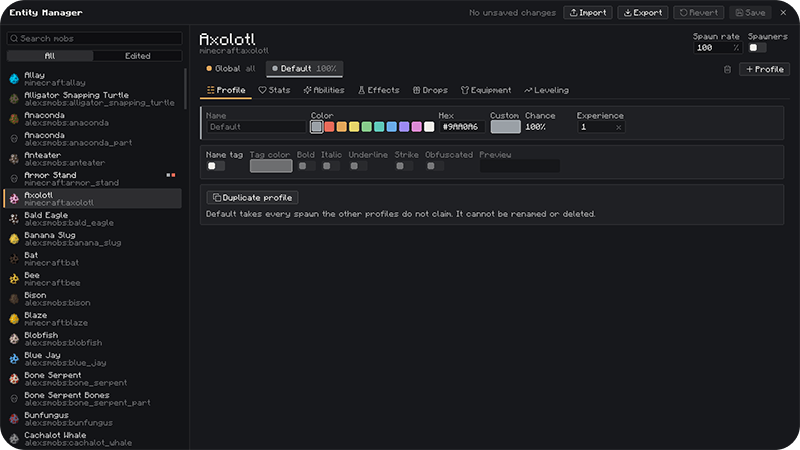
Customize any mob in Minecraft, Vanilla or Modded, from one in-game editor. No commands or JSON editing needed.
How to use
- Press K in game to open the editor. You can change the key in Controls.
- Pick a mob on the left, then add profiles with + Profile.
- Edit the tabs: Profile, Stats, Abilities, Effects, Drops, Equipment, Leveling.
- In singleplayer changes apply instantly.
Profiles (Mob variants)
- Give any mob several variants, each with its own spawn chance. For example: 95% normal zombie, 5% "Elite".
- The Default profile is the vanilla mob. Your custom profiles take their share of spawns, and Default gets the rest.
- Each profile has its own name, colour and optional name tag, with any colour, bold, italic, underline, strikethrough or obfuscated.
- Spawn rate is a separate setting per mob. It makes a mob more or less common without touching the variant chances.
What each profile can change
- Stats: health, damage, speed, armor and every other vanilla attribute.
- Abilities: apply effects at range, shoot projectiles (fireballs, arrows, potions, wither skulls, TNT, shulker bullets, evoker fangs, lightning, or projectiles from other mods), summon other mobs, or suffocate the target.
- Ability Settings: each ability has its own cooldown, chance and range. It can target the mob's attack target, the nearest player, or everyone around it.
- Effects: effects the mob may spawn with, each with its own chance, optionally permanent.
- Drops: custom items with chances, amounts, a Looting bonus and enchantments, or replace the vanilla drops completely.
- Equipment: armor and weapons with a wear chance, a drop chance and enchantments.
- Leveling: mobs spawn with higher and higher levels as the player is progressing. You can pick which stats scale with the level.
Global profile
- Each mob also has a Global profile that applies on top of all its variants. - Click the small box next to a field to force that value on every profile. Those fields then appear locked in the other profiles. - Abilities, effects and drops added in Global go to every variant.
Compatibility
- Mobs, items, effects, enchantments and potions from other mods show up in the editor automatically.
Using the config on a server
The editor only runs on the client, so you build the config in singleplayer and copy it to the server. The server never receives edits from players' editors.
1. Set everything up in singleplayer and click Save. Use Export if you want a copy somewhere else.
2. Copy the file to the server: config/entity-manager/entity-manager.json An exported entity-manager-export.json works too.
3. Check the server log for a line like Loaded <number> configured entities from <name> to confirm it worked.
Project description from CurseForge.
Pick your setup
Entity Manager - Configurable Abilities, Effects, Leveling and more by Minecraft version and loader
Choose the version and loader you play, then open the matching release.
Minecraft version
1.20.3
1 loader buildMinecraft version
1.20.2
1 loader buildMinecraft version
1.20.1
1 loader buildMinecraft version
1.20
1 loader buildCheck the dependencies, then try the file in a copied instance before changing a world you care about.
Recent files
Entity Manager - Configurable Abilities, Effects, Leveling and more versions and loaders
entity-manager-1.0.0+1.20.3-1.20.4.jar
14 Oct 2026
Client Source doesn’t say Server Source doesn’t say Dependencies No extras listed Listed on Release listing
Check the 1.20.4 · Fabric setup Fabric1.20.41.20.3 release
entity-manager-1.0.0+1.20.2.jar
14 Oct 2026
Client Source doesn’t say Server Source doesn’t say Dependencies No extras listed Listed on Release listing
Check the 1.20.2 · Fabric setup 1.20.2Fabric release
entity-manager-1.0.0+1.20-1.20.1.jar
14 Oct 2026
Client Source doesn’t say Server Source doesn’t say Dependencies No extras listed Listed on Release listing
Check the 1.20.1 · Fabric setup Fabric1.20.11.20 release
Looking for an older file? The official CurseForge project page is in Resources.
 mod
mod CurseForge + Modrinth · Minecraft
Questlog
Adds a quest system designed to make info conveyance in modpacks far more intuitive!
 mod
mod CurseForge + Modrinth · Minecraft
More Quest Types
An FTBQuests Addon that adds 14~ new tasks and 11~ new rewards!
 mod
mod CurseForge + Modrinth · Minecraft
DragonMine Z: Auto Trainer
This is an unofficial add-on for DragonMine Z that will allow you to automatically complete the training minigames to make the TP grind much easier.