Minecraft version
Back to mods 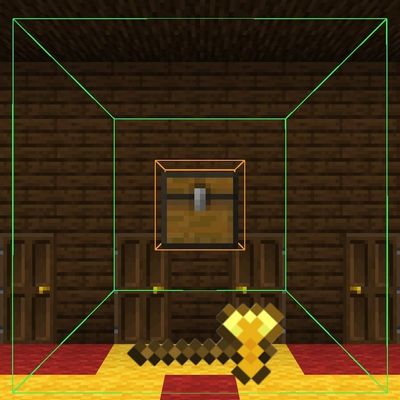
CurseForge · Minecraft mod
Quest Rooms Storages
📦Quest Rooms Storages Create quest rooms easy and fun
Choose a version Pick your version below, then grab the matching file.
Quick answer
Which Quest Rooms Storages release should I use?
Latest stable file Quest Rooms Storages 1.20.1-1.20.6 forge.jar
Game version 1.20.2, 1.20.5, 1.20.1
Loader Forge
Quest Rooms Storages 1.20.1-1.20.6 forge.jar targets 1.20.2, 1.20.5, 1.20.1 with Forge. The project page does not say whether this file belongs on the client, dedicated server, or both. No extra mods listed for this file.
Where it goes
Is Quest Rooms Storages required on the client, server, or both?
The project page does not say whether this file belongs on the client, dedicated server, or both.
Client Source doesn’t say
Dedicated server Source doesn’t say
Loader for this release Forge
Required install it here Optional supported, not mandatory Not supported do not install here Source doesn’t say do not assume
The source does not explicitly classify this release as client-only or server-only.
What else does Quest Rooms Storages 1.20.1-1.20.6 forge.jar need?
Quest Rooms Storages 1.20.1-1.20.6 forge.jar. Change the file and its required mods may change too.
This file does not list any required mods. Do not add a library just because a different file uses it.
This file does not list any required or optional mods.
Before you install it
Add Quest Rooms Storages without breaking your instance.
Built for Quest Rooms Storages 1.20.1-1.20.6 forge.jar. Pick another file and the loader, install side or required mods may change.
- 01
Stick to this file
Use Quest Rooms Storages 1.20.1-1.20.6 forge.jar. It targets 1.20.2, 1.20.5, 1.20.1 with Forge; another release may have different loader, side or dependency requirements.
- 02
Bring the mods it needs
This file does not list any required mods. Do not add a library just because a different file uses it.
- 03
Put it on the correct side
The project page does not say whether this file belongs on the client, dedicated server, or both.
- 04
Pick the file you checked
Use the “Get this file” button beside Quest Rooms Storages 1.20.1-1.20.6 forge.jar. It opens that exact file at the source.
About this project
What does Quest Rooms Storages add?
📦 Quest Rooms Storages by hamster
Have you ever created an escape room or an adventure map for yourself, only to find that playing it isn't as fun because you already know exactly where every key and essential item is hidden? This mod solves that problem completely! Designed specifically for map makers and escape room creators, it allows you to instantly and randomly distribute loot across a selected area. Test your own creations with a true element of surprise!
✨ Key Features
• 🟢 Visual Area Selection: An easy-to-use tool area wind lets you instantly define your target area. Boundaries are highlighted with a sleek, vibrant green outline. • 🟠 Automatic Container Detection: The mod automatically detects all storage blocks (chests, barrels, etc.) within the selected area, highlights them in bright orange, and displays the total count on your screen. • ⚙️ Intuitive Configuration Menu: Once your area is selected, press the confirmation key (Q by default, fully rebindable in the controls settings) to open the setup interface. • 🎒 Creative Inventory Integration: Pick any item you want to spawn directly from the familiar Creative Mode menu using Left-Click (LMB). • 📊 Fexible Loot Customization: For every item added, you can easily configure: • Maximum amount per single chest. • Total number of this item allowed across the entire area. • Spawn probability (chance). • 🎲 One-Click Randomization: Add as many items as you like, click "Fill Containers," and the mod will randomly distribute the loot among the detected chests. The selection then resets automatically, making the tool ready for its next use!
🛠 How It Works (Step-by-Step)
- Equip the area wind tool and mark the corners of your desired area.
- Confirm that the mod detected all your chests (look for the orange highlights and the counter).
- Press Q (or your custom bound key) to open the menu.
- Left-click items from the Creative tabs to select them.
- Set your preferred limits and spawn rates, then click "Add Item".
- Hit "Fill Containers" and get ready to experience your own escape room blindly!
mod translated to american english and russian language
other mods storages and items to pick support too!
try this now!
my social media: tiktok - @_hamster_tiktok228offic youtube - @_hamster_yt telegram - hamsterTUT
Project description from CurseForge.
Pick your setup
Quest Rooms Storages by Minecraft version and loader
Choose the version and loader you play, then open the matching release.
Minecraft version
1.20.5
1 loader buildMinecraft version
1.20.4
1 loader buildMinecraft version
1.20.3
1 loader buildMinecraft version
1.20.2
1 loader buildMinecraft version
1.20.1
1 loader buildCheck the dependencies, then try the file in a copied instance before changing a world you care about.
Recent files
Quest Rooms Storages versions and loaders
Quest Rooms Storages 1.20.1-1.20.6 forge.jar
14 Oct 2026
Client Source doesn’t say Server Source doesn’t say Dependencies No extras listed Listed on Release listing
Check the 1.20.6 · Forge setup 1.20.21.20.51.20.1Forge release
Looking for an older file? The official CurseForge project page is in Resources.
 mod
CurseForge · Minecraft
Iron's Patches
Iron's Spells and Spellbooks patches for minor compat and performance
 mod
CurseForge · Minecraft
Mynt 4
Not a real mint!
 mod
CurseForge · Minecraft
Sculptory
Powerful, beginner-friendly building and world-editing tools. Sculpt terrain, build faster, and learn as you go with a built-in tutorial and wiki. Free and open source.