Minecraft version
Back to mods 
CurseForge · Minecraft mod
Fancy Player Animation
Awesome player animations for your Minecraft world
Choose a version Pick your version below, then grab the matching file.
Quick answer
Which Fancy Player Animation release should I use?
Latest stable file fancyplayeranimation-1.2.0.jar
Game version 1.21.1
Loader NeoForge
Fancy Player Animation fancyplayeranimation-1.2.0.jar targets 1.21.1 with NeoForge. The project page does not say whether this file belongs on the client, dedicated server, or both. No extra mods listed for this file.
Where it goes
Is Fancy Player Animation required on the client, server, or both?
The project page does not say whether this file belongs on the client, dedicated server, or both.
Client Source doesn’t say
Dedicated server Source doesn’t say
Loader for this release NeoForge
Required install it here Optional supported, not mandatory Not supported do not install here Source doesn’t say do not assume
The source does not explicitly classify this release as client-only or server-only.
What else does Fancy Player Animation fancyplayeranimation-1.2.0.jar need?
fancyplayeranimation-1.2.0.jar. Change the file and its required mods may change too.
This file does not list any required mods. Do not add a library just because a different file uses it.
This file does not list any required or optional mods.
Before you install it
Add Fancy Player Animation without breaking your instance.
Built for Fancy Player Animation fancyplayeranimation-1.2.0.jar. Pick another file and the loader, install side or required mods may change.
- 01
Stick to this file
Use fancyplayeranimation-1.2.0.jar. It targets 1.21.1 with NeoForge; another release may have different loader, side or dependency requirements.
- 02
Bring the mods it needs
This file does not list any required mods. Do not add a library just because a different file uses it.
- 03
Put it on the correct side
The project page does not say whether this file belongs on the client, dedicated server, or both.
- 04
Pick the file you checked
Use the “Get this file” button beside fancyplayeranimation-1.2.0.jar. It opens that exact file at the source.
About this project
What does Fancy Player Animation add?



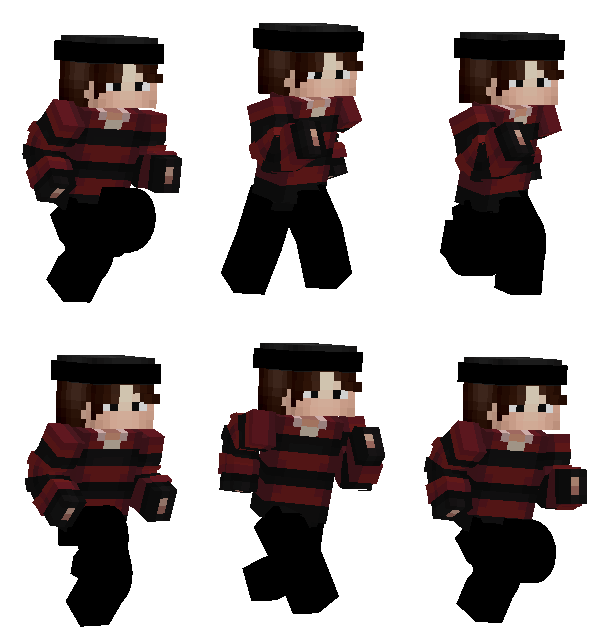
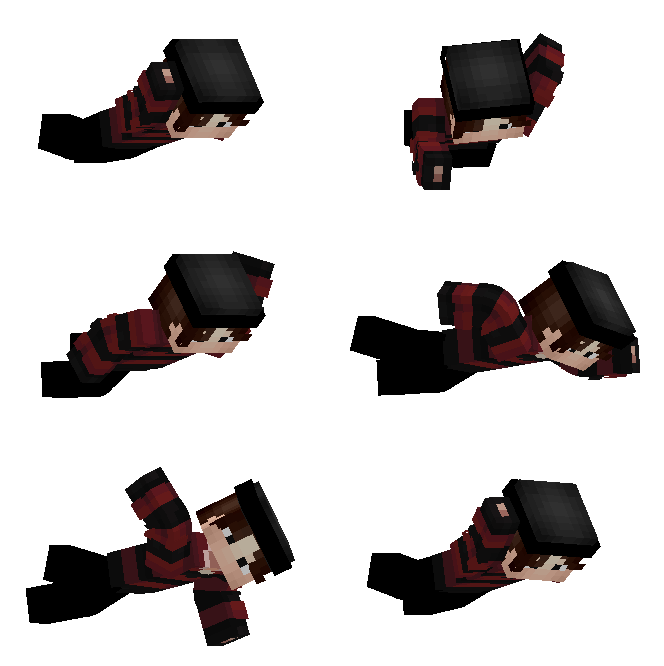


Fancy Player Animation brings fluid, Action & Stuff–style animations to the player: walk, run, long idle, jump, fall and swim, with elbows and knees that actually bend.
✔ Works with any skin (classic and slim arms) ✔ Vanilla and modded armor, capes (including OptiFine) and elytra follow the animated body ✔ Held items follow the forearm ✔ Client-side only, so no server install is needed ✔ No dependencies
Tip: press F5 to see the animations in third person.
Requires NeoForge 1.21.1
Credits & originality
Fancy Player Animation is an original project by SgodProject. All code is original and written specifically for this mod: no code, models, textures, sounds or other assets from other mods or projects are included or reused.
The animation style is only inspired by the look of mods like Action & Stuff; nothing was copied from them.
The preview GIFs were rendered with the author’s own Minecraft skin.
The mod is client-side, has no dependencies (other than NeoForge itself), and does not bundle any third-party libraries.
Project description from CurseForge.
Pick your setup
Fancy Player Animation by Minecraft version and loader
Choose the version and loader you play, then open the matching release.
Check the dependencies, then try the file in a copied instance before changing a world you care about.
Recent files
Fancy Player Animation versions and loaders
fancyplayeranimation-1.2.0.jar
fancyplayeranimation-1.2.2.jar
17 Oct 2026
Client Source doesn’t say Server Source doesn’t say Dependencies No extras listed Listed on Release listing
Check the 1.21.1 · NeoForge setup 1.21.1NeoForge release
fancyplayeranimation-1.0.0.jar
14 Oct 2026
Client Source doesn’t say Server Source doesn’t say Dependencies No extras listed Listed on Release listing
Check the 1.21.1 · NeoForge setup 1.21.1NeoForge release
Looking for an older file? The official CurseForge project page is in Resources.