Minecraft version
Back to mods 
CurseForge · Minecraft mod
Aether Clouds -- Clouds shader
A client-side cloud overhaul with configurable volumetric and voxel styles that follow world lighting and weather.
Choose a version Pick your version below, then grab the matching file.
Quick answer
Which Aether Clouds -- Clouds shader release matches 26.3 Forge?
beta file Aether Clouds 0.0.1 - Forge 26.3
Game version 26.3
Loader Forge
Aether Clouds -- Clouds shader Aether Clouds 0.0.1 - Forge 26.3 targets 26.3 with Forge. The project page does not say whether this file belongs on the client, dedicated server, or both. No extra mods listed for this file.
Where it goes
Is Aether Clouds -- Clouds shader required on the client, server, or both?
The project page does not say whether this file belongs on the client, dedicated server, or both.
Client Source doesn’t say
Dedicated server Source doesn’t say
Loader for this release Forge
Required install it here Optional supported, not mandatory Not supported do not install here Source doesn’t say do not assume
The source does not explicitly classify this release as client-only or server-only.
What else does Aether Clouds -- Clouds shader Aether Clouds 0.0.1 - Forge 26.3 need?
Aether Clouds 0.0.1 - Forge 26.3 on 26.3 Forge. Every mod below is checked against that same setup.
This file does not list any required mods. Do not add a library just because a different file uses it.
This file does not list any required or optional mods.
Before you install it
Add Aether Clouds -- Clouds shader without breaking your instance.
Built for Aether Clouds -- Clouds shader Aether Clouds 0.0.1 - Forge 26.3 on 26.3 Forge. Pick another file and the loader, install side or required mods may change.
- 01
Stick to this file
Use Aether Clouds 0.0.1 - Forge 26.3. It targets 26.3 with Forge; another release may have different loader, side or dependency requirements.
- 02
Bring the mods it needs
This file does not list any required mods. Do not add a library just because a different file uses it.
- 03
Put it on the correct side
The project page does not say whether this file belongs on the client, dedicated server, or both.
- 04
Pick the file you checked
Use the “Get this file” button beside Aether Clouds 0.0.1 - Forge 26.3. It opens that exact file at the source.
About this project
What does Aether Clouds -- Clouds shader add?
Give your world a sky of its own.
Volumetric clouds • Pixel art skies • Live customization

Choose the mood above your world. Aether Clouds replaces vanilla clouds with twelve distinct styles, from broad volumetric formations to playful pixel silhouettes. Switch between two collections and fine-tune each style without leaving the game.

Soft formations, tall cloud towers, layered skies, and delicate high clouds. The six volumetric styles offer different shapes and distributions.
Cumulus · Cumulus Towers · Stratocumulus
Cumulonimbus · Altocumulus · Cirrus
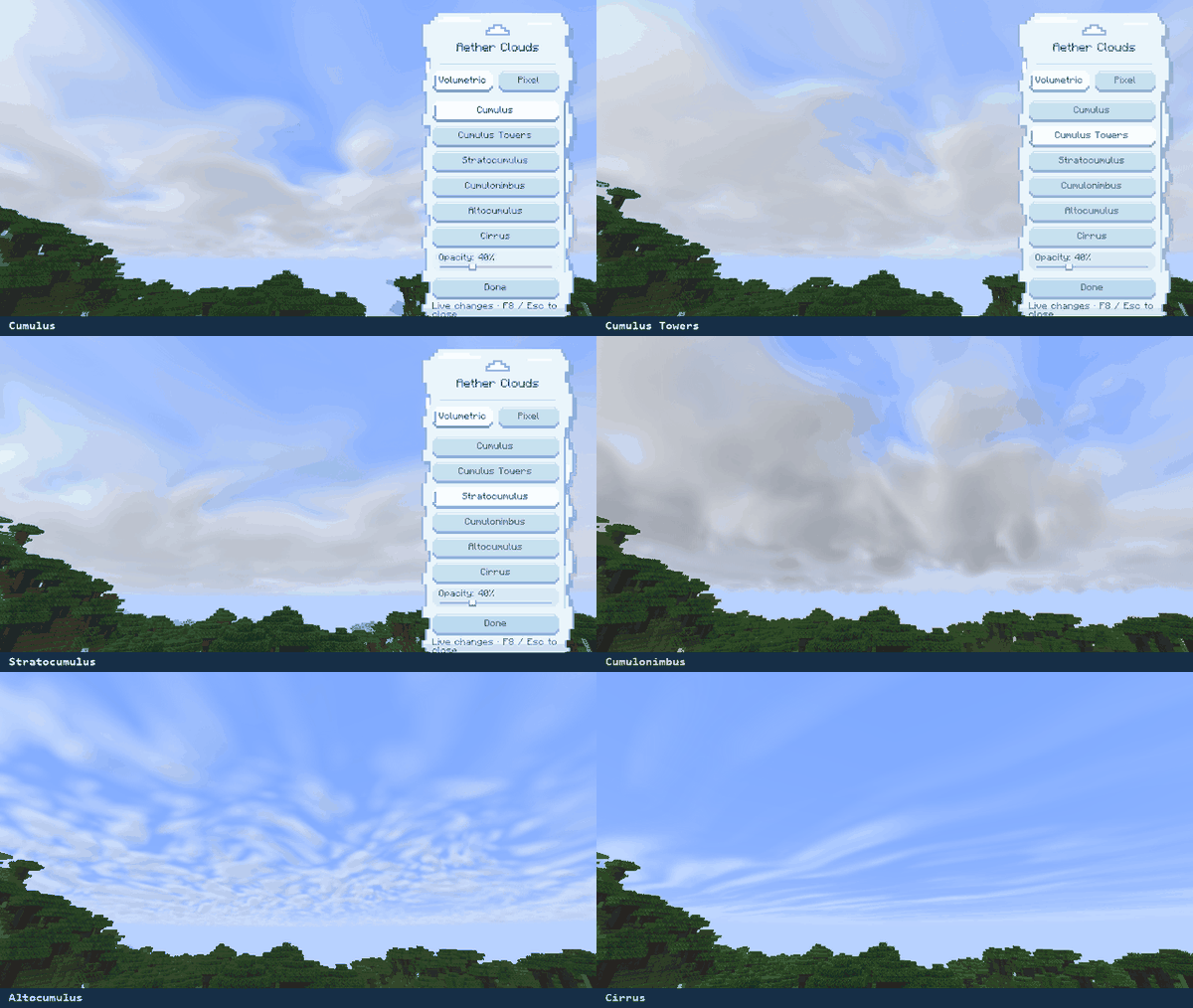
Actual in-game capture: choosing styles in the sidebar, then viewing the sky.

A collection for skies with a blocky or illustrated character. Explore bold shapes, soft blocks, terraces, painted forms, and ink-like clouds.
Karma Clouds · Sky Blocks · Sky Billows
Sky Terraces · Painted Cumulus · Ink Clouds
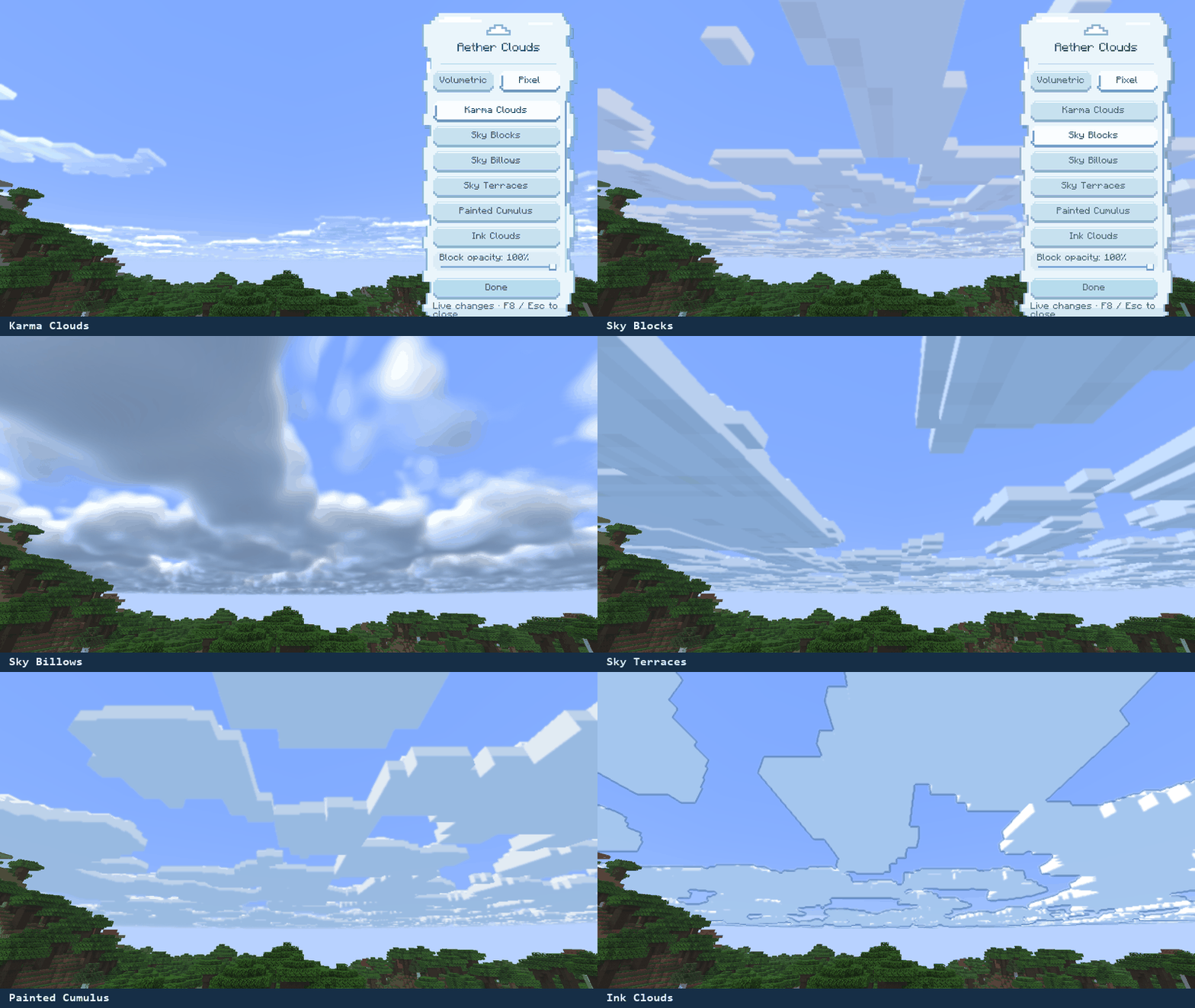

Press F8 inside a world to open the cloud-themed sidebar. Choose a collection, select a style, and adjust its controls while the world remains visible.
- Opacity and density: make clouds lighter or change the amount of sky they cover.
- Edge controls: adjust softness and enable edge filtering on supported pixel styles.
- Saved per style: every cloud style remembers its own settings, including after restarting Minecraft.
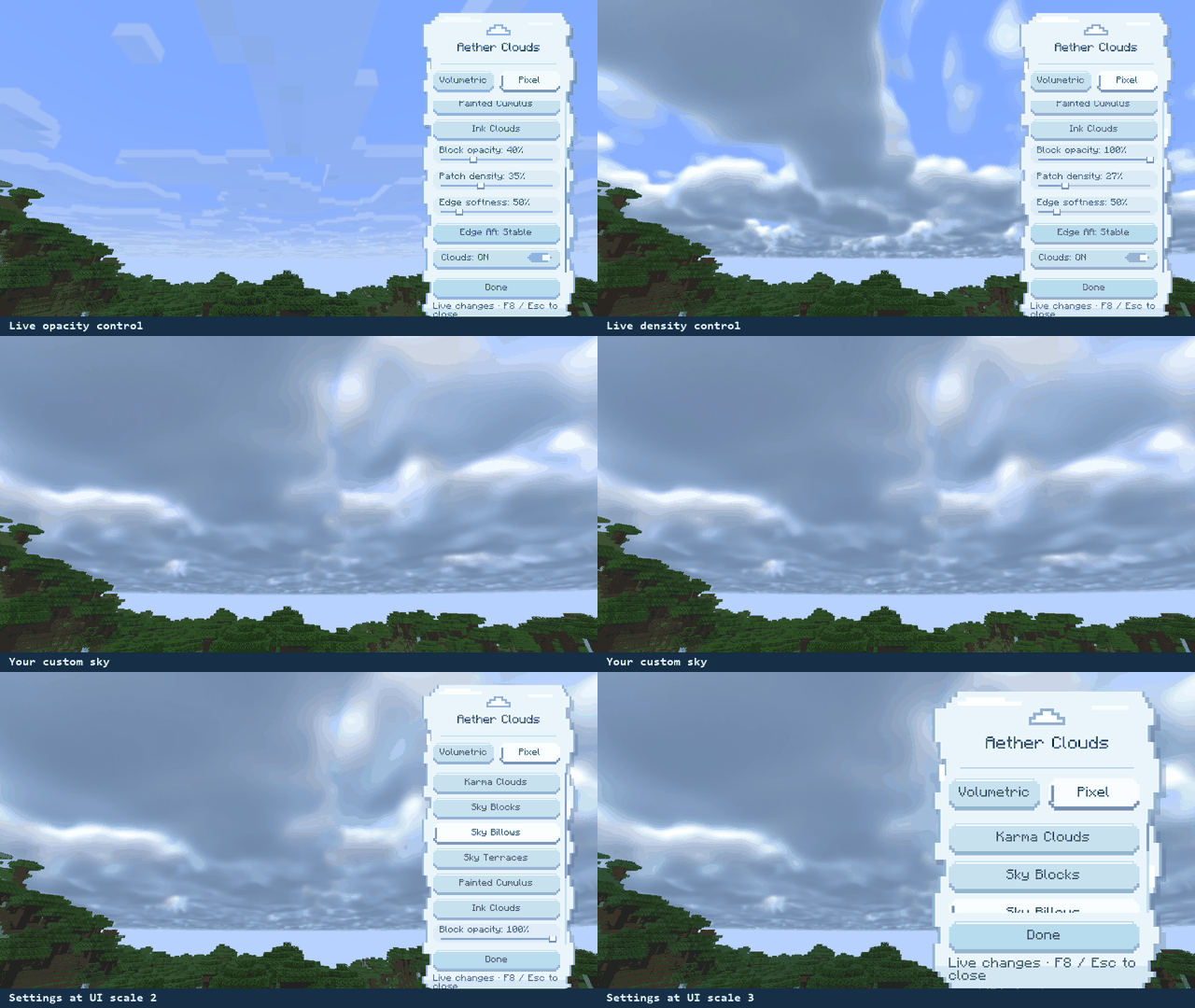
Actual in-game capture: opacity and density changes, plus the sidebar at UI scales 2 and 3.

Cloud color and lighting follow the world’s sky, day/night cycle, rain, and thunderstorms. Aether Clouds changes the clouds; terrain and water retain the game’s lighting.

1. Choose your build. Match both your Minecraft version and loader.
2. Install it. Place one matching JAR in your mods folder.
3. Look up. Enable Minecraft clouds, enter a world, and press F8.
Fabric · Forge · NeoForge
1.20.1 · 1.21.1 · 1.21.11 · 26.2 · 26.3
| Minecraft | Java |
|---|---|
| 1.20.1 | 17 |
| 1.21.1 / 1.21.11 | 21 |
| 26.2 / 26.3 | 25 |
Fabric builds bundle the required Fabric API Base and Resource Loader modules. A separate Fabric API installation is not required for Aether Clouds alone.

Shader packs: when Iris is installed, Aether Clouds disables its custom cloud renderer and leaves the normal rendering path active. External shader-pack compatibility is not claimed.
Performance: edge filtering can increase GPU work. Results depend on hardware and settings; Sodium, Fabulous graphics, MSAA, and distant-terrain combinations have not been verified across every supported version.

Aether Clouds · Version 0.0.1 · All Rights Reserved
Independent code and assets are owned by Haider x. Karma Clouds adapts Karma Shader by X-Haider, with its original attribution and ARR notice retained. Bundled Fabric API components retain their Apache-2.0 licenses. See each release’s included license files for the full terms.
Project description from CurseForge.
Pick your setup
Aether Clouds -- Clouds shader by Minecraft version and loader
Choose the version and loader you play, then open the matching release.
Minecraft version
26.2
3 loader buildsMinecraft version
1.21.11
3 loader buildsMinecraft version
1.21.1
3 loader buildsMinecraft version
1.20.1
3 loader buildsCheck the dependencies, then try the file in a copied instance before changing a world you care about.
Recent files
Aether Clouds -- Clouds shader versions and loaders
Aether Clouds 0.0.1 - Forge 26.3
aether-clouds-forge-26.3-0.0.1.jar
15 Oct 2026
Client Source doesn’t say Server Source doesn’t say Dependencies No extras listed Listed on Release listing
Check the 26.3 · Forge setup Forge26.3 beta
Looking for an older file? The official CurseForge project page is in Resources.
 mod
CurseForge · Minecraft
Carpeted
"Elevate your interior design! Custom rug models with smart directional rotation and seamless placement physics."
 mod
CurseForge · Minecraft
eTag: Enchantment Tags (Standalone + JEI Addon)
Stop reading long tooltips mid-fight! ETag displays colorful enchantment initials in the 4 corners of your items and books—working standalone in Survival inventory and seamlessly inside JEI.
 mod
CurseForge · Minecraft
NeroRuins
Explore it, loot it, uncover it — abandoned labs, crashed ships, alien temples and station wrecks that give every world a reason to be landed on.