Minecraft version
Back to mods 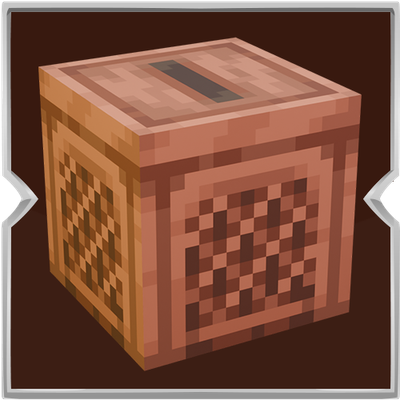
CurseForge · Minecraft mod
Jukebox: Backport
Play the music discs stored in the chest above a jukebox, one after another, in slot order.
Choose a version Pick your version below, then grab the matching file.
Quick answer
Which Jukebox: Backport release matches 26.3 Forge?
Best match for your filters Jukebox Backport 1.0.0
Game version 26.3
Loader Fabric, Forge, NeoForge
Jukebox: Backport Jukebox Backport 1.0.0 targets 26.3 with Fabric, Forge, NeoForge. The project page does not say whether this file belongs on the client, dedicated server, or both. No extra mods listed for this file.
Where it goes
Is Jukebox: Backport required on the client, server, or both?
The project page does not say whether this file belongs on the client, dedicated server, or both.
Client Source doesn’t say
Dedicated server Source doesn’t say
Loader for this release Fabric, Forge, NeoForge
Required install it here Optional supported, not mandatory Not supported do not install here Source doesn’t say do not assume
The source does not explicitly classify this release as client-only or server-only.
What else does Jukebox: Backport Jukebox Backport 1.0.0 need?
Jukebox Backport 1.0.0 on 26.3 Forge. Every mod below is checked against that same setup.
This file does not list any required mods. Do not add a library just because a different file uses it.
This file does not list any required or optional mods.
Before you install it
Add Jukebox: Backport without breaking your instance.
Built for Jukebox: Backport Jukebox Backport 1.0.0 on 26.3 Forge. Pick another file and the loader, install side or required mods may change.
- 01
Stick to this file
Use Jukebox Backport 1.0.0. It targets 26.3 with Fabric, Forge, NeoForge; another release may have different loader, side or dependency requirements.
- 02
Bring the mods it needs
This file does not list any required mods. Do not add a library just because a different file uses it.
- 03
Put it on the correct side
The project page does not say whether this file belongs on the client, dedicated server, or both.
- 04
Pick the file you checked
Use the “Get this file” button beside Jukebox Backport 1.0.0. It opens that exact file at the source.
About this project
What does Jukebox: Backport add?
Put a chest directly on top of a jukebox and place your music discs inside it. The jukebox takes the discs in the order of the chest slots, plays each song, and puts the disc back when the song ends. After a short pause, it takes the next disc.

If the chest holds one disc, that song keeps repeating. If it holds several discs, they play in order and return to the first disc after the last one.
How to use it:
- Place a chest or a trapped chest directly above a jukebox.
- Put your music discs in the chest, in the order you want to hear them.
- Wait for the jukebox to take the first disc and start playing.
- Click the jukebox if you want to skip the current song.
- The disc goes back into the chest and the next one starts immediately.
- Only the chest sitting on the jukebox is used.
- A double chest does not combine both halves into one playlist.
- If the chest is full when a disc needs to return, that disc drops on the ground.
- If there is no chest above the jukebox, it behaves like a normal jukebox.
While a playlist is playing, music notes float around the front and sides of the jukebox. The jukebox also has its own wooden look, with a framed checkerboard side and a thin slot on top. If you leave the world and come back, the song that was playing continues.
Project description from CurseForge.
Pick your setup
Jukebox: Backport by Minecraft version and loader
Choose the version and loader you play, then open the matching release.
Minecraft version
26.2
3 loader buildsMinecraft version
1.21.1
2 loader buildsMinecraft version
1.20.1
2 loader buildsCheck the dependencies, then try the file in a copied instance before changing a world you care about.
Recent files
Jukebox: Backport versions and loaders
Jukebox Backport 1.0.0
JukeboxBackport-26.3.jar
15 Oct 2026
Client Source doesn’t say Server Source doesn’t say Dependencies No extras listed Listed on Release listing
Check the 26.3 · Forge setup FabricForgeNeoForge26.3 release
Looking for an older file? The official CurseForge project page is in Resources.
 mod
CurseForge · Minecraft
EzBackup
Create manual backups and store them as a compressed file in the directory of your choice and restore from backups without disconnecting. Works great on singleplayer and e4mc servers where you are the host!
 mod
CurseForge · Minecraft
CoreProtectGUI
The first real GUI for CoreProtect. Hundreds of rows of chat text become a clean, sortable, filterable window - player heads, item icons, translated names - and its commands become forms you fill in. 12 languages.
 mod
Modrinth · Minecraft
Just Redstone Waterlog
Adds the waterlogged property to redstone components: dust, torches, repeaters, comparators, levers, buttons and pressure plates.