Minecraft version
Back to mods 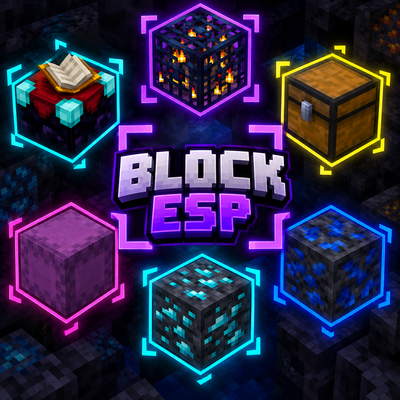
CurseForge · Minecraft mod
BlockESP
A clean, instant Block ESP for Fabric 1.21.11. Highlight any block in the game — ores, chests, shulker boxes, spawners, vaults, suspicious sand, sculk, and 1200+ others — through walls. Press X to toggle. No chunk reload, no freeze, instant.
Choose a version Pick your version below, then grab the matching file.
Quick answer
Which BlockESP release should I use?
Latest stable file blockesp-1.0.0v-1.21.11mc
Game version 1.21.11
Loader Fabric
blockesp-1.0.0v-1.21.11mc targets 1.21.11 with Fabric. The project page does not say whether this file belongs on the client, dedicated server, or both. No extra mods listed for this file.
Where it goes
Is BlockESP required on the client, server, or both?
The project page does not say whether this file belongs on the client, dedicated server, or both.
Client Source doesn’t say
Dedicated server Source doesn’t say
Loader for this release Fabric
Required install it here Optional supported, not mandatory Not supported do not install here Source doesn’t say do not assume
The source does not explicitly classify this release as client-only or server-only.
What else does blockesp-1.0.0v-1.21.11mc need?
blockesp-1.0.0v-1.21.11mc. Change the file and its required mods may change too.
This file does not list any required mods. Do not add a library just because a different file uses it.
This file does not list any required or optional mods.
Before you install it
Add BlockESP without breaking your instance.
Built for blockesp-1.0.0v-1.21.11mc. Pick another file and the loader, install side or required mods may change.
- 01
Stick to this file
Use blockesp-1.0.0v-1.21.11mc. It targets 1.21.11 with Fabric; another release may have different loader, side or dependency requirements.
- 02
Bring the mods it needs
This file does not list any required mods. Do not add a library just because a different file uses it.
- 03
Put it on the correct side
The project page does not say whether this file belongs on the client, dedicated server, or both.
- 04
Pick the file you checked
Use the “Get this file” button beside blockesp-1.0.0v-1.21.11mc. It opens that exact file at the source.
About this project
What does BlockESP add?
Block ESP
A clean, instant Block ESP for Fabric — Minecraft 1.21.11
Overview
Block ESP is a lightweight, fully configurable Block ESP (Extra Sensory Perception) mod for Minecraft. It draws wireframe outlines around the blocks you choose — ores, chests, shulker boxes, spawners, vaults, suspicious sand, sculk, and any of the ~1200 blocks in the game — visible through walls.
Toggle it with a single key. No chunk reload. No freeze. No client/server lag. Just press X and every block you've selected lights up instantly.
Why this ESP and not another?
- Instant toggle — no chunk re-mesh, no freeze, no waiting for chunks to reload. Press X, ESP is on. Press X again, it's off.
- Pick exactly what you see — a searchable grid of icons exposes the entire Block registry. Search by name in your game's language (English or French), tick what you want.
- Sensible defaults — by default the ESP enables ores (overworld + deepslate + nether), all 17 shulker box variants, chests / barrels / hoppers / dispensers, crafting utility blocks, redstone, spawners, trial spawners, vaults, infested blocks, suspicious sand/gravel, sculk, light sources, amethyst, player heads, end portal frames, dragon egg, beacon, conduit, respawn anchor — and more.
- Color-coded — every default block has a pre-assigned outline color (diamond = cyan, gold = yellow, emerald = green, redstone = red, chests = gold, spawners = light blue, etc.).
- ModMenu integration — a full in-game config screen with a search bar, render-distance slider, ESP ON/OFF toggle, scrollable grid of icons, and Reset / All ON / All OFF / Done buttons.
- Performance-first — the render loop uses a primitive long hashset (no autoboxing), pre-decoded color channels, and a throttled incremental chunk scanner. 100k+ highlighted blocks no longer tanks your FPS.
- Bilingual — English (en_us) and French (fr_fr).
Features
- Toggle with X — instant on/off, no chunk reload.
- Searchable grid of every block in the game (~1200 blocks).
- Render distance slider — 1 to 16 chunks around the player.
- Pre-assigned colors for the catalog blocks (ores, containers, spawners, etc.).
- Background scanner — daemon thread pool, never blocks the render thread.
- Chunks re-scan as the player moves (throttled, distance-sorted queue).
- Connected outlines — adjacent enabled blocks share edges (clean look, fewer vertices).
- HUD toast — a green "✓ ESP ON" or red "✗ ESP OFF" pill appears above the hotbar for ~3s after each toggle.
- ModMenu config screen — search bar + slider + grid + ON/OFF + Reset / All / Done.
- Client-side only — works on any vanilla server. The server doesn't see anything.
Installation
- Install Fabric Loader 0.17.0 or newer for Minecraft 1.21.11.
- Install Fabric API.
- (Optional) Install ModMenu for the in-game config screen.
- Drop blockesp-1.0.0.jar into your
.minecraft/mods/folder. - Launch Minecraft 1.21.11 with the Fabric profile.
Usage
| Action | Effect |
|---|---|
| Press X in-game | Toggle ESP on/off (instant) |
| ModMenu → Block ESP → Configure | Search bar + render distance slider + ON/OFF + scrollable grid of icons |
| Esc → Options → Controls | Rebind the key (category "Block ESP") |
<button class="absolute top-1 right-1 z-10 p-1.5 rounded-lg bg-[#f7f7f7] dark:bg-[#272A2F] hover:bg-[#E5E5E5] dark:hover:bg-[#272A2F] opacity-0 group-hover/table:opacity-100 transition-opacity duration-200"></button>
Default highlighted blocks
- Ores — coal, iron, copper, gold, redstone, lapis, diamond, emerald (overworld + deepslate variants), nether quartz, nether gold, ancient debris, gilded blackstone.
- Storage / loot — chest, trapped chest, ender chest, barrel, hopper, dispenser, dropper, all 17 shulker box variants.
- Crafting / utility — crafting table, enchanting table, chiseled bookshelf, bookshelf, lectern, anvil (all states), smithing table, loom, cartography table, fletching table, grindstone, stonecutter, furnace, blast furnace, smoker, brewing stand, cauldron (all variants).
- Redstone — repeater, comparator, redstone lamp, wire, torch, lever, daylight detector, target, observer, piston, sticky piston, note block, jukebox.
- Spawners & special — spawner, trial spawner, vault, dragon egg, beacon, conduit, respawn anchor, end portal frame, end portal, end gateway.
- Dangerous / useful — TNT, obsidian, crying obsidian, reinforced deepslate.
- Infested blocks — all 7 silverfish variants.
- Archaeology — suspicious sand, suspicious gravel.
- Sculk — sculk, shrieker, catalyst, sensor, calibrated sensor, vein.
- Light sources — glowstone, sea lantern, shroomlight, end rod, lantern, soul lantern, torch, soul torch, glow lichen.
- Amethyst — budding, small / medium / large bud, cluster.
- Player heads & skulls — player, skeleton, wither skeleton, zombie, creeper, dragon, piglin (head + wall variants).
- Misc valuable — lightning rod, bell, sponge, wet sponge, cobweb.
Performance
Block ESP is built around a background scanner running on a daemon thread pool, completely decoupled from the render thread. The render loop only reads a pre-built list of targets and draws wireframe outlines — it never touches world data.
The hot path has been heavily optimized:
- Position lookups use a primitive
LongOpenHashSet(fastutil) — noLongautoboxing on thecontains()calls. - Color channels (r, g, b, a) and the packed ARGB int are pre-decoded at scan time inside each
EspTargetrecord — no per-frame bit-shifting. - The render thread takes a single per-frame snapshot under a
ReadWriteLockand uses it lock-free. - The chunk scanner is throttled (max 8 chunks/tick) and sorted by Manhattan distance to the player — the chunks nearest to you light up first.
Math.sqrtremoved from the line rasterizer — cube edges are axis-aligned, the normal is already a unit vector.
Compatibility
- Minecraft 1.21.11 (only).
- Fabric Loader 0.17.0+.
- Fabric API (required).
- ModMenu 17.0.1 (optional, but strongly recommended — without it you can't open the config screen).
- Java 21+.
- Client-side only — safe on any vanilla server. Doesn't modify any server behavior.
Frequently Asked Questions
Q: Can I use this on a server? Yes. Block ESP is 100% client-side. The server doesn't even know you have it installed. Works on vanilla servers, Realms, and any modded server that allows client mods.
Q: Will this get me banned? It depends on the server's rules. Block ESP is a "client enhancement" that gives you an unfair advantage — most PvP servers and competitive servers ban it. Survival servers, private servers, and your own worlds are fine. Always check the server's rules before using it.
Q: Can I add my own blocks? Yes. Open ModMenu → Block ESP → Configure, and use the search bar to find any block in the game. Tick the ones you want. User-enabled blocks that aren't in the catalog use white outlines by default.
Q: How do I change the colors? Colors are currently defined in the source code (EspBlocks.java). Edit the catalog and rebuild to change the defaults. A config-screen color picker is planned for a future release.
Q: Why no chunk re-mesh like other ESP mods? Chunk re-meshing causes the freeze you see in older ESP mods. Block ESP draws the outlines as a separate overlay on top of the world, using a custom RenderType with NO_DEPTH_TEST — that's why the outlines are visible through walls and why the toggle is instant.
Credits & License
- Author — LunoX
- License — MIT (free to use, modify, redistribute with attribution)
If you like the mod, please leave a comment / favorite on the project page — it really helps with visibility. Thanks!
Project description from CurseForge.
Pick your setup
BlockESP by Minecraft version and loader
Choose the version and loader you play, then open the matching release.
Check the dependencies, then try the file in a copied instance before changing a world you care about.
Recent files
BlockESP versions and loaders
blockesp-1.0.0v-1.21.11mc
blockesp-2.0.0.jar
15 Oct 2026
Client Source doesn’t say Server Source doesn’t say Dependencies No extras listed Listed on Release listing
Check the 1.21.11 · Fabric setup Fabric1.21.11 release
Looking for an older file? The official CurseForge project page is in Resources.
 mod
mod CurseForge + Modrinth · Minecraft
Modulation
A growing collection of quality-of-life tweaks, bug fixes, and cross-mod integrations for modpack creators!
 mod
mod CurseForge + Modrinth · Minecraft
Fishing For Stars
Faithful recreation of Stardew Valley's fishing minigame
 mod
mod CurseForge · Minecraft
Ore Generators
Tired of spending hours mining in caves? Craft resource generators to produce all your essential ores automatically!