Minecraft version
Back to mods 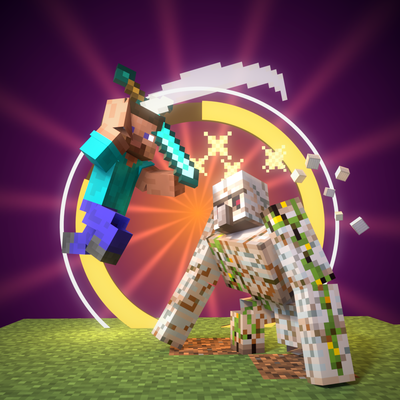
CurseForge · Minecraft mod
QTE Finishers
Bring a boss down to 15% health and press R for a cinematic finisher with quick-time prompts. Every vanilla boss has its own 30-second fight scene. Miss a prompt and it gets back up.
Choose a version Pick your version below, then grab the matching file.
Quick answer
Which QTE Finishers release should I use?
beta file qtefinishers-forge-1.20.1-1.0.2.jar
Game version 1.20.1
Loader Forge
QTE Finishers qtefinishers-forge-1.20.1-1.0.2.jar targets 1.20.1 with Forge. The project page does not say whether this file belongs on the client, dedicated server, or both. No extra mods listed for this file.
Where it goes
Is QTE Finishers required on the client, server, or both?
The project page does not say whether this file belongs on the client, dedicated server, or both.
Client Source doesn’t say
Dedicated server Source doesn’t say
Loader for this release Forge
Required install it here Optional supported, not mandatory Not supported do not install here Source doesn’t say do not assume
The source does not explicitly classify this release as client-only or server-only.
What else does QTE Finishers qtefinishers-forge-1.20.1-1.0.2.jar need?
qtefinishers-forge-1.20.1-1.0.2.jar. Change the file and its required mods may change too.
This file does not list any required mods. Do not add a library just because a different file uses it.
This file does not list any required or optional mods.
Before you install it
Add QTE Finishers without breaking your instance.
Built for QTE Finishers qtefinishers-forge-1.20.1-1.0.2.jar. Pick another file and the loader, install side or required mods may change.
- 01
Stick to this file
Use qtefinishers-forge-1.20.1-1.0.2.jar. It targets 1.20.1 with Forge; another release may have different loader, side or dependency requirements.
- 02
Bring the mods it needs
This file does not list any required mods. Do not add a library just because a different file uses it.
- 03
Put it on the correct side
The project page does not say whether this file belongs on the client, dedicated server, or both.
- 04
Pick the file you checked
Use the “Get this file” button beside qtefinishers-forge-1.20.1-1.0.2.jar. It opens that exact file at the source.
About this project
What does QTE Finishers add?
QTE Finishers
Beat a boss down to 15% health: it kneels, dizzy, and normal damage can't kill it. Walk up and press R to start a cinematic finisher with quick-time prompts. Hit them all to kill it in style. Miss one and you get thrown off while it gets back up.
Every boss has its own scene
- Iron Golem: wrestle it, rip its arm off, beat it with it… then hand it a poppy.
- Warden: stay still, climb on its back, rip out its souls.
- Ravager: ride it like a rodeo and twist its horns.
- Wither: twist its heads off one by one and take the Nether Star.
- Ender Dragon: get carried off in its claw, ride it, stab it and crash it into the ground.
- Other big mobs, from other mods too, get a shorter general finisher.
Good to know
- Change the key in Controls > "QTE Finishers".
- Settings are in
config/qtefinisher-common.toml. - Add mobs with the entity tag
qtefinisher:finishable, or block them withqtefinisher:not_finishable. - Works in multiplayer. Install it on both the server and every client.
Bugs and reports goes in the Discord Server
Project description from CurseForge.
Pick your setup
QTE Finishers by Minecraft version and loader
Choose the version and loader you play, then open the matching release.
Check the dependencies, then try the file in a copied instance before changing a world you care about.
Recent files
QTE Finishers versions and loaders
qtefinishers-forge-1.20.1-1.0.2.jar
22 Nov 2026
Client Source doesn’t say Server Source doesn’t say Dependencies No extras listed Listed on Release listing
Check the 1.20.1 · Forge setup 1.20.1Forge beta
qtefinishers-forge-1.20.1-1.0.1.jar
4 Nov 2026
Client Source doesn’t say Server Source doesn’t say Dependencies No extras listed Listed on Release listing
Check the 1.20.1 · Forge setup 1.20.1Forge beta
qtefinishers-forge-1.20.1-1.0.0.jar
15 Oct 2026
Client Source doesn’t say Server Source doesn’t say Dependencies No extras listed Listed on Release listing
Check the 1.20.1 · Forge setup 1.20.1Forge beta
Looking for an older file? The official CurseForge project page is in Resources.
 mod
Modrinth · Minecraft
Jeff The Landshark
Bring home Jeff the Landshark as a fully interactive companion with unique abilities, progression, collectibles, armor, weapons, blocks, and much more custom features.
 mod
CurseForge · Minecraft
MasterBall Traders Co.
Run your own Pokémon TCG card shop: rip packs, price cards, serve customers, grade slabs and play real PvP TCG matches.
 mod
CurseForge · Minecraft
ReturnSMP Shenanigans
a mod that adds new emotes, and various assets