Minecraft version
Back to mods 
CurseForge · Minecraft mod
Inventory Tabs Next
Adds tabs to access nearby containers without leaving your inventory. A recreation supporting 1.21.11 and beyond.
Choose a version Pick your version below, then grab the matching file.
Quick answer
Which Inventory Tabs Next release should I use?
Latest stable file [Fabric/NeoForge] 26.3-1.0.1
Game version 26.3
Loader Fabric, NeoForge
Inventory Tabs Next [Fabric/NeoForge] 26.3-1.0.1 targets 26.3 with Fabric, NeoForge. The project page does not say whether this file belongs on the client, dedicated server, or both. No extra mods listed for this file.
Where it goes
Is Inventory Tabs Next required on the client, server, or both?
The project page does not say whether this file belongs on the client, dedicated server, or both.
Client Source doesn’t say
Dedicated server Source doesn’t say
Loader for this release Fabric, NeoForge
Required install it here Optional supported, not mandatory Not supported do not install here Source doesn’t say do not assume
The source does not explicitly classify this release as client-only or server-only.
What else does Inventory Tabs Next [Fabric/NeoForge] 26.3-1.0.1 need?
[Fabric/NeoForge] 26.3-1.0.1. Change the file and its required mods may change too.
This file does not list any required mods. Do not add a library just because a different file uses it.
This file does not list any required or optional mods.
Before you install it
Add Inventory Tabs Next without breaking your instance.
Built for Inventory Tabs Next [Fabric/NeoForge] 26.3-1.0.1. Pick another file and the loader, install side or required mods may change.
- 01
Stick to this file
Use [Fabric/NeoForge] 26.3-1.0.1. It targets 26.3 with Fabric, NeoForge; another release may have different loader, side or dependency requirements.
- 02
Bring the mods it needs
This file does not list any required mods. Do not add a library just because a different file uses it.
- 03
Put it on the correct side
The project page does not say whether this file belongs on the client, dedicated server, or both.
- 04
Pick the file you checked
Use the “Get this file” button beside [Fabric/NeoForge] 26.3-1.0.1. It opens that exact file at the source.
About this project
What does Inventory Tabs Next add?
Inventory Tabs Next
A recreation of Inventory Tabs for newer versions of Minecraft, available for Fabric and NeoForge.
This mod adds a row of tabs above your inventory and container screens. Easily switch to nearby chests, crafting tables, furnaces, and other containers with a click or a key press without leaving your inventory.

Features
- Switch between nearby chests, crafting tables, furnaces, and other containers without leaving your inventory.
- Swap to nearby entity inventories, including chest boats, chest minecarts, villagers, and horses.
- Access your full inventory while riding horses or other entities, without dismounting.

- Carried item stacks carry over to the next screen as long as you have an empty inventory slot.
Project description from CurseForge.
Pick your setup
Inventory Tabs Next by Minecraft version and loader
Choose the version and loader you play, then open the matching release.
Minecraft version
26.2
2 loader buildsMinecraft version
26.1.2
2 loader buildsMinecraft version
26.1.1
2 loader buildsMinecraft version
26.1
2 loader buildsMinecraft version
1.21.11
2 loader buildsCheck the dependencies, then try the file in a copied instance before changing a world you care about.
Recent files
Inventory Tabs Next versions and loaders
[Fabric/NeoForge] 26.3-1.0.1
InventoryTabs-26.3-1.0.1.jar
16 Oct 2026
Client Source doesn’t say Server Source doesn’t say Dependencies No extras listed Listed on Release listing
Check the 26.3 · Fabric setup FabricNeoForge26.3 release
[Fabric/NeoForge] 26.1-1.0.1
InventoryTabs-26.1-1.0.1.jar
16 Oct 2026
Client Source doesn’t say Server Source doesn’t say Dependencies No extras listed Listed on Release listing
Check the 26.1.2 · Fabric setup FabricNeoForge26.126.1.1 release
[Fabric/NeoForge] 1.21.11-1.0.1
InventoryTabs-1.21.11-1.0.1.jar
16 Oct 2026
Client Source doesn’t say Server Source doesn’t say Dependencies No extras listed Listed on Release listing
Check the 1.21.11 · Fabric setup FabricNeoForge1.21.11 release
[Fabric/NeoForge] 26.2-1.0.1
InventoryTabs-26.2-1.0.1.jar
16 Oct 2026
Client Source doesn’t say Server Source doesn’t say Dependencies No extras listed Listed on Release listing
Check the 26.2 · Fabric setup FabricNeoForge26.2 release
1.21.11-1.0.0+fabric+neoforge
InventoryTabs-1.21.11-1.0.0.jar
12 Oct 2026
Client Required Server Not supported Dependencies No extras listed Listed on Release listing
Check the 1.21.11 · Fabric setup 1.21.11FabricNeoForge release
26.3-1.0.0+fabric+neoforge
InventoryTabs-26.3-1.0.0.jar
12 Oct 2026
Client Required Server Not supported Dependencies No extras listed Listed on Release listing
Check the 26.3 · Fabric setup 26.3FabricNeoForge release
26.2-1.0.0+fabric+neoforge
InventoryTabs-26.2-1.0.0.jar
12 Oct 2026
Client Required Server Not supported Dependencies No extras listed Listed on Release listing
Check the 26.2 · Fabric setup 26.2FabricNeoForge release
26.1-1.0.0+fabric+neoforge
InventoryTabs-26.1-1.0.0.jar
12 Oct 2026
Client Required Server Not supported Dependencies No extras listed Listed on Release listing
Check the 26.1.2 · Fabric setup 26.126.1.126.1.2Fabric release
Looking for an older file? The official CurseForge project page is in Resources.
 mod
CurseForge · Minecraft
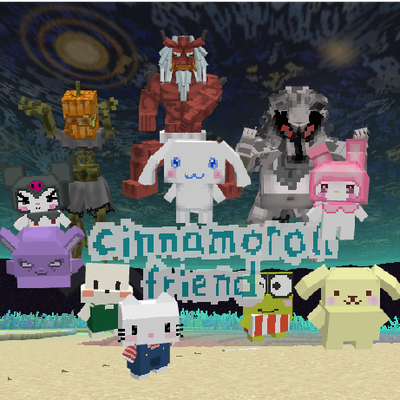
Cinnamoroll friends
Live with Cinnamoroll, Kuromi, My Melody, Hello Kitty, Pompompurin and Pochacco in a cozy town! Talk to them, accept their quests, and uncover an original story with 3 RPG bosses,and a new dimension. Fan-made mod, not affiliated with or endorsed by Sanrio.
 mod
CurseForge · Minecraft
Yueyue Quick Backup
Singleplayer full and file-deduplicated backups, named restore points, quick restore, integrity checks and Carpet fake-player state support.
 mod
CurseForge · Minecraft
Plain Enchantment Levels
Read standard enchantment tooltip levels as plain numbers, including levels above 10. Client-side for NeoForge 1.21.1.